node-red-smithtek-hysteresis
Version:
Adds hysteresis function to node-red
64 lines (34 loc) • 3.84 kB
Markdown
# smithtek-node-red-hysteresis
**Installation**
Install using the `NodeRED palette manager`
## Usage
The Hysteresis node is used in industrial control systems to monitor, react, control hardware when changes in values happen.
A classic example is a wastewater pit pumping system. The sewage water reaches a high setpoint the pump is activated. The sewage water falls to a low set-point the pump is deactivated. Temperature, chemicals, flow rates, all benefit from hysteresis control.
Smithtek Hysteresis comes with a set-point formatter node. This allows the operator to adjust the high and low setpoint remotely using `MQTT` or any other communications protocol. They simply inject the set-point values to the formatter and this handles the interaction between the
Hysteresis controller node.
## Settings / Properties
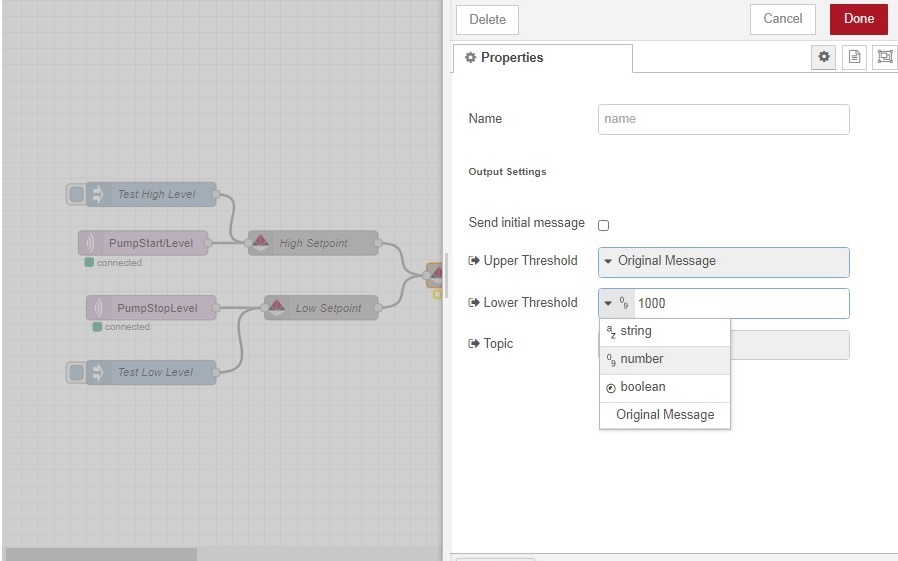
- `Threshold settings`. In this property you set what the output message will be when the threshold value has been met. The property can be , `String, Bool, Number`.
- `Topic` This can be passed from the original message or you can overwrite it within the node property
- `Send Initial Message` Activating this will cause the node to check the first valid message received and compare against the Upper threshold and Lower Threshold AKA `Set-Points`If the message value exceeds any of the set points the node will trigger the relevant output message.
## Node Status
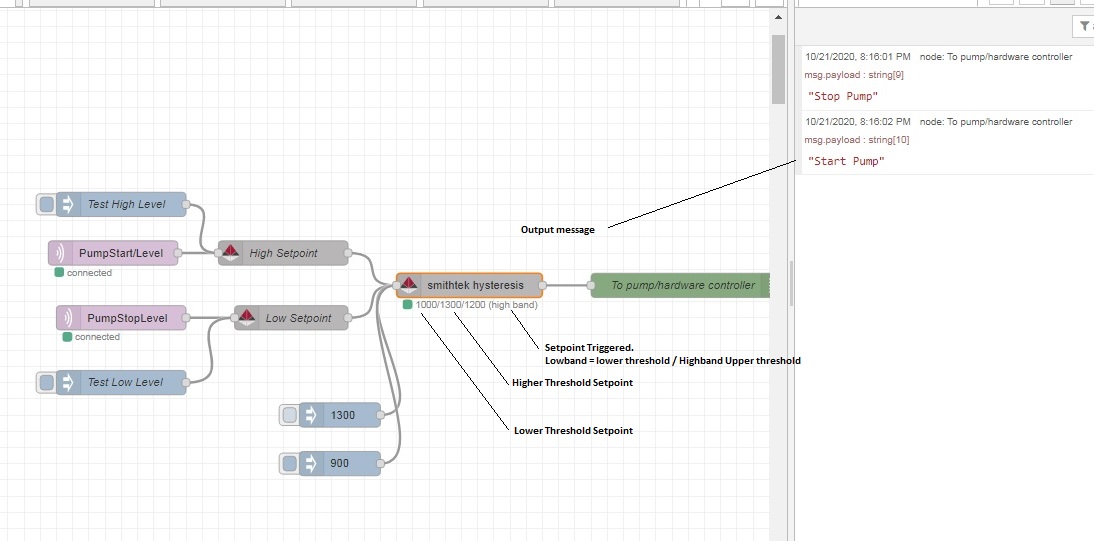
The node will display the upper and lower threshold setpoint values. It will also display what setpoint is triggered and the last payload value received.
## Input
The input pin expects a payload value number in either a `String Number` or a `Number`. This value will be from the formatter node. If using other nodes the message to set the thresholds must be
`payload:{high: value}` or
`payload:{low: value}`
## Output
The output pin will output a payload can be a `String, Bool, Number`
## Formatter Node
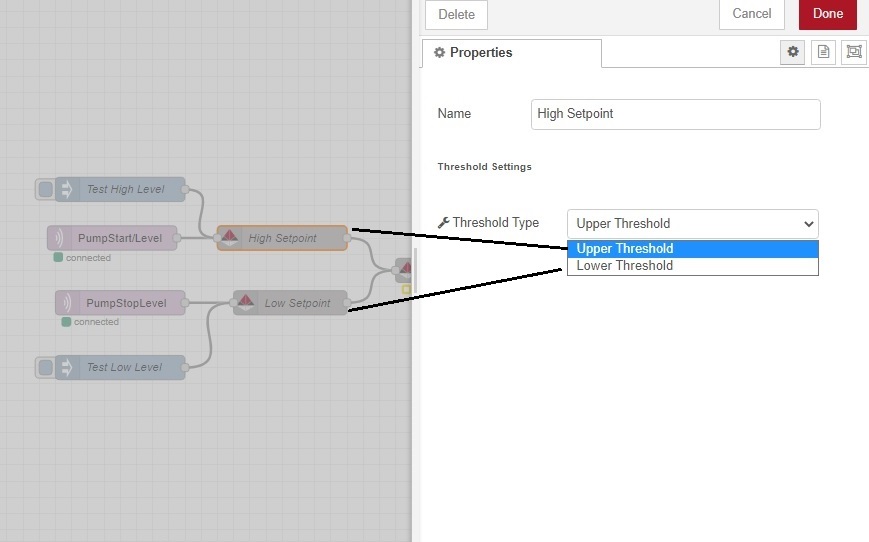
This node will take any value and format it to send the correct message to the hysteresis node. It will help minimize nodes withing the flow. Copy the node into the flow. Select in the property settings `Upper Threshold or Lower threshold` Then wire your upstream node to the input pin.
/////////////////////////////////////////////////////////////////////////////////////////////////////////////////////////////////////////////////
### License
Copyright (c) 2020 www.smithtek.com.au Licenced under the terms of the GPLv3
THIS SOFTWARE IS PROVIDED BY THE COPYRIGHT HOLDERS AND CONTRIBUTORS "AS IS" AND ANY EXPRESS OR IMPLIED WARRANTIES, INCLUDING, BUT NOT LIMITED TO, THE IMPLIED WARRANTIES OF MERCHANTABILITY AND FITNESS FOR A PARTICULAR PURPOSE ARE DISCLAIMED. IN NO EVENT SHALL DAMIEN CLARK BE LIABLE FOR ANY DIRECT, INDIRECT, INCIDENTAL, SPECIAL, EXEMPLARY, OR CONSEQUENTIAL DAMAGES (INCLUDING, BUT NOT LIMITED TO, PROCUREMENT OF SUBSTITUTE GOODS OR SERVICES; LOSS OF USE, DATA, OR PROFITS; OR BUSINESS INTERRUPTION) HOWEVER CAUSED AND ON ANY THEORY OF LIABILITY, WHETHER IN CONTRACT, STRICT LIABILITY, OR TORT (INCLUDING NEGLIGENCE OR OTHERWISE) ARISING IN ANY WAY OUT OF THE USE OF THIS SOFTWARE, EVEN IF ADVISED OF THE POSSIBILITY OF SUCH DAMAGE.
### Acknowledgements
We would like to thank the following people for their hard word, time and effort.
- Sensorhub.tech
- Nick O'Leary and Dave Conway-Jones for creating Node-Red
- Sineos - https://github.com/Sineos/node-red-contrib-hysteresis For starting this project.