node-red-contrib-yeelight-compat-hue
Version:
A collection of Node-RED nodes for controlling and observing Yeelight lighting devices, compatible with node-red-contrib-node-hue flows.
143 lines (106 loc) • 6.15 kB
Markdown
[](https://www.npmjs.com/package/node-red-contrib-yeelight-compat-hue)
[](https://travis-ci.org/mattmattmatt/node-red-contrib-yeelight-compat-hue)
[](https://github.com/mattmattmatt/node-red-contrib-yeelight-compat-hue)
[](https://www.npmjs.com/package/node-red-contrib-yeelight-compat-hue)
[](https://flows.nodered.org/node/node-red-contrib-yeelight-compat-hue)
[](https://github.com/semantic-release/semantic-release)
# node-red-contrib-yeelight-compat-hue
[Node-RED](http://nodered.org) nodes to control [MiHome/Xiaomi Yeelights](https://www.yeelight.com/) from your smart home, somewhat [API compatible with node-red-contrib-node-hue nodes](https://github.com/jdomeij/node-red-contrib-node-hue#input-node).
## Install
Run the following command in your Node-RED user directory – typically `~/.node-red`:
```bash
npm i node-red-contrib-yeelight-compat-hue -S
```
## Usage
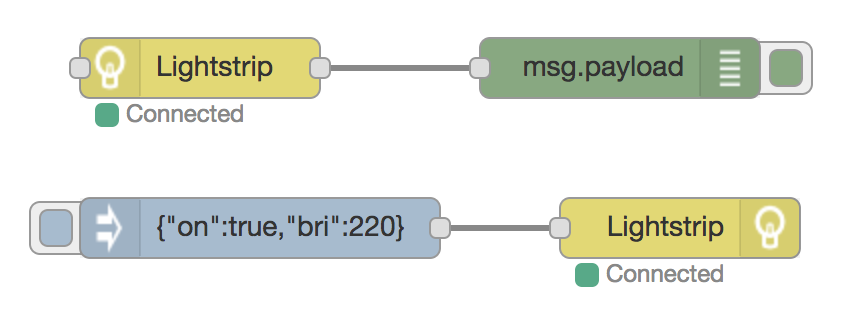
Provides two palette nodes – one to send control commands to a Yeelight, and one to receive messages when a Yeelight's state changes.
### Output node
Sets the state of the selected Yeelight device.
`msg.payload` must be an object containing the new state's properties of the selected Yeelight device.
| Property | Details |
| :---| :---|
| `on` | Sets the `on` state where the value is `true` or `false`|
| `bri` | Sets the brightness value from `0` to `255` |
| `ct` | Sets the color temperature value in Kelvin from `1700` to `6500` |
| `hue` | Sets the hue value from `0` to `65535` |
| `sat` | Sets the saturation value from `0` to `255` |
| `hex` | Sets the rgb value from `#00000` to `#FFFFFF` |
| `duration` | Sets a transition time in milliseconds, e.g. `4500` means 4.5 seconds. Defaults to `500` |
#### Example payloads
```JSON
{
"on": true,
"bri": 255,
"hue": 913,
"sat": 255,
"duration": 5000
}
```
```JSON
{
"on": true,
"bri": 120,
"hex": "#AA00CC",
}
```
```JSON
{
"ct": 2200,
}
```
The node supports sending [color temperature values](http://www.erco.com/service/rgbw/), [hex values](http://htmlcolorcodes.com/) and [HSV values](https://alloyui.com/examples/color-picker/hsv).
The brightness value will always have to be provided separately and will not be deducted from e.g. a hex value's brightness component.
##### References
This node's input payload structure is based on [node-red-contrib-node-hue](https://github.com/jdomeij/node-red-contrib-node-hue#input-node), which is based on [Node Hue API](https://github.com/peter-murray/node-hue-api#lightstate-options).
### Input node
Returns the current state of the selected Yeelight device.
`msg.payload` is an object containing the current state of the selected Yeelight device.
The node will listen to changes of the connected Yeelight and send a message whenever a change is detected. The `payload` property of the message will be set to the new state of the Yeelight.
Additionally, a fresh state can be requested from the connected Yeelight by sending a message to the node. The `payload` property of the message will be overwritten with the state of the Yeelight. All other properties of the `msg` are preserved.
#### Example payload
```JSON
{
"state": {
"on": false,
"bri": 255,
"colormode": "rgb",
"hex": "#ff1500",
"hue": 913,
"sat": 255
},
"name": "Closet",
"raw": {
"name": "Closet",
"power": "off",
"bright": "100",
"rgb": "16717056",
"ct": "4244",
"hue": "0",
"sat": "100",
"color_mode": "1",
"delayoff": "0",
"flowing": "0",
"flow_params": "0,1,10000,1,16711680,69,33000,1,16711882,34,39000,1,16744704,17,34000,1,16711680,61",
"music_on": "0"
}
}
```
The `raw` property of `msg.payload` contains the raw state information retrieved from the Yeelight for advanced usage.
Note that value scales are not compatible with _node-red-contrib-node-hue_, and that `hue` value and `rgb` value will not match since only the correct color per `color_mode` is returned by the lamp.
### Configuration node
Configures a Yeelight connection to one light in the local network.
#### Options
| Property | Details |
| :--- | :--- |
| Hostname | An IP address or other hostname that points to a Yeelight on the network |
| Port number | Port number the Yeelight is accessible over, default being `55443` |
#### Details
**Developer mode/LAN control** has to be activated (usually from within the Yeelight app) to allow local control of the Yeelight through Node-RED. You can <a href="https://www.yeelight.com/en_US/developer" target="_blank">learn more about Yeelight developer options</a> here.
## Support
If something is not working as expected, if you think there is a feature missing, or if you think this node could be improved in other ways, [please create an issue](https://github.com/mattmattmatt/node-red-contrib-yeelight-compat-hue/issues) on GitHub.
### Links
- Find [node-red-contrib-yeelight-compat-hue in the Node-RED flow library](https://flows.nodered.org/node/node-red-contrib-yeelight-compat-hue)
- Find [node-red-contrib-yeelight-compat-hue on npm](https://www.npmjs.com/package/node-red-contrib-yeelight-compat-hue)
- Find [node-red-contrib-yeelight-compat-hue on GitHub](https://github.com/mattmattmatt/node-red-contrib-yeelight-compat-hue)
### Hello bear