node-red-contrib-state
Version:
Shared state with persistence, notification, and history
112 lines (74 loc) • 4.55 kB
Markdown
Shared state with persistence, notification, and history
========================================================
This contributes [Node-RED](http://nodered.org/) nodes for defining logical state,
sharing that state across nodes, tracking history, and triggering flows based on change.

Shared state with history is persisted, remaining stable across reboots of Node-RED.
## Logical State
State associated with a physical device is considered physical state. Logical state
are computations such as "Person Is In The Room", usually a combination of physical
state and some computation.
Logical state helps with system understanding. "Person Is In The Room" may be the
combination of many physical and logical states, and can be used for example,
in determining room HVAC profile.
These nodes provide a place to represent that logical state, share it with other
nodes, persist it, keep history, and provide state change triggers for flows.
## Data Typing
State nodes can specify data types offering inbound type conversions, min/max
limiting, and unit of measue awareness and conversion.
## Setting State
State is set by sending the value to the setState node in the _msg.payload_. After saving
to disk, the new state is made available to all mechanisms described in the _Getting State_
section below.
If data type is specified, setting state will assure the correct data type is represented.
State nodes with compatible units of measure can be chaned for unit of measure conversion.
## Getting State
Once state is set and persisted using the _Setting State_ section above, the new state is
made available with the getState node and in the global state context.
### The getState Node
The getState node can be dropped onto any flow to trigger a message on initialization, and on
state change. The _msg.topic_ contains the state name, the _msg.payload_ contains the state value,
and the _msg.state_ object contains an object with the following structure
`{value:value, prev:prev_value, timestamp:num, history:history, config:config}`, where the _history_ object
is an array of `{val:value, ts=num}` objects. Timestamps are milliseconds from the Unix epoch
because they serialize nicely, they work well for `Date()` construction, and they simplify
computing durations between timestamps. The `config` element is the state configuration, containing
any metadata defined on the state node such as data type, unit of measure, etc.
### Shared State with Global Context
The global context object contains a _state_ element - an object containg the current state
and history for all state elements in all flows. This is available for all function and
custom nodes needing to use logical state to perform their task.
The keys in the _state_ object are the state names, and the values are the same structure
as the _msg.state_ object defined in the getState node above.
An example using the function node:
```
let isRoomOccupied = global.get("state").isRoomOccupied.value;
```
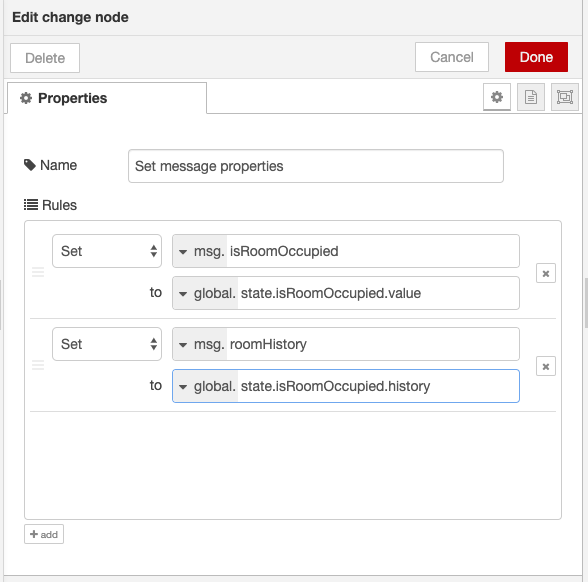
Another useful way to obtain shared state is to add it to a message using the _Change_ node:
## Shared State Storage
Shared state is saved onto the filesystem, along with history, on each state change. This assures stability
across server restarts.
Each state is written to a file in a _./shared-state_ directory within the current Node-RED application
directory. If that isn't a good place to save state on your system, the global context _sharedStateDir_
value can be used to override this default.
This can be placed in the _settings.js_ file under the _functionGlobalContext_ property.
Example settings.js:
```
functionGlobalContext: {
sharedStateDir: '/opt/data/node-red-shared-state'
},
```
See the
[Global Context](https://nodered.org/docs/user-guide/writing-functions#global-context)
discussion for further information.
## See Also
* [Representing Binary State with Confidence](https://github.com/lorenwest/node-red-contrib-state/wiki/Binary-State-with-External-Validation)
## Installation
1. Open the Node-RED dashboard
1. Select the _Manage Pallete_ menu item
1. Select the _Install_ tab
1. Enter `node-red-contrib-state` into the search
1. Press the `install` button for this module
## License
MIT License. See [LICENSE.txt](https://raw.githubusercontent.com/lorenwest/node-red-contrib-state/master/LICENSE.txt) for more details.