node-red-contrib-reterminal
Version:
The node accessing for Seeed Studio reTerminal various data such as buttons, buzzer, LED, light, touch positions and accelerometer sensor.
97 lines (73 loc) • 8.76 kB
Markdown
# node-red-contrib-reterminal
The node accessing for Seeed Studio reTerminal various data such as buttons, buzzer, LED, light, touch positions and accelerometer sensor.
## About reTerminal
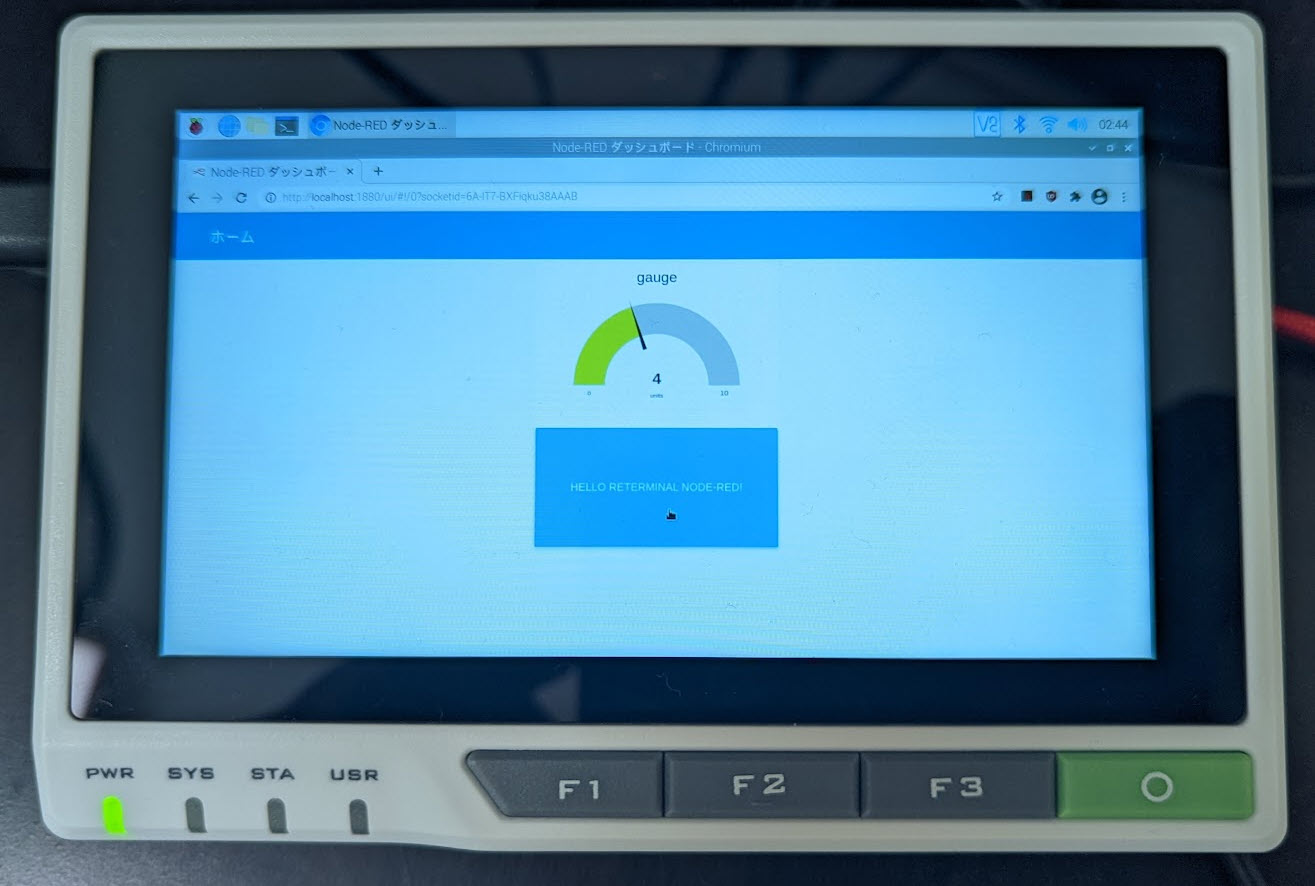
- [reTerminal \- Embedded Linux with Raspberry Pi CM4 and 5\-Inch Capacitive Multi\-Touch Screen \- Seeed Studio](https://www.seeedstudio.com/ReTerminal-with-CM4-p-4904.html)
## Install
Move your Node-RED user directory ~/.node-red
```
npm i node-red-contrib-reterminal
```
or
* Go to "Palette Manager" menu on your Node-RED.
* Search "node-red-contrib-reterminal" on Node-RED Library.
* Click "Install".
## Quick Start Flow
Import this flow after installed. See [Importing and Exporting Flows : Node\-RED](https://nodered.org/docs/user-guide/editor/workspace/import-export) about importing.
```
[{"id":"d6b4ebfcf6b94c1e","type":"buttons","z":"f994f94243fd8cf5","name":"","x":150,"y":160,"wires":[["ac6e1a3c0c652665"]]},{"id":"ac6e1a3c0c652665","type":"debug","z":"f994f94243fd8cf5","name":"","active":true,"tosidebar":true,"console":false,"tostatus":false,"complete":"false","statusVal":"","statusType":"auto","x":450,"y":160,"wires":[]},{"id":"c0ae57d8d10522fc","type":"accelerometer","z":"f994f94243fd8cf5","name":"","x":170,"y":300,"wires":[["96163321e4c5ffec"]]},{"id":"96163321e4c5ffec","type":"debug","z":"f994f94243fd8cf5","name":"","active":true,"tosidebar":true,"console":false,"tostatus":false,"complete":"false","statusVal":"","statusType":"auto","x":450,"y":300,"wires":[]},{"id":"8bf5a488e484ef7c","type":"led_sta_green","z":"f994f94243fd8cf5","name":"","x":900,"y":160,"wires":[]},{"id":"45c243d6007098af","type":"led_sta_red","z":"f994f94243fd8cf5","name":"","x":890,"y":300,"wires":[]},{"id":"bb36d7fe0771dee4","type":"led_usr_green","z":"f994f94243fd8cf5","name":"","x":900,"y":480,"wires":[]},{"id":"f59a1f6f456b3d82","type":"inject","z":"f994f94243fd8cf5","name":"","props":[{"p":"payload"},{"p":"topic","vt":"str"}],"repeat":"","crontab":"","once":false,"onceDelay":0.1,"topic":"","payload":"true","payloadType":"bool","x":670,"y":480,"wires":[["bb36d7fe0771dee4"]]},{"id":"be3c349ad01799ca","type":"inject","z":"f994f94243fd8cf5","name":"","props":[{"p":"payload"},{"p":"topic","vt":"str"}],"repeat":"","crontab":"","once":false,"onceDelay":0.1,"topic":"","payload":"false","payloadType":"bool","x":670,"y":520,"wires":[["bb36d7fe0771dee4"]]},{"id":"6218e1ca0a3cde93","type":"comment","z":"f994f94243fd8cf5","name":"Get buttons status.","info":"","x":150,"y":120,"wires":[]},{"id":"66cc6b4133b7c90d","type":"comment","z":"f994f94243fd8cf5","name":"Get accelerometer sensor value.","info":"","x":190,"y":260,"wires":[]},{"id":"fc3c346828e99aec","type":"comment","z":"f994f94243fd8cf5","name":"Turn STA LED to green.","info":"","x":700,"y":120,"wires":[]},{"id":"9776933cca3f98d4","type":"comment","z":"f994f94243fd8cf5","name":"Turn STA LED to red.","info":"","x":700,"y":260,"wires":[]},{"id":"931ecb6864a57fba","type":"comment","z":"f994f94243fd8cf5","name":"Turn USR LED to green.","info":"","x":710,"y":440,"wires":[]},{"id":"a08066e92cfc1a1f","type":"inject","z":"f994f94243fd8cf5","name":"","props":[{"p":"payload"},{"p":"topic","vt":"str"}],"repeat":"","crontab":"","once":false,"onceDelay":0.1,"topic":"","payload":"true","payloadType":"bool","x":670,"y":320,"wires":[["45c243d6007098af"]]},{"id":"3f354196ccefc8e5","type":"inject","z":"f994f94243fd8cf5","name":"","props":[{"p":"payload"},{"p":"topic","vt":"str"}],"repeat":"","crontab":"","once":false,"onceDelay":0.1,"topic":"","payload":"false","payloadType":"bool","x":670,"y":360,"wires":[["45c243d6007098af"]]},{"id":"5828d20d3c21aa15","type":"inject","z":"f994f94243fd8cf5","name":"","props":[{"p":"payload"},{"p":"topic","vt":"str"}],"repeat":"","crontab":"","once":false,"onceDelay":0.1,"topic":"","payload":"true","payloadType":"bool","x":670,"y":160,"wires":[["8bf5a488e484ef7c"]]},{"id":"e160f3e85690820e","type":"inject","z":"f994f94243fd8cf5","name":"","props":[{"p":"payload"},{"p":"topic","vt":"str"}],"repeat":"","crontab":"","once":false,"onceDelay":0.1,"topic":"","payload":"false","payloadType":"bool","x":670,"y":200,"wires":[["8bf5a488e484ef7c"]]},{"id":"d4813edd60e9c3bd","type":"buzzer","z":"f994f94243fd8cf5","name":"","x":870,"y":640,"wires":[]},{"id":"8fdb3b50b5876ea5","type":"comment","z":"f994f94243fd8cf5","name":"Set buzzer.","info":"","x":660,"y":600,"wires":[]},{"id":"a14c49e7123ef758","type":"inject","z":"f994f94243fd8cf5","name":"","props":[{"p":"payload"},{"p":"topic","vt":"str"}],"repeat":"","crontab":"","once":false,"onceDelay":0.1,"topic":"","payload":"true","payloadType":"bool","x":670,"y":640,"wires":[["d4813edd60e9c3bd"]]},{"id":"0073ba0b53706192","type":"inject","z":"f994f94243fd8cf5","name":"","props":[{"p":"payload"},{"p":"topic","vt":"str"}],"repeat":"","crontab":"","once":false,"onceDelay":0.1,"topic":"","payload":"false","payloadType":"bool","x":670,"y":680,"wires":[["d4813edd60e9c3bd"]]},{"id":"dd9ca714b1a05bdb","type":"comment","z":"f994f94243fd8cf5","name":"Get light sensor value.","info":"","x":160,"y":400,"wires":[]},{"id":"26606a8cf26964d0","type":"light_sensor","z":"f994f94243fd8cf5","name":"","x":140,"y":440,"wires":[["c3c0cfebe0b19ce2"]]},{"id":"c3c0cfebe0b19ce2","type":"debug","z":"f994f94243fd8cf5","name":"","active":true,"tosidebar":true,"console":false,"tostatus":false,"complete":"false","statusVal":"","statusType":"auto","x":450,"y":440,"wires":[]},{"id":"7a98534ab70f03cd","type":"touch_panel","z":"f994f94243fd8cf5","name":"","x":140,"y":580,"wires":[["708abdb0422fb69c"]]},{"id":"2170538cc673b520","type":"comment","z":"f994f94243fd8cf5","name":"Get touch position.","info":"","x":150,"y":540,"wires":[]},{"id":"708abdb0422fb69c","type":"debug","z":"f994f94243fd8cf5","name":"","active":true,"tosidebar":true,"console":false,"tostatus":false,"complete":"false","statusVal":"","statusType":"auto","x":450,"y":580,"wires":[]}]
```
Like this flow,
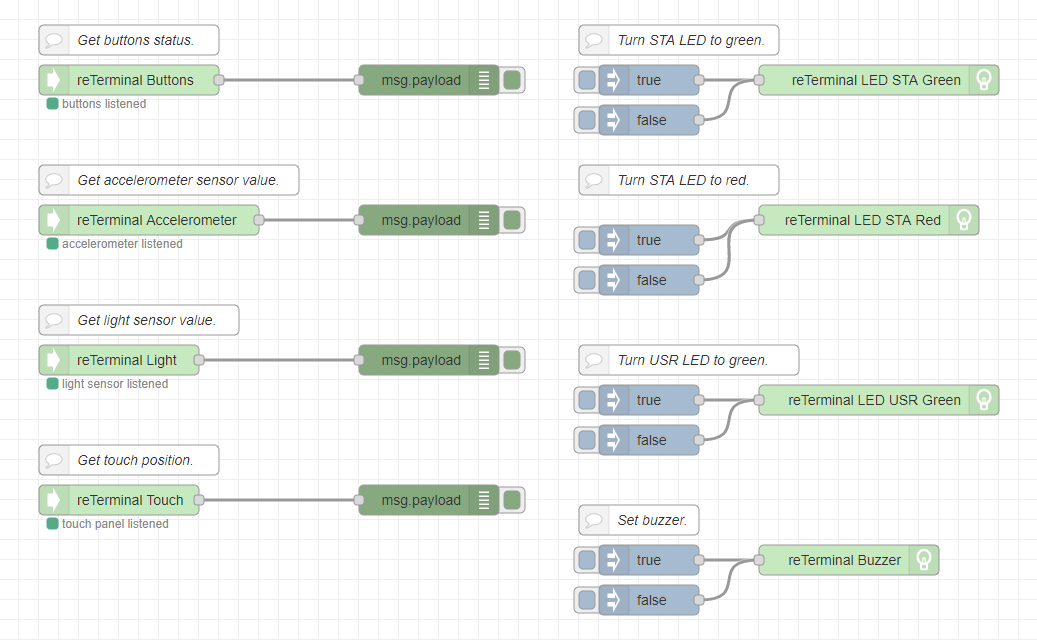
Usage,
- Get buttons status.
- `reTerminal Buttons` node will catch the button status when you push F1 / F2 / F3 / O buttons.
- Get accelerometer sensor status.
- `reTerminal Accelerometer` node will catch the accelerometer sensor data.
- Get light sensor status.
- `reTerminal Light` node will catch the light sensor data.
- Get touch position.
- `reTerminal Touch` node will catch the touch position data when you touch the display.
- Turn STA LED to green.
- `reTerminal STA LED Green` node will turn on green in reTerminal STA LED when inject node boolean true is clicked.
- `reTerminal STA LED Green` node will turn off in reTerminal STA LED when inject node boolean false is clicked.
- Turn STA LED to red.
- `reTerminal STA LED Rreen` node will turn on red in reTerminal STA LED when inject node boolean true is clicked.
- `reTerminal STA LED Rreen` node will turn off in reTerminal STA LED when inject node boolean false is clicked.
- Turn USR LED to green.
- `reTerminal USR LED Green` node will turn on green in reTerminal USR LED when inject node boolean true is clicked.
- `reTerminal USR LED Green` node will turn off in reTerminal USR LED when inject node boolean false is clicked.
- Set buzzer.
- `reTerminal Buzzer` node will turn on the reTerminal build-in buzzer when inject node boolean true is clicked.
- `reTerminal Buzzer` node will turn off the reTerminal build-in buzzer when inject node boolean true is clicked.
## Acknowledgments
The node uses [npm package for reTerminal](https://www.npmjs.com/package/npm-reterminal) for easiry reTerminal device Data access.
This library is easy to access reTerminal device Datas such as buttons, buzzer, LED, light, touch positions and accelerometer sensor. Thanks!
## History
- v0.1.3
- Accelerometer sensor node shifted from getting using exec spawn to getting inner function.
- Light sensor node shifted also the same approach.
- And added a interval stop for them definitely when Node-RED closed.
- v0.1.2
- Intervals getting data about accelerometer and light sensor changed 200 ms to 1000ms temporarily.
- I will change them so that you can freely choose the interval in the near future.
- v0.1.1
- Countermeasures about getting one over more lines at Buttons node.
- v0.1.0
- Changed some node names bitly.
- Light sensor supported.
- Buzzer supported.
- Touch Panel supported.
- Updated a quick start flow accordingly.
- v0.0.5
- Added a quick start flow.
- v0.0.3
- Accelerometer sensor supported.
- LED STA Green on/off supported.
- LED STA Red on/off supported.
- LED USR Green on/off supported.
- v0.0.1
- First release.
- Buttons supported.
## License
MIT License