node-red-contrib-panasonic-comfort-cloud
Version:
Node-RED implementation of panasonic-comfort-cloud-client
103 lines (79 loc) • 3.39 kB
Markdown
# node-red-contrib-panasonic-comfort-cloud
[](https://deepscan.io/dashboard#view=project&tid=16513&pid=19832&bid=520480)





Node-RED support for Panasonic Comfort Cloud to control air conditioning systems over REST API. This libaray uses the same endpoints as the mobile app Panasonic Comfort Cloud. Based on [panasonic-comfort-cloud-client](https://www.npmjs.com/package/panasonic-comfort-cloud-client).
# Features
* Get groups of the devices.
* Get single device by Device ID.
* Send commands to device.
# Usage
Provide username and password via the config node. The access token will be retrieved and stored in the credentials after the first login. It will only be stored in memory store, so after a restart, it will have to be renewed again. This is done automatically if you have provided a correct username and password.
## Groups
Does not process any input, but returns a list of all homes and devices in your setup.
## Device
Takes device ID as an input in the payload or by providing it via the node config. You can find the device id by looking for **guid** in the list of devices from the **groups** result.
## Command
Send commands to a device based on device id and commands provided by a JSON object.
Commands must be injected as a JSON object containing the correct values. These values can be either an enum key (case insensitive) or value. The JSON object can consist of one or many properties/parameters. The corresponding key/value pair are listed below.
### Values
Valid values for **operate**:
* Off = 0
* On = 1
Valid values for **operationMode**:
* Auto = 0
* Dry = 1
* Cool = 2
* Heat = 3
* Fan = 4
Valid values for **ecoMode**:
* Auto = 0
* Powerful = 1
* Quiet = 2
Valid values for **temperatureSet**:
* 8 - 30
Valid values for **airSwingUD**:
* Up = 0
* UpMid = 3
* Mid = 2
* DownMid = 4
* Down = 1
Valid values for **airSwingLR**:
* Left = 0
* LeftMid = 4
* Mid = 2
* RightMid = 3
* Right = 1
Valid values for **fanAutoMode**:
* Disabled = 1
* AirSwingAuto = 0
* AirSwingLR = 3
* AirSwingUD = 2
Valid values for **fanSpeed**:
* Auto = 0
* Low = 1
* LowMid = 2
* Mid = 3
* HighMid = 4
* High = 5
### Payload example
```JSON
{
"deviceId": "CS-XXXXXXX+1234567890",
"operate": "On",
"operationMode": "Heat",
"ecoMode": "Auto",
"temperatureSet": 22,
"airSwingUD": "Mid",
"airSwingLR": "Mid",
"fanAutoMode": "AirSwingAuto",
"fanSpeed": "Auto"
}
```
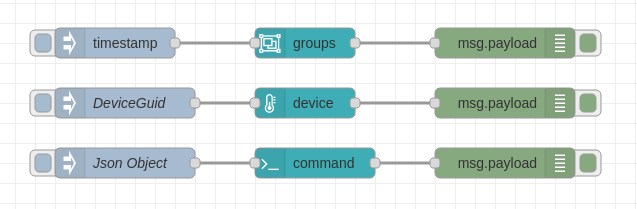
[Click here do download demo flow](https://raw.githubusercontent.com/bisand/node-red-contrib-panasonic-comfort-cloud/master/examples/demo.json)
## Licence
[MIT](https://github.com/bisand/node-red-contrib-panasonic-comfort-cloud/blob/HEAD/LICENSE)