node-red-contrib-netbeast
Version:
Netbeast nodes for node-red
56 lines (32 loc) • 2.48 kB
Markdown
We have added a new module to integrate the Netbeast api. It has been developed by Netbeast Team.
This will guide you to add the Netbeast node to your Node-RED directory. It's supposed that you have Node-RED installed, if it's not installed and you still want to try the Netbeast node, check out this [repository](http://github.com/netbeast/node-red) where you can find how to install the Node-RED app we have developed into your **Dashboard**.
Before you can use the Netbeast node in Node-RED, you will need a Netbeast Dashboard running in your network. Have a look at this useful guide [netbeast docs](http://docs.netbeast.co/chapters/get_started/get_started_from_your_laptop.html) and learn how to install and run the dashboard.
Now you can install the Netbeast node to your Node-RED installation by using this command in your Node-RED root directory:
```
npm install node-red-contrib-netbeast
```
It is widely explained in the [Node-RED documentation](http://nodered.org/docs/getting-started/adding-nodes)
After installing the Netbeast node you will need to restart Node-RED for it to pick-up the new nodes.
Once you have installed the Netbeast Dashboard and the Netbeast node for Node-RED, you can follow this instructions to learn how to use the node.
First of all, you have to run the Netbeast Dashboard
```
beast start --port 8000
```
Now run Node-RED by using this command in your Node-RED root directory
```
node red.js
```
Finally go to your browser. You will find Node-RED running at ```http://localhost:1880```if you are using the default port. If all went fine you will have a new module called **netbeast** and you will be able to configure node-red to control your devices using Netbeast.
Have a look at [Netbeast api](http://github.com/netbeast/api) for full information about all available topics and arguments you can use.
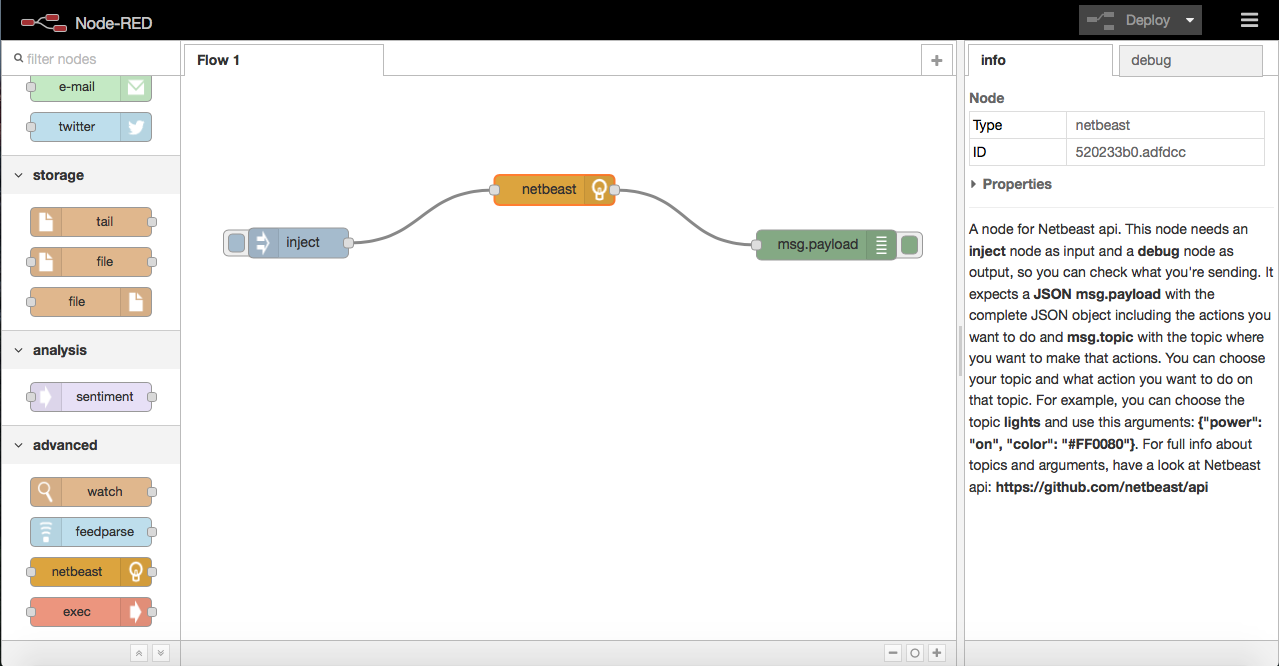
Here you have the nodes you need to include with the "netbeast" one so it can work propertly.
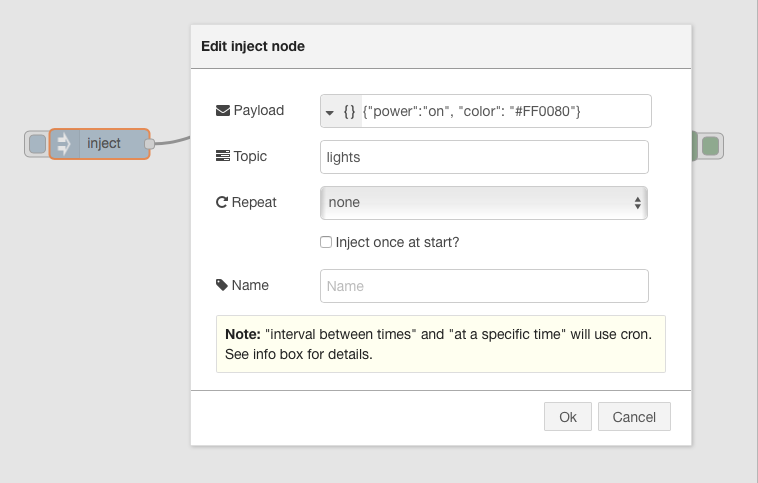
And here you can see an example of what you should write in the inject node.
Netbeast: http://netbeast.co / staff@netbeast.co
- [Netbeast](http://netbeast.co)
- [Node-Red](http://nodered.org)