node-red-contrib-fibaro-hc2-bridge
Version:
A bridge between Fibaro HomeCenter 2 and NodeRed
132 lines (112 loc) • 4.19 kB
Markdown
The node connects to a HomeCenter and listens for device property changes, gives devices friendly identifiers (e.g. `living-room/light/lamp`) and emit output node-red events.
The node also consumes input events and calls HomeCenter actions based on given input events.
## Flow example
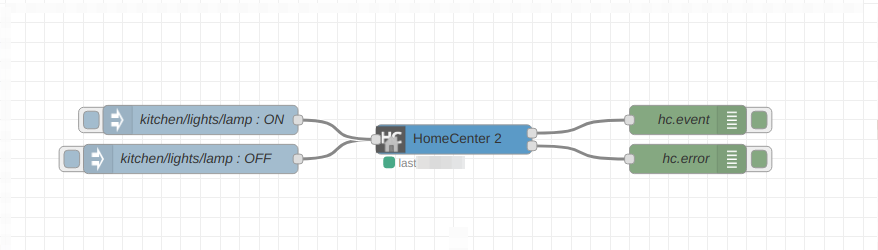
```json
[{"id":"81e3d6d5.cf8668","type":"home-center","z":"dfb9ceb.40e533","name":"HomeCenter 2","device":"","x":460,"y":100,"wires":[["6375721b.5dd3bc"],["54ad8d6d.220454"]]},{"id":"6375721b.5dd3bc","type":"debug","z":"dfb9ceb.40e533","name":"hc.event","active":true,"tosidebar":true,"console":false,"tostatus":false,"complete":"true","targetType":"full","x":700,"y":80,"wires":[]},{"id":"54ad8d6d.220454","type":"debug","z":"dfb9ceb.40e533","name":"hc.error","active":true,"tosidebar":true,"console":false,"tostatus":false,"complete":"true","targetType":"full","x":700,"y":120,"wires":[]},{"id":"6dbacab5.56a1a4","type":"inject","z":"dfb9ceb.40e533","name":"kitchen/lights/lamp : OFF","topic":"kitchen/lights/lamp","payload":"false","payloadType":"bool","repeat":"","crontab":"","once":false,"onceDelay":0.1,"x":190,"y":120,"wires":[["81e3d6d5.cf8668"]]},{"id":"5de166ca.8e9998","type":"inject","z":"dfb9ceb.40e533","name":"kitchen/lights/lamp : ON","topic":"kitchen/lights/lamp","payload":"true","payloadType":"bool","repeat":"","crontab":"","once":false,"onceDelay":0.1,"x":200,"y":80,"wires":[["81e3d6d5.cf8668"]]}]
```
Light has turned on:
```json
{
"topic": "garage/light/lamp",
"id": 10,
"property": "value",
"payload": true,
"previous": false
}
```
Temperature has changed:
```json
{
"topic": "living-room/climate/temperature",
"id": 20,
"property": "value",
"payload": 22.7,
"previous": 22.9
}
```
Device power consumption has changed:
```json
{
"topic": "living-room/climate/fan",
"id": 30,
"property": "power",
"payload": 2.9,
"previous": 2.7
}
```
Event message format:
```
{
"topic": "device literal identifier",
"payload": {
"action1": [],
"action2": [argument1],
"action3": [argument1, argument2, ...]
}
}
```
Turn on a light:
```json
{
"topic": "garage/light/lamp",
"payload": {
"turnOn": []
}
}
```
Change RGB/W device color:
```json
{
"topic": "living-room/light/led-strip",
"payload": {
"setColor": [255, 0, 0, 0]
}
}
```
`payload` can be a boolean value, in this case it will be transformed into `turnOn` and `turnOff` actions.
A shortcut version of turning on a light (in case when a device has `turnOn` and `turnOff` actions), `true` calls `turnOn` and `false` calls `turnOff` action accordingly:
```json
{
"topic": "garage/light/lamp",
"payload": true
}
```
In the case when `payload` is nether object nor boolean it will be transformed into `setValue` action.
A shortcut version of setting a brightness of an RGB/W or a dimmer device (in case when a device has `setValue` action):
```json
{
"topic": "living-room/light/led-strip",
"payload": 50
}
```
In the case when an action has only one argument it can be passed without wrapping it into an array:
```json
{
"topic": "living-room/climate/thermostat",
"payload": {
"setFanMode": 2
}
}
```
instead of:
```json
{
"topic": "living-room/climate/thermostat",
"payload": {
"setFanMode": [2]
}
}
```
The second output allows handling error responses from HomeCenter and the node.
The information for introspecting the devices friendly names and all possible actions is available on the node context.
1) Navigate to `Context Data`
2) Select a HomeCenter node
3) Click on `Refresh`
4) Devices and their available actions grouped by rooms and categories can be introspected on the node context: 