node-red-contrib-conta-azul-api
Version:
Conta Azul API wrapper for Node-Red
64 lines (35 loc) • 8.5 kB
Markdown

This node enables you to work with the Conta Azul API, giving you the ability to set parameters through the Node-RED-UI and trigger the flow from within your existing flow.
It is based on [ ContaAzul API](https://developers.contaazul.com/).

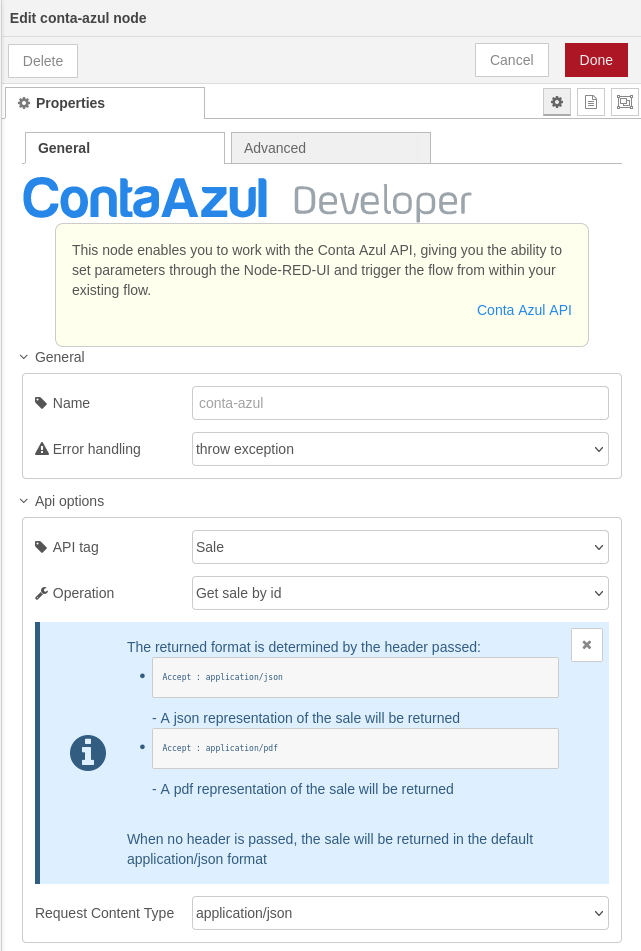
Hovering on an operations title or a key, you see the respective comments within the mouseover. This allows you to understand what a parameter is meant for. Required parameters are marked with an asterisk.

For JSON-parameters you can further show the structure by clicking on show keys. Again, the comments can be found within the mouseover.

Each parameter has an input-field corresponding to its type. You can further define that a parameter shall be read from the incoming message object or define a jsonata expression.
JSON parameters may define a sample structure. You can set this as the value by clicking the corresponding button - either with only the required keys (set required) or with all keys (set default).
## 4. Authentification
If the API requires an authentification token you can log in using the standard `http-request` node of Node-RED. The JWT token you get as a response must then be put into `msg.openApiToken` to be automatically placed in the request-header as bearer authentification.
In case you would like to use a different authentification than bearer, you can use `msg.headers` as you can do with the default http request node of Node-RED.
Both message object will be deleted afterwards if you do not set the option "Keep authentification".
## 5. Error handling
You can choose how to handle a returning server error. The last server response object will be placed in msg.response instead of msg.error. This ensures that all 3 ways react the same.
* `Standard`: The flow moves on normally. You have to handle an server error in your flow.
* `Separate output`: Your flow will take a different way.
* `Throw an exception`: Throws an node.error which can be catched by the standard 'catch' node (usefull for many nodes with the same error handling).
## Sample

```json
[{"id":"487db9b6715b0e50","type":"tab","label":"Conta Azul API","disabled":false,"info":"","env":[]},{"id":"9b8802ac7671fc6a","type":"group","z":"487db9b6715b0e50","name":"","style":{"fill":"#bfdbef","label":true},"nodes":["2b2fa87a3ebdd2b9","a2d2d1b9d446f1a8","7925e8f35166a321","657f72e1082f3e16","90b407562de16c0f","c4e0873c88c773bc","82b6e134785ca7de"],"x":34,"y":39,"w":952,"h":162},{"id":"2b2fa87a3ebdd2b9","type":"oauth2","z":"487db9b6715b0e50","g":"9b8802ac7671fc6a","name":"OAuth2 - Conta Azul","container":"oauth2Response","grant_type":"authorization_code","access_token_url":" https://api.contaazul.com/oauth2/token","authorization_endpoint":"https://api.contaazul.com/auth/authorize","redirect_uri":"/oauth2/redirect_uri","open_authentication":"FiKnN7E7eSesMm7QmYQRDCOKHaWy4igr","username":"","password":"","client_id":"","client_secret":"","scope":"Product","proxy":"","senderr":false,"client_credentials_in_body":false,"rejectUnauthorized":false,"headers":{},"x":340,"y":80,"wires":[["657f72e1082f3e16"]]},{"id":"a2d2d1b9d446f1a8","type":"inject","z":"487db9b6715b0e50","g":"9b8802ac7671fc6a","name":"","props":[{"p":"payload"},{"p":"topic","vt":"str"}],"repeat":"","crontab":"","once":false,"onceDelay":0.1,"topic":"","payload":"","payloadType":"date","x":140,"y":80,"wires":[["2b2fa87a3ebdd2b9"]]},{"id":"7925e8f35166a321","type":"debug","z":"487db9b6715b0e50","g":"9b8802ac7671fc6a","name":"debug","active":true,"tosidebar":true,"console":true,"tostatus":true,"complete":"true","targetType":"full","statusVal":"payload","statusType":"auto","x":880,"y":120,"wires":[]},{"id":"657f72e1082f3e16","type":"function","z":"487db9b6715b0e50","g":"9b8802ac7671fc6a","name":"set ACCESS_TOKEN","func":"global.set('ACCESS_TOKEN', msg.oauth2Response.access_token);\nreturn msg;","outputs":1,"noerr":0,"initialize":"","finalize":"","libs":[],"x":660,"y":80,"wires":[["7925e8f35166a321"]]},{"id":"90b407562de16c0f","type":"inject","z":"487db9b6715b0e50","g":"9b8802ac7671fc6a","name":"","props":[{"p":"payload"},{"p":"topic","vt":"str"}],"repeat":"","crontab":"","once":false,"onceDelay":0.1,"topic":"","payload":"","payloadType":"date","x":140,"y":160,"wires":[["82b6e134785ca7de"]]},{"id":"c4e0873c88c773bc","type":"conta-azul","z":"487db9b6715b0e50","g":"9b8802ac7671fc6a","name":"","api":"Product","server":"","keepAuth":false,"alternServer":false,"operation":"list1","operationData":{"tags":["Product"],"summary":"List product categories","description":"","operationId":"list1","produces":["application/json"],"parameters":[{"name":"name","in":"query","description":"The name of the product category","required":false,"type":"string"},{"name":"page","in":"query","description":"The page of the list to be returned","required":false,"type":"string"},{"name":"size","in":"query","description":"The quantity of items in the page to be returned","required":false,"type":"string"}],"responses":{"200":{"description":"Product Categories found with the specified parameters","schema":{"type":"array","items":{"type":"object","properties":{"id":{"type":"string","format":"uuid","example":"c7288c09-829d-48b9-aee2-4f744e380587","description":"The id of the product's category"},"name":{"type":"string","example":"Kitchen utensils","description":"The name of the product's category"}},"description":"A category that can be applied to a product","$$ref":"https://api.contaazul.com/schema#/definitions/ProductCategory"}}},"400":{"description":"Invalid search parameters. The possible reasons are : <ul><li>A invalid search parameter was provided</li><li>No search parameters were provided</li></ul>"},"401":{"description":"Unauthorized token - it may be due to an invalid token or no token provided"}},"__originalOperationId":"list","path":"/v1/product-categories"},"errorHandling":"Standard","internalErrors":{"readUrl":false},"parameters":[{"id":"namequery","name":"name","in":"query","required":false,"value":"","isActive":false,"type":"str","allowedTypes":["str","json","jsonata","msg","flow","global"],"description":"The name of the product category","schema":null,"keys":null,"showDescription":false},{"id":"pagequery","name":"page","in":"query","required":false,"value":"","isActive":false,"type":"str","allowedTypes":["str","json","jsonata","msg","flow","global"],"description":"The page of the list to be returned","schema":null,"keys":null,"showDescription":false},{"id":"sizequery","name":"size","in":"query","required":false,"value":"","isActive":false,"type":"str","allowedTypes":["str","json","jsonata","msg","flow","global"],"description":"The quantity of items in the page to be returned","schema":null,"keys":null,"showDescription":false}],"requestContentType":"application/json","responseContentType":"","showDescription":true,"devMode":false,"outputs":1,"x":610,"y":160,"wires":[["7925e8f35166a321"]]},{"id":"82b6e134785ca7de","type":"function","z":"487db9b6715b0e50","g":"9b8802ac7671fc6a","name":"get ACCESS_TOKEN","func":"msg.openApiToken = global.get('ACCESS_TOKEN');\nreturn msg;","outputs":1,"noerr":0,"initialize":"","finalize":"","libs":[],"x":340,"y":160,"wires":[["c4e0873c88c773bc"]]}]
```
This repository and the code inside it is licensed under the MIT License. Read LICENSE for more information.
If you want to modify something inside the conta-azul.html file, I recommend to use [SIR](https://gitlab.com/2WeltenChris/svelte-integration-red).
With help of SIR you can handle the conta-azul.svelte file in which the code is much cleaner and easier to handle.