node-notifier
Version:
A Node.js module for sending notifications on native Mac, Windows (post and pre 8) and Linux (or Growl as fallback)
321 lines (251 loc) • 11.3 kB
Markdown
# node-notifier [![NPM version][npm-image]][npm-url] [![Install size][size-image]][size-url] [![Build Status][ci-image]][ci-url]
Send native desktop notifications from Node.js on macOS, Windows and Linux.
Uses Notification Center on macOS, Toasts on Windows 8+ (taskbar balloons on older
Windows) and `notify-send` on Linux, with Growl as a fallback.
[Works with Electron](#electron).

## Install
```shell
npm install node-notifier
```
Requires Node.js 22.22+, 24.15+ or 26+. The package is ES modules only, but
`require('node-notifier')` still works through Node's `require(esm)` support.
TypeScript types are included, so `/node-notifier` is no longer needed
(uninstall it if you have it). Each notifier has its own options type, e.g.
`NotificationCenterNotification` or `NotifySendNotification`.
### CLI
Need notifications from the terminal or a shell script? Use
[node-notifier-cli](https://github.com/mikaelbr/node-notifier-cli), no install
needed:
```shell
npx node-notifier-cli -t "Hello" -m "My message"
```
See the [node-notifier-cli README](https://github.com/mikaelbr/node-notifier-cli#readme)
for all options.
## Usage
```javascript
import notifier from 'node-notifier';
notifier.notify('Message');
notifier.notify(
{
title: 'My notification',
message: 'Hello, there!',
icon: '/absolute/path/to/icon.png', // Not supported on macOS or balloons
sound: true,
actions: ['OK', 'Cancel'] // Waits for the user (macOS, Windows, Linux)
},
(error, response, metadata) => {
// metadata.activationType, and metadata.activationValue for actions and replies
}
);
notifier.on('click', (notifierObject, options, event) => {});
notifier.on('timeout', (notifierObject, options) => {});
```
The default `notifier` picks the right notifier for your platform (see the
[decision flow](./DECISION_FLOW.md)). Options that a platform doesn't support are
ignored. To tune options per platform, use a notifier directly:
```javascript
import {
NotificationCenter, // macOS
WindowsToaster, // Windows 8+
WindowsBalloon, // Windows < 8
NotifySend, // Linux
Growl
} from 'node-notifier';
new NotifySend(options).notify(notification, callback);
```
### Requirements
- **macOS**: 10.14 or newer.
- **Windows**: 8 or newer for Toasts. Earlier versions use taskbar balloons.
- **Linux**: `notify-send` (`libnotify-bin` on Debian/Ubuntu).
- **Other**: [Growl](https://github.com/growl/growl) running.
## `NotificationCenter` (macOS)
Wraps the bundled [`terminal-notifier`](https://github.com/julienXX/terminal-notifier) 3.0.0
(universal binary for Intel and Apple silicon). Other `terminal-notifier` flags can be
passed as options, e.g. `-group` becomes `{ group: 'id' }`.
```javascript
import { NotificationCenter } from 'node-notifier';
const notifier = new NotificationCenter({
withFallback: false, // Use Growl on macOS < 10.14
customPath: undefined // Path to your own terminal-notifier binary
});
notifier.notify(
{
title: undefined,
subtitle: undefined,
message: undefined,
sound: false, // true ('Bottle') or a name: Basso, Blow, Bottle, Frog, Funk, Glass, Hero, Morse, Ping, Pop, Purr, Sosumi, Submarine, Tink
contentImage: undefined, // Absolute path to a local image
open: undefined, // URL to open on click
group: undefined, // Notifications in the same group replace each other
actions: undefined, // String | Array<String>. Action buttons
reply: false, // Boolean | String. Adds a text field, a string is used as placeholder
timeout: 10, // Seconds to wait for actions/reply, or false to wait forever
wait: false // Shorthand for timeout: 5
},
(error, response, metadata) => {}
);
```
- Only notifications with `actions` or `reply` wait for the user. Others call the
callback right away and emit no `click` or `timeout` events.
- `metadata.activationType` is `contentsClicked`, `actionClicked`, `replied`,
`closed` or `timeout`.
- A waiting notification keeps your process alive. Call `notifier.clearAll()` to
stop waiting on all notifications from that instance.
- `icon` is not supported. macOS always shows the icon of the sending app. For a
custom icon, build `terminal-notifier` with your icon
(`make icon ICON=logo.png APP_NAME=my-tool`) and point `customPath` to it.
- macOS asks for notification permission the first time a notification is sent.
See [`example/macInput.ts`](./example/macInput.ts) for actions and reply.
## `WindowsToaster` (Windows 8+)
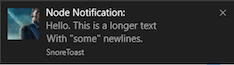
Uses [SnoreToast](https://invent.kde.org/libraries/snoretoast).
```javascript
import { WindowsToaster } from 'node-notifier';
const notifier = new WindowsToaster({
withFallback: false, // Use balloons on Windows < 8
customPath: undefined // Path to your own SnoreToast.exe
});
notifier.notify(
{
title: undefined,
message: undefined, // Required unless `remove` is set
icon: undefined, // Absolute path to a PNG, max 1024×1024 px and 200 KB
sound: false, // true, or a Windows sound such as 'Notification.Mail'
actions: undefined, // Array<String>. Action buttons
appID: undefined, // Your app's ID. Without it the toast shows "SnoreToast"
id: undefined, // Number. ID to use with `remove`
remove: undefined, // Number. ID of a notification to close
duration: undefined, // 'short' (~7s, default) or 'long' (~25s)
install: undefined, // Creates a Start menu shortcut for `appID`
application: undefined // Executable to start when clicked after node-notifier stopped listening
},
(error, response, metadata) => {}
);
```
- **Set `appID`** to the ID your app registered at install (e.g.
`com.squirrel.your.app` with Squirrel). Otherwise the toast shows "SnoreToast".
- Toasts always wait for the user. `wait` and `timeout` don't change how long a
toast is shown, use `duration`. After that it stays in the Action Center.
- Choosing an action emits an event named after the lower-cased label. See
[`example/toaster-with-actions.ts`](./example/toaster-with-actions.ts).
- On 32-bit Windows the bundled SnoreToast is 0.7.0: `duration` is ignored, and
clicks with a custom `appID` aren't reported. Use `customPath` with a newer
SnoreToast to get both.
- No toasts? Check that banners are enabled for the app under
Settings › System › Notifications.
## `WindowsBalloon` (Windows < 8)
Uses [notifu](http://www.paralint.com/projects/notifu/).
```javascript
import { WindowsBalloon } from 'node-notifier';
new WindowsBalloon({ withFallback: false, customPath: undefined }).notify(
{
title: undefined,
message: undefined,
sound: false,
time: 5000, // Milliseconds to show the balloon
wait: false,
type: 'info' // info | warn | error
},
(error, response) => {}
);
```
## `NotifySend` (Linux)
```javascript
import { NotifySend } from 'node-notifier';
new NotifySend().notify(
{
title: 'Foo',
message: 'Hello World',
icon: '/absolute/path/to/icon.png',
timeout: 10, // Seconds before the notification expires
actions: undefined, // String | Array<String>. Requires notify-send 0.7.10+
transient: false, // Don't keep it in the notification history
'app-name': 'node-notifier',
urgency: undefined, // low | normal | critical
category: undefined,
hint: undefined
},
(error, response, metadata) => {}
);
```
- Only notifications with `actions` wait for the user. Choosing an action emits
`click` with the label in `metadata.activationValue`, running out of time emits
`timeout`. See [`example/notify-send-actions.ts`](./example/notify-send-actions.ts).
- `actions` needs libnotify 0.7.10+ (e.g. Ubuntu 24.04, Debian 12) and a
notification daemon that supports actions.
- See [`notify-send(1)`](https://man.archlinux.org/man/notify-send.1) for all flags.
## `Growl`
```javascript
import fs from 'node:fs';
import { Growl } from 'node-notifier';
new Growl({ name: 'My App', host: 'localhost', port: 23053 }).notify({
title: 'Foo',
message: 'Hello World',
icon: fs.readFileSync('/path/to/icon.png'),
sticky: false
});
```
See [growly](https://github.com/theabraham/growly/) for more options.
## Common issues
### WSL
Under WSL, notifications are shown in Windows. To use Linux notifications instead
(with an X server and a notification daemon), start the process with:
```sh
NODE_NOTIFIER_WSL_NOTIFIER=linux node app.js
```
It is read when `node-notifier` is imported, so setting `process.env` later has no
effect. You can also use `NotifySend` directly.
Windows can only show icons from a Windows drive. An `icon` on a mounted drive
(e.g. `/mnt/c/Users/me/icon.png`) is converted to its Windows path, other icons are
skipped. If you copied the package without keeping file permissions, run
`chmod +x` on the `.exe` files in `vendor/`.
### Cron, PM2 and services
Notifications are shown on the desktop of the logged-in user, so the process must
run as that user while they are logged in.
- **Linux:** cron and some process managers start without the session environment,
so `notify-send` can't reach the session bus. Set `XDG_RUNTIME_DIR` (and
`DBUS_SESSION_BUS_ADDRESS` if needed):
```sh
* * * * * XDG_RUNTIME_DIR=/run/user/$(id -u) DBUS_SESSION_BUS_ADDRESS=unix:path=/run/user/$(id -u)/bus node /path/to/app.js
```
With PM2, run it as the desktop user (not root), or set the same variables.
- **Windows:** services running as `SYSTEM` can't show notifications. Make the
service (or PM2) log on as the logged-in user.
### Electron
Binaries can't run from inside an `asar` archive. Unpack the `vendor/` folder:
```shell
asar pack . app.asar --unpack "./node_modules/node-notifier/vendor/**"
```
Or with `electron-builder`, in `package.json`:
```json
"build": {
"asarUnpack": ["./node_modules/node-notifier/**/*"]
}
```
### Bundlers (webpack, etc.)
`node-notifier` finds its bundled binaries relative to its own files, so keep it out
of the bundle. In webpack:
```javascript
externals: {
'node-notifier': 'commonjs node-notifier'
}
```
## Thanks
`node-notifier` is made possible by
[`terminal-notifier`](https://github.com/julienXX/terminal-notifier),
[SnoreToast](https://invent.kde.org/libraries/snoretoast),
[notifu](http://www.paralint.com/projects/notifu/) and
[growly](https://github.com/theabraham/growly/).
## License
[MIT](./LICENSE). The vendored [SnoreToast](./vendor/snoreToast/LICENSE) (LGPL-3),
[notifu](./vendor/notifu/LICENSE) (BSD 3-Clause) and
[terminal-notifier](./vendor/terminal-notifier-LICENSE) have their own licenses. See
[`vendor/snoreToast/README.md`](./vendor/snoreToast/README.md) for the versions and
source of the bundled SnoreToast binaries.
[npm-url]: https://npmjs.org/package/node-notifier
[npm-image]: https://img.shields.io/npm/v/node-notifier.svg?style=flat
[size-url]: https://packagephobia.com/result?p=node-notifier
[size-image]: https://badgen.net/packagephobia/install/node-notifier
[ci-url]: https://github.com/mikaelbr/node-notifier/actions/workflows/test.yml
[ci-image]: https://github.com/mikaelbr/node-notifier/actions/workflows/test.yml/badge.svg