nilfam-editor
Version:
A powerful, customizable rich-text editor built with TipTap, React, and Tailwind CSS. Supports RTL/LTR text, resizable media (images/videos), tables, code blocks, font styling, and more for an enhanced content creation experience.
222 lines (158 loc) • 7.25 kB
Markdown




**Nilfam Editor** is a powerful, customizable, and feature-rich text editor built for **React js** using the [Tiptap](https://tiptap.dev/) library. Designed to cater to both developers and end-users, it offers seamless support for right-to-left (RTL) languages like Persian (Farsi) and left-to-right (LTR) languages like English. Whether you're editing rich text, code blocks, tables, or multimedia content, Nilfam Editor provides a modern and intuitive experience with a sleek interface powered by **Tailwind CSS**.
> **Note**: Nilfam Editor is designed to work seamlessly with both **React** and **Next.js**, making it a versatile choice for modern web applications.
This editor is perfect for React developers looking for a lightweight yet extensible rich text editor with advanced features like syntax-highlighted code blocks, media uploads, and custom tables—all under the permissive **MIT License**.
- **Multilingual Support**: Fully optimized for RTL (e.g., Persian) and LTR (e.g., English) text directions.
- **Code Editing**: Syntax-highlighted code blocks supporting JavaScript, Python, CSS, PHP, Rust, Go, and more.
- **Rich Text Tools**: Font family, size, alignment, text color, highlighting, bold/italic, links, and lists.
- **Media Management**: Upload and resize images, videos, and audio files effortlessly.
- **Custom Tables**: Create, edit, and manage tables with advanced functionality.
- **Code Copy Button**: Easily copy code blocks with a single click (feature in progress).
- **Extensible**: Custom extensions for line height, font size, and more.
- **Responsive Design**: Styled with Tailwind CSS for a modern, visually appealing UI.
- **Developer-Friendly**: Modular components and easy integration into React projects.
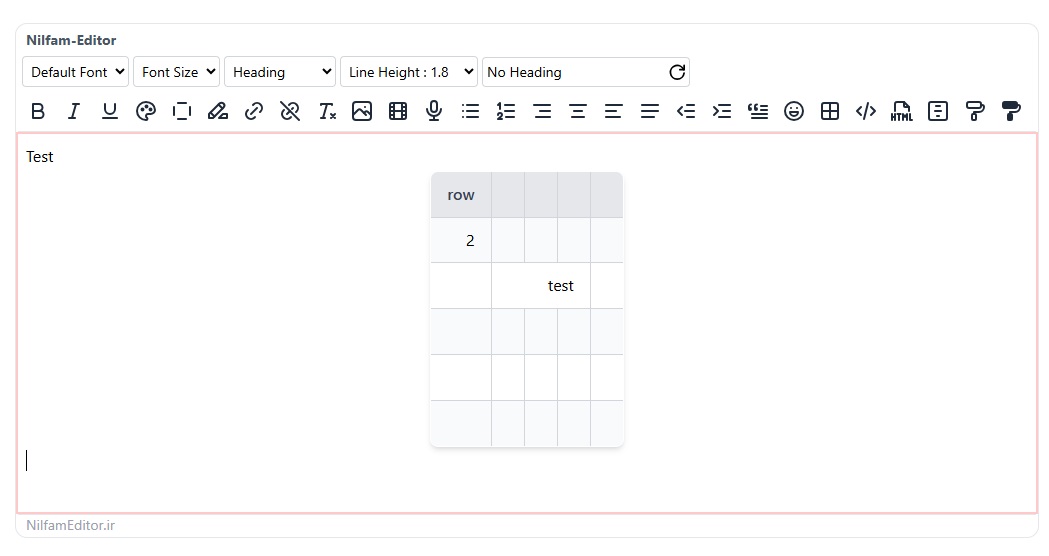
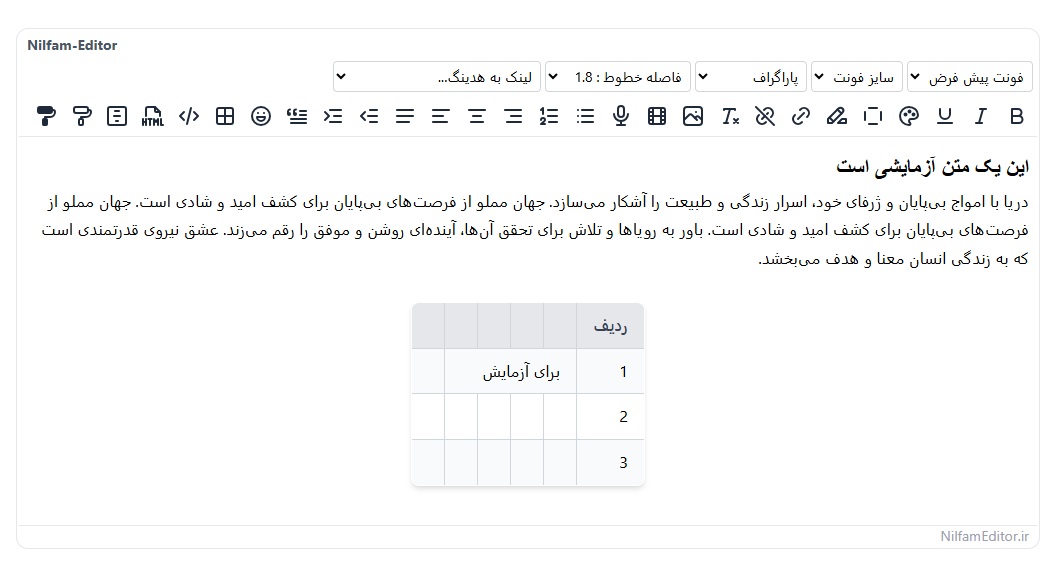
## Preview
### English (LTR)
### Persian (RTL)
## Installation
To add Nilfam Editor to your React project, simply install it via npm:
```bash
npm i nilfam-editor
```
## Usage
### Basic Usage (react-js)
After installing, import and use the `NilfamEditor` component in your React app:
```javascript
import { useEffect, useState } from 'react';
import { NilfamEditor } from 'nilfam-editor';
import 'nilfam-editor/nilfam-editor.css';
function App() {
const [content, setContent] = useState('<p>Start editing...</p>');
useEffect(() => {
console.log(content);
}, [content]);
return (
<div className="flex flex-col p-20">
<NilfamEditor value={content} onChange={setContent} />
</div>
);
}
export default App;
```
To enable Persian language with RTL (right-to-left) support, set the `lang` prop to `"fa"`:
```javascript
import { useEffect, useState } from 'react';
import { NilfamEditor } from 'nilfam-editor';
import 'nilfam-editor/nilfam-editor.css';
function App() {
const [content, setContent] = useState('<p>شروع ویرایش...</p>');
const myFonts = [
{ label: 'ایران سنس', value: 'IRANSansXFaNum' },
{ label: 'فونت کلمه', value: 'Kalameh' },
{ label: 'فونت پلاک', value: 'Pelak' },
];
useEffect(() => {
console.log(content);
}, [content]);
return (
<div className="flex flex-col p-20">
<NilfamEditor
lang="fa"
value={content}
onChange={setContent}
fonts={myFonts}
/>
</div>
);
}
export default App;
```
- **Note**: Setting `lang="fa"` enables RTL mode automatically, aligning text right-to-left and using Persian as the default language.
To enable Persian language with RTL (right-to-left) support, set the `lang` prop to `"fa"`:
```javascript
"use client"
import React, {useEffect, useState} from 'react';
import {NilfamEditor} from "nilfam-editor";
import 'nilfam-editor/nilfam-editor.css';
const Editor = () => {
const [content, setContent] = useState('<p>Start editing...</p>');
useEffect(() => {
console.log(content);
}, [content]);
return (
<div className="flex flex-col p-20">
<NilfamEditor value={content} onChange={setContent} />
</div>
);
};
export default Editor;
```
To add custom fonts to the editor, follow these steps:
Add your font files to your project and define them using `@font-face` in your CSS file (e.g., `App.css`):
```css
@font-face {
font-family: 'Kalameh';
font-style: normal;
font-weight: normal;
src: url('assets/fonts/kalameh/Woff/KalamehWebFaNum-Regular.woff') format('woff'),
url('assets/fonts/kalameh/Woff2/KalamehWebFaNum-Regular.woff2') format('woff2');
}
@font-face {
font-family: 'Pelak';
font-style: normal;
font-weight: bold;
src: url('assets/fonts/pelak/Woff/PelakFA-Bold.woff') format('woff'),
url('assets/fonts/pelak/Woff2/PelakFA-Bold.woff2') format('woff2');
}
```
- **Tip**: Ensure the font file paths are correct relative to your project structure.
Create an array of fonts with `label` (display name) and `value` (font-family name), then pass it to the `fonts` prop:
```javascript
const myFonts = [
{ label: 'font kalameh', value: 'Kalameh' },
{ label: 'font pelak', value: 'Pelak' },
];
<NilfamEditor
lang="fa"
value={content}
onChange={setContent}
fonts={myFonts}
/>;
```
- **Note**: The `value` must match the `font-family` name defined in your `@font-face` rules.
- **Fonts**: Extend the `fonts` prop with your preferred font list as shown above.
- **Styling**: Modify Tailwind CSS classes in `nilfam-editor/nilfam-editor.css` to match your design.
- Version 1.0.5 - Fixed hook order issue, improved Next.js 15 compatibility with manual installation and Turbopack support, and updated dependencies.
- Initial release with core features: rich text editing, code blocks, tables, and media support.
- Full RTL/LTR support with Persian optimization.
- Tailwind CSS integration for styling.
Nilfam Editor is licensed under the [MIT License](LICENSE). Feel free to use, modify, and distribute it as you see fit.
```plaintext
MIT License
Copyright (c) 2025 NilfamEditor
Permission is hereby granted, free of charge, to any person obtaining a copy of this software...
```
## Credits
- Built with [Tiptap](https://tiptap.dev/) for the editor core.
- Styled using [Tailwind CSS](https://tailwindcss.com/).
- Syntax highlighting powered by [highlight.js](https://highlightjs.org/) via Lowlight.
## Contact
Have questions or suggestions? Reach out via:
- **GitHub Issues**: [Open an issue](https://github.com/mehr1300/nilfam-editor/issues)