nikki
Version:
A browser-based IDE written in NodeJS. For Real.
194 lines (137 loc) • 6.24 kB
Markdown
<img align="right" width="250px" src="http://openclipart.org/people/FEN/FEN_Bad_hair_day.svg" />
# Nikki
A fast, browser-based IDE written in NodeJS. **For Real**.
Nikki's philosophy embraces the *"less is better"* approach, giving
you a smart text editor that lets you focus on code rather than
making you waste your time waiting for the IDE to boot, to
suggest a method or to scan a new project.
Nikki is purely built on JavaScript (both on the browser
and on Node), HTML and CSS, uses [socket.io](http://socket.io/)
to have fun with your filesystem and the
[ACE editor](http://ace.c9.io/) to let you edit files
like you're on your (ex) favourite IDE.
## Installation
The recommended way to install nikki is to do it
globally:
```
npm install -g nikki
```
## Usage
[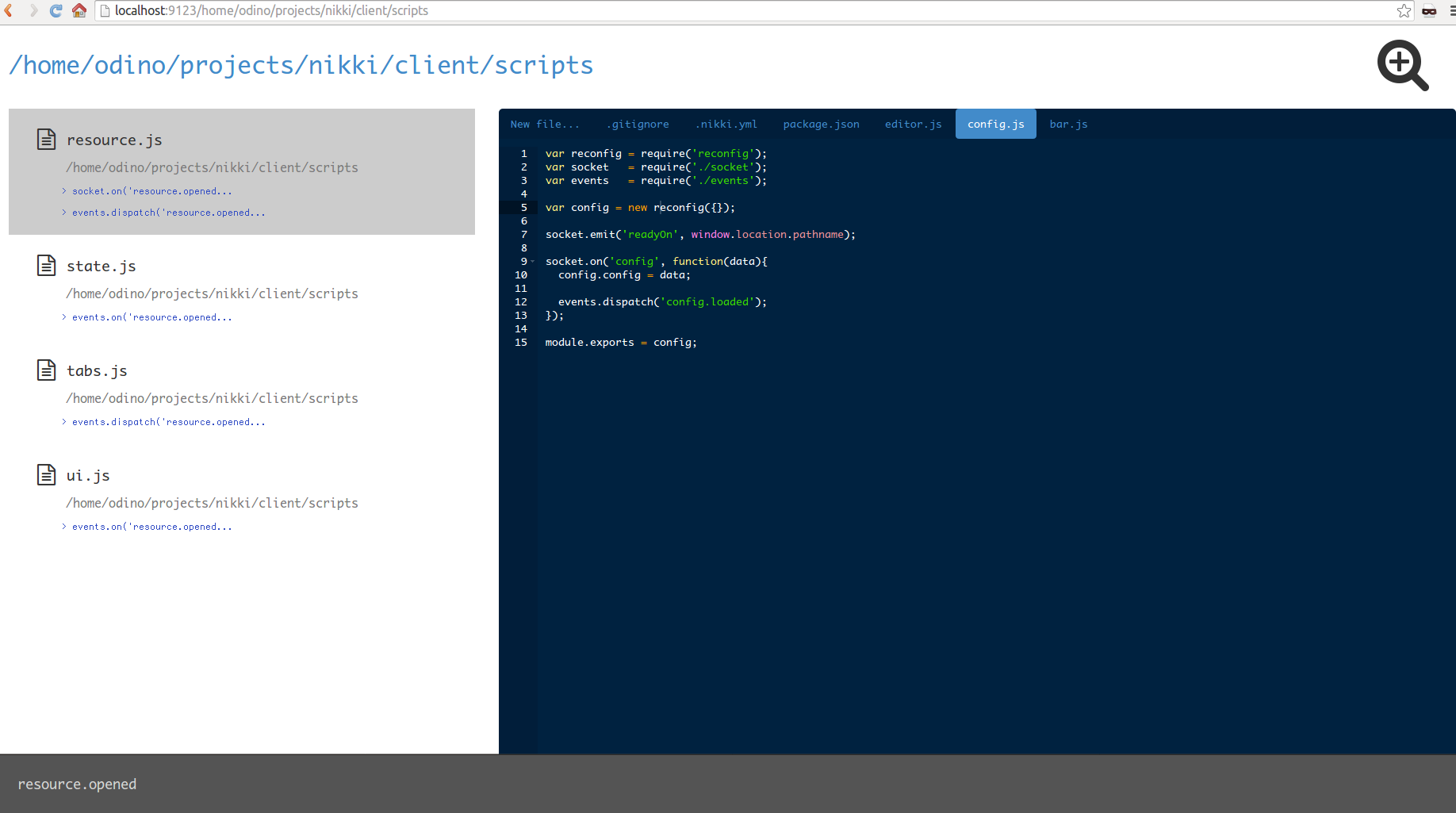](https://raw.githubusercontent.com/odino/nikki/master/bin/images/nikki-ss.png?token=328420__eyJzY29wZSI6IlJhd0Jsb2I6b2Rpbm8vbmlra2kvbWFzdGVyL2Jpbi9pbWFnZXMvbmlra2kuZ2lmIiwiZXhwaXJlcyI6MTQwMzk4MDA4N30%3D--df43445fcfba173ae878bc6447c1169b61bc59cf)
Once you have it installed globally you can simply
start nikki from the command line:
```
nikki
```
This command will open your browser at `http://localhost:9123/`,
where the IDE is running.
To open specific project, simply specify it in the URL, for
example `http://localhost:9123/home/odino/my-project`.
You can check whether nikki is runnin with a `nikki --status`;
if you want to stop nikki simply run `nikki --stop`.
If you wish to start nikki on another port, simply specify it
once you start the IDE:
```
nikki --port 8000
```
By default, nikki opens on the directory from which it was launched,
which means that:
```
cd /tmp
nikki
```
will open the browser at `http://localhost:9123/tmp`
If you feel lost, simply run a `nikki --help` and get some comfort;
in any case, upon booting, you will find a `nikki.log` file
in nikki's root directory: in case of errors, have a look there.
## Configuration
By default, nikki comes with some configs stored
in the [.nikki.yml](https://github.com/odino/nikki/blob/master/.nikki.yml)
file of the module itself; you can setup custom
configs by storing a `.nikki.yml` file in your home
directory, or in the directory from which you are starting
nikki.
For example, to change the editor theme, you can
create the `.nikki.yml` configuration file in `~`:
```
editor:
theme: chaos
```
For a full list of available configurations, have
a look [here](https://github.com/odino/nikki/blob/master/.nikki.yml).
If you want to be more granular and specify
per-project configurations, you can do it by
storing another `.nikki.yml` in your project's
folder (ie. `/home/user/projects/test-project/.nikki.yml`):
once you open nikki at `localhost:9123/home/user/projects/test-project`
you will see that you are now using custom configurations
that will only be available on that project.
## Shortcuts
Nikki is thought with shortcuts in mind and focused on letting
you write code without using your mouse.
Here are some of the shortcuts you might find useful
while using it (on Macs, simply replace `ctrl` with `⌘`):
* use `up` or `down` to move between files / directories
* press `space` to open a file / directory
* `ctrl + s` will save the current open file
* `ctrl + f` to find a string in the current file
* `ctrl + shift + f` will search for files and directories
* `ctrl + shift + g` will search in files
* press `ctrl + shift + x` to switch the focus between the filesystem structure
and the editor tab (this is handy when you open a file, save it and then
wanna open another file without using the mouse)
* press `delete` to delete either a file or a directory
When you are on the editor tab, use your usual shortcuts
(ie. `tab` to indent, `ctrl + z` to undo), as we are using
the [ACE editor](http://ace.c9.io/#nav=about).
To switch between editor tabs, press `ctrl + <` and `ctrl + >`;
to close a tab simply use `ctrl + shift + l`.
For a full list of keyboard shortcuts supported by the
editor visit [its documentation](https://github.com/ajaxorg/ace/wiki/Default-Keyboard-Shortcuts).
## File / directory search
When the search is enabled (`ctrl + shift + f`),
you can use a single word or a
sequence of words to match a path; long story short:
* `app` matches `app.js` and `app_production.js`
* `app prod` only matches `app_production.js`
* `proj app` matches `/some/path/project/app.js`
Nikki will look for files from the current
directory onwards.
## Support
Nikki should work on all modern browser: for an optimal
experience, though, we recommend the latest versions of
Chrome and Firefox.
## Development
You can contribute to nikki by simply forking this repo and
running it locally; `cd` into nikki's root, run `npm install`
and launch the app with gulp:
```
git clone git@github.com:odino/nikki.git
cd nikki
npm install
gulp
```
By the way, the layout sucks, **big time**: never been a genious
with HTML and CSS so if you guys wanna come up with something I'd
be super happy.
## License
For the ones who care, nikki is released under the MIT license.
## Are you for real?
"Kinda", "Why not?" and "Let's just have fun" are all valid
answers to this question.
Of course, calling this thing an "IDE" is a bit - well, a lot -
pretentious. On purpose ;-)
The main idea behind nikki came up to my mind months ago
when I was thinking on why we are still relying on desktop
applications to interact with the filesystem while we can
simply use sockets to make the browser communicate, in a simple
way, with the server. At the same time, I got so much frustrated
with traditional IDEs like Eclipse, Netbeans, WebStorm: tried
all of them and it's just ridicolous how much time you spend in
waiting for that thing to respond to your actions.
> Hey, couldn't you simply use TextMate or LightTable?
Yes, but then, where's the fun?
## Bonus
The sickest thing is that I started building Nikki with WebStorm
and, once it got quite decent, I continued to **build Nikki with
Nikki**.