ngx-rumbletalk
Version:
RumbleTalk Angular integration
207 lines (171 loc) • 4.74 kB
Markdown
# NgxRumbletalk
An angular library for Rumbletalk group chats. Your platform for creating engaging messaging
chat rooms for online events, web-site, platforms ,or apps.
## Features
- Angular compatibility
- CSS Customization
- Polls
- create multiple rooms
- Video and audio calls
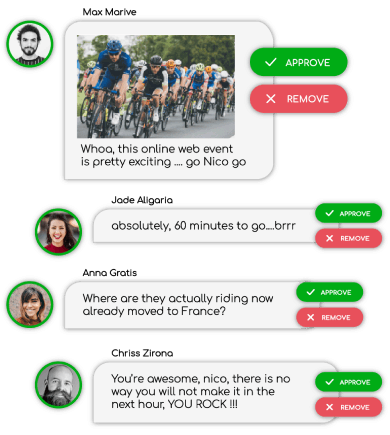
- Approve message mode (Q&A)
- Backend agnostic
- voice and audio messages
- Images, videos, files & emojis
- Private messages
- Text formatting - bold, italic, strikethrough, underline
- Online / Offline users status
- Flexible options and slots
- Different themes
- Floating or embed chat
- Mute all
## Installation
Using npm:
`npm i ngx-rumbletalk`
## Supported versions:
| Angular Version | Supported Version |
| ---------------------- | ----------------- |
| 15.x.x | 5.x.x |
| 14.x.x | 4.x.x |
| 13.x.x (Ivy) | 3.x.x |
| <=12.x.x (View Engine) | 2.x.x |
## Setup
**Import** `NgxRumbletalkModule` to your application's module
```typescript
import { NgxRumbletalkModule } from 'ngx-rumbletalk';
@NgModule({
...
imports: [ NgxRumbletalkModule ],
...
})
export class AppModule { }
```
## Component usage
Use this in any of your `html` file where you would like to place the chat
### Basic use
```html
<ngx-rumbletalk [hash]="hash" [width]="700" [height]="500"></ngx-rumbletalk>
```
### Floating
```html
<ngx-rumbletalk [hash]="hash" [floating]="true" side="right" image="https://d1pfint8izqszg.cloudfront.net/images/toolbar/toolbar.png" counter="14:23">
</ngx-rumbletalk>
```
<table>
<tr>
<th>Option</th>
<th>Type</th>
<th>Default</th>
<th>Description</th>
</tr>
<tr>
<td>hash</td>
<td>string</td>
<td></td>
<td>The hash string which defines the chat to be loaded</td>
</tr>
<tr>
<td>width</td>
<td>number</td>
<td><b>700</b> if <i>floating</i> is true</td>
<td>Size of the width of the chat in pixels</td>
</tr>
<tr>
<td>height</td>
<td>number</td>
<td><b>500</b> if <i>floating</i> is true</td>
<td>Size of the height of the chat in pixels</td>
</tr>
<tr>
<td>floating</td>
<td>boolean</td>
<td>false</td>
<td>Displays the chat in a floating manner or else it is fixed</td>
</tr>
<tr>
<td>side</td>
<td>string</td>
<td>right</td>
<td>If <i>floating</i> is <i>true</i>, sets which side of the window will the floating chat be displayed, can only be either 'left' or 'right'</td>
</tr>
<tr>
<td>image</td>
<td>string</td>
<td>
<a href="https://d1pfint8izqszg.cloudfront.net/images/toolbar/toolbar.png" target="_blank">default image</a>
</td>
<td>If <i>floating</i> is <i>true</i>, sets the image used for the floating chat</td>
</tr>
<tr>
<td>counter</td>
<td>string</td>
<td>14:23</td>
<td>If <i>floating</i> is <i>true</i>, top:left coordinates of the counter/number of users in the chat</td>
</tr>
</table>
## Service usage
These are the available methods you can use in the chat by importing the `NgxRumbleTalkService` file
> Note: Don't forget to import the service and interfaces
> `import { LoginData, LogoutData, LogoutCbData, NgxRumbletalkService } from 'ngx-rumbletalk';`
> in the file you are working on and inject it in your class constructor
> `constructor(private rumbletalkService: NgxRumbletalkService) {}`
### Methods
#### login(data: LoginData): Promise<any>
```typescript
this.rumbletalkService.login(data)
.then(response => console.log(response))
.catch(error => console.log(error));
```
Used to log in to your chat
#### logout(data: LogoutData): void
```typescript
this.rumbletalkService.logout(data);
```
Used to log out from your chat
#### logoutCB(data: LogoutCbData): void
```typescript
this.rumbletalkService.logoutCB(data);
```
Used to log out from your chat but with a callback that you can use for whatever purpose
#### openPrivateChat(data: OpenPrivateChatData): void
```javascript
this.ref.current.openPrivateChat({
hash: hash,
username: username,
});
```
Used to open the private chat
## Interface
### LoginData
```typescript
export interface LoginData {
hash: string;
username: string;
password?: string;
image?: string;
forceLogin?: boolean;
}
```
### LogoutData
```typescript
export interface LogoutData {
hash: string;
userId?: string;
username?: string;
}
```
### LogoutCbData
```typescript
export interface LogoutCbData {
hash: string;
callback: any;
}
```
### OpenPrivateChatData
```typescript
export interface OpenPrivateChatData {
hash: string;
userId?: string;
username?: string;
}
```