ngx-qrcode-styling
Version:
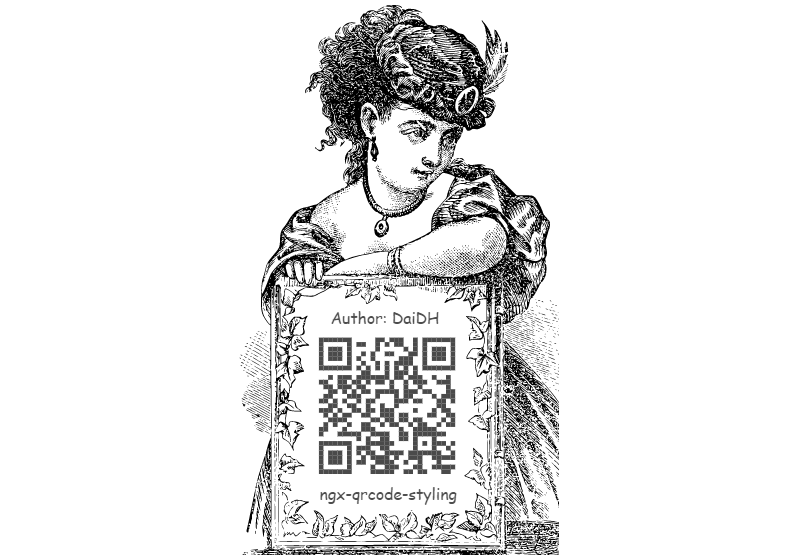
This library is built for the purpose for generating QR codes with a logo and styling.
476 lines (386 loc) • 16.5 kB
Markdown
# ngx-qrcode-styling
This library is built for the purpose generating QR codes with a logo and styling. \
Demo on the [Github](https://id1945.github.io/ngx-qrcode-styling) or [Stackblitz](https://stackblitz.com/edit/angular-ngx-qrcode-styling) or [Codesandbox](https://codesandbox.io/s/ngx-qrcode-styling-vlvvi) \
Generating styled QRcodes [Online](https://qr-code-styling.com/)
## Installation
Install `ngx-qrcode-styling` from `npm`:
```bash
npm install ngx-qrcode-styling@<version> --save
```
Add wanted package to NgModule imports:
```typescript
import { NgxQrcodeStylingModule } from 'ngx-qrcode-styling';
@NgModule({
imports: [
NgxQrcodeStylingModule
]
})
```
Add component to your page:
```typescript
import { Options } from 'ngx-qrcode-styling';
export class AppComponent {
public config: Options = {
width: 300,
height: 300,
data: "https://www.facebook.com/",
image: "https://upload.wikimedia.org/wikipedia/commons/5/51/Facebook_f_logo_%282019%29.svg",
margin: 5,
dotsOptions: {
color: "#1977f3",
type: "dots"
},
backgroundOptions: {
color: "#ffffff",
},
imageOptions: {
crossOrigin: "anonymous",
margin: 0
}
};
}
```
```html
<ngx-qrcode-styling [config]="config"></ngx-qrcode-styling>
```
<details><summary><b>Multi input</b></summary>
```html
<ngx-qrcode-styling
#qrcode
[config]="config"
[type]="'canvas'"
[shape]="'square'"
[width]="200"
[height]="200"
[margin]="5"
[data]="'Angular QRCode'"
[image]="'https://upload.wikimedia.org/wikipedia/commons/5/51/Facebook_f_logo_%282019%29.svg'">
</ngx-qrcode-styling>
```
```typescript
import { NgxQrcodeStylingComponent, Options } from 'ngx-qrcode-styling';
export class AppComponent {
@ViewChild('qrcode', { static: false }) public qrcode!: NgxQrcodeStylingComponent;
onUpdate(): void {
this.qrcode.update(this.qrcode.config, {
// height: 300,
// width: 300,
frameOptions: {
height: 600,
width: 600,
},
...
}).subscribe((res) => {
// TO DO something!
});
}
onDownload(): void {
this.qrcode.download("file-name.png").subscribe((res) => {
// TO DO something!
});
}
}
```
</details>
<details><summary><b>Element reference</b></summary>
```html
<div #canvas></div>
```
```typescript
import { NgxQrcodeStylingService, Options } from 'ngx-qrcode-styling';
export class AppComponent implements AfterViewInit {
@ViewChild("canvas", { static: false }) canvas: ElementRef;
public config: Options = {...};
constructor(private qrcode: NgxQrcodeStylingService) {}
ngAfterViewInit(): void {
// Create QRCode by Service and ElementRef
this.qrcode.create(this.config, this.canvas.nativeElement).subscribe((res) => {
// TO DO something!
});
}
}
```
</details>
<details><summary><b>Element id</b></summary>
```html
<div id="canvas"></div>
```
```typescript
import { NgxQrcodeStylingService, Options } from 'ngx-qrcode-styling';
export class AppComponent implements AfterViewInit {
public config: Options = {...};
constructor(private qrcode: NgxQrcodeStylingService) {}
ngAfterViewInit(): void {
// Create QRCode by Service and HTMLElement
this.qrcode.create(this.config, document.getElementById('canvas')).subscribe((res) => {
// TO DO something!
});
}
}
```
</details>
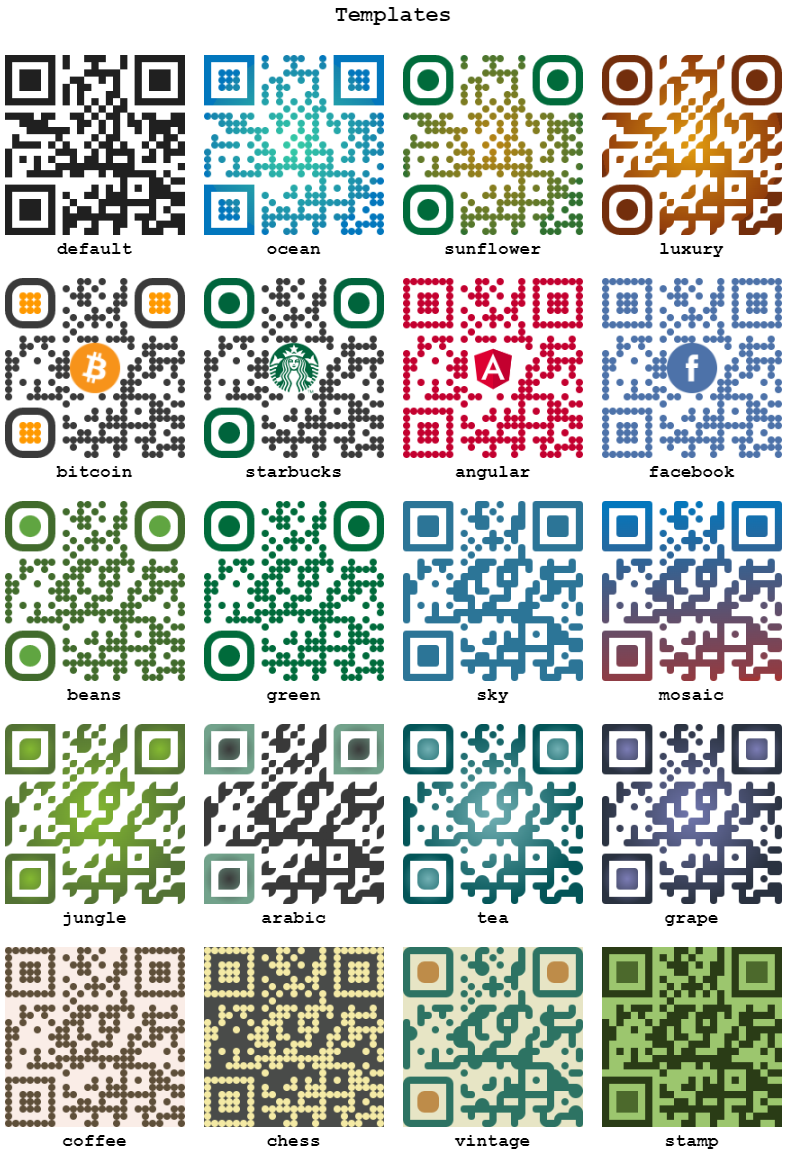
<details><summary><b>Using a template</b></summary>
```typescript
import { Options } from 'ngx-qrcode-styling';
export class AppComponent {
public config: Options = {
template: 'bitcoin',
...
}
}
```
Or
```html
<ngx-qrcode-styling [template]="'bitcoin'" [data]="'ngx-qrcode-styling'"></ngx-qrcode-styling>
```
</details>
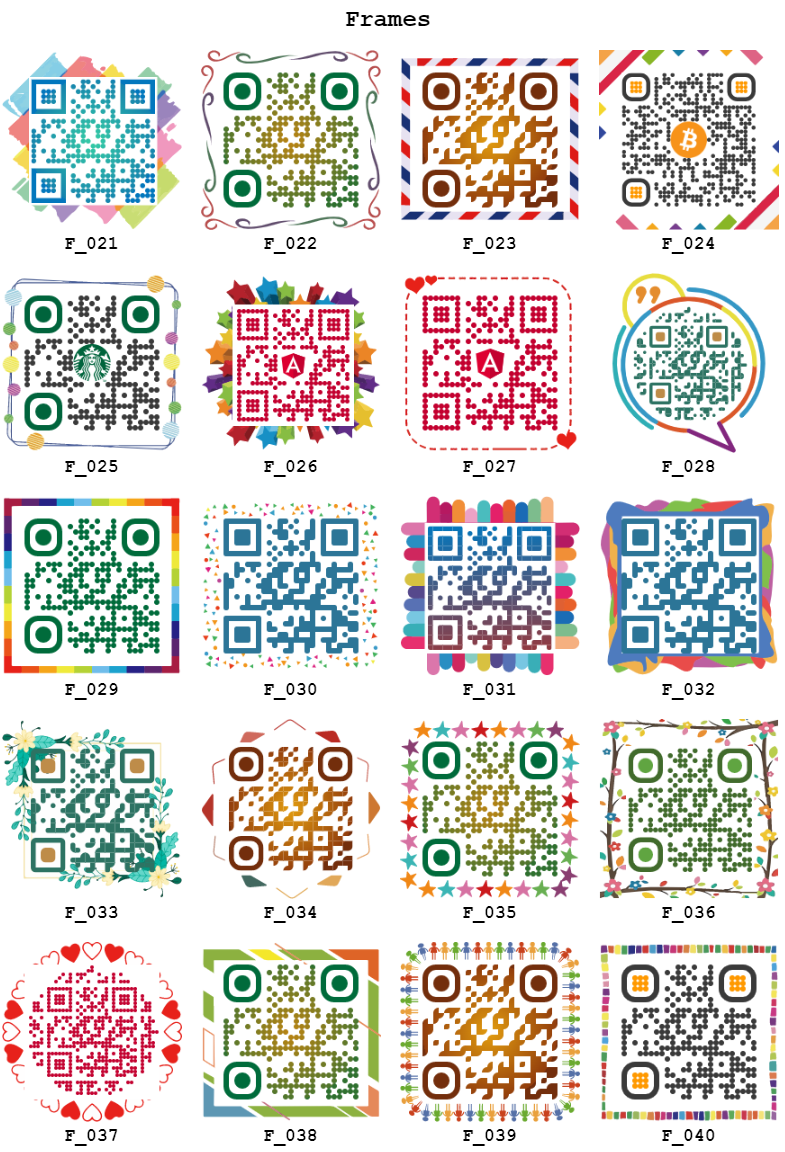
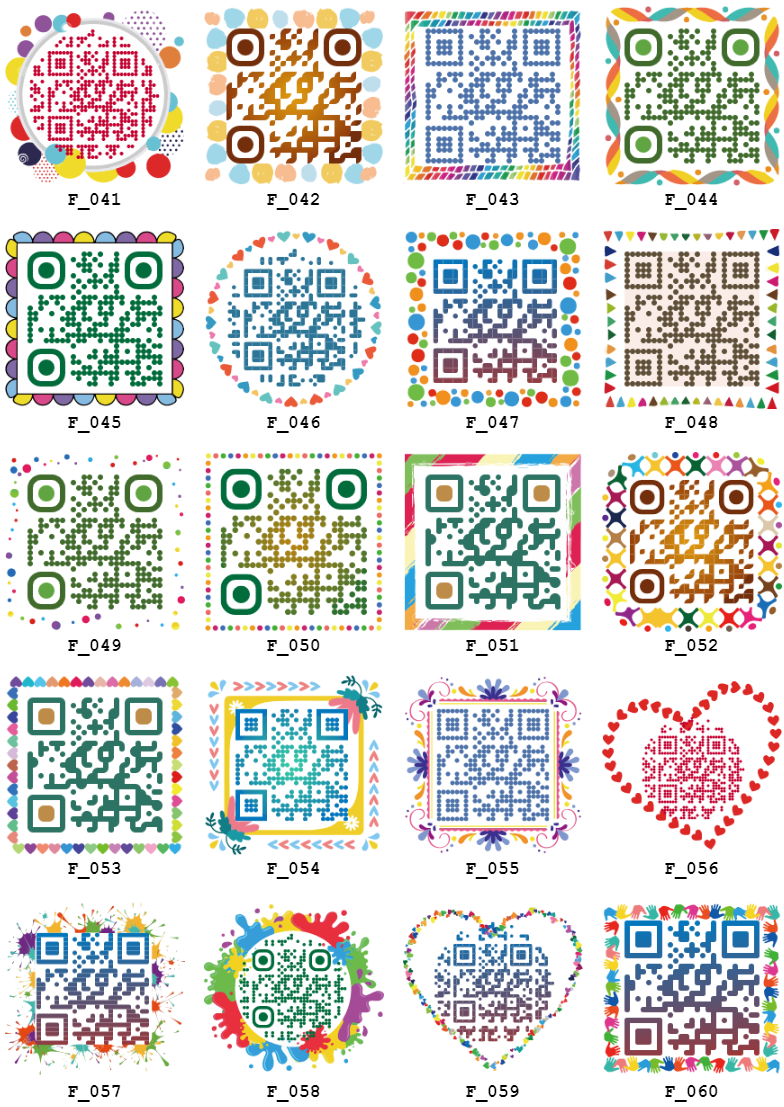
<details><summary><b>Using a frame</b></summary>
```typescript
import { Options } from 'ngx-qrcode-styling';
export class AppComponent {
public config: Options = {
frameOptions: {
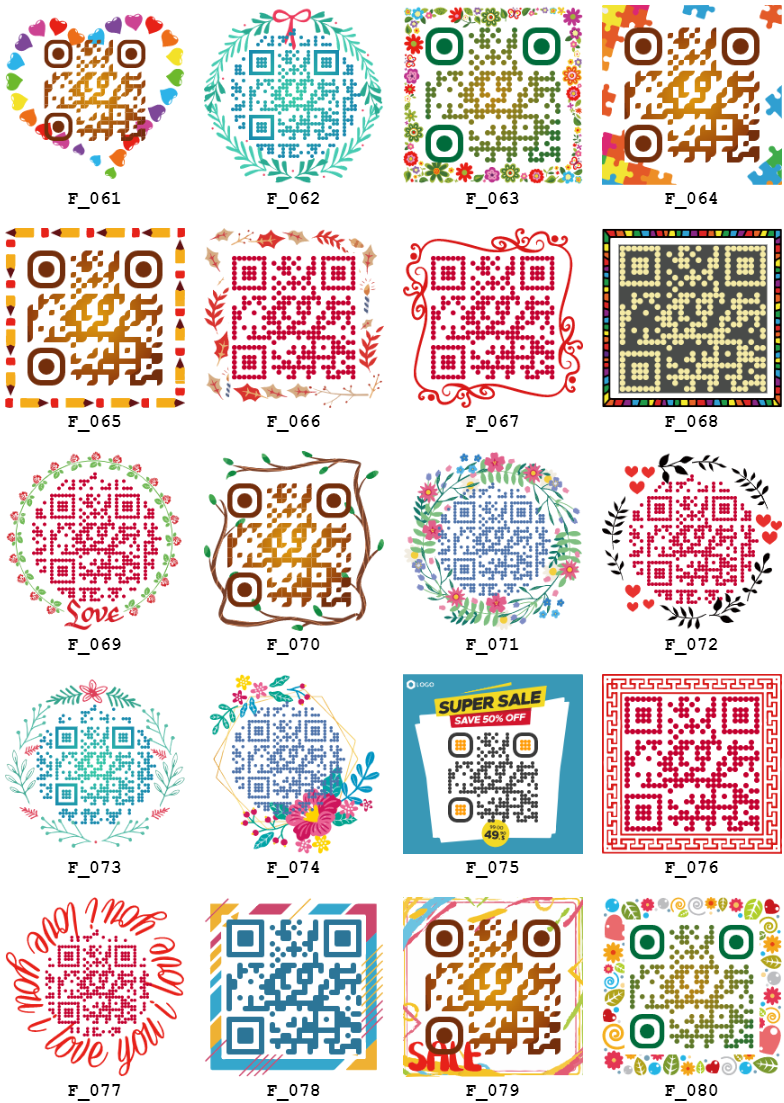
style: 'F_036',
width: 300,
height: 300,
x: 50,
y: 50
}
...
}
}
```
Or
```html
<ngx-qrcode-styling
[template]="'bitcoin'"
[data]="'ngx-qrcode-styling'"
[width]="280"
[height]="280"
[image]="'https://upload.wikimedia.org/wikipedia/commons/thumb/9/9a/BTC_Logo.svg/60px-BTC_Logo.svg.png'"
[frameOptions]="{style: 'F_036', height: 300, width: 300, x: 60, y: 60}">
</ngx-qrcode-styling>
```
</details>
### API Documentation
#### Input
<details><summary><b>frameOptions :hammer_and_wrench:</b></summary>
Property |Type |Default Value|Description
----------------------------|-----------------------------------------------|-------------|-----------------------------------------------------
(type) |`canvas`, `svg` |`canvas` |The type of the element that will be rendered
(shape) |`square`, `circle` |`square` |The type of the element that will be rendered
(width) |number |`300` |Size of canvas
(height) |number |`300` |Size of canvas
(margin) |number |`0` |Margin around canvas
(data) |string | |The date will be encoded to the QR code
(image) |string | |The image will be copied to the center of the QR code
(scale) |number |`0` |Scale qrcode
(rotate) |number |`0` |Rotate qrcode
(zIndex) |`1`, `2` |`2` |QR position is before or after
(template) |`default`, `ocean`, `sunflower`, `luxury`, `bitcoin`, `starbucks`, `angular`, `facebook`, `beans`, `green`, `sky`, `mosaic`, `coffee`, `vintage`, `stamp`, `chess`, `jungle` , `arabic` , `tea` , `grape` | `default` | The design of the element that will be rendered
(frameOptions) |object | |Options will be passed to `qrcode-generator` lib
(qrOptions) |object | |Options will be passed to `qrcode-generator` lib
(imageOptions) |object | |Specific image options, details see below
(dotsOptions) |object | |Dots styling options
(cornersSquareOptions) |object | |Square in the corners styling options
(backgroundOptions) |object | |QR background styling options
</details>
#### Event
<details><summary><b>Component and Service :hammer_and_wrench:</b></summary>
| Field | Description | Type | Default |
| --- | --- | --- | --- |
| (create) | status | AsyncSubject | - |
| (update) | status | AsyncSubject | - |
| (download) | status | AsyncSubject | - |
</details>
#### Models in Config
<details><summary><b>Options</b></summary>
```typescript
export declare type Options = {
type?: DrawType;
shape?: ShapeType;
width?: number;
height?: number;
margin?: number;
data?: string;
image?: string;
scale?: number;
rotate?: number;
template?: string;
zIndex?: 1 | 2;
frameOptions?: {
style?: string;
height?: number;
width?: number;
x?: number;
y?: number;
texts?: UnknownObject[]; // SVG Attribute reference
contents?: UnknownObject[]; // SVG Attribute reference
containers?: UnknownObject[]; // SVG Attribute reference
};
qrOptions?: {
typeNumber?: TypeNumber;
mode?: Mode;
errorCorrectionLevel?: ErrorCorrectionLevel;
};
imageOptions?: {
hideBackgroundDots?: boolean;
imageSize?: number;
crossOrigin?: string;
margin?: number;
};
dotsOptions?: {
type?: DotType;
color?: string;
gradient?: Gradient;
};
cornersSquareOptions?: {
type?: CornerSquareType;
color?: string;
gradient?: Gradient;
};
cornersDotOptions?: {
type?: CornerDotType;
color?: string;
gradient?: Gradient;
};
backgroundOptions?: {
round?: number;
color?: string;
gradient?: Gradient;
};
};
```
</details>
#### Model Details
<details><summary><b>frameOptions</b></summary>
Property |Type |Default Value
--------------------|--------------------------------------------------|-------------
style |`F_020`, ... `F_080`, `FE_001`, ... `FE_XXX` |`F_020`
width |number(`0 - max`) |`300`
height |number(`0 - max`) |`300`
x |number(`0 - max`) |`50`
y |number(`0 - max`) |`50`
texts |UnknownObject[] | -
contents |UnknownObject[] | -
containers |UnknownObject[] | -
</details>
<details><summary><b>qrOptions</b></summary>
Property |Type |Default Value
--------------------|--------------------------------------------------|-------------
typeNumber |`0`,`40` |`0`
mode |`Numeric`, `Alphanumeric`, `Byte`, `Kanji` |
errorCorrectionLevel|`L`, `M`, `Q`, `H` |`Q`
</details>
<details><summary><b>imageOptions</b></summary>
Property |Type |Default Value|Description
------------------|---------------------------------------|-------------|------------------------------------------------------------------------------
hideBackgroundDots|boolean |`true` |Hide all dots covered by the image
imageSize |number |`0.4` |Coefficient of the image size. Not recommended to use ove 0.5. Lower is better
margin |number |`0` |Margin of the image in px
crossOrigin |`anonymous`, `use-credentials` | |Set "anonymous" if you want to download QR code from other origins.
</details>
<details><summary><b>dotsOptions</b></summary>
Property|Type |Default Value|Description
--------|------------------------------------------------------------------------------|-------------|-------------------
color |string |`#000` |Color of QR dots
gradient|object | |Gradient of QR dots
type |`rounded`,`dots`, `classy`, `classy-rounded`, `square`, `extra-rounded` |`square` |Style of QR dots
</details>
<details><summary><b>backgroundOptions</b></summary>
Property|Type |Default Value
--------|------|-------------
color |string|`#fff`
gradient|object|
</details>
<details><summary><b>cornersSquareOptions</b></summary>
Property|Type |Default Value|Description
--------|-----------------------------------------|-------------|-----------------
color |string | |Color of Corners Square
gradient|object | |Gradient of Corners Square
type |`dot`, `square`, `extra-rounded` | |Style of Corners Square
</details>
<details><summary><b>cornersDotOptions</b></summary>
Property|Type |Default Value|Description
--------|-------------------------|-------------|-----------------
color |string | |Color of Corners Dot
gradient|object | |Gradient of Corners Dot
type |`dot`, `square` | |Style of Corners Dot
</details>
<details><summary><b>Gradient</b></summary>
`dotsOptions.gradient`
`backgroundOptions.gradient`
`cornersSquareOptions.gradient`
`cornersDotOptions.gradient`
Property |Type |Default Value|Description
----------|----------------------------|-------------|---------------------------------------------------------
type |`linear`, `radial` |`linear` |Type of gradient spread
rotation |number |0 |Rotation of gradient in radians (Math.PI === 180 degrees)
colorStops|array of objects | |Gradient colors. Example `[{ offset: 0, color: 'blue' }, { offset: 1, color: 'red' }]`
</details>
<details><summary><b>Gradient colorStops</b></summary>
`dotsOptions.gradient.colorStops[]`
`backgroundOptions.gradient.colorStops[]`
`cornersSquareOptions.gradient.colorStops[]`
`cornersDotOptions.gradient.colorStops[]`
Property|Type |Default Value|Description
--------|----------------|-------------|-----------------------------------
offset |`0`, `1` | |Position of color in gradient range
color |string | |Color of stop in gradient range
</details>
#### Support versions
<table>
<tr>
<th colspan="2">Support versions</th>
</tr>
<tr>
<td>Angular 19</td>
<td>1.3.3</td>
</tr>
<tr>
<td>Angular 16</td>
<td>1.3.2</td>
</tr>
<tr>
<td>Angular 6</td>
<td>1.3.1</td>
</tr>
</table>
#### Author Information
<table>
<tr>
<th colspan="2">Author Information</th>
</tr>
<tr>
<td>Author</td>
<td>DaiDH</td>
</tr>
<tr>
<td>Phone</td>
<td>+84845882882</td>
</tr>
<tr>
<td>Country</td>
<td>Vietnam</td>
</tr>
</table>
#### To make this library more complete, please donate to me if you can!
<table>
<tr>
<th>Bitcoin</th>
<th>Paypal</th>
<th>MBBank</th>
</tr>
<tr>
<td><img src="https://raw.githubusercontent.com/id1945/id1945/master/donate-bitcoin.png" width="182px"></td>
<td><img src="https://raw.githubusercontent.com/id1945/id1945/master/donate-paypal.png" width="182px"></td>
<td><img src="https://raw.githubusercontent.com/id1945/id1945/master/donate-mbbank.png" width="182px"></td>
</tr>
</table>
[Beerware License](https://github.com/id1945/ngx-qrcode-styling/blob/master/LICENSE). Copyright (c) 2021 DaiDH