ngx-annotate-text
Version:
This Angular component library is perfect for tasks like visualizing named entity recognition, part of speech tagging, or annotating text datasets. It allows for interactively highlighting and annotating parts of text.
168 lines (118 loc) • 8.15 kB
Markdown
# ngx-annotate-text
<img alt="GitHub Workflow Status (branch)" src="https://img.shields.io/github/actions/workflow/status/philenius/ngx-annotate-text/main.yml?branch=main&style=for-the-badge"> <a href="https://github.com/philenius/ngx-annotate-text/issues"><img alt="GitHub issues" src="https://img.shields.io/github/issues/philenius/ngx-annotate-text?style=for-the-badge"></a> <img alt="GitHub" src="https://img.shields.io/github/license/philenius/ngx-annotate-text?style=for-the-badge"> <img alt="npm" src="https://img.shields.io/npm/v/ngx-annotate-text?style=for-the-badge">
[](https://codesandbox.io/s/ngx-annotate-text-demo-sgb4t1?fontsize=14&hidenavigation=1&module=%2Fsrc%2Fapp%2Fapp.component.html&theme=dark)
This Angular component library is perfect for tasks like visualizing named entity recognition, part of speech tagging, or annotating text datasets. It allows for interactively highlighting and annotating parts of text.

## Features
- 👆 Interactively mark text ranges such as sentences, words, or parts of words.
- 🗑️ Easily remove existing annotations.
- 🎉 Purely based on CSS, with no use of SVGs or canvas.
- 🛠️ Customize annotation rendering with your own Angular components.
## Demo
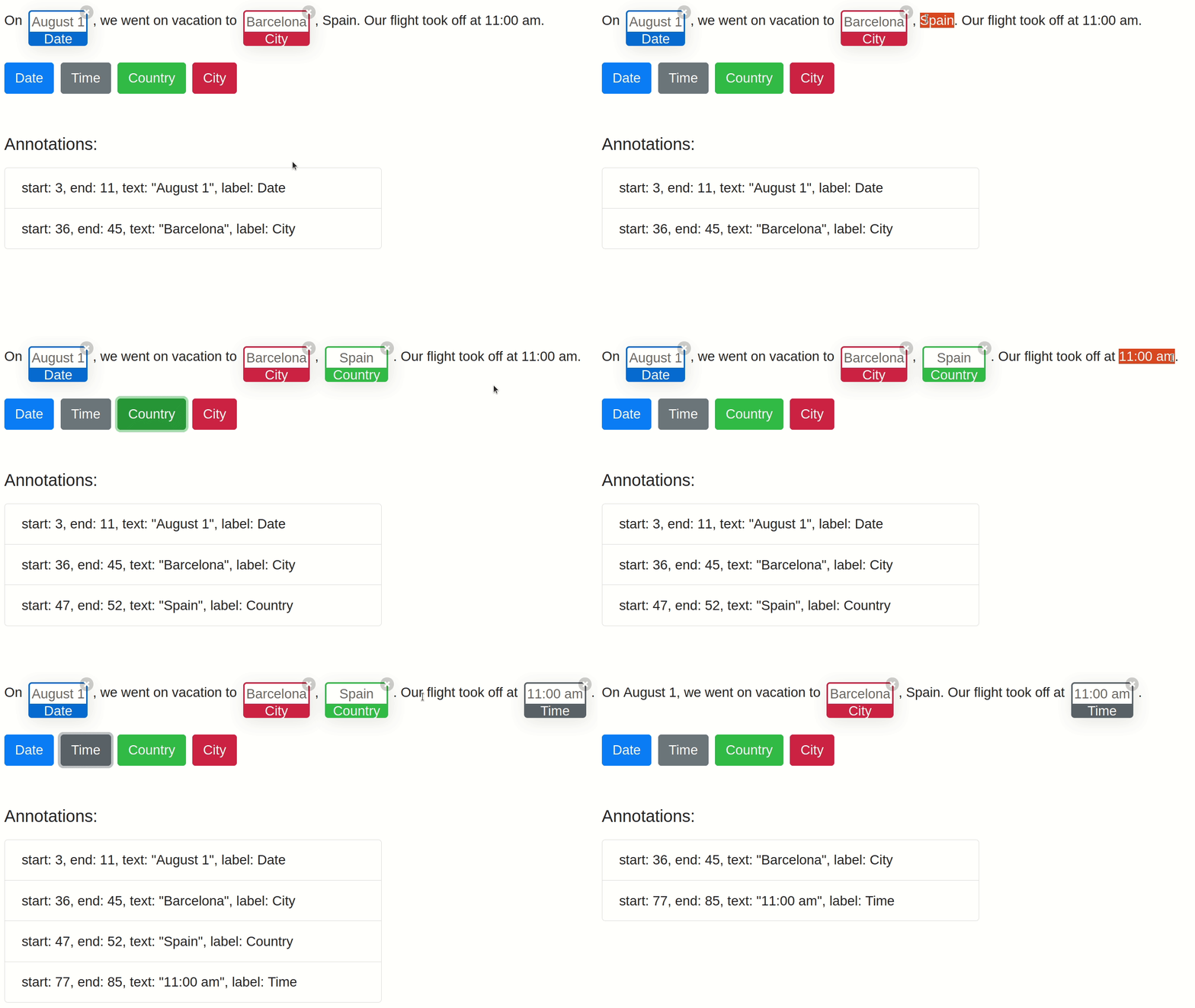
[](https://codesandbox.io/s/ngx-annotate-text-demo-sgb4t1?fontsize=14&hidenavigation=1&module=%2Fsrc%2Fapp%2Fapp.component.html&theme=dark)
View and edit the live demo Angular app on <a href="https://codesandbox.io/s/ngx-annotate-text-demo-sgb4t1?fontsize=14&hidenavigation=1&module=%2Fsrc%2Fapp%2Fapp.component.html&theme=dark">codesandbox.io</a> or look through the code of the demo app in [ngx-annotate-text/src/app/](https://github.com/philenius/ngx-annotate-text/tree/main/src/app).
**Screen recording:**
## Usage
1. Install the NPM package:
```bash
npm install ngx-annotate-text
```
2. In your Angular component import the `NgxAnnotateTextComponent` and create two properties for the text to be displayed and the list of annotations:
```typescript
import { Annotation, NgxAnnotateTextComponent } from 'ngx-annotate-text';
@Component({
selector: 'app-root',
imports: [NgxAnnotateTextComponent],
templateUrl: './app.component.html',
styleUrl: './app.component.css',
})
export class AppComponent {
annotations: Annotation[] = [
new Annotation(3, 11, 'Date', '#0d6efd'),
new Annotation(36, 45, 'City', '#dc3545'),
new Annotation(47, 52, 'Country', '#198754'),
new Annotation(77, 85, 'Time', '#6c757d'),
];
text = 'On August 1, we went on vacation to Barcelona, Spain. Our flight took off at 11:00 am.';
}
```
3. Add the component `ngx-annotate-text` to your component's template:
```html
<ngx-annotate-text
[(annotations)]="annotations"
[removable]="true"
[text]="text"
annotationClass="my-annotation"
#annotateText
>
</ngx-annotate-text>
```
3. Having set `annotationClass="my-annotation"`, a custom CSS styling can be applied by combining `::ng-deep` with the class selector `.my-annotation`, e.g., to remove the border-radius:
```css
::ng-deep .my-annotation .annotation-parent,
::ng-deep .my-annotation .annotation-content {
border-radius: 0rem !important;
}
```
## API - NgxAnnotateText
### Inputs
| Input | Description | Type | Default value |
| :-------------------------- | ------------------------------------------------------------ | ------------------ | :------------ |
| annotations | Represents the parts of the given text which shall be annotated. | `Annotation[]` | `[]` |
| annotationClass | An optional CSS class applied to all elements which wrap the annotated parts of the given text. | `string\|undefined` | `undefined` |
| annotationRendererComponent | An optional Angular component that shall be used for rendering the annotation. By default, it uses the provided `NgxAnnotationRendererComponent`. You can implement your own annotation rendering component to customize the visualization of annotations. The custom component must implement the interface `NgxAnnotationRendererComponentInterface`. | `NgxAnnotationRendererComponentInterface` | `NgxAnnotationRendererComponent` |
| removable | Determines whether annotations shall have a small button in the top right corner so that the user can remove an annotation. | `boolean` | `true` |
| text | The text which shall be displayed and annotated. | `string` | empty string |
### Outputs
| Output | Description | Type |
| ----------------- | ----------------------------------------------------------------------------------------------------------------------- | ---------------------------- |
| annotationsChange | Emits the list of existing annotations after an element has been removed by the user. | `EventEmitter<Annotation[]>` |
| clickAnnotation | Emits the selected annotation when the user clicks on an annotation's box, the label or text. | `EventEmitter<Annotation>` |
| removeAnnotation | Emits the selected annotation when the user removes it by clicking the annotation's X button in the upper right corner. | `EventEmitter<Annotation>` |
### Methods
| Method | Description | Return type |
| ------------------------------------ | ------------------------------------------------------------ | ---------------------- |
| getCurrentTextSelection | Returns the start index and end index of the currently selected text range. Returns `undefined` if no text is currently selected. | `ISelection|undefined` |
| isOverlappingWithExistingAnnotations | Returns true if the given text selection is (partially) overlapping with an existing annotation. Returns false otherwise. | `boolean` |
---
## Development
### Recreate project from scratch
```bash
npm install -g @angular/cli@^20
ng new ngx-annotate-text-workspace
cd ngx-annotate-text-workspace/
ng generate library ngx-annotate-text
ng add angular-eslint@^20
ng g angular-eslint:add-eslint-to-project ngx-annotate-text-workspace
ng g angular-eslint:add-eslint-to-project ngx-annotate-text
npm install prettier --save-dev
ng build ngx-annotate-text
ng lint
ng test ngx-annotate-text
```
### Build
Run `ng build ngx-annotate-text` to build the project. The build artifacts will be stored in the `dist/` directory.
### Running the demo app
Run `ng serve --open` to start the demo app in your browser.
### Running linting tools
Run `ng lint ngx-annotate-text` to execute ESLint.
### Running unit tests
Run `ng test ngx-annotate-text --code-coverage` to execute the unit tests via [Karma](https://karma-runner.github.io). Don't forget to set the environment variable for where to find Chrome / Chromium like so: `export CHROME_BIN=/snap/bin/chromium`.
### Publish library as an npm package
:warning: Don't manually publish to npmjs.org, there is a pipeline that runs automatically when a new release is created.
```bash
ng build ngx-annotate-text --configuration production
cd dist/ngx-annotate-text
npm publish
```
### Development server
Build the library in watch mode:
```bash
ng build ngx-annotate-text --watch
```
Run the Angular dev server:
```bash
ng serve --open
```
Navigate to `http://localhost:4200/`. The app will automatically reload if you change any of the source files.