ng-mat-daterange-picker
Version:
[](https://circleci.com/gh/ashishgkwd/ngx-mat-daterange-picker) [](https
232 lines (177 loc) • 7.18 kB
Markdown
[](https://circleci.com/gh/ashishgkwd/ngx-mat-daterange-picker) [](https://codeclimate.com/github/ashishgkwd/ngx-mat-daterange-picker/maintainability)
[](https://codeclimate.com/github/ashishgkwd/ngx-mat-daterange-picker/test_coverage)

Angular Material Date range picker with configurable Date presets.
Fully compatible with latest Angular versions.
Please see the installation table below for version compatability.
Packaged using [ng-packagr](http://spektrakel.de/ng-packagr/)
https://ashishgkwd.github.io/ngx-mat-daterange-picker/
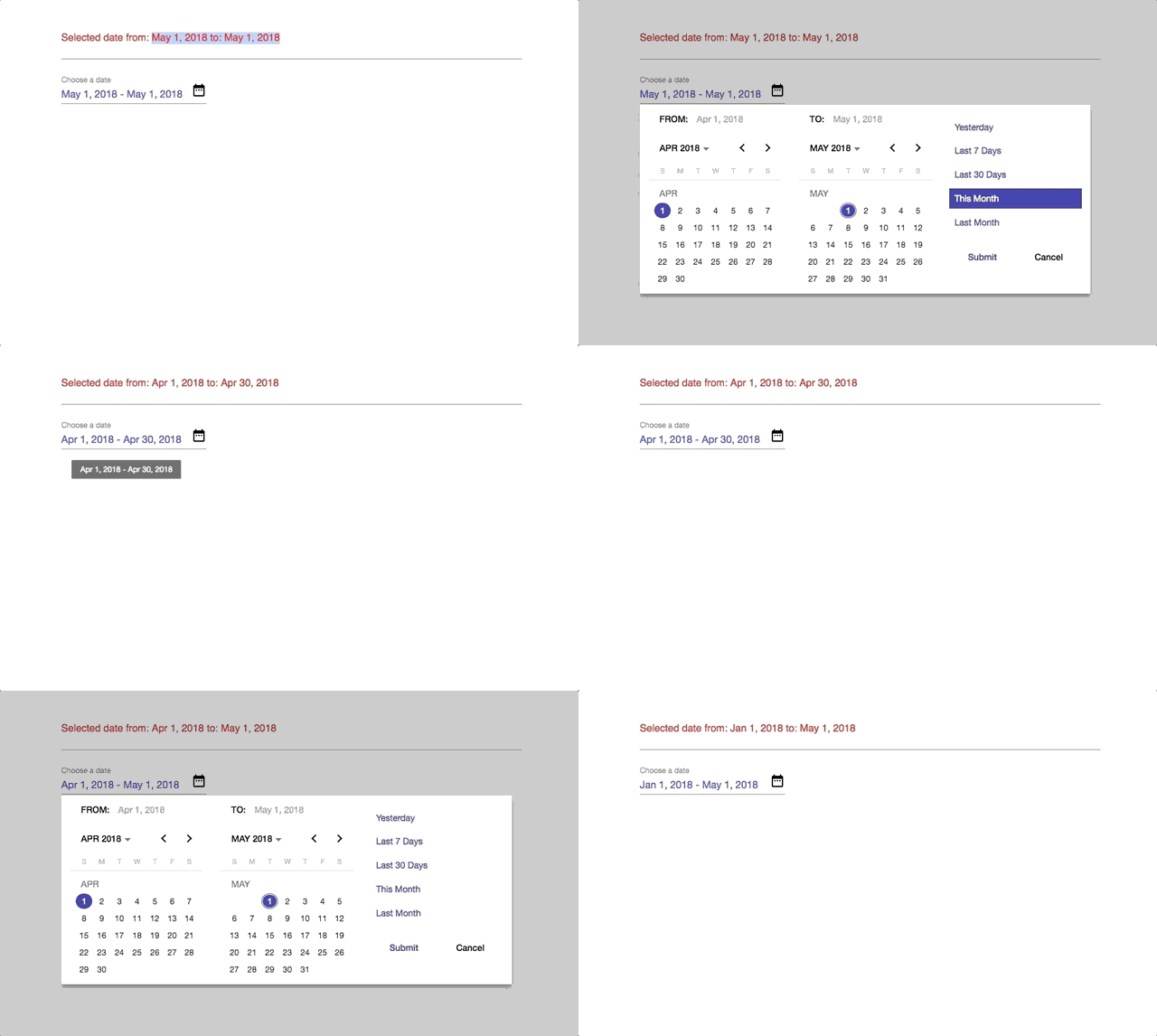
Angular Version | Compatible version
---|---
6.0 | v1.1.4
5.0 and below | v0.0.2
```javascript
npm install ngx-mat-daterange-picker --save
or
yarn add ngx-mat-daterange-picker --save
```
```javascript
npm install ngx-mat-daterange-picker@0.0.2 --save
or
yarn add ngx-mat-daterange-picker@0.0.2 --save
```
**NOTE:** Angular Material requires the `BrowserAnimationsModule` and
as per [
`app.module.ts`
```typescript
import {BrowserAnimationsModule} from '@angular/platform-browser/animations';
@NgModule({
...
imports: [BrowserAnimationsModule],
...
})
```
Please note and install the following peer dependencies necessary for Angular v6
```json
"peerDependencies": {
"@angular/animations": "^6.1",
"@angular/cdk": "^6.1",
"@angular/material": "^6.1"
}
```
Import `NgxMatDrpModule` module in your application module.
`app.module.ts`
```typescript
import { NgxMatDrpModule } from 'ngx-mat-daterange-picker';
@NgModule({
...,
imports: [..., NgxMatDrpModule, ...],
...
})
export class AppModule { }
```
Setup the `NgxDrpOptions` configuration required by the component and the handler function to receive the `Range` object on Date selection.
`app.component.ts`
```typescript
import { Component } from '@angular/core';
import { NgxDrpOptions, PresetItem, Range } from 'ngx-mat-daterange-picker';
@Component({
selector: 'app-root',
templateUrl: './app.component.html',
styleUrls: ['./app.component.css']
})
export class AppComponent {
range:Range = {fromDate:new Date(), toDate: new Date()};
options:NgxDrpOptions;
presets:Array<PresetItem> = [];
ngOnInit() {
const today = new Date();
const fromMin = new Date(today.getFullYear(), today.getMonth()-2, 1);
const fromMax = new Date(today.getFullYear(), today.getMonth()+1, 0);
const toMin = new Date(today.getFullYear(), today.getMonth()-1, 1);
const toMax = new Date(today.getFullYear(), today.getMonth()+2, 0);
this.setupPresets();
this.options = {
presets: this.presets,
format: 'mediumDate',
range: {fromDate:today, toDate: today},
applyLabel: "Submit",
calendarOverlayConfig: {
shouldCloseOnBackdropClick: false,
hasBackDrop: false
}
// cancelLabel: "Cancel",
// excludeWeekends:true,
// fromMinMax: {fromDate:fromMin, toDate:fromMax},
// toMinMax: {fromDate:toMin, toDate:toMax}
};
}
// handler function that receives the updated date range object
updateRange(range: Range){
this.range = range;
}
// helper function to create initial presets
setupPresets() {
const backDate = (numOfDays) => {
const today = new Date();
return new Date(today.setDate(today.getDate() - numOfDays));
}
const today = new Date();
const yesterday = backDate(1);
const minus7 = backDate(7)
const minus30 = backDate(30);
const currMonthStart = new Date(today.getFullYear(), today.getMonth(), 1);
const currMonthEnd = new Date(today.getFullYear(), today.getMonth()+1, 0);
const lastMonthStart = new Date(today.getFullYear(), today.getMonth()-1, 1);
const lastMonthEnd = new Date(today.getFullYear(), today.getMonth(), 0);
this.presets = [
{presetLabel: "Yesterday", range:{ fromDate:yesterday, toDate:today }},
{presetLabel: "Last 7 Days", range:{ fromDate: minus7, toDate:today }},
{presetLabel: "Last 30 Days", range:{ fromDate: minus30, toDate:today }},
{presetLabel: "This Month", range:{ fromDate: currMonthStart, toDate:currMonthEnd }},
{presetLabel: "Last Month", range:{ fromDate: lastMonthStart, toDate:lastMonthEnd }}
]
}
}
```
Pass the reference of the new range selection handler function to `selectedDateRangeChanged` **event emitter** and the `NgxDrpOptions` options reference to the `options` **input** property.
`app.compnent.html`
```html
<ngx-mat-drp (selectedDateRangeChanged)="updateRange($event)" [options]="options"
```
Reset the date using `ViewChild` reference:
```typescript
@ViewChild('dateRangePicker', {static: false}) dateRangePicker;
...
const today = new Date();
const resetRange = {fromDate: today, toDate: today};
this.dateRangePicker.resetDates(resetRange); // will trigger selectedDateRangeChanged
```
```typescript
export interface PresetItem {
presetLabel: string;
range: Range;
}
export interface Range {
fromDate: Date;
toDate: Date;
}
export interface CalendarOverlayConfig {
panelClass?: string;
hasBackdrop?: boolean;
backdropClass?: string;
shouldCloseOnBackdropClick?: boolean;
}
export interface NgxDrpOptions {
presets: Array<PresetItem>;
format: string;
range: Range;
excludeWeekends?: boolean;
locale?: string;
fromMinMax?: Range;
toMinMax?: Range;
applyLabel?: string;
cancelLabel?: string;
animation?: boolean;
calendarOverlayConfig?: CalendarOverlayConfig;
placeholder?: string;
startDatePrefix?: string;
endDatePrefix?: string;
}
```
Run `ng build` to build the project. The build artifacts will be stored in the `dist/` directory. Use the `--prod` flag for a production build.
Run `npm run packagr` to build the library project. The build artifacts will be stored in the `dist/`.
Run `ng test` to execute the unit tests via [Karma](https://karma-runner.github.io).
MIT