ng-katex-2
Version:
Angular module to write beautiful math expressions in TeX syntax boosted by [KaTeX](https://github.com/Khan/KaTeX) library. You can see a demo [here](https://garciparedes.github.io/ng-katex).
302 lines (218 loc) • 12.3 kB
Markdown
# ng-katex-2
Angular module to write beautiful math expressions in TeX syntax boosted by [KaTeX](https://github.com/Khan/KaTeX) library.
You can see a demo [here](https://garciparedes.github.io/ng-katex).
---
[](https://www.npmjs.com/package/ng-katex-2)
[](https://www.npmjs.com/package/ng-katex-2)
[](https://github.com/kai1992cool/ng-katex-2)
[](https://github.com/kai1992cool/ng-katex-2/blob/master/README.md)
## About ng-KaTeX-2:
This repo was created for [ng-katex library is compatible with Angular 18?](https://stackoverflow.com/questions/79445693/ng-katex-library-is-compatible-with-angular-18)
The reason for creation of this repository is because the original repo [ng-katex](https://github.com/garciparedes/ng-katex) has been archived and supports upto angular 13.
Since angular18 is throwing error for components not being standalone, I upgraded to version 14, so that it can be used for angular versions 14 and above.
All credits to the original author, I am just upgrading for it to work for latest versions of angular and future maintainenace if necessary.
## Common Steps for standalone and modular:
* First install `ng-katex-2`:
npm i ng-katex-2 --save
* If you want to use styling of `katex` refer the section [katex include css](#styling)
### Usage with standalone components:
#### [Using `KatexDirective`](#standalonedirective):
The `KatexDirective` requires `KatexService`, which needs to be provided, for this we need to add the `importProvidersFrom(KatexModule)` to our `bootstrapApplication`'s `providers` array.
import { importProvidersFrom } from '@angular/core';
import { bootstrapApplication } from '@angular/platform-browser';
import { KatexModule } from 'ng-katex-2';
bootstrapApplication(App, {
providers: [importProvidersFrom(KatexModule)],
});
#### Usage of other components:
The other component do not have any DI for `KatexService`, so you can just import and use them:
@Component({
selector: 'app-root',
imports: [KatexComponent],
template: `
<ng-katex [equation]="equation" [options]="options"></ng-katex>
`,
})
export class App {
equation: string = '\\sum_{i=1}^nx_i';
options: KatexOptions = {
displayMode: true,
};
}
### Usage with modules:
#### [Using `KatexDirective`](#modulesdirective):
The `KatexDirective` requires `KatexService`, which needs to be provided, for this we need to add the `KatexModule` to imports array of `AppModule`.
We can also add `KatexDirective` to the `declarations` array and `KatexService` to the `providers` array of `AppModule`.
import {
KatexComponent,
KatexDirective,
KatexHtmlComponent,
KatexParagraphComponent,
KatexService,
} from 'ng-katex-2';
@NgModule({
declarations: [AppComponent],
imports: [
BrowserModule, // can be imported normally and used without providers.
KatexComponent, // can be imported normally and used without providers.
KatexDirective, // to use this we need to add KatexService to the providers array.
KatexHtmlComponent, // can be imported normally and used without providers.
KatexParagraphComponent, // can be imported normally and used without providers.
// or just with a single line
// KatexModule, // imports everything.
],
providers: [KatexService], // service needed to use the directive.
bootstrap: [AppComponent],
})
export class AppModule {}
## Version Table With Example:
| Angular version | ng-katex-2 version | Stackblitz Standalone Demo | Stackblitz Modular Demo |
| --------------- | ------------------ | -------------------------- | ------------------------ |
| Angular 14 | 14.0.x | [Stackblitz Demo - 14](https://stackblitz.com/edit/angular-ivy-4fju9eqz?file=src%2Fapp.component.ts) | [Stackblitz Demo - 14](https://stackblitz.com/edit/angular-ivy-zoqjbezq?file=src%2Fapp.component.ts) |
| Angular 15 | 15.0.x | [Stackblitz Demo - 15](https://stackblitz.com/edit/stackblitz-starters-payq5ruj?file=src%2Fmain.ts) | [Stackblitz Demo - 15](https://stackblitz.com/edit/stackblitz-starters-s2cudydj) |
| Angular 16 | 16.0.x | [Stackblitz Demo - 16](https://stackblitz.com/edit/angular-ivy-16-hvbsfb1t?file=src%2Fmain.ts) | [Stackblitz Demo - 16](https://stackblitz.com/edit/angular-ivy-16-2alkpoqp?file=src%2Fapp%2Fapp.module.ts) |
| Angular 17 | 17.0.x | [Stackblitz Demo - 17](https://stackblitz.com/edit/stackblitz-starters-tmkgvgmy?file=src%2Fapp%2Fapp.component.ts) | [Stackblitz Demo - 17](https://stackblitz.com/edit/stackblitz-starters-qogbg3zt?file=src%2Fapp%2Fapp.module.ts) |
| Angular 18 | 18.0.x | [Stackblitz Demo - 18](https://stackblitz.com/edit/stackblitz-starters-6kndzswx) | [Stackblitz Demo - 18](https://stackblitz.com/edit/stackblitz-starters-qtcvbowb) |
| Angular 19 | 19.0.x | [Stackblitz Demo - 19](https://stackblitz.com/edit/stackblitz-starters-kehozioh) | [Stackblitz Demo - 19](https://stackblitz.com/edit/stackblitz-starters-kyqudqly) |
| Angular 20 | 20.0.x | [Stackblitz Demo - 20](https://stackblitz.com/edit/stackblitz-starters-pcswesgc) | [Stackblitz Demo - 20](https://stackblitz.com/edit/stackblitz-starters-pdd1mqw3) |
| Angular 21 | 21.0.x | [Stackblitz Demo - 21](https://stackblitz.com/edit/stackblitz-starters-drjamh8v) | [Stackblitz Demo - 21](https://stackblitz.com/edit/stackblitz-starters-vujhzjdj) |
x -> stands for patch, where I post minor updates, can be ignored. But make sure you have `ng-katex-2` set to `^15.2.11`. Here `^` is important so that all minor and patch versions are considered, compared to `~` which only takes into account patch versions.
## Troubleshooting:
* If you find intellisense not working, kindly add `typeRoots` to your `tsconfig.json` (this will help with autocomplete of imports for both `ng-katex-2` and `katex`).
{
...
"compilerOptions": {
...
"typeRoots": [
"node_modules/@types"
],
...
}
}
* If you want to get rid of the below error (Add the below line to your `angular.json`)

### angular.json:
...
"architect": {
"build": {
...
"options": {
...
"allowedCommonJsDependencies": ["extract-math"],
...
},
...
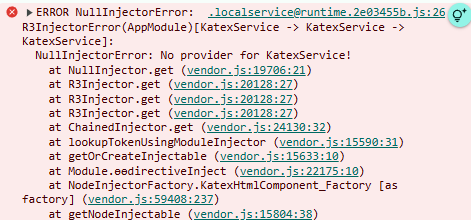
* If you get the below error:
>ERROR NullInjectorError: R3InjectorError(AppModule)[KatexService -> KatexService -> KatexService]:
> NullInjectorError: No provider for KatexService!
Then you should refer the sections [Using Katex Directive - standalone](#standalonedirective) and [Using Katex Directive - modular](#modulesdirective).
---
# Original [ng-katex](https://github.com/garciparedes/ng-katex) Readme.MD:
# ng-KaTeX
[](https://www.npmjs.com/package/ng-katex)
[](https://travis-ci.org/garciparedes/ng-katex)
[](https://www.npmjs.com/package/ng-katex)
[](https://github.com/garciparedes/ng-katex)
[](https://github.com/garciparedes/ng-katex/blob/master/README.md)
## Description
Angular module to write beautiful math expressions in TeX syntax boosted by [KaTeX](https://github.com/Khan/KaTeX) library.
You can see a demo [here](https://garciparedes.github.io/ng-katex).
## Install
To install the module you can simply type it on your command line:
```
npm install ng-katex --save
```
To add the module to your project add the `KatexModule` to `import`'s field of your parent module:
```js
import { NgModule } from '@angular/core';
import { BrowserModule } from '@angular/platform-browser';
import { KatexModule } from 'ng-katex';
import { AppComponent } from './app/app.component';
@NgModule({
imports: [
BrowserModule,
KatexModule
],
declarations: [AppComponent],
bootstrap: [AppComponent]
})
class AppModule {}
platformBrowserDynamic().bootstrapModule(AppModule);
```
# [Styling](#styling)
#### Important!
**If you're using [`angular-cli`](https://github.com/angular/angular-cli), add the katex css import to your `styles.css`:**
```css
@import '~katex/dist/katex.css';
```
**If you're not using the `angular-cli`, import the stylesheet to your `index.html`:**
```html
<link rel="stylesheet" href="https://cdnjs.cloudflare.com/ajax/libs/KaTeX/0.11.0/katex.min.css">
```
## Usage
You can write a LaTeX equation as follows:
```js
import { Component } from '@angular/core';
@Component({
selector: 'my-app',
template: `<ng-katex [equation]="equation"></ng-katex>`
})
export class AppComponent {
equation: string = '\\sum_{i=1}^nx_i';
}
```
Also, you can add options to `ng-katex` components with:
```js
import { Component } from '@angular/core';
import { KatexOptions } from 'ng-katex';
@Component({
selector: 'my-app',
template: `<ng-katex [equation]="equation" [options]="options"></ng-katex>`
})
export class AppComponent {
equation: string = '\\sum_{i=1}^nx_i';
options: KatexOptions = {
displayMode: true,
};
}
```
The `options` object structure is defined [here](https://github.com/Khan/KaTeX#rendering-options).
If you want to write a paragraph with LaTeX equations, you can do it as follows:
```js
import { Component } from '@angular/core';
@Component({
selector: 'my-app',
template: `<ng-katex-paragraph [paragraph]="paragraph"></ng-katex-paragraph>`
})
export class AppComponent {
paragraph: string = `
You can write text, that contains expressions like this: $x ^ 2 + 5$ inside them. As you probably know.
You also can write expressions in display mode as follows: $$\\sum_{i=1}^n(x_i^2 - \\overline{x}^2)$$.
In first case you will need to use \\$expression\\$ and in the second one \\$\\$expression\\$\\$.
To scape the \\$ symbol it's mandatory to write as follows: \\\\$
`;
}
```
If you want to write HTML with LaTeX equations, you can do it as follows: (Security Note: this bypasses Angular DOM Sanitization)
```js
import { Component } from '@angular/core';
@Component({
selector: 'my-app',
template: `<ng-katex-html [html]="html"></ng-katex-html>`
})
export class AppComponent {
html: string = `
<div>You can write html, that contains expressions like this: $x ^ 2 + 5$ inside them. As you probably know. You also can write expressions in display mode as follows: $$\\sum_{i=1}^n(x_i^2 - \\overline{x}^2)$$. In first case you will need to use \\$expression\\$ and in the second one \\$\\$expression\\$\\$. To scape the \\$ symbol it's mandatory to write as follows: \\\\$</div><p>: <button>I'm a button</button></p>
`;
}
```
## Contributors
- Sergio García Prado [@garciparedes](https://garciparedes.me)
- Joshua Claxton [@joshclax](https://www.joshclax.com/)
## Changelog
See [changelog](https://github.com/garciparedes/ng-katex/releases) page to get info about release changes.
## Contributing
See [CONTRIBUTING.md](CONTRIBUTING.md)
## License
ng-katex is licensed under [MIT](LICENSE) license.