nextjs-toast-notify
Version:
Es un paquete npm moderno, intuitivo, flexible, liviano e imprescindible para agregar notificaciones emergentes (toasts) a tus aplicaciones web con Next.js.
403 lines (289 loc) • 11.4 kB
Markdown
# Nextjs Toast Notify
[](https://www.npmjs.com/package/nextjs-toast-notify)
[](https://github.com/urian121/nextjs-toast-notify)
[](https://www.npmjs.com/package/nextjs-toast-notify)
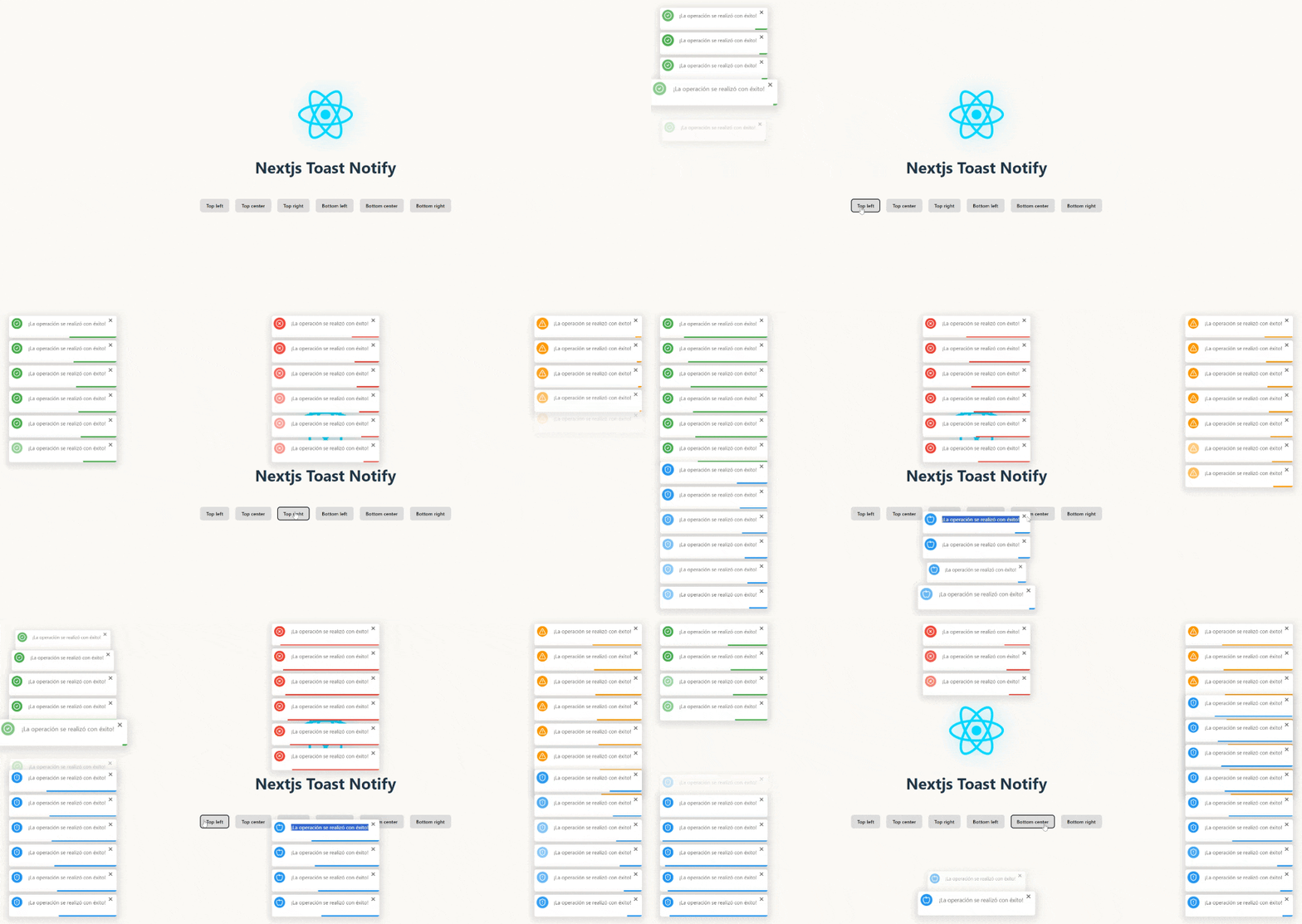
👉 [View Code on GitHub](https://github.com/urian121/nextjs-toast-notify-con-reactjs)
> 📖 **¿Hablas español?** La documentación también está disponible en español:
> [README en Español](./README_es.md)
🚀 **Nextjs Toast Notify** is the ultimate library for modern web notifications. Transform your boring alerts into **elegant and customizable toasts** with just a single line of code.
**What makes it special?**
✨ **Fast, elegant, and hassle-free** - From installation to implementation in less than 1 minute
🎨 **Fully customizable** - Control every aspect: position, animation, duration, icons, and sounds
⚡ **Ultra lightweight** - No heavy dependencies, maximum performance
🔧 **Plug & Play** - Compatible with React, Next.js, Vanilla JS, and any modern framework
## Installation
Install **Nextjs Toast Notify** easily with your favorite package manager:
```bash
# Using npm
npm install nextjs-toast-notify --save
# Or with yarn
yarn add nextjs-toast-notify
```
## Use Cases:
### 🔥How to Integrate Nextjs Toast Notify into a ToDo App with React.js 🚀
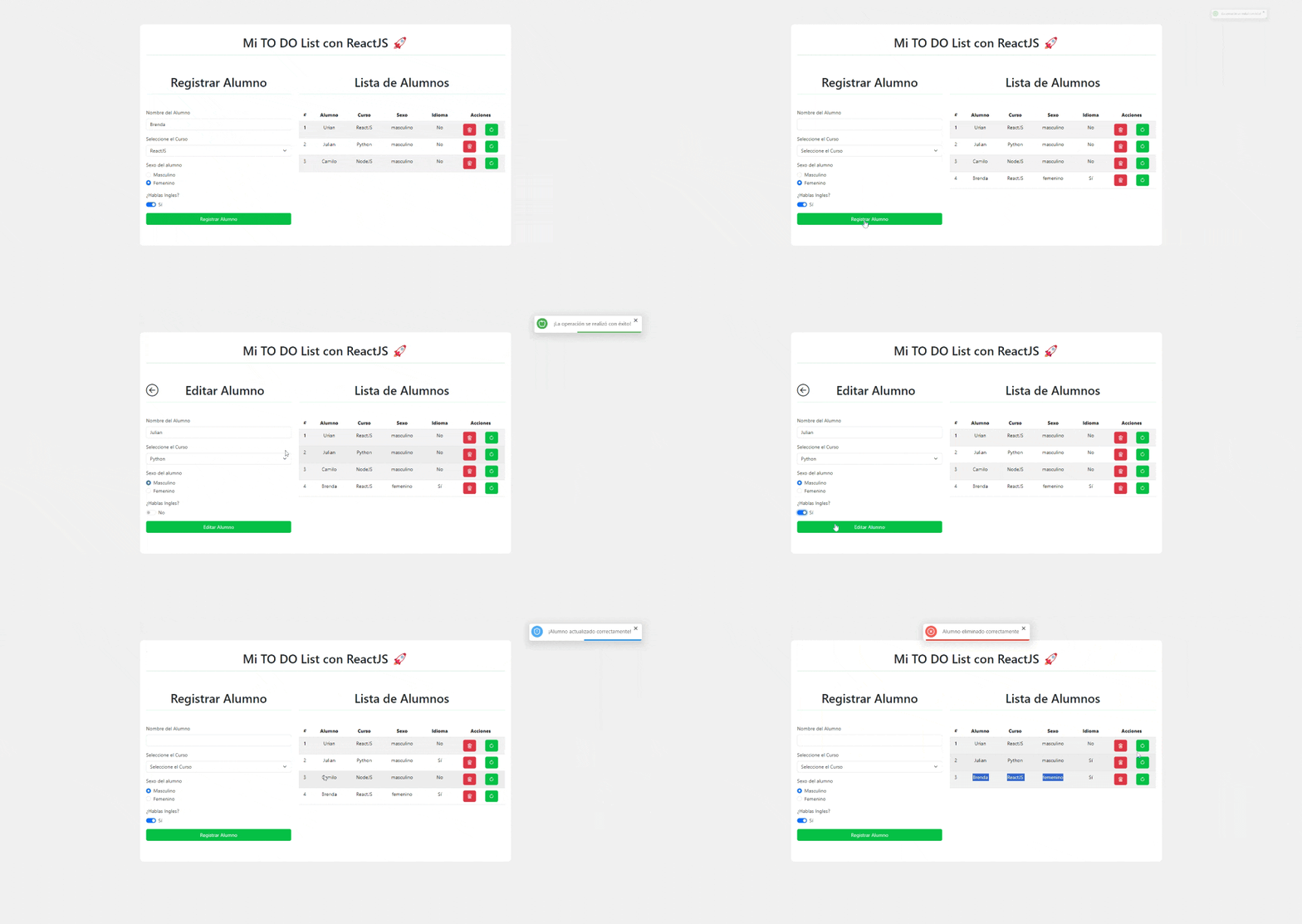
👉 [View Code on GitHub](https://github.com/urian121/Create-ToDo-List-App-with-ReactJS)
### Practical Example using React.js
```jsx
import { showToast } from "nextjs-toast-notify";
function App() {
const handleShowToast = () => {
showToast.success("The operation was completed successfully!", {
duration: 5000,
progress: true,
position: "top-right",
transition: "bounceIn",
icon: '<svg xmlns="http://www.w3.org/2000/svg" width="20" height="20" viewBox="0 0 24 24" fill="none" stroke="currentColor" stroke-width="1.75" stroke-linecap="round" stroke-linejoin="round" class="lucide lucide-check"><path d="M20 6 9 17l-5-5"/></svg>',
sound: true,
});
};
return <button onClick={handleShowToast}>Show Toast</button>;
}
export default App;
```
**For Next.js 13+ (App Router):** Simply add `"use client"` at the top of your component — and that’s it! The toast will work perfectly on the client.
```jsx
"use client"; // This indicates the component will be rendered on the client
import { showToast } from "nextjs-toast-notify";
// Main Next.js component
export default function App() {
// Event handler to show the toast
const handleShowToast = () => {
showToast.success("The operation was completed successfully!");
};
return (
<button onClick={handleShowToast}>Show Toast</button>
);
}
```
### 🔥Integrate Next.js Toast Notify into a Next.js application 🚀
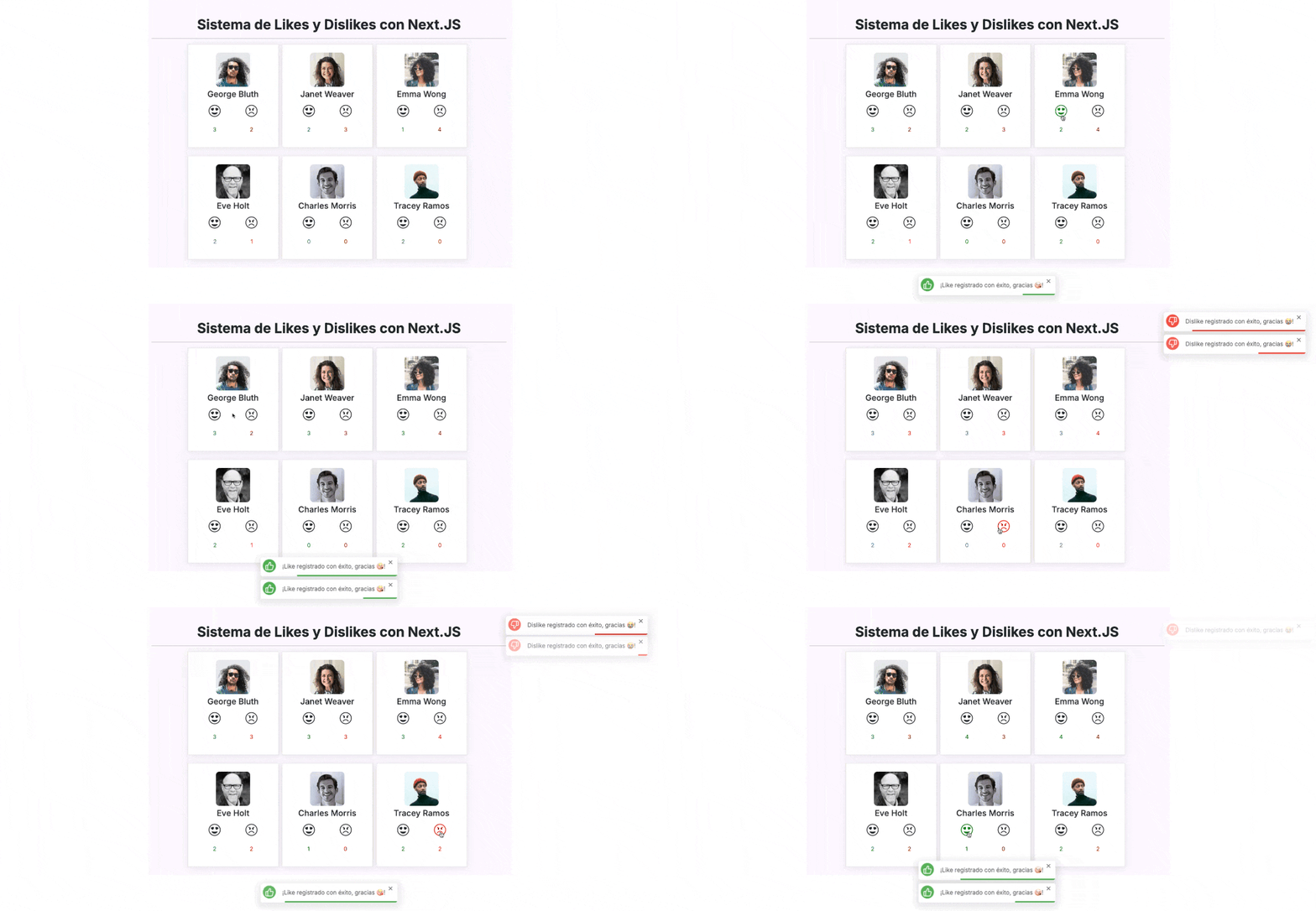
👉 [View Code on GitHub](https://github.com/urian121/sistema-like-dislikes-con-nextjs-y-nextjs-toast-notify)
## Usage via CDN
You can also include **Nextjs Toast Notify** directly in your project using a CDN link. Follow these steps:
```html
<!DOCTYPE html>
<html lang="en">
<head>
<meta charset="UTF-8" />
<meta name="viewport" content="width=device-width, initial-scale=1.0" />
<title>Nextjs Toast Notify with CDN</title>
</head>
<body>
<button id="show-toast">Show Toast</button>
<script src="https://unpkg.com/nextjs-toast-notify@latest/dist/nextjs-toast-notify.min.js"></script>
<script>
document.getElementById("show-toast").addEventListener("click", () => {
showToast.success("Hello to all JavaScript Devs!", {
duration: 5000,
position: "top-right",
transition: "swingInverted",
icon: "",
sound: true,
});
});
</script>
</body>
</html>
```
## Nextjs Toast Notify API
The **Nextjs Toast Notify** API allows you to display toast notifications with a wide range of configurations. Below is how to use the available methods and what options you can configure.
### Notification Types
**Nextjs Toast Notify** allows you to display different types of notifications depending on your application's context.
To define the type, simply specify it when calling `showToast`:
* ✅ **`showToast.success`** → Displays a **success** toast
* ❌ **`showToast.error`** → Displays an **error** toast
* ⚠️ **`showToast.warning`** → Displays a **warning** toast
* ⬆️ **`showToast.info`** → Displays an **info** toast
#### Usage Examples
```jsx
import { showToast } from "nextjs-toast-notify";
function App() {
const handleShowSuccessToast = () => {
showToast.success("Operation successful!"); // 'showToast.success' | 'showToast.error' | 'showToast.info' | 'showToast.warning'
};
return <button onClick={handleShowSuccessToast}>Toast Success</button>;
}
export default App;
```
### Display Notifications in Different Screen Positions
To display notifications in different positions on the screen, specify the `position` option with one of the following values:
* **`top-left`** → Top-left corner
* **`top-center`** → Top-center
* **`top-right`** → Top-right corner
* **`bottom-left`** → Bottom-left corner
* **`bottom-center`** → Bottom-center
* **`bottom-right`** → Bottom-right corner
Here is an example:
```jsx
import { showToast } from "nextjs-toast-notify";
function App() {
const handleToastPosition = () => {
showToast.success("Operation successful!", {
position: "top-right",
});
};
return <button onClick={handleToastPosition}>Top Right Toast</button>;
}
export default App;
```
### Notification Duration
The default duration of notifications is **8 seconds**, but you can customize it using the `duration` option.
* **Property:** `duration`
* **Type:** `number | null`
* **Default:** `8000`
**Behavior of `duration`:**
* **`number`**: The toast automatically closes after the specified time (in milliseconds)
* **`null`**: The toast uses the default duration (8000ms) for the progress bar, but **does NOT close automatically**. Requires manual closing by the user
**Example with custom duration**:
```jsx
import { showToast } from "nextjs-toast-notify";
function App() {
const handleShowToast = () => {
showToast.success("Toast closes in 5 seconds!", {
duration: 5000,
});
};
return <button onClick={handleShowToast}>Auto-close Toast</button>;
}
export default App;
```
**Example with manual close**:
```jsx
import { showToast } from "nextjs-toast-notify";
function App() {
const handleShowPersistentToast = () => {
showToast.warning("This toast requires manual closing!", {
duration: null,
});
};
return <button onClick={handleShowPersistentToast}>Persistent Toast</button>;
}
export default App;
```
### Show Progress Bar
The **progress bar** is displayed by default, but you can disable it if you prefer.
* **Property:** `progress`
* **Type:** `boolean`
* **Default:** `true`
**Example**:
```jsx
import { showToast } from "nextjs-toast-notify";
function App() {
const handleShowToast = () => {
showToast.info("Information toast!", {
progress: false,
});
};
return <button onClick={handleShowToast}>Show Toast</button>;
}
export default App;
```
### Notification Position
The default position is the **top-right corner**, but you can change it with the `position` option.
* **Property:** `position`
* **Type:** `'top-left' | 'top-center' | 'top-right' | 'bottom-left' | 'bottom-center' | 'bottom-right'`
* **Default:** `'top-right'`
**Example**:
```jsx
import { showToast } from "nextjs-toast-notify";
function App() {
const handleToastPosition = () => {
showToast.success("Centered toast correctly!", {
position: "top-center",
});
};
return <button onClick={handleToastPosition}>Centered Toast</button>;
}
export default App;
```
### Notification Animation
Customize the **entry and exit animation** using the `transition` option.
* **Property:** `transition`
* **Type:** `'fadeIn' | 'bounceIn' | 'swingInverted' | 'popUp' | 'topBounce' | 'bounceInDown' | 'slideInUp'`
* **Default:** `'fadeIn'`
**Example**:
```jsx
import { showToast } from "nextjs-toast-notify";
function App() {
const handleToastAnimationPopUp = () => {
showToast.error("Toast with popUp animation!", {
transition: "popUp",
});
};
return <button onClick={handleToastAnimationPopUp}>Bounce Toast</button>;
}
export default App;
```
### Custom Icons for Notifications
Add a **custom icon** to enhance the visual identity.
If not provided, a **default icon based on the notification type** will be used.
* **Property:** `icon`
* **Type:** `string`
**Example**:
```jsx
function App() {
const handleToastIcon = () => {
showToast.success("Toast with icon!", {
icon: "🎉",
});
};
return <button onClick={handleToastIcon}>Toast with icon</button>;
}
```
### Notification Sound
Enable a **sound when showing the notification** to better capture user attention.
* **Property:** `sound`
* **Type:** `boolean`
* **Default:** `false`
**Example**:
```jsx
import { showToast } from "nextjs-toast-notify";
function App() {
const handleToastSound = () => {
showToast.info("Toast with sound enabled!", {
sound: true,
});
};
return <button onClick={handleToastSound}>Toast with sound</button>;
}
export default App;
```
### Full Example
```jsx
import { showToast } from "nextjs-toast-notify";
function App() {
const showNotification = () => {
showToast.success("Operation successful!", {
duration: 4000,
position: "top-center",
transition: "bounceIn",
icon: "🚀",
progress: false,
sound: true,
});
};
return <button onClick={showNotification}>Show Notification</button>;
}
export default App;
```
The notification has a **duration of 4 seconds**, is **centered at the top**, with a **bounce animation**, a **custom icon**, **no progress bar**, and **sound enabled**.
---
## 🤝 Join and Contribute
If you find any issue or have an idea to improve the package, please open an issue or submit a pull request on GitHub:
[https://github.com/urian121/nextjs-toast-notify](https://github.com/urian121/nextjs-toast-notify)
---
## 👨💻 Developer
**Urian Viera**
🌐 [https://www.urianviera.com](https://www.urianviera.com)
📺 [https://www.youtube.com/WebDeveloperUrianViera](https://www.youtube.com/WebDeveloperUrianViera)
💌 [urian1213viera@gmail.com](mailto:urian1213viera@gmail.com)
☕ [https://www.paypal.com/donate/?hosted_button_id=4SV78MQJJH3VE](https://www.paypal.com/donate/?hosted_button_id=4SV78MQJJH3VE)
---
## Copyright
© 2024 Urian Viera. All rights reserved.
---
## License
Licensed under MIT
[](https://github.com/urian121/nextjs-toast-notify)