nextcloud-node-client
Version:
Nextcloud client API for node.js TypeScript applications
497 lines (435 loc) • 16.6 kB
Markdown
<img src="https://raw.githubusercontent.com/hobigo/nextcloud-node-client/master/ncnc-logo.png" width="100" style="max-width:100%;">
Access nextcloud remotely from node.js applications with a rich and simple TypeScript / JavaScript API.

[](https://npmjs.org/package/nextcloud-node-client)
[](https://david-dm.org/hobigo/nextcloud-node-client)
[](https://coveralls.io/github/hobigo/nextcloud-node-client?branch=master)
[](https://packagephobia.now.sh/result?p=nextcloud-node-client)
[](https://hobigo.github.io/nextcloud-node-client)
- upload and download files
- create files and folder structures
- all user management functions
- create shares
- tagging and commenting
The nextcloud node client is used to automate access to nextcloud servers from node.js apppliactions.
```typescript
// typescript
import Client, { File, Folder, Tag, Share } from "nextcloud-node-client";
(async () => {
try {
// create a new client using connectivity information from environment
const client = new Client();
// create a folder structure if not available
const folder: Folder = await client.createFolder("folder/subfolder");
// create file within the folder
const file: File = await folder.createFile("myFile.txt", Buffer.from("My file content"));
// add a tag to the file and create the tag if not existing
await file.addTag("MyTag");
// add a comment to the file
await file.addComment("myComment");
// get the file content
const content: Buffer = await file.getContent();
// share the file publicly with password and note
const share: Share = await client.createShare({ fileSystemElement: file });
await share.setPassword("some password");
await share.setNote("some note\nnew line");
// use the url to access the share
const shareLink:string = share.url;
// delete the folder including the file and share
await folder.delete();
} catch (e) {
// some error handling
console.log(e);
}
})();
```
* [Installation](
* [Upload files and folders](./docs/upload.md)
* [Get files recursively](./docs/getFiles.md)
* [User Management](./docs/userManagement.md)
* [Tagging](./docs/tagging.md)
* [Security and access management](
* [Concepts and Philosophy](
* [API](
* [Architecture](
* [Examples](
``
npm install nextcloud-node-client
``
The client requires the WebDAV url of the nextcloud server and the credentials.
Use an app specific password generated in the security - devices & sessions section of the nextcloud settings.
Credentials can be specified in the environment:
```
NEXTCLOUD_USERNAME= "<your user name>"
NEXTCLOUD_PASSWORD = "<your password>"
NEXTCLOUD_URL= "https://<your nextcloud host>/remote.php/webdav"
```
The cloud service configuration `VCAP_SERVICES` can be used alternativley (refer to the Cloud Foundry documentation for details).
The nextcloud credentials are stored in the section for user provided services `user-provided`.
The client is able to access the service credentials by providing the instance name.
```json
{
"user-provided": [
{
"credentials": {
"password": "<your password>",
"url": "https://<your nextcloud host>/remote.php/webdav",
"username": "<your user name>"
},
"name": "<your service instance name>"
}
]
}
```
Creating a nextcloud client
```typescript
// uses the environment to initialize
import Client from "nextcloud-node-client";
const client = new Client();
```
```typescript
// uses explicite credentials
import Client, { Server } from "nextcloud-node-client";
const server: Server = new Server(
{ basicAuth:
{ password: "<your password>",
username: "<your user name>",
},
url: "https://<your nextcloud host>/remote.php/webdav",
});
const client = new Client(server);
```
The nextcloud-node-client provids a object oriented API in TypeScript. The focus is to provide a simple access to the nextcloud resources rather than a full functional coverage.
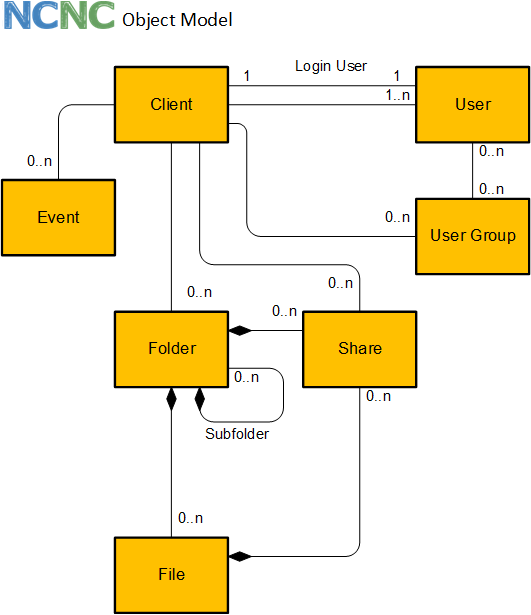
The client comes with an object oriented API to access the APIs of nextcloud. The following object types are supported:
The client is the root object and represents the connection to the nextcloud server. The client is used to get access to the root folder and the tag repository.
The folder is the representation of a nextcloud folder. It may contain many files. All files of a folder are deleted, if the folder is deleted.
The file is the representation of a nextcloud file. Every file is contained in a folder.
Tags are used to filter for file and folders. Tags can be created and assigned to files or folders.
Files and folders can be shared with user, user groups or publicly. The share can be password protected and an exiration date can be applied.
This is an overview of the client API.
Details can be found in the [API docs](https://hobigo.github.io/nextcloud-node-client)
- factory method for client
- create folder
- get folder, get root folder
- create file
- get file
- create tag*
- get tags, by name, by id
- get quota
- find users, get user by id
- create user
- mass creations and changes of users
- get user groups, by id
- create user group
- get name, id, base name, urls
- delete
- create sub folders
- get sub folder
- create file
- get files
- get tags, add tag, remove tag
- add comment
- get comments
- move/rename
- get name, id, base name, urls, content type
- get content
- delete
- get tags, add tag, remove tag
- add comment
- get comments
- get folder
- move/rename
- get name, id
- delete*
- create, update, delete
- delete
- get members, get subadmins
- delete
- get properties (display name, email, quota and usage, language, last login, ...)
- change properties (display name, email, quota, language, password, ...)
- send welcome email
- enable / disable
- promote to super admin / demote from super admin
- get member groups, get subadmin groups
- add to user group as member / remove from member user group
- promote as subadmin for user group / demote from subadmin user group
\* admin permissions required
### API Examples
#### Quota
```typescript
const q: IQuota = await client.getQuota();
// { used: 479244777, available: 10278950773 }
```
```typescript
const si: ISystemInfo = await client.getSystemInfo();
```
```typescript
// create folder
const folder: Folder = await client.createFolder("/products/brooms");
// create subfolder
const subfolder: Folder = await folder.createSubFolder("soft brooms");
// "/products/brooms/soft brooms"
```
```typescript
// get folder
const folder: Folder = await client.getFolder("/products");
// get subfolders
const subfolders: Folder[] = await folder.getSubFolders();
```
```typescript
// get folder
const folder: Folder = await client.getFolder("/products");
await folder.delete();
```
```javascript
const folder = await client.getFolder("/products");
const file = folder.createFile("MyFile.txt", new Buffer("My new file"));
```
```javascript
const file = await client.getFile("/products/MyFile.txt");
// or
const folder = await client.getFolder("/products");
const file = await folder.getFile("MyFile.txt");
// file: name, baseName, lastmod, size, mime
```
```javascript
const file = await client.getFile("/products/MyFile.txt");
const buffer = await file.getContent();
```
```javascript
const file = await client.getFile("/products/MyFile.txt");
const url = await file.getUrl();
```
```javascript
const file = await client.getFile("/products/MyFile.txt");
await file.addTag("myTag");
```
```javascript
const file = await client.getFile("/products/MyFile.txt");
await file.delete();
```
```javascript
const folder = await client.getFolder("/products");
const files = await folder.getFiles();
```
```javascript
const file = await client.getFile("/products/MyFile.txt");
await file.move("/products/brooms/MyFileRenamed.txt");
```
```typescript
const file = await client.getFile("/products/MyFile.txt");
// share the file (works also for folder)
const createShare: ICreateShare = { fileSystemElement: file };
const share: Share = await client.createShare(createShare);
// change share settings
await share.setPassword("some password");
await share.setNote("some note\nnew line");
await share.setExpiration(new Date(2020, 11, 5));
// use the url to access the share
const shareLink:string = share.url;
// delete share, if not required anymore
await share.delete();
```
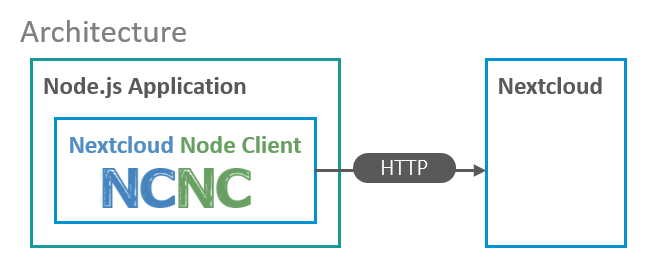
The nextcloud node client can be used by node applications to extend the nextcloud functionality remotely. The client uses only HTTP apis of nextcloud for access.
```typescript
// typescript
import Client, { User, UserGroup } from "nextcloud-node-client";
(async () => {
try {
// create a new client using connectivity
// information from environment
const client = new Client();
// create a new user group
const group: UserGroup = await client.createUserGroup("MyGroup");
// create a new user with a email or password
const user: User = await client.createUser({ id: "MyUserId", email: "mail@example.com" });
// set some properties
// ... password, phone, website, twitter, address, email, locale
await user.setDisplayName("My Display Name");
await user.setQuota("5 GB");
await user.setLanguage("en");
// get properties
// ... quota, user friendly quota, phone, website, twitter, address, locale
const email = await user.getEmail();
// disable user
await user.disable();
// enable user
await user.enable();
// promote to super administrator
await user.promoteToSuperAdmin();
// demote from super administrator
await user.demoteFromSuperAdmin();
// resend welcome email to user
await user.resendWelcomeEmail();
// add to user group as member
await user.addToMemberUserGroup(group);
// get member user groups
const memberGroups: UserGroup[] = await user.getMemberUserGroups();
// get user ids of memembers
await group.getMemberUserIds();
// remove user from member group
await user.removeFromMemberUserGroup(group);
// promote user as subadmin for user group
await user.promoteToUserGroupSubadmin(group);
// get user groups where the user is subadmin
const subadminGroups: UserGroup[] = await user.getSubadminUserGroups();
// get user ids of subadmins
await group.getSubadminUserIds();
// demote user from being subadmin for user group
await user.demoteFromSubadminUserGroup(group);
// delete the user
await user.delete();
// delete the user group
await group.delete();
// mass creations / updates of users
// groups are created on the fly
await client.upsertUsers([
{ id: "myUser1", email: "myUser1@example.com", enabled: false, memberGroups: ["group1", "group2"] },
{ id: "myUser2", password: "mySecurePassword", displayName: "My Name", superAdmin: true, quota: "2 GB" },
// ...
]);
} catch (e) {
// use specific exception *error classes
// for error handling documented in @throws
}
})();
```
```typescript
// typescript
import Client, { File, Folder, Share, Tag, FileSystemElement } from "nextcloud-node-client";
(async () => {
try {
// create a new client using connectivity information from environment
const client = new Client();
// create a folder structure if not available
const folder: Folder = await client.createFolder("folder/subfolder");
// create file within the folder
const file: File = await folder.createFile("myFile.txt", Buffer.from("My file content"));
// create two tags
const tag1: Tag = await client.createTag("tag 1");
const tag2: Tag = await client.createTag("tag 2");
// assign tag to folder
folder.addTag(tag1.name);
// assign tag to files
file.addTag(tag1.name);
file.addTag(tag2.name);
// get list of file system elements with the tag1 assigned
let fse: FileSystemElement[] = await client.getFileSystemElementByTags([tag1]);
// print names of folder and file
console.log(fse[0].name);
console.log(fse[1].name);
// get list of file system elements with the tag1 and tag2
fse = await client.getFileSystemElementByTags([tag1, tag2]);
// print name of file
console.log(fse[0].name);
// delete the tags
await tag1.delete();
await tag2.delete();
// delete the folder including the file and share
await folder.delete();
} catch (e) {
// some error handling
console.log(e);
}
})();
```
Tested with nextcloud 17.0.1, 18.0.0
A code coverage of 100% is aspired
* support also the nextcloud server url instead of the WebDAV url only
* download file to local disk
* download folder contents to disk recursively
* Search for files api
* client in github actions - upload files
* <strike>upload local file on disk to nextcloud</strike>
* <strike>upload local folder on disk to nextcloud recursively</strike>
* <strike>command get files recurively</strike>
* <strike>filter get files recurively</strike>
* <strike>example get files recurively</strike>
<strike>* Get files and folders by tags client.getFileSystemObjectByTags</strike>
User:
* <strike>get</strike>
* <strike>getIds limit, offset, search</strike>
* <strike>create</strike>
* <strike>update</strike>
* <strike>delete</strike>
* <strike>deactivate</strike>
* <strike>add/remove group member</strike>
* <strike>add/remove group subadmin</strike>
* <strike>example in readme</strike>
* send notification
User group:
* <strike>get</strike>
* <strike>create</strike>
* <strike>delete</strike>
Create file and get file using streams
* create event objects
* start observer
* subscribe to events and register handler functions
* telegram support
Share with
* user
* usergroup
* email-address
basic methods are available since 1.2.0 without strong typing
* notification object
* Introduction of exception classes instead of error codes (breaking change)
* <strike>Move from codecov to coveralls</strike>
### Search
* Search for files api
* client in github actions - upload files
## License
Apache