nestjs-otel
Version:
NestJS OpenTelemetry Library
583 lines (442 loc) • 18 kB
Markdown

# NestJS OpenTelemetry (OTEL)

[](https://www.npmjs.com/package/nestjs-otel)
## Description
[OpenTelemetry](https://opentelemetry.io/) module for [Nest](https://github.com/nestjs/nest).
## Why
Setting up observability metrics with nestjs requires multiple libraries and patterns. OpenTelemetry has support for multiple exporters and types of metrics such as Prometheus Metrics.
## Observability
Please read this [comprehensive whitepaper](https://github.com/cncf/tag-observability/blob/main/whitepaper.md) if that's your first time working with metrics, tracing, and logs.

## Examples
A full working examples are available. This includes a nestjs application fully integrated with prometheus, grafana, loki and tempo:
- [nestjs-otel-prom-grafana-tempo](https://github.com/pragmaticivan/nestjs-otel-prom-grafana-tempo )
## Installation
```bash
npm i nestjs-otel @opentelemetry/sdk-node --save
```
## Setup
Some peers dependencies are required when some configurations are enabled.
```
@opentelemetry/exporter-prometheus
```
1. Create tracing file (`tracing.ts`):
```ts
import {
CompositePropagator,
W3CTraceContextPropagator,
W3CBaggagePropagator,
} from '@opentelemetry/core';
import { BatchSpanProcessor } from '@opentelemetry/sdk-trace-base';
import { JaegerExporter } from '@opentelemetry/exporter-jaeger';
import { getNodeAutoInstrumentations } from '@opentelemetry/auto-instrumentations-node';
import { JaegerPropagator } from '@opentelemetry/propagator-jaeger';
import { B3Propagator } from '@opentelemetry/propagator-b3';
import { PrometheusExporter } from '@opentelemetry/exporter-prometheus';
import { NodeSDK } from '@opentelemetry/sdk-node';
import { AsyncLocalStorageContextManager } from '@opentelemetry/context-async-hooks';
import * as process from 'process';
const otelSDK = new NodeSDK({
metricReader: new PrometheusExporter({
port: 8081,
}),
spanProcessor: new BatchSpanProcessor(new JaegerExporter()),
contextManager: new AsyncLocalStorageContextManager(),
textMapPropagator: new CompositePropagator({
propagators: [
new JaegerPropagator(),
new W3CTraceContextPropagator(),
new W3CBaggagePropagator(),
new B3Propagator(),
],
}),
instrumentations: [getNodeAutoInstrumentations()],
});
export default otelSDK;
// You can also use the shutdown method to gracefully shut down the SDK before process shutdown
// or on some operating system signal.
process.on('SIGTERM', () => {
otelSDK
.shutdown()
.then(
() => console.log('SDK shut down successfully'),
err => console.log('Error shutting down SDK', err)
)
.finally(() => process.exit(0));
});
```
2. Import the metric file and start otel node SDK:
```ts
import otelSDK from './tracing';
import { NestFactory } from '@nestjs/core';
import { AppModule } from './app.module';
import { Logger } from 'nestjs-pino';
async function bootstrap() {
// Start SDK before nestjs factory create
await otelSDK.start();
const app = await NestFactory.create(AppModule);
app.useLogger(app.get(Logger));
await app.listen(3000);
}
bootstrap();
```
3. Configure nest-otel:
3.1. With `forRoot`:
```ts
const OpenTelemetryModuleConfig = OpenTelemetryModule.forRoot({
metrics: {
hostMetrics: true, // Includes Host Metrics
},
});
@Module({
imports: [OpenTelemetryModuleConfig],
})
export class AppModule {}
```
3.2. With `forRootAsync`:
```ts
OpenTelemetryModule.forRootAsync({
useClass: OtelConfigService
});
```
```ts
import { Injectable, Logger } from '@nestjs/common'
import { ConfigService } from '@nestjs/config'
import { OpenTelemetryOptionsFactory, OpenTelemetryModuleOptions } from 'nestjs-otel';
@Injectable()
export class OtelConfigService implements OpenTelemetryOptionsFactory {
private readonly logger = new Logger(OtelConfigService.name)
constructor(private configService: ConfigService) {}
createOpenTelemetryOptions(): Promise<OpenTelemetryModuleOptions> | OpenTelemetryModuleOptions {
const { hostMetrics } = this.configService.get('otel')
return {
metrics: {
hostMetrics: hostMetrics.enabled,
},
};
}
}
```
## Span Decorator
If you need, you can define a custom Tracing Span for a method. It works async or sync.
Span optionally takes one or both of the following parameters:
* `name` - explicit name of the span; if omitted, it is derived as `<class-name>.<method-name>`.
* `options` - `SpanOptions` to customize the span options.
You can also supply a function as the `options` argument. It will be called with the decorated method's arguments, so you can dynamically customize the span options.
```ts
import { Span } from 'nestjs-otel';
export class BooksService {
// span.name == 'CRITICAL_SECTION'
@Span('CRITICAL_SECTION')
async getBooks() {
return [`Harry Potter and the Philosopher's Stone`];
}
// span.name == 'BooksService.getBooksAgain'
@Span()
async getBooksAgain() {
return [`Harry Potter and the Philosopher's Stone`];
}
// explicitly set span options
@Span('getBook', { kind: SpanKind.SERVER })
async getBook(id: number) {
// ...
}
// options are set dynamically based on the id parameter
@Span('getBook', (id) => ({ attributes: { bookId: id } }))
async getBookAgain(id: number) {
// ...
}
// same as above, but span name is omitted and inferred automatically
@Span((id) => ({ attributes: { bookId: id } }))
async getBookOnceMore(id: number) {
// ...
}
// Capture return value as attribute
// Note: Explicitly type the result to ensure type safety
@Span({
onResult: (result: string[]) => ({ attributes: { 'book.count': result.length } }),
})
async getBooks() {
return ['Book 1', 'Book 2'];
}
}
```
## Traceable Decorator
If you want to trace all methods in a class, you can use the `@Traceable` decorator.
```ts
import { Traceable } from 'nestjs-otel';
@Injectable()
@Traceable()
export class UsersService {
findAll() {
// This method will be automatically traced
return [];
}
findOne(id: string) {
// This method will also be automatically traced
return {};
}
}
```
## Current Span Decorator
You can access the current span in your controllers using the `@CurrentSpan` decorator.
> **Note:** This decorator only works in Controllers, Resolvers, and Gateways where NestJS handles argument injection. It does **not** work in standard service-to-service calls.
```ts
import { Controller, Get } from '@nestjs/common';
import { Span } from '@opentelemetry/api';
import { CurrentSpan } from 'nestjs-otel';
@Controller('cats')
export class CatsController {
@Get()
findAll(@CurrentSpan() span: Span) {
if (span) {
span.setAttribute('custom.attribute', 'value');
}
return 'This action returns all cats';
}
}
```
## Baggage Decorator
You can access the OpenTelemetry Baggage (Distributed Context) in your controllers using the `@Baggage` decorator.
```ts
import { Controller, Get } from '@nestjs/common';
import { Baggage } from 'nestjs-otel';
@Controller('cats')
export class CatsController {
@Get()
findAll(@Baggage('tenant-id') tenantId: string) {
console.log('Tenant ID:', tenantId);
return 'This action returns all cats';
}
}
```
## Tracing Service
In case you need to access native span methods for special logics in the method block:
```ts
import { TraceService } from 'nestjs-otel';
@Injectable()
export class BookService {
constructor(private readonly traceService: TraceService) {}
@Span()
async getBooks() {
const currentSpan = this.traceService.getSpan(); // --> retrives current span, comes from http or @Span
await this.doSomething();
currentSpan.addEvent('event 1');
currentSpan.end(); // current span end
const span = this.traceService.startSpan('sub_span'); // start new span
span.setAttributes({ userId: 1 });
await this.doSomethingElse();
span.end(); // new span ends
return [`Harry Potter and the Philosopher's Stone`];
}
}
```
## Wide Events
Wide events (also known as canonical log lines) emit one context-rich event per request, with attributes accumulated across the whole request lifecycle. See [A Practitioner's Guide to Wide Events](https://jeremymorrell.dev/blog/a-practitioners-guide-to-wide-events/) for the pattern.
This library implements the pattern on top of OpenTelemetry: the `WideEventInterceptor` opens an attribute bag per request and, when the request finishes, flushes everything onto a single span — marking it with `nestjs_otel.wide_event = true` so you can filter wide-event spans in your backend. The `WideEventService` lets any provider enrich that bag from anywhere in the request's async call chain — no request-scoped injection needed.
By default the attributes land on the best-available recording span at flush time (the HTTP root on Express / plain Fastify, or the active handler span when an instrumentation such as `@opentelemetry/instrumentation-nestjs-core` or `@fastify/otel` nests a span per request phase). To guarantee they land on the **trace root span** regardless of instrumentation nesting, register the [`WideEventSpanProcessor`](#targeting-the-root-span-wideeventspanprocessor).
1. Register the interceptor globally:
```ts
import { APP_INTERCEPTOR } from '@nestjs/core';
import { OpenTelemetryModule, WideEventInterceptor } from 'nestjs-otel';
@Module({
imports: [OpenTelemetryModule.forRoot()],
providers: [
{
provide: APP_INTERCEPTOR,
useClass: WideEventInterceptor,
},
],
})
export class AppModule {}
```
The example above opens a wide event for **every** request in the application. To limit wide events to specific controllers instead, skip the `APP_INTERCEPTOR` provider and apply the interceptor directly with `@UseInterceptors`:
```ts
import { Controller, Get, UseInterceptors } from '@nestjs/common';
import { WideEventInterceptor } from 'nestjs-otel';
@Controller('checkout')
@UseInterceptors(WideEventInterceptor)
export class CheckoutController {
// every route in this controller now emits a wide event
}
```
2. Enrich the event from anywhere in the request:
```ts
import { WideEventService } from 'nestjs-otel';
@Injectable()
export class CheckoutService {
constructor(private readonly wideEvent: WideEventService) {}
async checkout(cart: Cart) {
this.wideEvent.setMany({
'user.id': cart.userId,
'cart.items': cart.items.length,
'cart.total': cart.total,
});
const stopTimer = this.wideEvent.startTimer('payment.duration_ms');
await this.paymentGateway.charge(cart);
stopTimer();
this.wideEvent.increment('db.queries');
}
}
```
All accumulated attributes land on a single span as one wide event:
```
GET /checkout
├── nestjs_otel.wide_event: true
├── code.function.name: CheckoutController.checkout
├── user.id: u-123
├── cart.items: 3
├── cart.total: 42.5
├── payment.duration_ms: 132.7
├── db.queries: 1
├── error.type: PaymentDeclinedError (set automatically on errors)
└── error.message: card declined (set automatically on errors)
```
Notes:
- The flushed span is marked `nestjs_otel.wide_event = true`. This marker is set last, so a handler-provided field can never overwrite it.
- The interceptor seeds `code.function.name` (`<Controller>.<handler>`) automatically and records `error.type`/`error.message` (plus `error.stack` when present) when the handler throws.
- `WideEventService` methods are safe no-ops outside a request handled by the interceptor.
- An async-context-aware context manager is required (the default with `NodeSDK` / `AsyncLocalStorageContextManager`), same as for tracing in general.
### Seeding baseline attributes
Use the `seed` option to populate baseline attributes on every request (e.g. ids derived from the authenticated request). It runs after guards, so `req.user` is available. A throwing seed never breaks the request — the error is recorded under `wide_event.seed.error`.
```ts
OpenTelemetryModule.forRoot({
wideEvents: {
seed: (ctx) => {
const req = ctx.switchToHttp().getRequest();
return {
'app.version': process.env.BUILD_SHA,
'user.id': req.user?.id,
};
},
},
});
```
Static values (version, region, ...) are often better modeled as OpenTelemetry [Resource](https://opentelemetry.io/docs/specs/otel/resource/sdk/) attributes; reserve `seed` for per-request derivations.
### `@WideEventField` decorator
Capture a method's return value (resolved value for async methods) onto the current wide event without calling the service manually. Works on any provider method that runs within the request's async context. A failing projection or a non-attribute value is silently skipped.
```ts
import { WideEventField } from 'nestjs-otel';
@Injectable()
export class BooksService {
// records `books.count` = result.length
@WideEventField('books.count', (books: string[]) => books.length)
async getBooks() {
return ['Book 1', 'Book 2'];
}
}
```
### Targeting the root span (`WideEventSpanProcessor`)
Instrumentations like `@opentelemetry/instrumentation-nestjs-core` and `@fastify/otel` wrap each request phase (middleware, guard, handler) in its own span. As a result, the span active when the interceptor runs is a nested child, not the trace root — so by default the wide event lands on that child span (e.g. `AppController.handler`) rather than on the root `GET /route`.
Register the `WideEventSpanProcessor` on your `NodeSDK` to make the interceptor flush onto the **local-root span** (the span with no in-process parent — normally the HTTP server span) instead:
```ts
import { NodeSDK } from '@opentelemetry/sdk-node';
import { BatchSpanProcessor } from '@opentelemetry/sdk-trace-base';
import { WideEventSpanProcessor } from 'nestjs-otel';
export const otelSDK = new NodeSDK({
spanProcessors: [
new WideEventSpanProcessor(),
new BatchSpanProcessor(traceExporter),
],
// ...instrumentations, contextManager, etc.
});
```
The processor only tracks which span is the local root per trace; it never exports spans, so keep your existing exporting processor in the list. It is optional — without it, wide events still flush onto the best-available recording span (see above), just not necessarily the trace root.
## Metric Service
[OpenTelemetry Metrics](https://www.npmjs.com/package/@opentelemetry/api) allow a user to collect data and export it to metrics backend like Prometheus.
```ts
import { MetricService } from 'nestjs-otel';
import { Counter } from '@opentelemetry/api';
@Injectable()
export class BookService {
private customMetricCounter: Counter;
constructor(private readonly metricService: MetricService) {
this.customMetricCounter = this.metricService.getCounter('custom_counter', {
description: 'Description for counter',
});
}
async getBooks() {
this.customMetricCounter.add(1);
return [`Harry Potter and the Philosopher's Stone`];
}
}
```
## Metric Decorators
### Metric Class Instances
If you want to count how many instance of a specific class has been created:
```ts
@OtelInstanceCounter() // It will generate a counter called: app_MyClass_instances_total.
export class MyClass {}
```
### Metric Class Method
If you want to increment a counter on each call of a specific method:
```ts
@Injectable()
export class MyService {
@OtelMethodCounter()
doSomething() {}
}
@Controller()
export class AppController {
@Get()
@OtelMethodCounter() // It will generate `app_AppController_doSomething_calls_total` counter.
doSomething() {
// do your stuff
}
}
```
### Metric Param Decorator
You have the following decorators:
- `@OtelCounter()`
- `@OtelUpDownCounter()`
- `@OtelHistogram()`
- `@OtelGauge()`
- `@OtelObservableGauge()`
- `@OtelObservableCounter()`
- `@OtelObservableUpDownCounter()`
Example of usage:
```ts
import { OtelCounter } from 'nestjs-otel';
import { Counter } from '@opentelemetry/api';
@Controller()
export class AppController {
@Get('/home')
home(
@OtelCounter('app_counter_1_inc', { description: 'counter 1 description' }) counter1: Counter
) {
counter1.add(1);
}
}
```
## Prometheus Metrics
When `metricExporter` is defined in otel SDK with a `PrometheusExporter`it will start a new process on port `8081` (default port) and metrics will be available at `http://localhost:8081/metrics`.
## Using with a logger
### Pino with instrumentation
This approach uses otel instrumentation to automatically inject spanId and traceId.
```ts
import { PinoInstrumentation } from '@opentelemetry/instrumentation-pino';
const otelSDK = new NodeSDK({
instrumentations: [new PinoInstrumentation()],
});
```
### Pino with custom formatter
This approach uses the global trace context for injecting SpanId and traceId as a property of your structured log.
```ts
import Pino, { Logger } from 'pino';
import { LoggerOptions } from 'pino';
import { trace, context } from '@opentelemetry/api';
export const loggerOptions: LoggerOptions = {
formatters: {
log(object) {
const span = trace.getSpan(context.active());
if (!span) return { ...object };
const { spanId, traceId } = trace.getSpan(context.active())?.spanContext();
return { ...object, spanId, traceId };
},
},
};
export const logger: Logger = Pino(loggerOptions);
```
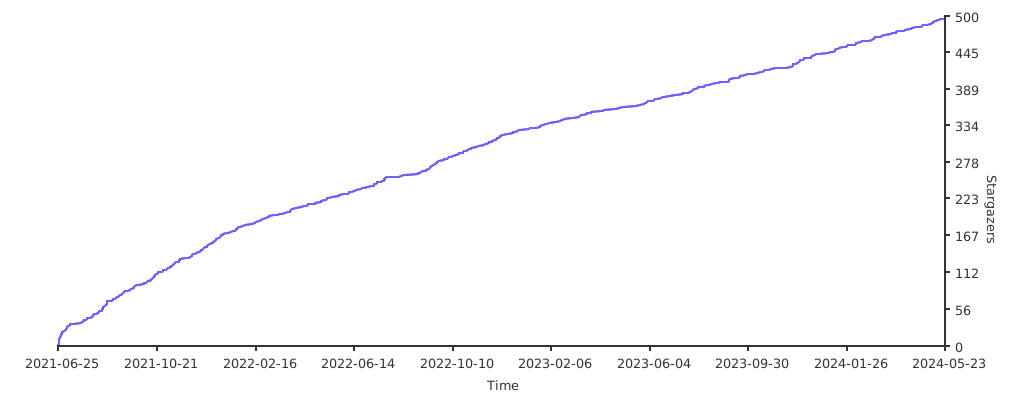
## Stargazers over time
[](https://starchart.cc/pragmaticivan/nestjs-otel)