nervjs
Version:
A react-like framework based on virtual-dom
270 lines (192 loc) • 7.33 kB
Markdown
<h3 style="text-align:center;font-weight: 300;" align="center">
<img src="http://storage.360buyimg.com/mtd/home/logo-2x1513837926707.png" width="160px">
</h3>
<p align="center">
<a href="https://www.npmjs.com/package/nervjs"><img src="https://img.shields.io/npm/v/nervjs.svg?style=flat-square" alt="Build Status"></a>
<a href="https://www.npmjs.com/package/vue"><img src="https://img.shields.io/npm/l/nervjs.svg" alt="License"></a>
<a href="https://coveralls.io/github/NervJS/nerv?branch=master"><img src="https://img.shields.io/coveralls/NervJS/nerv.svg?style=flat-square" alt="Coverage Status"></a>
<a href="https://www.npmjs.com/package/nervjs"><img src="https://img.shields.io/npm/dt/nervjs.svg?style=flat-square" alt="Downloads"></a>
<a href="https://travis-ci.org/NervJS/nerv"><img src="https://img.shields.io/travis/NervJS/nerv.svg?style=flat-square" alt="Build Status"></a>
<a href="https://saucelabs.com/u/nerv-project"><img src="https://saucelabs.com/browser-matrix/nerv-project.svg" alt="Sauce Test Status"></a>
</p>
> Nerv is a virtual-dom based JavaScript (TypeScript) library with identical React 16 API, which offers much higher performance, tinier package size and better browser compatibility.
[中文](/README_CN.md)
## Features
⚛ Identical React API, no 'nerv-compat' is needed
️⚔ Battle tested, serve in [JD.com](https://www.jd.com/2017?t=1607) home page and [TOPLIFE.com](https://www.toplife.com)
⚡️ High performance
🤣 IE8 compatibility
🎯 Tiny size, 9Kb gzipped
🌗 Isomorphic rendering on both client and server
💫 Support React 16 features, Error Boundaries, Portals, custom DOM attributes, etc.
## Packages
This repository is a monorepo that we manage using [Lerna](https://github.com/lerna/lerna). That means that we actually publish [several packages](/packages) to npm from the same codebase, including:
| Package | Description |
| ------------- |:-------------:|
| [`nervjs`](/packages/nerv) | The core of Nerv |
| [`nerv-redux`](/packages/nerv-redux) | Nerv binding for Redux |
| [`nerv-devtools`](/packages/nerv-devtools) | Provides support for React's Dev Tools for Nerv |
| [`nerv-server`](/packages/nerv-server) | Support for server side rendering |
| [`nerv-test-utils`](/packages/nerv-test-utils) | Suite of utilities for testing Nerv applications |
| [`nerv-utils`](/packages/nerv-utils) | Internal Helpers functions for Nerv |
| [`nerv-shared`](/packages/nerv-shared) | Internal shared functions for Nerv |
| [`nerv-create-class`](/packages/nerv-create-class) | The legacy `createClass` API for Nerv |
## Getting Started
The easiest way to get started with Nerv is using [CodeSandbox Playground](https://codesandbox.io/s/qkr5ww1q8j), If you use React, you already know how to use Nerv.
### Install
Of course we recommend that you use Nerv with [Webpack](https://webpack.js.org) and [Babel](https://babeljs.io).First you can install Nerv like this
With npm
```bash
$ npm install --save nervjs
```
With yarn
```bash
$ yarn add nervjs
```
### Usage
Import what you need. Nerv provides both named and default exports, you can use Nerv as a namespace or simply import what you need as locals.
**Default exports:**
```javascript
import Nerv from 'nervjs'
class HelloMessage extends Nerv.Component {
render() {
return <div>Hello {this.props.name}</div>
}
}
Nerv.render(
<HelloMessage name="Nerv" />,
document.getElementById('app')
)
```
**Named:**
```javascript
import { Component, render } from 'nervjs'
class HelloMessage extends Component {
render() {
return <div>Hello {this.props.name}</div>
}
}
render(
<HelloMessage name="Nerv" />,
document.getElementById('app')
)
```
☝️ For more information please move to the official [development document](https://nervjs.github.io/docs/)
## Examples
* [TodoMVC](https://github.com/NervJS/nerv-redux-todomvc), built with Nerv and Redux
* [Nerv's landing page](https://github.com/NervJS/nerv-website), built with Nerv and [react-intl](https://github.com/yahoo/react-intl)
* [JD.com](https://www.jd.com/2017?t=1607)
* [TOPLIFE.com](https://www.toplife.com)
## Switching to Nerv from React
Switching to Nerv from React is easy as adding alias `nervjs` for `react` and `react-dom`. No changes in code needed.
### Usage with Webpack
Add an alias in your `webpack.config.js`:
```js
{
// ...
resolve: {
alias: {
'react': 'nervjs',
'react-dom': 'nervjs',
// Not necessary unless you consume a module using `createClass`
'create-react-class': "nerv-create-class"
}
}
// ...
}
```
### Usage with Babel
Install the babel plugin for aliasing
```bash
$ npm install --save-dev babel-plugin-module-resolver
```
In `.babelrc`:
```js
{
"plugins": [
["module-resolver", {
"root": ["."],
"alias": {
"react": "nervjs",
"react-dom": "nervjs",
// Not necessary unless you consume a module using `createClass`
"create-react-class": "nerv-create-class"
}
}]
]
}
```
### Usage with Browserify
Install the aliasify transform:
```bash
$ npm i --save-dev aliasify
```
Then in your `package.json`:
```js
{
"aliasify": {
"aliases": {
"react": "nervjs",
"react-dom": "nervjs"
}
}
}
```
## Compatible with React
Nerv currently support React API and features:
### `react`
* React.createClass (legacy)
* React.createElement
* React.cloneElement
* React.Component
* React.PureComponent
* React.PropTypes
* React.Children
* React.isValidElement
* React.createFactory
* [Error Boundaries](https://reactjs.org/docs/error-boundaries.html#introducing-error-boundaries) (React 16)
### `react-dom`
* React.unstable_renderSubtreeIntoContainer (legacy)
* ReactDOM.render
* ReactDOM.unmountComponentAtNode
* ReactDOM.findDOMNode
* ReactDOM.hydrate (React 16)
* ReactDOM.createPortal (React 16)
## Internet Explorer 8 (or below) compatibility
First, install `es5-polyfill`:
```bash
npm install --save es5-polyfill
```
Then insert the code into the beginning of your entry file:
```js
require('es5-polyfill');
```
At last, setting `.babelrc` if you are using `babel`:
```js
{
"presets": [
["env", {
"spec": true,
"useBuiltIns": false
}],
["es3"]
],
...
}
```
## Developer Tools
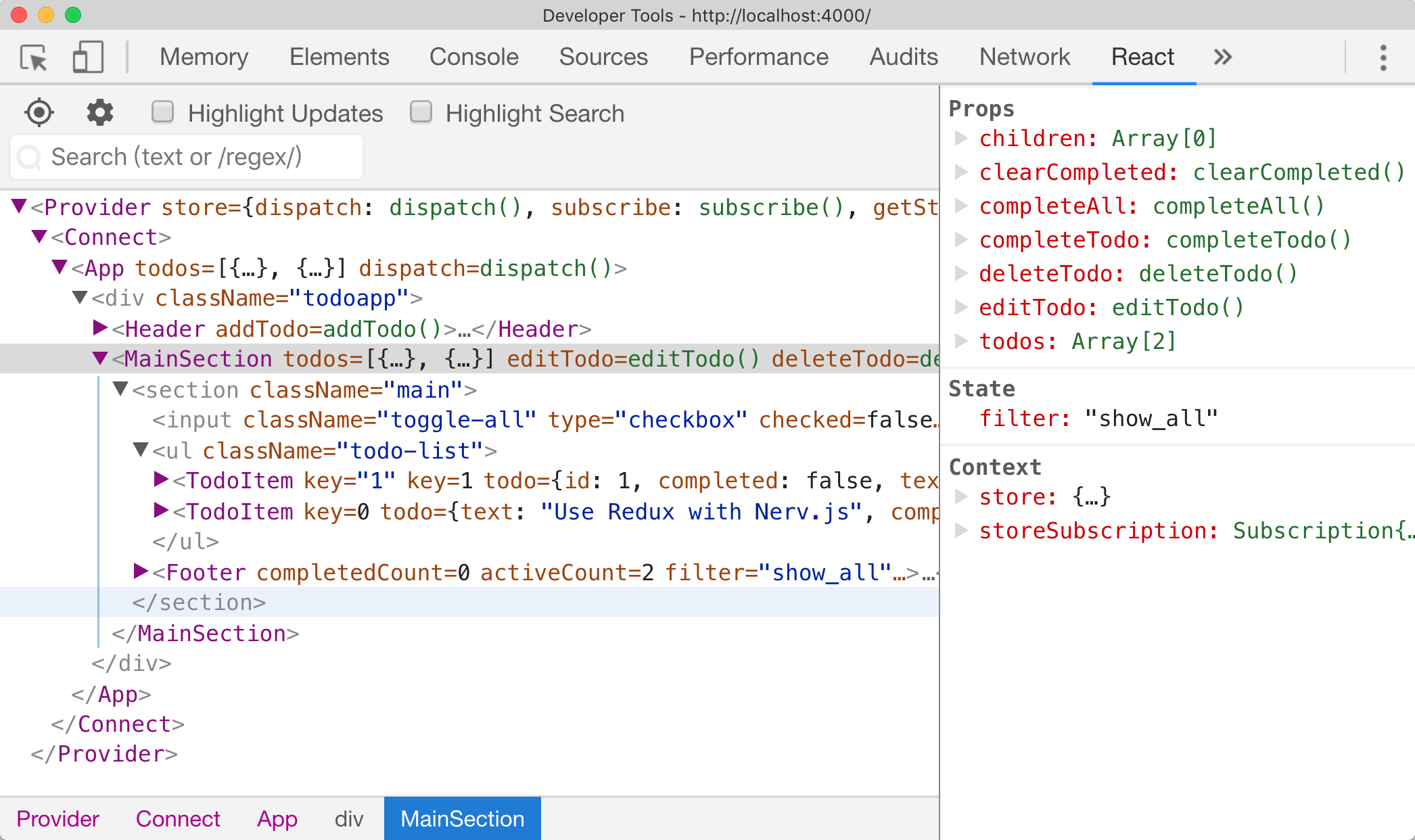
Nerv has a development tools module which allows you to inspect the component hierarchies via the [React Chrome Developer Tools](https://chrome.google.com/webstore/detail/react-developer-tools/fmkadmapgofadopljbjfkapdkoienihi) plugin.
To enable the Nerv development tools you must install the `nerv-devtools` module and then `require('nerv-devtools')` before the initial `Nerv.render()`.
```js
if (process.env.NODE_ENV !== 'production') {
require('nerv-devtools')
}
// before Nerv.render()
Nerv.render(<App />, document.getElementById('#root'))
```
## [Change Log](https://github.com/NervJS/nerv/blob/master/packages/nerv/CHANGELOG.md)
## Acknowledgement
[AOTU.IO(JD Multi-terminal Development Department)](https://aotu.io)
## License
[](https://app.fossa.io/projects/git%2Bgithub.com%2FNervJS%2Fnerv?ref=badge_large)