nativescript-photo-editor
Version:
A NativeScript plugin for editing your photos (crop, draw, add text, etc.)
70 lines (53 loc) • 3.05 kB
Markdown
[](https://travis-ci.com/PeterStaev/nativescript-photo-editor)
[](https://www.npmjs.com/package/nativescript-photo-editor)
[](https://www.npmjs.com/package/nativescript-photo-editor)
[](https://www.npmjs.com/package/nativescript-photo-editor)
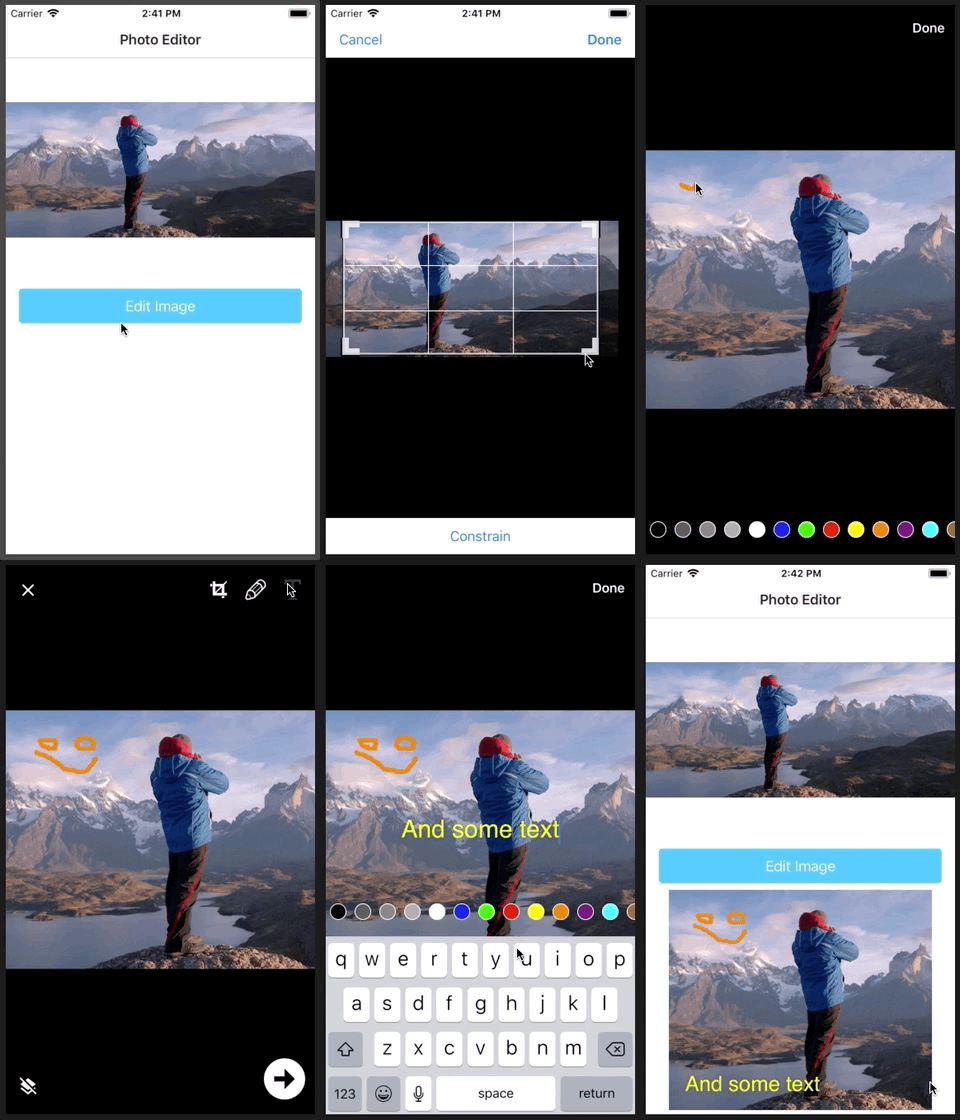
A NativeScript photo editor. It allows you to crop, draw something on your image or add some text.
## Screenshot
## Installation
Run the following command from the root of your project:
`tns plugin add nativescript-photo-editor`
This command automatically installs the necessary files, as well as stores nativescript-photo-editor as a dependency in your project's `package.json` file.
## Configuration
There is no additional configuration needed!
## API
### Methods
* **editPhoto(options): Promise**
Opens the photo editor with the given options. If the user accepts the edited image the promise is resolved with an instance of the new `ImageSource`. If the user cancels the edit the promise will be rejected.
## Usage
Simply create an instance of the photo editor, pass the image you want to edit and which editor controls you **don't** want to use (if any) an that's it!
```ts
import { PhotoEditor, PhotoEditorControl } from "nativescript-photo-editor";
const photoEditor = new PhotoEditor();
photoEditor.editPhoto({
imageSource: originalImage.imageSource,
hiddenControls: [
PhotoEditorControl.Save,
PhotoEditorControl.Crop,
],
}).then((newImage: ImageSource) => {
// Here you can save newImage, send it to your backend or simply display it in your app
resultImage.imageSource = newImage;
}).catch((e) => {
console.error(e);
});
```
## Usage in Angular
There is no difference in usage between Core and Angular. So you can refer to the above usage examples on how to use this plugin with Angular.
## Demos
This repository includes a plain NativeScript demo. In order to run it execute the following in your shell:
```shell
$ git clone https://github.com/peterstaev/nativescript-photo-editor
$ cd nativescript-photo-editor
$ npm install
$ npm run demo-ios
```
This will run the plain NativeScript demo project on iOS. If you want to run it on Android simply use the `-android` instead of the `-ios` sufix.
## Donate
[](https://bit.ly/2AS9QKB)
`bitcoin:14fjysmpwLvSsAskvLASw6ek5XfhTzskHC`
## Credits
* For iOS this uses the `iOSPhotoEditor` pod (https://cocoapods.org/pods/iOSPhotoEditor)
* For Android uses adjusted code with added cropping from https://github.com/eventtus/photo-editor-android