music-start-pro
Version:
Music Start Pro is a discord bot that can play YouTube music by slash command.
129 lines (98 loc) • 5.01 kB
Markdown
# Music Start Pro
[](https://www.npmjs.org/package/music-start-pro)    [](https://discord.gg/qQM9avGy2R) 

## Overview
Music Start Pro is a discord bot that can play YouTube music by slash command.
```sh
# Install
npm install -g music-start-pro
# Start music-start-pro
ms --token [YOUR-DISCORD-BOT-TOKEN]
# See help
ms --help
Usage: ms [options]
Options:
-v, --version output the current version
-t, --token <discord_bot_token> specify the discord bot token (default: "")
-d, --disable-log do not save and load the log file
-h, --help display help for command
```
Get a token on [Discord Developer Portal](https://discord.com/developers/applications)
Add the bot to your Discord server by visiting
```
https://discord.com/api/oauth2/authorize?client_id=[YOUR-CLIENT-ID]&permissions=8&scope=bot%20applications.commands
```
> **Notice**
>
> You must run `music start bot` server before joining the bot to the Discord guild.
---
+ [Click here to invite the testing bot to your guild.](https://discord.com/api/oauth2/authorize?client_id=889377515225886800&permissions=8&scope=bot%20applications.commands) The availability of the server is not guaranteed.
+ [Join our Discord server.](https://discord.gg/qQM9avGy2R)
## Features
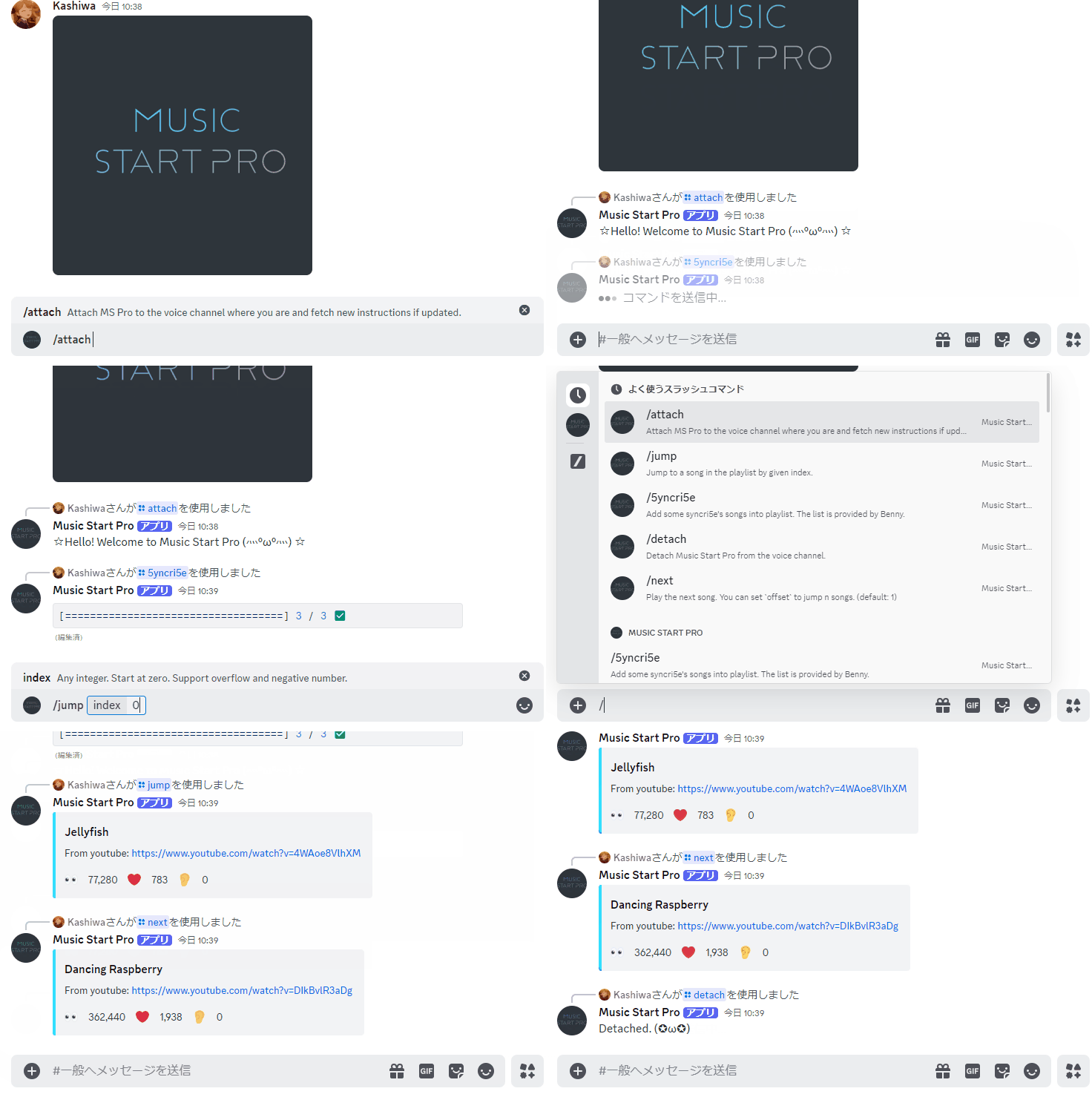
+ `/attach`
+ Attach MS Pro to the voice channel where you are. Thus, you must join the voice channel first.
+ At the same time, the command fetches the new instructions set if updated.
+ You can detach the MS Pro by `/detach`.
+ If you move the MS Pro to another voice channel, please `/attach` again after moving.
+ `/append [youtube-url]`
+ Append the song to the playlist by the given YouTube URL.
+ You can just input the video ID. That is, if you want to play `https://www.youtube.com/watch?v=Qj0Dmwxv-KY`, you can use `/append Qj0Dmwxv-KY` instead.
+ `/lang [code]`
+ Now support `en` and `zh`
+ en: English
+ zh: Traditional Chinese
+ Playlist
+ `/list` Show the playlist.
+ `/swap [idx1] [idx2]`Swap 2 songs by index number.
+ `/remove [idx]`Remove the song by index number.
+ `/clear` Remove all songs.
+ `/sort` Sort the playlist in alphabetical order.
+ `/shuffle` Shuffle the playlist.
+ `/search [regexp]` Search the songs in the playlist.
+ `/distinct` Remove duplicate songs.
+ Player control
+ `/jump [idx]` Jump to a song in the playlist by given index.
+ `/pre` Play the previous song.
+ `/next` Play the next song.
+ `/vol` Show the volume.
+ `/vol [number]` Set the volume, where the number is in [0, 1].
+ `/pause`, `/resume`, `/stop`
+ Batch Operation
+ `/json` Output the playlist by JSON format.
+ `/json [json-string]` Add a batch of songs by giving a JSON string.
+ `/aqours` Add **Aqours**' songs that author recommends into playlist.
+ `/llss ` Add the songs about **LoveLive Sunshine** into playlist. The list is provided by Benny.
+ `/azalea` Add **AZALEA**'s songs that author recommends into playlist.
+ `/muse` Add some **μ's**' songs into playlist. The list is provided by Benny.
+ `/nijigasaki` Add some **Nijigasaki**'s songs into playlist. The list is provided by Benny.
+ `/q4` Add **QU4RTZ**'s songs into playlist.
+ `/liella` Add some **Liella**'s songs into playlist. The list is provided by Benny.
+ `/hasunosora` Add **Hasu No Sora**'s songs into playlist. The list is provided by Benny.
+ `/genjitsu` Add the songs about **Yohane the Parhelion** into playlist. The list is provided by Benny.
+ `/5yncri5e` Add **5yncri5e**'s songs into playlist.
+ General index number
+ The index starts at 0, and can be the modulus of the total number of songs.
+ Negative number -1 stands for the last song
+ Support overflow, e.g., we have 16 songs
+ The first song 0 = 16 (mod 16)
+ The second song 1 = 17 (mod 16)
+ The last song 15 = 31 = -1 (mod 16)
## Contribution
```sh
# clone the repository
git clone https://github.com/ksw2000/Music-Start-Discord-Bot-Pro
# initialize
npm i
# You can start the program by
npm run start
# Please use lint before making a pull request
npm run lint
```
## Deploy by Docker
Build docker image by using Dockerfile in `docker/Dockerfile` or pull the docker image.
```sh
docker build -t my-music-start .
# or
docker pull ksw2000/music-start
```