multi.js
Version:
A user-friendly replacement for select boxes with multiple attribute enabled
119 lines (88 loc) • 3.04 kB
Markdown
multi.js
=======
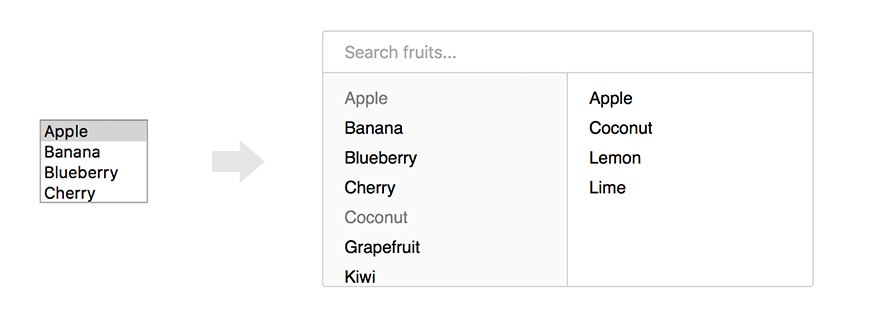
multi.js is a user-friendly replacement for select boxes with the multiple attribute. It has no dependencies, is mobile-friendly, and provides search functionality. multi.js is also easy to style with CSS and optionally supports jQuery.
Check out the [demo](https://fabianlindfors.se/multijs/).
Installation
-----
Install with npm:
```bash
npm install --save multi.js
```
Install with yarn:
```bash
yarn add multi.js
```
After installing with npm or yarn, import both the library and stylesheet:
```bash
import multi from "multi.js/dist/multi-es6.min.js";
import "multi.js/dist/multi.min.css";
```
Install manually by cloning or downloading the repository to your project and including both files in the dist directory.
```html
<link rel="stylesheet" type="text/css" href="multijs/dist/multi.min.css">
<script src="multijs/dist/multi.min.js"></script>
```
Usage
-----
multi.js can be applied to any select element with the multiple attribute enabled.
```javascript
var select_element = document.getElementById("your_select_element");
multi(select_element);
```
To customize multi a few options can be passed with the function call. Below are all the default values.
```javascript
multi(select_element, {
"enable_search": true,
"search_placeholder": "Search...",
"non_selected_header": null,
"selected_header": null,
"limit": -1,
"limit_reached": function () {},
"hide_empty_groups": false,
});
```
To add headers to both columns set values for these options:
```javascript
multi(select_element, {
'non_selected_header': 'All options',
'selected_header': 'Selected options'
});
```
You can add a limit of option selected for your select using the `limit` parameter. Default is -1, which means "no limit".
```javascript
multi(select_element, {
'limit': 10
});
```
Additionally, there a callback is available: `limit_reached`, invoked when the user selects the last available option before reaching the limit (for example, the 10th element of a maximum of 10).
```javascript
multi(select_element, {
'limit': 10,
'limit_reached': function () {
alert('You have selected 10/10 elements.');
}
});
```
multi.js is fully native Javascript but also has jQuery support. If you have jQuery included multi can be applied to a select element as follows:
```javascript
$('#your_select_element').multi();
```
TODO
-----
* ~~Native Javascript, no jQuery~~
* ~~Support for disabled options~~
* ~~Support for optgroups~~
* Browser testing
* Support for retrieving options by AJAX
* Tests
Contributing
-----
All contributions, big and small, are very welcome.
Use [Prettier](https://prettier.io) to format all code after editing. Build the project with Grunt and bump the version number before creating a pull request.
License
-----
multi.js is licensed under [MIT](https://github.com/Fabianlindfors/multi.js/blob/master/LICENSE).