mozaik
Version:
Mozaik dashboard composition tool
140 lines (105 loc) • 4.36 kB
Markdown
![MOZAÏK][logo]
[![License][license-image]][license-url]
[![Travis CI][travis-image]][travis-url]
[![NPM version][npm-image]][npm-url]
[![Quality][codeclimate-image]][codeclimate-url]
[![Dependencies][gemnasium-image]][gemnasium-url]
Mozaïk is a tool based on nodejs / react / reflux / d3 / stylus to easily craft beautiful dashboards. [See demo](http://mozaik.herokuapp.com/)
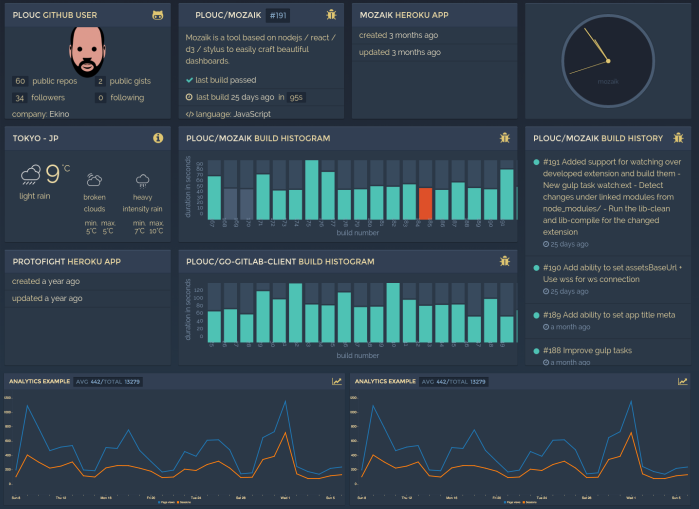
**Features:**
- Scalable layout
- Themes support
- Extendable by modules
- Grid positioning
- Optimized backend communication
- Rotation support (with smooth transition)
## Getting started
[](https://gitter.im/plouc/mozaik?utm_source=badge&utm_medium=badge&utm_campaign=pr-badge&utm_content=badge)
Easy way to get started is using the demo dashboard. Look at the instructions on the dedicated repository https://github.com/plouc/mozaik-demo.
Alternatively, use provided [Yeoman generator][generator-mozaik-url] available to start with new dashboard or widget:
```shell
npm install -g yo gulp generator-mozaik
yo mozaik
npm install
gulp build
node app.js
```
Visit the [Wiki](https://github.com/plouc/mozaik/wiki) for further information/doc.
## Widgets
Widgets are maintained as separate modules, thus available via [mozaik-ext-name in npm.js](https://www.npmjs.com/search?q=mozaik). To install an extension:
- Install modules from [npmjs][npmjs-url]:
```shell
npm install --save mozaik-ext-example
```
- Register widgets by adding to dashboard ``src/App.jsx``:
```javascript
import mozaikExampleComponents from 'mozaik-ext-example';
Mozaik.Registry.addExtension('example', mozaikExampleComponents);
```
Configure size, widget placement and params in `config.js`:
```javascript
module.exports = {
// ...
dashboards: [
// Dashboard 1
{
columns: 2, rows: 2, // Dashboard grid layout
widgets: [
{
type: 'example.widget_name', // WidgetName -> widget_name
param1: 'value1', // See widget documentation
columns: 1, rows: 1, // Size
x: 0, y: 0 // Position
}
]
}
]
}
```
- If widget needs to communicate with backend (see widget documentation), register its client api by adding to dashboard `app.js`:
```javascript
mozaik.bus.registerApi('example',
require('mozaik-ext-example/client')
);
```
If client api requires configuration, it is provided in dashboard's `config.js`:
```javascript
module.exports = {
env: process.env.NODE_ENV || 'production',
host: 'localhost',
port: process.env.PORT || 5000,
// Server-side client configuration.
// By convention, the name follow the module
api: {
example: {
foo: 'bar'
},
}
// ...
}
```
- (Re)build the dashboard:
```shell
gulp build
```
## Themes
Mozaïk dashboard comes with 5 themes and makes it easy to [develop your own theme](https://github.com/plouc/mozaik/wiki/theming). Set theme name in `config.js`:
```javascript
// Options: bordeau, night-blue, light-grey, light-yellow, yellow
theme: 'night-blue'
```
[license-image]: https://img.shields.io/github/license/plouc/mozaik.svg?style=flat-square
[license-url]: https://github.com/plouc/mozaik/blob/master/LICENSE.md
[logo]: https://raw.githubusercontent.com/wiki/plouc/mozaik/assets/mozaik-logo-v2.png
[widget-count-image]: https://img.shields.io/badge/widgets-x21-green.svg?style=flat-square
[npm-image]: https://img.shields.io/npm/v/mozaik.svg?style=flat-square
[npm-url]: https://www.npmjs.com/package/mozaik
[widget-count-url]: https://github.com/plouc/mozaik/tree/master/src/ext
[travis-image]: https://img.shields.io/travis/plouc/mozaik.svg?style=flat-square
[travis-url]: https://travis-ci.org/plouc/mozaik
[codeclimate-image]: https://img.shields.io/codeclimate/github/plouc/mozaik.svg?style=flat-square
[codeclimate-url]: https://codeclimate.com/github/plouc/mozaik
[gemnasium-image]: https://img.shields.io/gemnasium/plouc/mozaik.svg?style=flat-square
[gemnasium-url]: https://gemnasium.com/plouc/mozaik
[npmjs-url]: https://www.npmjs.com
[generator-mozaik-url]: https://www.npmjs.com/package/generator-mozaik