motorvehicles
Version:
机动车发票展示、motorvehiclesinvoice、vue发票模板
900 lines (760 loc) • 19.9 kB
Markdown
# 🚗 机动车销售统一发票组件
> 一个专业的机动车销售统一发票 Vue 组件,支持自定义校验、主题配置、响应式布局
**问题反馈:** 微信 `zkhh6666`(请备注好来意)
## 📦 安装 (Installation)
```bash
npm install motorvehicles --save
```
> ⚠️ **重要提示:** 建议为组件设置唯一的 `key` 属性,避免数据复用导致的渲染问题
## 🚀 快速开始 (Quick Start)
### 1. 引入组件
```javascript
import MotorVehiclesIvoice from 'motorvehicles'
import 'motorvehicles/motorvehicles.css' // 可以通过 class 名来覆盖其中属性
export default {
components: {
MotorVehiclesIvoice
}
}
```
### 2. 使用组件
```vue
<template>
<div>
<!-- 基础使用 -->
<MotorVehiclesIvoice
:key="invoice.id"
:targetLocation="locationConfig"
:targetContent="invoiceData"
/>
<!-- 自定义主题 -->
<MotorVehiclesIvoice
:key="invoice.id"
:targetLocation="locationConfig"
:targetContent="invoiceData"
themeColor="#1890ff"
fontSize="16px"
taxRateList="customRateList"
/>
</div>
</template>
```
## 📖 配置详解
### 📌 参数配置 (Props)
| 参数名称 | 说明 | 类型 | 默认值 | 必填 |
|:---:|:---|:---:|:---:|:---:|
| `targetLocation` | 字段位置和校验规则配置 | `Array<Object>` | `[]` | ✅ |
| `targetContent` | 发票数据内容 | `Object` | `{}` | ✅ |
| `mode` | 显示模式 | `String` | `'normal'` | ❌ |
| `themeColor` | 主题颜色(边框和文字颜色) | `String` | `'#964300'` | ❌ |
| `fontSize` | 字体大小 | `String` | `'14px'` | ❌ |
| `borderWidth` | 边框宽度 | `String` | `'1px'` | ❌ |
| `taxRateList` | 税率下拉选项列表 | `Array<Object>` | 默认税率 | ❌ |
| `key` | 组件唯一标识 | `String/Number` | - | 推荐 |
#### mode 模式说明
| 模式值 | 说明 |
|:---:|:---|
| `'normal'` | 正常模式,字段可编辑(根据 disabled 配置) |
| `'look'` | 查看模式,所有字段只读 |
### 📋 targetLocation 配置说明
定义发票各字段的位置、状态和校验规则
#### 字段说明
| 字段 | 说明 | 类型 | 示例 | 必填 |
|:---:|:---|:---:|:---|:---:|
| `index` | 字段位置索引(从 0 开始) | `Number` | `0` | ✅ |
| `key` | 字段显示名称(用户可见) | `String` | `'开票日期'` | ✅ |
| `name` | 字段数据名称(对应 targetContent) | `String` | `'kaipiaoriqi'` | ✅ |
| `disabled` | 是否禁用编辑 | `Boolean` | `false` | ❌ |
| `required` | 是否必填 | `Boolean` | `false` | ❌ |
| `type` | 字段类型 | `String` | `'input'` / `'select'` | ❌ |
| `validateFields` | 校验规则 | `Object/Function` | 见下方说明 | ❌ |
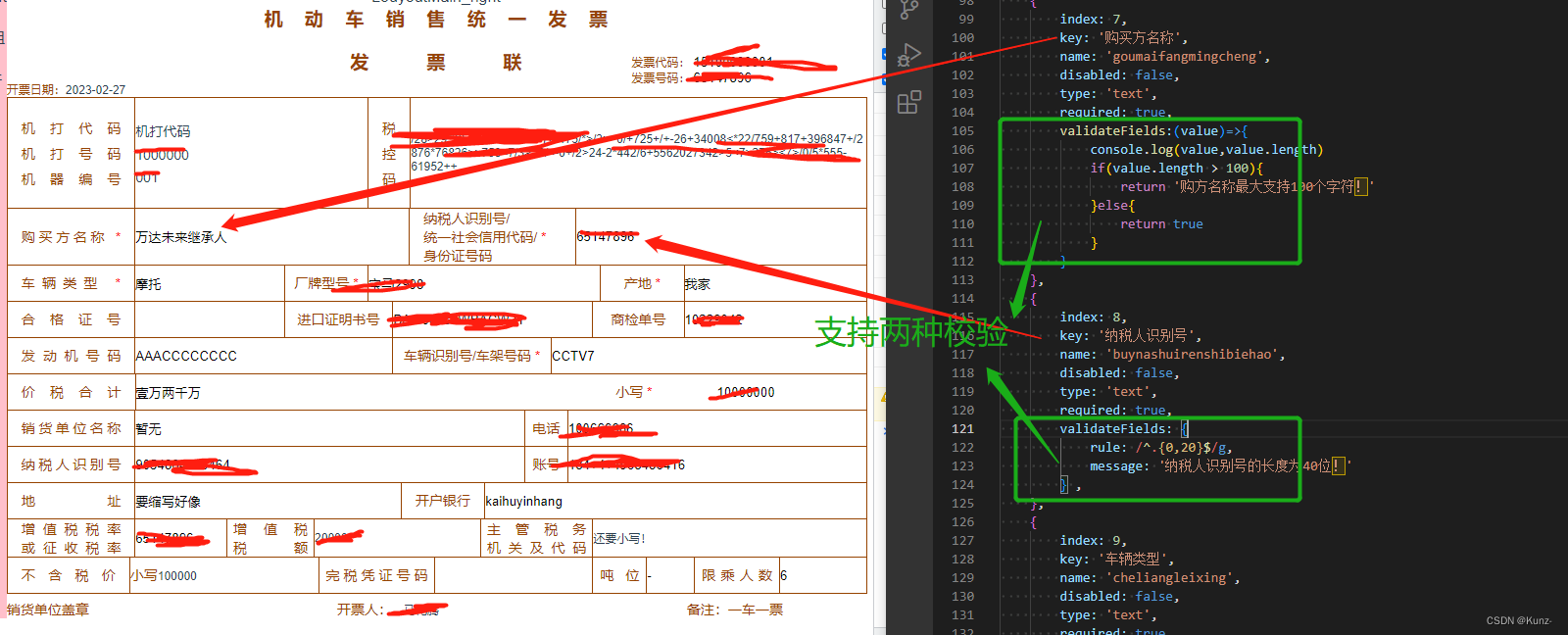
#### 校验规则配置
**1. 正则表达式校验:**
```javascript
{
index: 7,
key: '购买方名称',
name: 'purchaserName',
disabled: false,
required: true,
validateFields: {
rule: /^[\u4e00-\u9fa5a-zA-Z0-9]{2,50}$/,
message: '购买方名称格式不正确,需2-50个字符'
}
}
```
**2. 自定义函数校验:**
```javascript
{
index: 8,
key: '纳税人识别号',
name: 'taxNo',
disabled: false,
required: true,
validateFields: (value) => {
if (!value) return '纳税人识别号不能为空'
if (!/^[A-Z0-9]{15,20}$/.test(value)) {
return '纳税人识别号格式不正确'
}
return true // 返回 true 表示校验通过
}
}
```
#### 完整配置示例
```javascript
const targetLocation = [
// 顶部信息区(只读)
{
index: 0,
key: '发票名称',
name: 'invoiceTitle',
disabled: true,
type: 'input'
},
{
index: 1,
key: '发票类型',
name: 'invoiceType',
disabled: true,
type: 'input'
},
{
index: 2,
key: '发票联次',
name: 'invoiceNum',
disabled: true,
type: 'input'
},
// 机打信息(只读)
{
index: 3,
key: '机打代码',
name: 'machineCode',
disabled: true,
type: 'input'
},
{
index: 4,
key: '机打号码',
name: 'machineNum',
disabled: true,
type: 'input'
},
{
index: 5,
key: '机器编号',
name: 'machineSerialNum',
disabled: true,
type: 'input'
},
{
index: 6,
key: '税控码',
name: 'taxControlCode',
disabled: true,
type: 'input'
},
// 购买方信息(可编辑+必填+校验)
{
index: 7,
key: '购买方名称',
name: 'purchaserName',
disabled: false,
required: true,
type: 'input',
validateFields: {
rule: /^[\u4e00-\u9fa5a-zA-Z0-9]{2,50}$/,
message: '购买方名称格式不正确'
}
},
{
index: 8,
key: '纳税人识别号',
name: 'taxNo',
disabled: false,
required: true,
type: 'select',
validateFields: (value) => {
if (!value) return '纳税人识别号不能为空'
if (!/^[A-Z0-9]{15,20}$/.test(value)) {
return '纳税人识别号格式不正确'
}
return true
}
},
// 车辆信息
{
index: 9,
key: '车辆类型',
name: 'vehicleType',
disabled: false,
required: true,
type: 'input'
},
{
index: 10,
key: '厂牌型号',
name: 'brandModel',
disabled: false,
required: true,
type: 'input'
},
{
index: 11,
key: '产地',
name: 'productionPlace',
disabled: false,
type: 'input'
},
{
index: 12,
key: '合格证号',
name: 'certificateNo',
disabled: false,
type: 'input'
},
{
index: 13,
key: '进口证明书号',
name: 'importCertNo',
disabled: false,
type: 'input'
},
{
index: 14,
key: '商检单号',
name: 'inspectionNo',
disabled: false,
type: 'input'
},
{
index: 15,
key: '发动机号码',
name: 'engineNo',
disabled: false,
type: 'input'
},
{
index: 16,
key: '车辆识别号/车架号码',
name: 'vin',
disabled: false,
required: true,
type: 'input',
validateFields: {
rule: /^[A-Z0-9]{17}$/,
message: '车辆识别号必须为17位'
}
},
// 价格信息
{
index: 17,
key: '价税合计(大写)',
name: 'totalAmount',
disabled: true,
type: 'input'
},
{
index: 18,
key: '价税合计(小写)',
name: 'totalAmountSmall',
disabled: false,
required: true,
type: 'input',
validateFields: {
rule: /^\d+(\.\d{1,2})?$/,
message: '请输入正确的金额格式'
}
},
// 销售方信息
{
index: 19,
key: '销货单位名称',
name: 'sellerName',
disabled: false,
type: 'input'
},
{
index: 20,
key: '电话',
name: 'sellerPhone',
disabled: false,
type: 'input'
},
{
index: 21,
key: '纳税人识别号',
name: 'sellerTaxNo',
disabled: false,
type: 'input'
},
{
index: 22,
key: '账号',
name: 'sellerAccount',
disabled: false,
type: 'input'
},
{
index: 23,
key: '地址',
name: 'sellerAddress',
disabled: false,
type: 'input'
},
{
index: 24,
key: '开户银行',
name: 'sellerBank',
disabled: false,
type: 'input'
},
// 税务信息
{
index: 25,
key: '增值税税率或征收率',
name: 'taxRate',
disabled: false,
type: 'select'
},
{
index: 26,
key: '增值税税额',
name: 'taxAmount',
disabled: true,
type: 'input'
},
{
index: 27,
key: '主管税务机关及代码',
name: 'taxAuthority',
disabled: true,
type: 'input'
},
{
index: 28,
key: '不含税价',
name: 'amountExcludingTax',
disabled: true,
type: 'input'
},
{
index: 29,
key: '完税凭证号码',
name: 'taxReceiptNo',
disabled: true,
type: 'input'
},
// 车辆参数
{
index: 30,
key: '吨位',
name: 'tonnage',
disabled: false,
type: 'input'
},
{
index: 31,
key: '限乘人数',
name: 'passengerCapacity',
disabled: false,
type: 'input'
}
]
```
### 📝 targetContent 配置说明
发票的实际数据内容,字段名与 `targetLocation` 中的 `name` 字段对应
```javascript
const targetContent = {
// 顶部信息
invoiceTitle: '机动车销售统一发票',
invoiceType: '增值税专用发票',
invoiceNum: '第一联:发票联',
// 机打信息
machineCode: '1100204130',
machineNum: '01245896',
machineSerialNum: 'M12345678',
taxControlCode: '12345678901234567890123456789012',
// 购买方信息
purchaserName: '张三',
taxNo: '91110000MA01XXXXX',
// 车辆信息
vehicleType: '小型轿车',
brandModel: '特斯拉 Model 3 标准续航后驱升级版',
productionPlace: '中国上海',
certificateNo: 'CERT2024123456',
importCertNo: '',
inspectionNo: '',
engineNo: 'ENG20240001',
vin: 'LRWXXXXXXXXXXX123',
// 价格信息
totalAmount: '叁拾伍万元整',
totalAmountSmall: '350,000.00',
// 销售方信息
sellerName: '某某汽车销售有限公司',
sellerPhone: '010-12345678',
sellerTaxNo: '91110000MA01YYYYY',
sellerAccount: '1234567890123456789',
sellerAddress: '北京市朝阳区某某街道100号',
sellerBank: '中国工商银行北京某某支行',
// 税务信息
taxRate: '0.13',
taxAmount: '40,265.49',
taxAuthority: '国家税务总局北京市税务局 11000000',
amountExcludingTax: '309,734.51',
taxReceiptNo: '',
// 车辆参数
tonnage: '',
passengerCapacity: '5'
}
```
### 📊 taxRateList 配置说明
自定义税率下拉选项
```javascript
const taxRateList = [
{ label: '13%', value: '0.13' },
{ label: '9%', value: '0.09' },
{ label: '6%', value: '0.06' },
{ label: '3%', value: '0.03' },
{ label: '0%', value: '0' }
]
```
传入组件:
```vue
<MotorVehiclesIvoice
:targetLocation="locationConfig"
:targetContent="invoiceData"
:taxRateList="taxRateList"
/>
```
### 🎨 主题自定义
通过 props 自定义组件样式:
```vue
<!-- 默认主题(棕色) -->
<MotorVehiclesIvoice
:targetLocation="locationConfig"
:targetContent="invoiceData"
/>
<!-- 蓝色主题 -->
<MotorVehiclesIvoice
:targetLocation="locationConfig"
:targetContent="invoiceData"
themeColor="#1890ff"
fontSize="16px"
borderWidth="2px"
/>
<!-- 红色主题 -->
<MotorVehiclesIvoice
:targetLocation="locationConfig"
:targetContent="invoiceData"
themeColor="#ff4d4f"
fontSize="12px"
borderWidth="1px"
/>
<!-- 自定义 CSS 覆盖 -->
<MotorVehiclesIvoice
class="custom-invoice"
:targetLocation="locationConfig"
:targetContent="invoiceData"
/>
```
也可以通过 CSS 覆盖样式:
```css
/* 覆盖默认样式 */
.custom-invoice .MotorVehiclesIvoice_AllBox_Font {
font-size: 16px !important;
color: #1890ff !important;
}
.custom-invoice .MotorVehiclesIvoice_AllBox_border {
border-color: #1890ff !important;
}
```
## 🔧 方法 (Methods)
### getFieldsValue()
获取组件当前的所有字段值
**返回值:** `Object` - 包含所有字段的数据对象
```javascript
// 通过 ref 调用
const invoiceData = this.$refs.motorInvoice.getFieldsValue()
console.log(invoiceData)
// 返回:
// {
// purchaserName: '张三',
// taxNo: '91110000MA01XXXXX',
// vehicleType: '小型轿车',
// brandModel: '特斯拉 Model 3',
// totalAmountSmall: '350,000.00',
// ...
// }
```
**使用示例:**
```vue
<template>
<div>
<MotorVehiclesIvoice
ref="motorInvoice"
:targetLocation="locationConfig"
:targetContent="invoiceData"
/>
<button @click="handleSave">保存</button>
</div>
</template>
<script>
export default {
methods: {
handleSave() {
const data = this.$refs.motorInvoice.getFieldsValue()
console.log('当前发票数据:', data)
// 调用接口保存...
}
}
}
</script>
```
### validateFields(callback)
触发表单校验,校验 `targetLocation` 中配置的所有规则
**参数:**
- `callback: Function(error, values)` - 校验完成后的回调函数
- `error`: 校验失败时的错误对象,格式:`{ code: 500, message: '错误信息' }`
- `values`: 校验成功时的所有字段值
**校验规则优先级:**
1. **必填校验:** 检查 `required: true` 的字段
2. **正则校验:** 检查配置了 `validateFields.rule` 的字段
3. **自定义校验:** 执行配置的 `validateFields` 函数
```javascript
this.$refs.motorInvoice.validateFields((error, values) => {
if (error) {
// 校验失败
console.error('校验失败:', error.message)
this.$message.error(error.message)
} else {
// 校验通过
console.log('校验通过,数据:', values)
this.submitInvoice(values)
}
})
```
**完整使用示例:**
```vue
<template>
<div>
<MotorVehiclesIvoice
ref="motorInvoice"
:targetLocation="locationConfig"
:targetContent="formData"
/>
<div class="button-group">
<button @click="handleValidate">校验</button>
<button @click="handleSubmit">提交</button>
<button @click="handleReset">重置</button>
</div>
</div>
</template>
<script>
export default {
data() {
return {
locationConfig: [...], // targetLocation 配置
formData: {...} // targetContent 数据
}
},
methods: {
// 仅校验
handleValidate() {
this.$refs.motorInvoice.validateFields((error, values) => {
if (error) {
this.$message.error(error.message)
} else {
this.$message.success('校验通过')
}
})
},
// 校验并提交
handleSubmit() {
this.$refs.motorInvoice.validateFields(async (error, values) => {
if (error) {
this.$message.error(error.message)
return
}
try {
const res = await this.$api.saveInvoice(values)
this.$message.success('保存成功')
} catch (err) {
this.$message.error('保存失败:' + err.message)
}
})
},
// 重置表单
handleReset() {
this.formData = {
purchaserName: '',
taxNo: '',
vehicleType: '',
// ... 重置所有字段
}
}
}
}
</script>
```
## 💡 使用技巧
### 1. 避免数据复用问题
为组件设置唯一的 `key` 避免 Vue 复用导致的数据错乱:
```vue
<MotorVehiclesIvoice
v-for="invoice in invoiceList"
:key="invoice.id"
:targetContent="invoice.data"
/>
```
### 2. 动态禁用字段
根据业务逻辑动态控制字段是否可编辑:
```javascript
computed: {
locationConfig() {
return this.baseLocation.map(item => {
// 已提交的发票,所有字段禁用
if (this.invoiceStatus === 'submitted') {
return { ...item, disabled: true }
}
// 审核中的发票,仅部分字段可编辑
if (this.invoiceStatus === 'reviewing') {
const editableFields = ['sellerPhone', 'sellerAddress']
return {
...item,
disabled: !editableFields.includes(item.name)
}
}
return item
})
}
}
```
### 3. 自定义复杂校验
实现多字段联动校验:
```javascript
{
index: 18,
key: '价税合计(小写)',
name: 'totalAmountSmall',
required: true,
validateFields: (value) => {
const amount = parseFloat(value.replace(/,/g, ''))
const taxRate = parseFloat(this.formData.taxRate)
const taxAmount = parseFloat(this.formData.taxAmount.replace(/,/g, ''))
// 校验:价税合计 ≈ 不含税价 + 税额
const expectedTotal = amount / (1 + taxRate)
const actualTotal = amount - taxAmount
if (Math.abs(expectedTotal - actualTotal) > 0.01) {
return '价税合计与税额不匹配,请检查'
}
return true
}
}
```
### 4. 打印功能
添加打印样式:
```vue
<template>
<div>
<MotorVehiclesIvoice
ref="invoice"
class="print-invoice"
:targetLocation="locationConfig"
:targetContent="invoiceData"
/>
<button @click="handlePrint">打印</button>
</div>
</template>
<script>
export default {
methods: {
handlePrint() {
window.print()
}
}
}
</script>
<style>
@media print {
/* 打印时隐藏按钮等元素 */
button {
display: none;
}
/* 调整发票样式 */
.print-invoice {
width: 210mm;
height: 297mm;
page-break-after: always;
}
}
</style>
```
### 5. 数据初始化
从接口获取数据并初始化组件:
```javascript
async mounted() {
try {
// 获取发票配置
const config = await this.$api.getInvoiceConfig()
this.locationConfig = config.fields
// 获取发票数据
const invoiceId = this.$route.params.id
if (invoiceId) {
const data = await this.$api.getInvoiceDetail(invoiceId)
this.invoiceData = data
}
} catch (err) {
this.$message.error('数据加载失败')
}
}
```
## 📸 效果预览
## 📝 注意事项
1. ⚠️ **key 的重要性:** 在列表渲染时务必设置唯一的 `key`,避免数据复用问题
2. ⚠️ **校验函数返回值:** 自定义校验函数必须返回 `true`(通过)或错误信息字符串(失败)
3. ⚠️ **必填字段标识:** 配置 `required: true` 的字段会在标签后显示红色 `*` 号
4. ⚠️ **字段索引顺序:** `targetLocation` 的 `index` 必须按顺序从 0 开始递增
5. ⚠️ **下拉框配置:** `type: 'select'` 的字段需要配置对应的 `taxRateList`
6. ⚠️ **样式覆盖:** 引入 CSS 后可以通过 class 名覆盖默认样式
7. ⚠️ **mode 模式:** `look` 模式下所有字段只读,`normal` 模式根据 `disabled` 配置决定
## 🆚 与增值税发票组件的区别
| 特性 | 机动车发票 | 增值税发票 |
|:---:|:---|:---|
| **数据结构** | 固定字段位置 | 灵活的 table 结构 |
| **适用场景** | 汽车销售 | 通用商品/服务 |
| **校验方式** | 单字段独立校验 | 支持行级校验 |
| **明细行数** | 固定格式 | 动态多行 |
## 📅 版本记录
### v1.0.0 (2025-11-25)
- 🎉 插件首次发布
- ✨ 支持机动车销售统一发票渲染
- ✨ 支持字段校验(必填、正则、自定义函数)
- ✨ 支持主题自定义(颜色、字体、边框)
- ✨ 支持只读/编辑模式切换
## 📄 License
MIT License
## 🤝 贡献与反馈
欢迎提交 Issue 和 Pull Request!
**联系方式:** 微信 `zkhh6666`(请备注好来意)
## 🔗 相关链接
- **GitHub 仓库:** [待补充]
- **在线示例:** [待补充]