motion
Version:
motion - moving development forward
70 lines (69 loc) • 5.35 kB
JSON
{
"_args": [
[
"colors@https://registry.npmjs.org/colors/-/colors-1.1.2.tgz",
"/Users/nw/flint/packages/flint"
]
],
"_from": "colors@1.1.2",
"_id": "colors@1.1.2",
"_inCache": true,
"_location": "/colors",
"_phantomChildren": {},
"_requested": {
"name": "colors",
"raw": "colors@https://registry.npmjs.org/colors/-/colors-1.1.2.tgz",
"rawSpec": "https://registry.npmjs.org/colors/-/colors-1.1.2.tgz",
"scope": null,
"spec": "https://registry.npmjs.org/colors/-/colors-1.1.2.tgz",
"type": "remote"
},
"_requiredBy": [
"/",
"/svgo"
],
"_resolved": "https://registry.npmjs.org/colors/-/colors-1.1.2.tgz",
"_shasum": "168a4701756b6a7f51a12ce0c97bfa28c084ed63",
"_shrinkwrap": null,
"_spec": "colors@https://registry.npmjs.org/colors/-/colors-1.1.2.tgz",
"_where": "/Users/nw/flint/packages/flint",
"author": {
"name": "Marak Squires"
},
"bugs": {
"url": "https://github.com/Marak/colors.js/issues"
},
"dependencies": {},
"description": "get colors in your node.js console",
"devDependencies": {},
"engines": {
"node": ">=0.1.90"
},
"files": [
"LICENSE",
"examples",
"lib",
"safe.js",
"themes"
],
"homepage": "https://github.com/Marak/colors.js",
"keywords": [
"ansi",
"colors",
"terminal"
],
"license": "MIT",
"main": "lib",
"name": "colors",
"optionalDependencies": {},
"readme": "# colors.js [](https://travis-ci.org/Marak/colors.js)\n\n## get color and style in your node.js console\n\n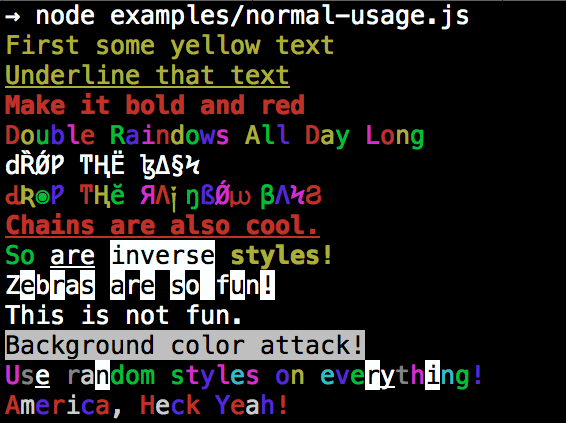\n\n## Installation\n\n npm install colors\n\n## colors and styles!\n\n### text colors\n\n - black\n - red\n - green\n - yellow\n - blue\n - magenta\n - cyan\n - white\n - gray\n - grey\n\n### background colors\n\n - bgBlack\n - bgRed\n - bgGreen\n - bgYellow\n - bgBlue\n - bgMagenta\n - bgCyan\n - bgWhite\n\n### styles\n\n - reset\n - bold\n - dim\n - italic\n - underline\n - inverse\n - hidden\n - strikethrough\n\n### extras\n\n - rainbow\n - zebra\n - america\n - trap\n - random\n\n\n## Usage\n\nBy popular demand, `colors` now ships with two types of usages!\n\nThe super nifty way\n\n```js\nvar colors = require('colors');\n\nconsole.log('hello'.green); // outputs green text\nconsole.log('i like cake and pies'.underline.red) // outputs red underlined text\nconsole.log('inverse the color'.inverse); // inverses the color\nconsole.log('OMG Rainbows!'.rainbow); // rainbow\nconsole.log('Run the trap'.trap); // Drops the bass\n\n```\n\nor a slightly less nifty way which doesn't extend `String.prototype`\n\n```js\nvar colors = require('colors/safe');\n\nconsole.log(colors.green('hello')); // outputs green text\nconsole.log(colors.red.underline('i like cake and pies')) // outputs red underlined text\nconsole.log(colors.inverse('inverse the color')); // inverses the color\nconsole.log(colors.rainbow('OMG Rainbows!')); // rainbow\nconsole.log(colors.trap('Run the trap')); // Drops the bass\n\n```\n\nI prefer the first way. Some people seem to be afraid of extending `String.prototype` and prefer the second way. \n\nIf you are writing good code you will never have an issue with the first approach. If you really don't want to touch `String.prototype`, the second usage will not touch `String` native object.\n\n## Disabling Colors\n\nTo disable colors you can pass the following arguments in the command line to your application:\n\n```bash\nnode myapp.js --no-color\n```\n\n## Console.log [string substitution](http://nodejs.org/docs/latest/api/console.html#console_console_log_data)\n\n```js\nvar name = 'Marak';\nconsole.log(colors.green('Hello %s'), name);\n// outputs -> 'Hello Marak'\n```\n\n## Custom themes\n\n### Using standard API\n\n```js\n\nvar colors = require('colors');\n\ncolors.setTheme({\n silly: 'rainbow',\n input: 'grey',\n verbose: 'cyan',\n prompt: 'grey',\n info: 'green',\n data: 'grey',\n help: 'cyan',\n warn: 'yellow',\n debug: 'blue',\n error: 'red'\n});\n\n// outputs red text\nconsole.log(\"this is an error\".error);\n\n// outputs yellow text\nconsole.log(\"this is a warning\".warn);\n```\n\n### Using string safe API\n\n```js\nvar colors = require('colors/safe');\n\n// set single property\nvar error = colors.red;\nerror('this is red');\n\n// set theme\ncolors.setTheme({\n silly: 'rainbow',\n input: 'grey',\n verbose: 'cyan',\n prompt: 'grey',\n info: 'green',\n data: 'grey',\n help: 'cyan',\n warn: 'yellow',\n debug: 'blue',\n error: 'red'\n});\n\n// outputs red text\nconsole.log(colors.error(\"this is an error\"));\n\n// outputs yellow text\nconsole.log(colors.warn(\"this is a warning\"));\n\n```\n\nYou can also combine them:\n\n```javascript\nvar colors = require('colors');\n\ncolors.setTheme({\n custom: ['red', 'underline']\n});\n\nconsole.log('test'.custom);\n```\n\n*Protip: There is a secret undocumented style in `colors`. If you find the style you can summon him.*\n",
"readmeFilename": "ReadMe.md",
"repository": {
"type": "git",
"url": "git+ssh://git@github.com/Marak/colors.js.git"
},
"scripts": {
"test": "node tests/basic-test.js && node tests/safe-test.js"
},
"version": "1.1.2"
}