mockserver
Version:
Easily mock your webservices while testing frontends.
326 lines (224 loc) • 8.58 kB
Markdown
# mockserver
[](https://travis-ci.org/namshi/mockserver)
**mockserver** is a library that will help you mocking your APIs
in **a matter of seconds**: you simply organize your mocked
HTTP responses in a bunch of mock files and it will serve them
like they were coming from a real API; in this way you can
write your frontends without caring too much whether your
backend is really ready or not.
## Installation
Mockserver can be installed globally if you need
to run it as a command:
```
$ npm install -g mockserver
$ mockserver -p 8080 -m test/mocks
Mockserver serving mocks under "test/mocks" at http://localhost:8080
```
or as a regular NPM module if you need to use it as
a library within your code:
```bash
npm install mockserver
```
then in your test file:
```javascript
var http = require('http');
var mockserver = require('mockserver');
http.createServer(mockserver('path/to/your/mocks')).listen(9001);
```
This will run a simple HTTP webserver, handled by mockserver, on port 9001.
At this point you can simply define your first mock: create a file in
`path/to/your/mocks/example-response` called `GET.mock`:
```
HTTP/1.1 200 OK
Content-Type: application/json; charset=utf-8
{
"Random": "content"
}
```
If you open your browser at `http://localhost:9001/example-response`
you will see something like this:
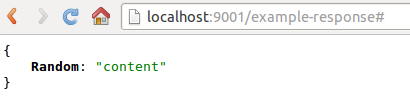
And it's over: now you can start writing your frontends without
having to wait for your APIs to be ready, or without having to spend
too much time mocking them, as mockserver lets you do it in seconds.
## Verbosity
By default mockserver is running in verbose mode: log messages are pushed to `stdout`.
That will help to distinguish, which mock file matches best the request.
```shell
$ mockserver -p 8080 -m './mocks'
Mockserver serving mocks {verbose:true} under "./mocks" at http://localhost:8080
Reading from ./mocks/api/GET--a=b.mock file: Not matched
Reading from ./mocks/api/GET.mock file: Matched
```
Option `-q|--quiet` disables this behavior.
## Mock files
As you probably understood, mock files' naming conventions are based
on the response that they are going to serve:
```
$REQUEST-PATH/$HTTP-METHOD.mock
```
For example, let's say that you wanna mock the response of a POST request
to `/users`, you would simply need to create a file named `POST.mock` under `users/`.
The content of the mock files needs to be a valid HTTP response, for example:
```
HTTP/1.1 200 OK
Content-Type: text/xml; charset=utf-8
{
"Accept-Language": "en-US,en;q=0.8",
"Host": "headers.jsontest.com",
"Accept-Charset": "ISO-8859-1,utf-8;q=0.7,*;q=0.3",
"Accept": "text/html,application/xhtml+xml,application/xml;q=0.9,*/*;q=0.8"
}
```
Check [our own mocks](https://github.com/namshi/mockserver/tree/master/test/mocks) as a reference.
## Custom Headers
You can specify request headers to include, which allows you to change the response based on what headers are
provided.
To do this, you need to let mockserver know which headers matter,
by exposing comma-separated environment `MOCK_HEADERS` variable, like so:
```shell
$ MOCK_HEADERS=x-foo,authorization mockserver -m . -p 9001
```
Or by setting the `headers` array on the mockserver object, like so:
```js
var mockserver = require('mockserver');
mockserver.headers = ['Authorization', 'X-My-Header'];
```
Any headers that are set and occur within the array will now be appended to the filename, immediately after the
HTTP method, like so:
```
GET /hello
Authorization: 12345
hello/GET_Authorization=12345.mock
```
```
GET /hello
X-My-Header: cow
Authorization: 12345
hello/GET_Authorization=12345_X-My-Header=cow.mock
```
**Note:** The order of the headers within the `headers` array determines the order of the values within the filename.
The server will always attempt to match the file with the most tracked headers, then it will try permutations of
headers until it finds one that matches. This means that, in the previous example, the server will look for files
in this order:
```
hello/GET_Authorization=12345_X-My-Header=cow.mock
hello/GET_X-My-Header_Authorization=12345=cow.mock
hello/GET_Authorization=12345.mock
hello/GET_X-My-Header=cow.mock
hello/GET.mock
```
The first one matched is the one returned, favoring more matches and headers earlier in the array.
The `headers` array can be set or modified at any time.
## Response Delays
When building applications, we cannot always guarantee that our users have a fast connection, which
is latency free. Also some HTTP calls inevitably take more time than we'd, like so we have added
the ability to simulate HTTP call latency by setting a custom header
```
Response-Delay: 5000
```
The delay value is expected in milliseconds, if not set for a given file there will be no delay.
## Query string parameters and POST body
In order to support query string parameters in the mocked files, replace all occurrences of `?` with `--`, then
append the entire string to the end of the file.
```
GET /hello?a=b
hello/GET--a=b.mock
```
```
GET /test?a=b&c=d?
test/GET--a=b&c=d--.mock
```
(This has been introduced to overcome issues in file naming on windows)
To combine custom headers and query parameters, simply add the headers _then_ add the parameters:
```
GET /hello?a=b
Authorization: 12345
hello/GET_Authorization=12345--a=b.mock
```
Similarly, you can do the same thing with the body of a POST request:
if you send `Hello=World` as body of the request, mockserver will
look for a file called `POST--Hello=World.mock`
In the same way, if your POST body is a json like `{"json": "yesPlease"}`,
mockserver will look for a file called `POST--{"json": "yesPlease"}.mock`.
_Warning! This feature is_ **NOT compatible with Windows**_. This is because Windows doesn't accept curly brackets as filenames._
If no parametrized mock file is found, mockserver will default to the
nearest headers based .mock file
ex:
```
GET /hello?a=b
Authorization: 12345
```
if there's no `hello/GET_Authorization=12345--a=b.mock`, we'll default to `hello/GET_Authorization=12345.mock` or to `hello/GET.mock`
## Wildcard slugs
If you want to match against a route with a wildcard - say in the case of an ID or other parameter in the URL, you can
create a directory named `__` as a wildcard.
For example, let's say that you want mock the response of a GET request
to `/users/:id`, you can create files named `users/1/GET.mock`, `users/2/GET.mock`, `users/3/GET.mock`, etc.
Then to create one catchall, you can create another file `users/__/GET.mock`. This file will act as a fallback
for any other requests:
ex:
```
GET /users/2
GET /users/2/GET.mock
```
ex:
```
GET /users/1000
GET /users/__/GET.mock
```
ex:
```
GET /users/1000/detail
GET /users/__/detail/GET.mock
```
## Custom imports
Say you have some json you want to use in your unit tests, and also serve as the body of the call. You can use this import syntax:
```
HTTP/1.1 200 OK
Content-Type: application/json
#import './data.json';
```
whereby `./data.json` is a file relative to the including mock file. You can have as many imports as you want per mock file.
You can also import `javascript` modules to create dynamic responses:
```js
// script.js
module.exports = {
id: Math.random()
.toString(36)
.substring(7),
date: new Date(),
};
```
Then import the file as above `#import './script.js'`
Dynamic values of headers can be filled with valid JS statements such as:
```
X-Subject-Token: #header ${require('uuid/v4')()};
```
## Custom response status
You can specify response status (200, 201, 404. etc.) depending on request parameters. To do this, you need to use `#import './code.js';` in first line of your mock file:
```
#import './code.js';
Content-Type: application/json; charset=utf-8
Access-Control-Allow-Origin: *
{
"Random": "Content"
}
```
You import `javascript` modules to create dynamic code responses:
```js
// code.js
module.exports = request.body.indexOf('foo') !== -1 ? 'HTTP/1.1 200 OK' : 'HTTP/1.1 400 Bad request'
```
## Tests
Tests run on travis, but if you wanna run them locally you simply
have to run `mocha` or its verbose cousin `./node_modules/mocha/bin/mocha`
(if you don't have mocha installed globally).
To run test with debug output, expose `DEBUG=true` environment variable:
```shell
$ DEBUG=true ./node_modules/mocha/bin/mocha
```
Or as npm shortcut:
```shell
$ DEBUG=true npm test
```