mobileconfig
Version:
Create and sign iOS mobileconfig configuration files
286 lines (226 loc) • 12 kB
Markdown
# mobileconfig
Create and sign iOS _mobileconfig_ configuration files.
Currently the module is able to auto configure and sign the following configuration payloads:
- `com.apple.mail.managed ` eg. e-mail accounts (IMAP only at this point)
Payload signing is handled by [jsrsasign](http://kjur.github.io/jsrsasign/) which is a JavaScript only crypto library. This means that you can generate your _mobileconfig_ files even in Windows.
## Usage
Require the module
```javascript
const mobileconfig = require('mobileconfig');
```
### Generate and sign Email configuration
Generate and sign Email account configuration with
```javascript
mobileconfig.getSignedEmailConfig(options, callback);
```
Where
- **options** is the options object for the account data with following properties
- **emailAddress** is the address to be configured
- **organization** is an optional name of the signing organization
- **identifier** is a reverse-DNS style identifier (eg. _com.example.myprofile_) for the profile
- **displayName** is an optional name for the profile
- **displayDescription** is a optional description for the profile
- **accountName** is an optional name for the email account
- **accountDescription** is an optional description for the email account
- **imap** is the incoming IMAP configuration data with the following properties
- **hostname** is the hostname of the server
- **port** is an optional port number for the server (standard port is used if not set)
- **secure** is a boolean that indicates if the server should use TLS/SSL (true) or not (false) when connecting (does not affect STARTTLS usage)
- **username** is the username of the email account
- **password** is the password for the account
- **smtp** is the outgoing SMTP configuration data
- **hostname** is the hostname of the server
- **port** is an optional port number for the server (standard port is used if not set)
- **secure** is a boolean that indicates if the server should use TLS/SSL (true) or not (false) when connecting (does not affect STARTTLS usage)
- **username** is the username of the email account. If missing then no authentication is used for SMTP
- **password** is the password for the account. If missing then IMAP password is used for SMTP as well
- **keys** includes the key and the certificate for signing the configuration file. See [signing configuration](#signing-configuration) for details of this object
- **callback** (_err_, _data_) is the callback function to run once the configuration is generated. _err_ is an Error object that is returned if an error occurs. _data_ is the signed DER file as Buffer object, store it as _name.mobileconfig_ to use
### Generate and sign CardDAV configuration
Generate and sign CardDAV configuration with
```javascript
mobileconfig.getSignedCardDAVConfig(options, callback);
```
Where
- **options** is the options object for the account data with following properties
- **organization** is an optional name of the signing organization
- **identifier** is a reverse-DNS style identifier (eg. _com.example.myprofile_) for the profile
- **displayName** is an optional name for the profile
- **displayDescription** is a optional description for the profile
- **accountName** is an optional name for the CardDAV account
- **accountDescription** is an optional description for the CardDAV account
- **dav** is the dav server configuration with the following properties
- **hostname** is the hostname of the server
- **port** is an optional port number for the server (standard port is used if not set)
- **secure** is a boolean that indicates if the server should use TLS/SSL (true) or not (false) when connecting
- **principalurl** is an URL for the currently authenticated user’s principal resource on the server
- **username** is the username of the email account
- **password** is the password for the account
- **callback** (_err_, _data_) is the callback function to run once the configuration is generated. _err_ is an Error object that is returned if an error occurs. _data_ is the signed DER file as Buffer object, store it as _name.mobileconfig_ to use
### Generate and sign CalDAV configuration
Generate and sign CalDAV configuration with
```javascript
mobileconfig.getSignedCalDAVConfig(options, callback);
```
Where
- **options** is the options object for the account data with following properties
- **organization** is an optional name of the signing organization
- **identifier** is a reverse-DNS style identifier (eg. _com.example.myprofile_) for the profile
- **displayName** is an optional name for the profile
- **displayDescription** is a optional description for the profile
- **accountName** is an optional name for the CalDAV account
- **accountDescription** is an optional description for the CalDAV account
- **dav** is the dav server configuration with the following properties
- **hostname** is the hostname of the server
- **port** is an optional port number for the server (standard port is used if not set)
- **secure** is a boolean that indicates if the server should use TLS/SSL (true) or not (false) when connecting
- **principalurl** is an URL for the currently authenticated user’s principal resource on the server
- **username** is the username of the email account
- **password** is the password for the account
- **callback** (_err_, _data_) is the callback function to run once the configuration is generated. _err_ is an Error object that is returned if an error occurs. _data_ is the signed DER file as Buffer object, store it as _name.mobileconfig_ to use
### Generate and sign WiFi configuration
Generate and sign WiFi configuration with
```javascript
mobileconfig.getSignedWifiConfig(options, callback);
```
Where
- **options** is the options object for the account data with following properties
- **organization** is an optional name of the signing organization
- **displayName** is an optional name for the profile
- **wifi** is the required wifi configuration with the following properties
- **encryptionType** encryption type of the wifi network (e.g WPA)
- **ssid** wifi network ssid
- **password** string password for the wifi network
- **keys** includes the key and the certificate for signing the configuration file. See [signing configuration](#signing-configuration) for details of this object
- **callback** (_err_, _data_) is the callback function to run once the configuration is generated.
### Generate and sign any configuration
Generate and sign any valid mobileconfig configuration object. See [ConfigurationProfile reference](https://developer.apple.com/library/content/featuredarticles/iPhoneConfigurationProfileRef/Introduction/Introduction.html) for details.
```javascript
mobileconfig.getSignedConfig(plistData, keys, callback);
```
Where
- **plistData** is an object of plist fields, see below for an example
- **keys** includes the key and the certificate for signing the configuration file. See [signing configuration](#signing-configuration) for details of this object
- **callback** (_err_, _data_) is the callback function to run once the configuration is generated. _err_ is an Error object that is returned if an error occurs. _data_ is the signed DER file as Buffer object, store it as _name.mobileconfig_ to use
**Example**
This example demonstrates generating and signing a profile file for an IMAP account.
```javascript
mobileconfig.getSignedConfig([
PayloadType: 'Configuration',
PayloadVersion: 1,
PayloadIdentifier: 'com.my.company',
PayloadUUID: uuid.v4(),
PayloadDisplayName: 'My Gmail Account',
PayloadDescription: 'Install this profile to auto configure your email account',
PayloadOrganization: 'My Company',
PayloadContent: {
PayloadType: 'com.apple.mail.managed',
PayloadVersion: 1,
PayloadIdentifier: 'com.my.company',
PayloadUUID: uuid.v4(),
PayloadDisplayName: 'IMAP Config',
PayloadDescription: 'Configures email account',
PayloadOrganization: 'My Company',
EmailAccountDescription: 'Configure your email account',
EmailAccountName: 'John Smith',
EmailAccountType: 'EmailTypeIMAP',
EmailAddress: 'my-email-address@gmail.com',
IncomingMailServerAuthentication: 'EmailAuthPassword',
IncomingMailServerHostName: 'imap.gmail.com',
IncomingMailServerPortNumber: 993,
IncomingMailServerUseSSL: true,
IncomingMailServerUsername: 'my-email-address@gmail.com',
IncomingPassword: 'verysecret',
OutgoingPasswordSameAsIncomingPassword: true,
OutgoingMailServerAuthentication: 'EmailAuthPassword',
OutgoingMailServerHostName: 'smtp.gmail.com',
OutgoingMailServerPortNumber: 587,
OutgoingMailServerUseSSL: false,
OutgoingMailServerUsername: 'my-email-address@gmail.com',
PreventMove: false,
PreventAppSheet: false,
SMIMEEnabled: false,
allowMailDrop: true
}
], {
key: '-----BEGIN PRIVATE KEY-----...',
cert: '-----BEGIN CERTIFICATE-----...'
}, callback)
```
### Signing configuration
Signing configuration object defines the signing process and includes the following properties
- **key** is the private key in PEM format
- **cert** is the certificate in PEM format to use
- **ca** is an array of certificate authority certs in PEM format
- **hashAlg** defines the hash algorithm
- _"sha256"_ (default)
- _"sha512"_
- _"sha384"_
- _"sha224"_
- _"sha1"_
- _"md5"_
- _"ripemd160"_
- **sigAlg** defines the signature algorithm
- _"SHA256withRSA"_ (default)
- _"SHA512withRSA"_
- _"SHA384withRSA"_
- _"SHA224withRSA"_
- _"SHA1withRSA"_
- _"MD5withRSA"_
- _"RIPEMD160withRSA"_
- _"SHA256withECDSA"_
- _"SHA512withECDSA"_
- _"SHA384withECDSA"_
- _"SHA224withECDSA"_
- _"SHA1withECDSA"_
- _"SHA256withSA"_
- _"SHA512withSA"_
- _"SHA384withSA"_
- _"SHA224withSA"_
- _"SHA1withDSA"_
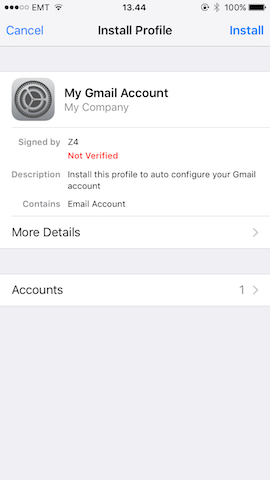
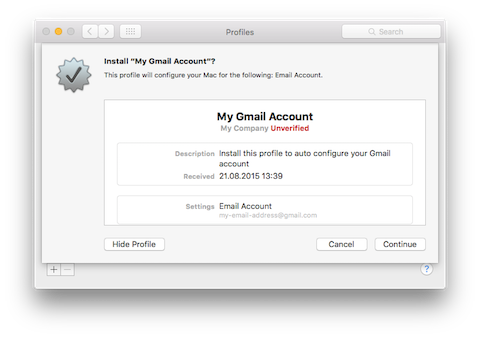
> **NB** You can use the same key and cert that you use for your HTTPS server. If the certificate is valid, then the profile is displayed as "Verified" in a green font, otherwise it is displayed as "Unverified"/"Not Verified" in a red font.
## Example
```javascript
const mobileconfig = require('mobileconfig');
const options = {
emailAddress: 'my-email-address@gmail.com',
identifier: 'com.my.company',
imap: {
hostname: 'imap.gmail.com',
secure: true,
username: 'my-email-address@gmail.com',
password: 'mypass'
},
smtp: {
hostname: 'smtp.gmail.com',
port: 587,
secure: false,
username: 'my-email-address@gmail.com',
password: false // use the same password as for IMAP
},
keys: {
key: '-----BEGIN PRIVATE KEY-----...',
cert: '-----BEGIN CERTIFICATE-----...'
}
};
mobileconfig.getSignedEmailConfig(options, function (err, data) {
console.log(err || data);
});
```
**Profile settings generated by this example used in iOS**
**Profile settings generated by this example used in OSX**
See full featured example [here](examples/imap.js)
## Changelog
#### 1.0.3
- WiFi template
#### 1.0.2
- CalDAV template
#### 1.0.1
- CardDAV template and signing methods
- Optional callback for unsigned methods
#### 1.0.0
- Initial version
## License
**MIT**