mjeditor
Version:
A modern, plugin-extensible rich text editor for React with beautiful custom dialogs, notification system, and comprehensive editing features. Built with Slate.js for maximum flexibility.
390 lines (318 loc) • 11.5 kB
Markdown
# MJ Editor
A modern, plugin-extensible rich text editor for React, built with Slate.js. Features beautiful custom dialogs, notification system, and comprehensive text editing capabilities.
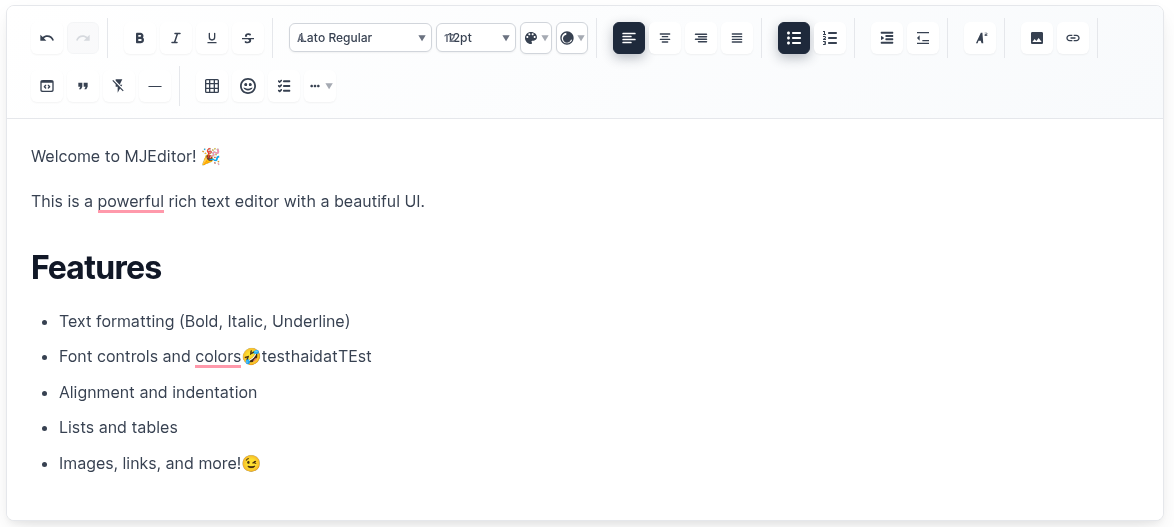
*Beautiful, modern interface with comprehensive toolbar and editing capabilities*
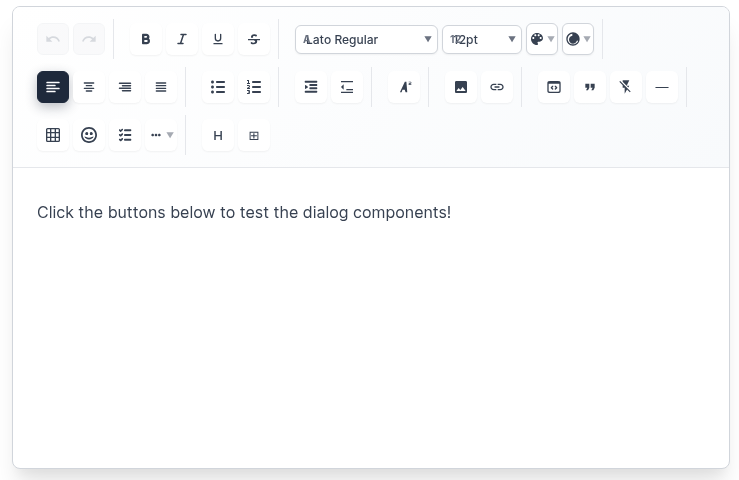
*Professional toolbar with text formatting, alignment, lists, and content insertion tools*
## ✨ Features
### 🎨 **Rich Text Editing**
- **Text Formatting**: Bold, Italic, Underline, Strikethrough
- **Font Controls**: Font family, size, color, background color
- **Text Alignment**: Left, Center, Right, Justify
- **Lists**: Bulleted lists, numbered lists, checklists
- **Indentation**: Increase/decrease text indentation
- **Headings**: H1-H6 heading support with paragraph options
### 🖼️ **Media & Content**
- **Images**: Insert images with URL, alt text, and captions
- **Links**: Insert hyperlinks with custom text
- **Tables**: Create tables with custom rows and columns
- **Emojis**: Insert emojis with categorized selection
- **Code Blocks**: Syntax-highlighted code blocks
- **Horizontal Rules**: Insert dividers
### 🎯 **User Experience**
- **Custom Dialogs**: Beautiful modal dialogs for all insertions
- **Notification System**: Custom notification cards (no browser alerts)
- **Responsive Design**: Works perfectly on desktop and mobile
- **Dark/Light Themes**: Built-in theme support
- **Auto-save**: Automatic content saving with configurable intervals
- **Keyboard Shortcuts**: Full keyboard navigation support
### 🔧 **Developer Experience**
- **Plugin System**: Extensible architecture with custom plugins
- **TypeScript Support**: Full type safety
- **Customizable Toolbar**: Show/hide specific tools
- **Export Options**: HTML, Markdown, and JSON export
- **Import Support**: Import from HTML and Markdown
## 🚀 Installation
```bash
npm install mjeditor
```
## 📖 Quick Start
```jsx
import React, { useState } from 'react';
import { MJEditor } from 'mjeditor';
import 'mjeditor/dist/editor.css';
function App() {
const [value, setValue] = useState([
{
type: 'paragraph',
children: [{ text: 'Hello, MJ Editor!' }],
},
]);
return (
<MJEditor
value={value}
onChange={setValue}
placeholder="Start typing..."
theme="light"
autoSave={true}
autoSaveInterval={5000}
onSave={(content) => console.log('Saved:', content)}
/>
);
}
```
## 🎛️ Advanced Usage
### With Custom Toolbar Configuration
```jsx
import React, { useState } from 'react';
import { MJEditor, NotificationProvider } from 'mjeditor';
import 'mjeditor/dist/editor.css';
function App() {
const [value, setValue] = useState([]);
return (
<NotificationProvider>
<MJEditor
value={value}
onChange={setValue}
placeholder="Start typing..."
theme="light"
toolbarConfig={{
showTextFormatting: true,
showFontControls: true,
showTextStyling: true,
showTextAlignment: true,
showIndentation: true,
showLists: true,
showTextPositioning: true,
showInsertOptions: true,
showAdvancedFeatures: true,
showUndoRedo: true,
disabledTools: ['emoji'], // Disable specific tools
customButtons: [
<button key="custom" onClick={() => alert('Custom action!')}>
Custom
</button>
]
}}
minHeight="400px"
maxHeight="600px"
autoSave={true}
autoSaveInterval={3000}
onSave={(content) => {
console.log('Auto-saved content:', content);
}}
/>
</NotificationProvider>
);
}
```
## 🎨 Custom Dialogs
### Image Dialog
- **URL Input**: Enter image URL with validation
- **Alt Text**: Add accessibility descriptions
- **Caption**: Optional image captions
- **Live Preview**: See image before insertion
### Link Dialog
- **URL Input**: Enter target URL
- **Link Text**: Custom display text
- **Validation**: URL format validation
- **Live Preview**: See link before insertion
### Table Dialog
- **Rows/Columns**: Select table dimensions
- **Live Preview**: See table structure
- **Quick Insert**: Instant table creation
### Emoji Dialog
- **Text Input**: Type custom emojis
- **Quick Selection**: Popular emoji buttons
- **Categories**: Organized emoji selection
- **Search**: Find emojis quickly
### Heading Dialog
- **Paragraph**: Regular paragraph text
- **H1-H6**: All heading levels
- **Visual Preview**: See heading styles
- **Descriptions**: Understand each option
## 🔔 Notification System
### Custom Notifications (No Browser Alerts!)
```jsx
import { NotificationProvider, useNotification } from 'mjeditor';
function MyComponent() {
const { showSuccess, showError, showWarning, showInfo } = useNotification();
const handleAction = () => {
showSuccess('Action completed successfully!');
showError('Something went wrong!');
showWarning('Please check your input!');
showInfo('Here is some information!');
};
return (
<NotificationProvider>
{/* Your app content */}
</NotificationProvider>
);
}
```
### Notification Types
- **Success**: ✅ Green notifications for successful actions
- **Error**: ❌ Red notifications for errors
- **Warning**: ⚠️ Yellow notifications for warnings
- **Info**: ℹ️ Blue notifications for information
## 📋 Available Plugins
### Core Plugins
- `TablePlugin` - Table creation and management
- `ImagePlugin` - Image insertion and rendering
- `LinkPlugin` - Hyperlink functionality
- `EmojiPlugin` - Emoji insertion
- `HeadingPlugin` - H1-H6 and paragraph support
### Text Formatting Plugins
- `BoldPlugin` - Bold text formatting
- `ItalicPlugin` - Italic text formatting
- `UnderlinePlugin` - Underline text formatting
- `StrikethroughPlugin` - Strikethrough text formatting
- `ColorPlugin` - Text and background colors
- `FontPlugin` - Font family and size controls
### Layout Plugins
- `AlignmentPlugin` - Text alignment controls
- `ListPlugin` - Bulleted and numbered lists
- `IndentationPlugin` - Text indentation
- `CodeBlockPlugin` - Code block insertion
- `HorizontalRulePlugin` - Horizontal dividers
## ⚙️ Configuration
### MJEditor Props
| Prop | Type | Default | Description |
|------|------|---------|-------------|
| `value` | `CustomElement[]` | `[]` | Editor content |
| `onChange` | `(value: CustomElement[]) => void` | - | Change handler |
| `plugins` | `Plugin[]` | `[]` | Array of plugins |
| `placeholder` | `string` | `'Start typing...'` | Placeholder text |
| `readOnly` | `boolean` | `false` | Read-only mode |
| `theme` | `'light' \| 'dark'` | `'light'` | Editor theme |
| `className` | `string` | `''` | Custom CSS class |
| `style` | `CSSProperties` | `{}` | Custom styles |
| `autoFocus` | `boolean` | `false` | Auto focus on mount |
| `autoSave` | `boolean` | `false` | Enable auto-save |
| `autoSaveInterval` | `number` | `30000` | Auto-save interval (ms) |
| `onSave` | `(value: CustomElement[]) => void` | - | Save handler |
| `toolbarConfig` | `ToolbarConfig` | `{}` | Toolbar configuration |
| `maxLength` | `number` | - | Maximum content length |
| `minHeight` | `string` | `'200px'` | Minimum editor height |
| `maxHeight` | `string` | - | Maximum editor height |
### ToolbarConfig
| Prop | Type | Default | Description |
|------|------|---------|-------------|
| `showTextFormatting` | `boolean` | `true` | Show text formatting buttons |
| `showFontControls` | `boolean` | `true` | Show font controls |
| `showTextStyling` | `boolean` | `true` | Show text styling options |
| `showTextAlignment` | `boolean` | `true` | Show alignment controls |
| `showIndentation` | `boolean` | `true` | Show indentation controls |
| `showLists` | `boolean` | `true` | Show list controls |
| `showTextPositioning` | `boolean` | `true` | Show positioning controls |
| `showInsertOptions` | `boolean` | `true` | Show insert options |
| `showAdvancedFeatures` | `boolean` | `true` | Show advanced features |
| `showUndoRedo` | `boolean` | `true` | Show undo/redo buttons |
| `disabledTools` | `string[]` | `[]` | Disable specific tools |
| `customButtons` | `ReactNode[]` | `[]` | Custom toolbar buttons |
## 📤 Export & Import
### Export Functions
```jsx
import {
serializeToHtml,
serializeToMarkdown
} from 'mjeditor';
// Export to HTML
const html = serializeToHtml(editorValue);
// Export to Markdown
const markdown = serializeToMarkdown(editorValue);
```
### Import Functions
```jsx
import {
deserializeFromHtml,
deserializeFromMarkdown
} from 'mjeditor';
// Import from HTML
const editorValue = deserializeFromHtml(htmlString);
// Import from Markdown
const editorValue = deserializeFromMarkdown(markdownString);
```
## 🎨 Customization
### Custom Styles
```css
/* Override default styles */
.mj-editor {
border: 2px solid #3182ce;
border-radius: 12px;
box-shadow: 0 4px 6px rgba(0, 0, 0, 0.1);
}
.mj-toolbar {
background: linear-gradient(135deg, #667eea 0%, #764ba2 100%);
border-radius: 8px 8px 0 0;
}
.mj-toolbar-button {
border-radius: 6px;
transition: all 0.2s ease;
}
.mj-toolbar-button:hover {
transform: translateY(-2px);
box-shadow: 0 4px 12px rgba(0, 0, 0, 0.15);
}
```
### Custom Plugin
```jsx
const CustomPlugin = {
name: 'custom',
commands: {
customAction: (editor, data) => {
// Custom command implementation
}
},
renderElement: (props) => {
// Custom element rendering
if (props.element.type === 'custom') {
return <div className="custom-element">{props.children}</div>;
}
return undefined;
},
renderLeaf: (props) => {
// Custom leaf rendering
if (props.leaf.custom) {
return <span className="custom-leaf">{props.children}</span>;
}
return undefined;
}
};
```
## 🌐 Browser Support
- **Chrome**: 60+
- **Firefox**: 55+
- **Safari**: 12+
- **Edge**: 79+
- **Mobile**: iOS Safari, Chrome Mobile
## 📦 Package Structure
```
mjeditor/
├── dist/ # Built files
├── src/
│ ├── components/ # Dialog components
│ ├── core/ # Core editor components
│ ├── plugins/ # Built-in plugins
│ ├── styles/ # CSS styles
│ ├── types/ # TypeScript types
│ └── utils/ # Utility functions
├── examples/ # Usage examples
└── demo/ # Demo application
```
## 🤝 Contributing
1. Fork the repository
2. Create your feature branch (`git checkout -b feature/amazing-feature`)
3. Commit your changes (`git commit -m 'Add some amazing feature'`)
4. Push to the branch (`git push origin feature/amazing-feature`)
5. Open a Pull Request
## 📄 License
MIT License - see [LICENSE](./LICENSE) file for details.
## 📝 Changelog
See [CHANGELOG.md](./CHANGELOG.md) for detailed version history.
## 🆘 Support
- **Issues**: [GitHub Issues](https://github.com/your-repo/mjeditor/issues)
- **Documentation**: [Full Documentation](https://mjeditor.dev)
- **Examples**: [Live Demo](https://mjeditor.dev/demo)
---
**MJ Editor** - Modern, beautiful, and powerful rich text editing for React applications. ✨