micro-test-runner
Version:
A minimal JavaScript test runner.
224 lines (167 loc) • 7.17 kB
Markdown
# Micro Test-Runner
  
A minimal JavaScript test runner.
[Package](https://www.npmjs.com/package/micro-test-runner) • [Demo](https://micro-test-runner.zakweb.dev/)
<br>
## Installation
```bash
npm install micro-test-runner
```
Include Micro Test-Runner in your project with:
```javascript
import test from 'micro-test-runner';
// Or
const test = require('micro-test-runner');
```
<br>
## Overview
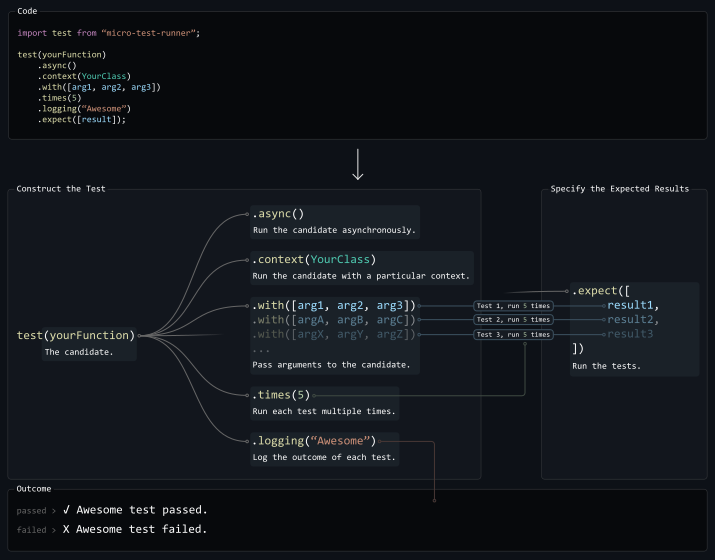
<br>
## Usage
Create a new test-runner with:
```javascript
const testRunner = test(yourFunction);
```
<br>
If your function requires a specific context (`this`), chain the `.context` method:
```javascript
class YourClass {
public static c = 17;
public static yourFunction (a, b) {
return a + b + this.c; // `this` is used by yourFunction.
}
}
// ...
testRunner.context(YourClass);
```
<br>
Specify the arguments to pass into your function:
```javascript
testRunner.with(arg1, arg2, arg3, etc...);
```
<details>
<summary>Advanced</summary>
You can chain `.with` methods to run your function multiple times with different arguments:
```javascript
testRunner.with(arg1, arg2) // Test 1.
.with(argA, argB) // Test 2.
.with(argX, argY) // Test 3.
```
</details>
<br>
Optionally, specify the number of times to run the test:
```javascript
testRunner.times(5); // Run the test 5 times.
```
<details>
<summary>Advanced</summary>
If you chained multiple `.with` methods, `.times(n)` will run the test `n` times for each set of arguments.
</details>
<br>
Finally, specify the results you expect your function to return from each test:
```javascript
testRunner.expect(result1, result2, result3, etc...);
```
<details>
<summary>Advanced</summary>
If a function is passed as an expected result, it will be evaluated on the value that the candidate returned for that particular test. This function should then return a boolean indicating whether the value was correct or not. For example:
```javascript
testRunner.expect(result1, result2, (value) => value typeof 'number');
```
</details>
<br>
## Results
Calling `.expect` will run the test(s), returning `true` if your function passes, `false` if not.
```javascript
const outcome = await testRunner.expect(result1, result2);
```
Alternately, if you'd like Micro Test-Runner to log the results for you, you can chain the `.logging()` method.
```javascript
import test from 'micro-test-runner';
test(yourFunction) // Test `yourFunction`...
.times(3) // 3 times...
.logging('Function Name', 'warn', ['✅', '❌']) // Logging the outcome...
.with('Hello', 'world!') // With these arguments...
.expect('Hello world!'); // And expect these results.
```
This method takes 4 arguments:
1. The name of the test.
2. `(Optional)` The severity used to log the test's failure. There are 3 options for this argument:
- `'log'` - Logs test results to the console.
- `'warn'` - Same as `'log'`, but failures will appear as warnings.
- `'error'` - Same as `'log'`, but failures will throw an error.
3. `(Optional)` Icons used to visually indicate the outcome of the test.
4. `(Optional)` Log the performance of each test run in the desired format:
- `'average'` - The average of all runs.
- `'table'` - A table showing the performance of each individual run.
<br>
## Examples
Logging:
```javascript
import test from 'micro-test-runner';
import { yourFunction } from './yourProject';
test(yourFunction) // Test `yourFunction`...
.times(3) // 3 times...
.logging('Function Name') // Logging the outcome...
.with('Hello', 'world!') // With these arguments...
.expect('Hello world!'); // And expect these results.
```
With result:
```javascript
import test from 'micro-test-runner';
import { apiCall } from './yourProject';
const result = await test(apiCall) // Test your `apiCall` function...
.times(3) // 3 times...
.with('https://example.com/api', '/endpoint') // With these arguments...
.expect('Hello internet!'); // And expect these results.
if (result) {
// Your test passed.
} else {
// Your test failed.
}
```
With result (promise):
```javascript
import test from 'micro-test-runner';
import { apiCall } from './yourProject';
test(apiCall) // Test your `apiCall` function...
.times(3) // 3 times...
.with('https://example.com/api', '/endpoint') // With these arguments...
.expect('Hello internet!') // And expect these results.
.then(result => {
if (result) {
// Your test passed.
} else {
// Your test failed.
}
});
```
Performance Logging:
```javascript
import test from 'micro-test-runner';
import { slowFunction } from './yourProject';
test(slowFunction) // Test `slowFunction`...
.times(3) // 3 times...
.with(2, 3) // With these arguments...
.with(4, 1) // And these arguments...
.logging('Slow', 'log', undefined, 'table') // Logging the outcome and performance to a table in the console...
.expect((value, runIndex, duration) => { // And expect these results (verified with a function).
return
value === 5 // Check the value returned by `slowFunction`.
&& duration < 200; // Check that `slowFunction` took less than 200ms.
});
/* Console output...
✓ Slow test passed in 1004.742ms (x̄ 160.779ms per run, over 6 runs):
╭──────┬───────┬───────────────╮
│ Test │ Run │ Duration (ms) │
├──────┼───────┼───────────────┤
│ 1 │ 1 │ 150.812 │
│ │ 2 │ 184.766 │
│ │ 3 │ 161.057 │
├──────┼───────┼───────────────┤
│ 2 │ 1 │ 162.936 │
│ │ 2 │ 159.213 │
│ │ 3 │ 145.887 │
╰──────┴───────┴───────────────╯
*/
```