mcp-code-graph
Version:
Code Graph MCP Server
191 lines (134 loc) • 6.37 kB
Markdown
[](https://deepgraph.co/JudiniLabs/mcp-code-graph)
<hr>
# Deep Graph MCP Server by [CodeGPT](https://codegpt.co/)
A [Model Context Protocol](https://modelcontextprotocol.io/quickstart/server) server that enables seamless interaction with Code Graphs.
<img width="1373" alt="Screenshot 2025-06-11 at 14 01 15" src="https://github.com/user-attachments/assets/a588bafc-d5a8-4955-8d48-3addaf3ed71c" />
## How this works
This MCP allows you to interact with the knowledge graphs available in your CodeGPT account or with public graphs from [DeepGraph](https://deepgraph.co).
You'll be able to use these advanced graph-based queries across different MCP Hosts such as ChatGPT, Cursor, Windsurf, CodeGPT Extension, GitHub Copilot, Claude Desktop, Claude Code, Gemini CLI, and others.
## Available Tools
- `list-graphs`: Lists available repository graphs with basic information.
- `get-code`: Retrieves the complete source code for a specific functionality from the graph.
- `find-direct-connections`: Explores the direct relationships of a functionality within the code graph.
- `nodes-semantic-search`: Semantically searches for code functionalities using natural language.
- `docs-semantic-search`: Semantically searches repository documentation.
- `get-usage-dependency-links`: Analyzes and lists functionalities affected by changes to a code entity.
- `folder-tree-structure`: Retrieves the tree structure of a folder in the repository.
## For Public Graphs (No Account Required)
You can interact with public graphs from [DeepGraph](https://deepgraph.co):
1. Find any public repository on [deepgraph.co](https://deepgraph.co)
2. Use the repository reference (e.g., `username/repository-name`)
## Installation using npx
Add the following configuration to your MCP client (CodeGPT Extension, Cursor, Copilot, Claude Desktop, Windsurf, etc.):
```json
{
"mcpServers": {
"Deep Graph MCP": {
"command": "npx",
"args": ["-y" , "mcp-code-graph@latest",
"username/repository-name", // DeepGraph repository URL
"username2/repository-name2" // Add more repositories if needed
]
}
}
}
```
### For Private Graphs (CodeGPT Account Required)
Before using the CodeGPT MCP Server with private graphs, ensure you have:
1. A CodeGPT account (sign up at [app.codegpt.co](https://app.codegpt.co))
2. Uploaded a repository to [Code Graph](https://help.codegpt.co/en/articles/9912447-code-graphs)
3. Get your API Key from [CodeGPT API Keys page](https://app.codegpt.co/user/api-keys) (required).
4. Get your Organization ID (optional) and Graph ID (optional).
### Installation with npx
Add the following configuration to your MCP client (CodeGPT Extension, Cursor, Copilot, Claude Desktop, Windsurf, etc.):
```json
{
"mcpServers": {
"Deep Graph MCP": {
"command": "npx",
"args": ["-y" , "mcp-code-graph@latest",
"CODEGPT_API_KEY", // Required
"CODEGPT_ORG_ID", // Optional
"CODEGPT_GRAPH_ID" // Optional
]
}
}
}
```
# CLI Providers
## Adding to Gemini CLI
Add the JSON configuration to your settings.json file:
Gemini CLI uses settings.json files for persistent configuration. There are two locations for these files:
- User settings file:
Location: ~/.gemini/settings.json (where ~ is your home directory).
Scope: Applies to all Gemini CLI sessions for the current user.
- Project settings file:
Location: .gemini/settings.json within your project's root directory.
Scope: Applies only when running Gemini CLI from that specific project. Project settings override user settings.
## Adding to Claude Code
Follow these steps to integrate Deep Graph MCP Server with Claude Code.
## Quick Setup
### For Private Graphs
```bash
claude mcp add "Deep Graph MCP" npx -- -y mcp-code-graph@latest CODEGPT_API_KEY
```
### For Public Graphs
```bash
claude mcp add "Deep Graph MCP" npx -- -y mcp-code-graph@latest username/repository-name
```
**For team sharing**, add the `-s project` flag:
```bash
claude mcp add -s project "Deep Graph MCP" npx -- -y mcp-code-graph@latest CODEGPT_API_KEY
# or for public graphs
claude mcp add -s project "Deep Graph MCP" npx -- -y mcp-code-graph@latest username/repository-name username2/repository-name
```
## Verification
```bash
# Verify installation
claude mcp list
# Get server details
claude mcp get "Deep Graph MCP"
```
## Advanced Workflows with Claude Code Custom Commands
Claude Code supports custom slash commands that combine multiple MCP Code Graph tools for comprehensive analysis workflows.
### Setup
**Copy the commands directory** from this repository to your project root:
```bash
cp -r .claude/ /path/to/your/project/
```
Commit to your project's git:
```bash
git add .claude/commands/
git commit -m "Add custom Claude Code commands for Deep Graph MCP"
```
## Available Commands
Repository-wide analysis commands (no parameters needed):
```bash
/project:analyze-architecture # Complete architectural overview
/project:security-audit # Comprehensive security analysis
/project:test-coverage-analyzer # Test coverage and quality analysis
/project:technical-debt-analyzer # Technical debt assessment
/project:api-ecosystem-analyzer # Complete API ecosystem analysis
/project:repository-onboarding # Full repository onboarding guide
```
Component-specific commands (require parameters):
```bash
/project:migration-planner [component/technology] # Smart migration planning
/project:performance-optimizer [component/function] # Performance optimization
/project:component-onboarding [component/feature] # Component-specific training
```
## Usage Examples
```bash
/project:analyze-architecture
/project:migration-planner React to Vue.js
/project:performance-optimizer DatabaseService.getUserData
/project:component-onboarding authentication system
```
## 📈 Star History
[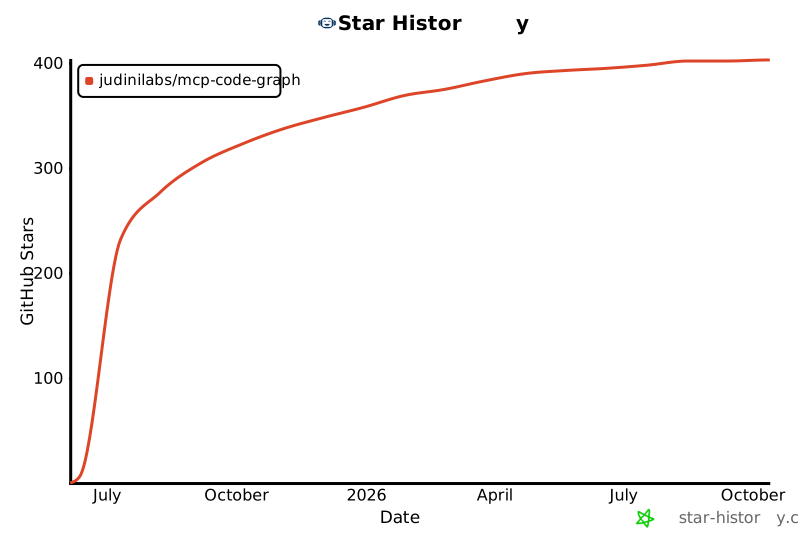](https://star-history.com/#JudiniLabs/mcp-code-graph&Date)
## Support
For support and feedback:
- Email: support@codegpt.co
- Website: [app.codegpt.co](https://app.codegpt.co)
## License
[MIT License](https://opensource.org/licenses/MIT)