mat-pick-range-dates
Version:
Angular 2 component range date picker.
173 lines (136 loc) • 4.46 kB
Markdown
# MatPickRangeModule
This project was generated with [Angular CLI](https://github.com/angular/angular-cli) version 20.1.4 & npm 22.14.0
Each version has oun branch on git
- 20.1.4
- 19.2.14
- 18.2.0
- 17.3.0
- 15.0.3
- 8.0.0
## Run locally
Run `npm i & npm run build & npm run start` for a dev server. Navigate to `http://localhost:4200/`. The app will automatically reload if you change any of the source files.
## Demo
https://ionut88.github.io/mat-pick-range-dates/
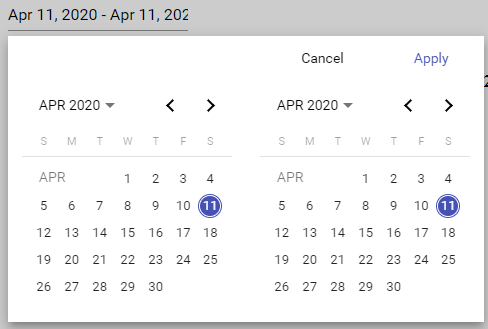
With default options
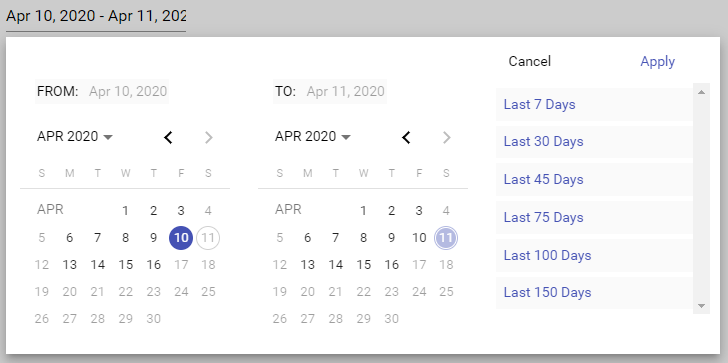
With custom options
## Install
```
$ npm install mat-pick-range-dates
```
## Peer Dependencies
Please note and install the following peer dependencies necessary for Angular v15
```json
"peerDependencies": {
"@angular/animations": "20.1.4",
"@angular/material": "20.1.4"
}
.css
@import "~@angular/material/prebuilt-themes/indigo-pink.css";
```
## Example
Import `MatPickRangeModule` module in your application module.
`app.module.ts`
```typescript
import { MatPickRangeModule } from 'ngx-mat-daterange-picker';
@NgModule({
imports: [MatPickRangeModule],
})
export class AppModule {}
```
`app.compnent.html`
```html
<mat-pick-range (selectedDateRangeChanged)="updateRange($event)" [options]="options" #picker></mat-pick-range>
```
Options are not required and will use defauls!
`app.component.ts`
```typescript
import { Component, OnInit, ViewChild } from '@angular/core';
import { Options, Range } from './mat-pick-range/model/model';
@Component({
selector: 'app-root',
templateUrl: './app.component.html',
styleUrls: ['./app.component.scss'],
})
export class AppComponent implements OnInit {
range: Range = { fromDate: new Date(), toDate: new Date() };
options: Options;
@ViewChild('picker', { static: false }) picker;
ngOnInit() {
const addDays = (numOfDays) => {
const today = new Date();
return new Date(today.setDate(today.getDate() + numOfDays));
};
const today = new Date();
this.options = {
presets: [
{
presetLabel: 'Last 7 Days',
range: { fromDate: addDays(-7), toDate: today },
},
{
presetLabel: 'Last 30 Days',
range: { fromDate: addDays(-30), toDate: today },
},
{
presetLabel: 'Last 45 Days',
range: { fromDate: addDays(-45), toDate: today },
},
],
format: 'mediumDate',
range: { fromDate: addDays(-1), toDate: today },
excludeWeekends: true,
locale: 'en-US',
fromMinMax: { fromDate: addDays(-45), toDate: addDays(5) },
toMinMax: { fromDate: addDays(-45), toDate: addDays(5) },
applyLabel: 'Apply',
cancelLabel: 'Cancel',
calendarOverlayConfig: {
panelClass: 'mat-prd-overlay',
hasBackdrop: true,
backdropClass: 'mat-prd-overlay-backdrop',
shouldCloseOnBackdropClick: true,
},
placeholder: 'Choose a date',
startDatePrefix: 'FROM:',
endDatePrefix: 'TO:',
};
}
updateRange(range: Range) {
this.range = range;
}
reset() {
const today = new Date();
this.picker.resetDates({
fromDate: new Date(today.getFullYear(), today.getMonth(), today.getDate() - 1),
toDate: today,
});
}
}
```
`defaultOptions`
```typescript
defaultOptions: Options = {
applyLabel: 'Apply',
cancelLabel: 'Cancel',
placeholder: 'Choose a date',
format: 'mediumDate',
excludeWeekends: false,
locale: 'en-US',
fromMinMax: { fromDate: null, toDate: null },
toMinMax: { fromDate: null, toDate: null },
range: { fromDate: new Date(), toDate: new Date() },
calendarOverlayConfig: {
panelClass: 'mat-prd-overlay',
hasBackdrop: true,
backdropClass: 'mat-prd-overlay-backdrop',
shouldCloseOnBackdropClick: true,
},
};
```
## Build
Run `ng build` to build the project. The build artifacts will be stored in the `dist/` directory.
Run `npm run watch` to build the library project and watch it. The build artifacts will be stored in the `dist/`.
## License
MIT