masonry-snap-grid-layout
Version:
A performant, responsive masonry layout library with smooth animations, dynamic columns, and zero dependencies.
201 lines (152 loc) • 6.07 kB
Markdown
# masonry-snap-grid-layout
[](https://www.npmjs.com/package/masonry-snap-grid-layout)
[](https://github.com/khachatryan-dev/masonry-snap-grid-layout/actions)
[](https://codesandbox.io/p/sandbox/l9xl7s)
[](https://codesandbox.io/p/sandbox/rgxsxp)
A performant masonry grid layout library with smooth animations, customizable gutter, columns, and dynamic item content.
---
## Demo Video
[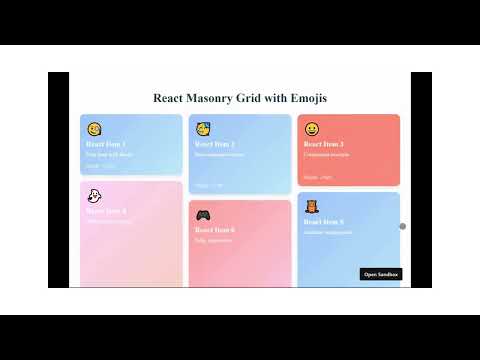](https://www.youtube.com/watch?v=mHK_6z9WEWs)
---
## 🚀 Features
- **Dynamic Columns & Gutter**: Automatically adapts to container width
- **Smooth Animations**: CSS-powered transitions when layout changes
- **Customizable Items**: Render any content with gradient backgrounds and emojis
- **Lightweight**: Zero dependencies, pure TypeScript
- **React & Vanilla JS**: Works with both React and plain JavaScript
- **Responsive**: Perfect for galleries, dashboards, and card layouts
---
## 🔧 Installation
```bash
npm install masonry-snap-grid-layout
# or
yarn add masonry-snap-grid-layout
# or
pnpm add masonry-snap-grid-layout
```
---
## 💡 Usage Examples
### Vanilla JavaScript (Live Demo)
```javascript
import MasonrySnapGridLayout from 'masonry-snap-grid-layout';
import 'masonry-snap-grid-layout/dist/index.css';
const container = document.getElementById('masonry-container');
const items = [
{ id: 1, title: "Sunset", emoji: "🌅", color: "#FF9A9E" },
{ id: 2, title: "Ocean", emoji: "🌊", color: "#A1C4FD" },
// ... more items
];
const masonry = new MasonrySnapGridLayout(container, {
gutter: 16,
minColWidth: 200,
animate: true,
transitionDuration: 300,
items: items,
renderItem: (item) => {
const div = document.createElement('div');
div.style.height = `${120 + Math.random() * 200}px`;
div.style.background = `linear-gradient(135deg, ${item.color} 0%, #FFFFFF 100%)`;
div.style.borderRadius = '12px';
div.style.padding = '16px';
div.style.color = '#333';
div.innerHTML = `
<div style="font-size: 2rem">${item.emoji}</div>
<h3 style="margin: 8px 0">${item.title}</h3>
`;
return div;
}
});
```
[](https://codesandbox.io/p/sandbox/l9xl7s)
---
### React (Live Demo)
```jsx
import MasonrySnapGrid from 'masonry-snap-grid-layout/react';
import 'masonry-snap-grid-layout/dist/index.css';
const items = Array.from({ length: 20 }, (_, i) => ({
id: i,
title: `Item ${i + 1}`,
emoji: ['🌻', '🌈', '🍕', '🎸', '🚀'][Math.floor(Math.random() * 5)],
height: 120 + Math.random() * 200
}));
export default function Gallery() {
return (
<MasonrySnapGrid
items={items}
gutter={16}
minColWidth={220}
animate
transitionDuration={400}
renderItem={(item) => (
<div style={{
height: `${item.height}px`,
background: `linear-gradient(135deg,
hsl(${Math.random() * 360}, 70%, 70%) 0%,
hsl(${Math.random() * 360}, 70%, 80%) 100%)`,
borderRadius: '12px',
padding: '16px',
color: 'white'
}}>
<div style={{ fontSize: '2rem' }}>{item.emoji}</div>
<h3 style={{ margin: '8px 0' }}>{item.title}</h3>
<small>Height: {Math.round(item.height)}px</small>
</div>
)}
/>
);
}
```
[](https://codesandbox.io/p/sandbox/rgxsxp)
---
## 🛠️ API Reference
### Configuration Options
| Option | Type | Default | Description |
|----------------------|---------------------------|---------|--------------------------------------|
| `gutter` | `number` | `16` | Spacing between items (px) |
| `minColWidth` | `number` | `250` | Minimum column width (px) |
| `animate` | `boolean` | `true` | Enable/disable animations |
| `transitionDuration` | `number` | `400` | Animation duration (ms) |
| `items` | `Array<T>` | `[]` | Your data items |
| `renderItem` | `(item: T) => HTMLElement`| - | Function to render each item |
| `classNames` | `Object` | - | Custom CSS class names |
### Methods
- `updateItems(newItems: T[])`: Refresh with new items
- `shuffleItems()`: Randomize item positions
- `destroy()`: Clean up the instance
---
## 🎨 Customization Tips
**1. Gradient Backgrounds**
Use CSS gradients for beautiful card backgrounds:
```css
background: linear-gradient(135deg, #ff9a9e 0%, #fad0c4 100%);
```
**2. Random Emojis**
Add personality with emojis:
```javascript
const emojis = ['🌻', '🌈', '🍕', '🎸', '🚀'];
const randomEmoji = emojis[Math.floor(Math.random() * emojis.length)];
```
**3. Responsive Breakpoints**
Adjust columns based on screen size:
```javascript
minColWidth: window.innerWidth < 768 ? 150 : 250
```
---
## 📦 Package Structure
```
dist/
├── index.js # Vanilla JS bundle
├── react.js # React component
├── index.d.ts # TypeScript types
└── index.css # Base styles
```
---
## 🤝 Contributing
1. Fork the repository
2. Create a feature branch (`git checkout -b feature/amazing-feature`)
3. Commit your changes (`git commit -m 'Add amazing feature'`)
4. Push to the branch (`git push origin feature/amazing-feature`)
5. Open a Pull Request
---
## 📄 License
MIT © [Aram Khachatryan](https://github.com/khachatryan-dev)