magik-server
Version:
A simple HTTP development server with some nice magik.
308 lines (237 loc) • 8.16 kB
Markdown
# magik-server
> a simple HTTP server with some nice magik.
## <a name="getting-started"></a>Getting Started
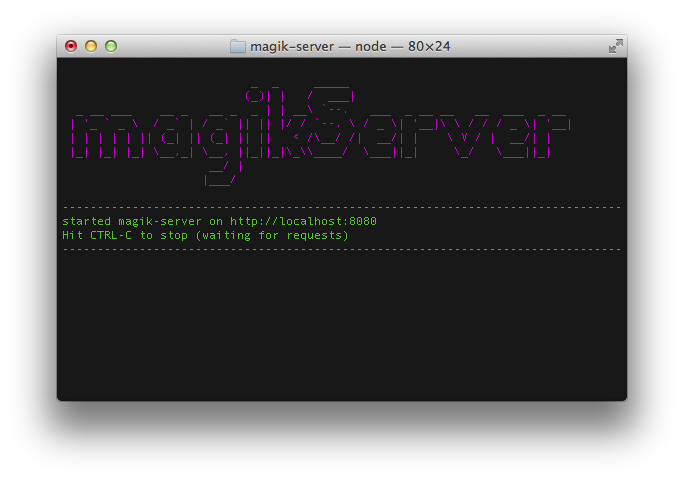
Install the package (globally) and start the server.
### npm
```sh
$ npm install -g magik-server
$ magik-server
```
### yarn
```sh
$ yarn global add magik-server
$ magik-server
```
### pnpm
```sh
$ pnpm add -g magik-server
$ magik-server
```
### bun
```sh
$ bun install -g magik-server
$ magik-server
```
# <a name="about"></a>About
magik-server is a small webserver that is intended to be used during the
development of front-end web applications and websites. There are quite a few
configuration options that can be set using command line switches, see below.
Also there's the possibility to influence server responses using
[query string parameters](#query-string-parameters).
# <a name="index"></a>Index
- [Getting started](#getting-started)
- [About](#about)
- [Documentation](#documentation)
- [Command line switches](#command-line-options)
- [-a](#switch-a)
- [--cors](#switch--cors)
- [-D](#no-directory-listing)
- [-e](#switch-e)
- [-h](#switch-h)
- [-H](#switch-H)
- [-i](#switch-i)
- [-n](#switch-n)
- [-o](#switch-o)
- [-p](#switch-p)
- [-r](#switch-r)
- [-s](#switch-s)
- [-t](#switch-t)
- [-u](#switch-u)
- [-v](#switch-v)
- [Query String Parameters](#query-string-parameters)
- [Examples](#examples)
- [Contributing](#contributing)
- [Icons](#icons)
- [License](#license)
# <a name="documentation"></a>Documentation
To display all command line options use the `-h` or `--help` switch
```sh
$ magik-server --help
```
# <a name="command-line-options"></a>Command line options
In this section all the available command line options are listed.
### <a name="switch-a"></a>IP Address
`-a` `--address`
Set the IP address the server is bound to. Default: localhost
```sh
$ magik-server -a 10.1.1.10
```
### <a name="switch--cors"></a>CORS Headers
`--cors`
Enable sending of CORS headers.
```sh
$ magik-server --cors
```
### <a name="switch-D"></a>no directory listing
`-D` `--no-dirs`
Disable directory listing. By default, when no suitable file is found to serve,
a directory listing will be displayed.
```sh
$ magik-server -D
```
### <a name="switch-e"></a>extension for the default index
`-e` `--extensions`
Adds one or more extensions to use to look up the default index page. By default
magikServer looks for: `html, htm, js`.
```sh
# add one extension
$ magik-server -e coffee
# add more than one extension
$ magik-server -e coffee, jade, styl
```
### <a name="switch-h"></a>Help
`-h` `--help`
Displays a list of all available command line options
### <a name="switch-H"></a>show hidden files
`-H` `--hidden`
Enables the display of hidden files. By default, files starting with a dot are
hidden in directory listings, use this switch to show them.
### <a name="switch-i"></a>index file(s)
`-i` `--index`
Adds one or more files that will be used as an index page. By default
magikServer looks for files with these names in the document root,
`index, default, main, app`.
More files can be added as a comma delimeted list:
```shell
$ magik-server -i my-index, my-app, my-other-index
```
### <a name="switch-n"></a>custom 404 page
`-n` `--not-found`
Adds the path to a custom 404 page. This path is relative to the document root.
```sh
$ magik-server -n error-pages/404.html
```
### <a name="switch-o"></a>open browser
`-o` `--open`
Automagically open the standard system web browser, after the server has
started.
### <a name="switch-p"></a>port number
`-p` `--port`
Sets the port number you wish to use for this server instance. If the port
number is already in use, the next available port will be automagically selectd.
The default port is 8080
```shell
$ magik-server -p 8090
```
### <a name="switch-r"></a>document root
`-r` `--root`
Sets the document root. Files from this folder will be served as if they are on
`/` in the browser.
```shell
$ magik-server -r app
```
### <a name="switch-s"></a>HTTP response status code
`-s` `--statusCode`
Sets the HTTP response code globally. Every response will have this status code.
You may also force response codes by using a
[query string parameter](#query-string-parameters). The default query string
parameter is magik-status, but you can also change this to any URL save string.
```sh
$ magik-server -s 201
$ magik-server -s my-status-param
```
### <a name="switch-t"></a> response time
`-t` `--time`
Sets the response time globally in milliseconds. Every reponse will take
(at least) this amount of time. You may also force response times by using a
[query string parameter](#query-string-parameters). The default query string
parameter is magik-time, but you can also change this to any URL save string.
```sh
$ magik-server -t 3000
$ magik-server -t my-time-param
```
### <a name="switch-u"></a>character encoding
`-u` `--encoding`
Sets the default character encoding of the files served. This defaults to UTF-8
and usually doesn't have to be changed.
```sh
$ magik-server -u cp-1252
```
### <a name="switch-v"></a>version information
`-v` `--version`
Displays version information of magik-server
```sh
$ magik-server -v
```
# <a name="query-string-parameters"></a> Query String Parameters
magikServer allows you to use query string parameters to change certain
behaviours. At this moment you can use these:
`magik-status`
Sets the HTTP response status code for this request. That means, the response is
certain to have the supplied status code. You can also change the name of the
parameter during startup, using the `-s` switch.
See also [`-s`](#switch-s)
`magik-time`
Sets the response time for this request. That means that the response will wait
at least the supplied amount of milliseconds before it is sent. You can also
change the name of the parameter during startup, using the `-t` switch.
See also [`-t`](#switch-t).
# <a name="examples"></a>Examples
Below you'll find a couple of commonly used ways to start up magik-server.
Start the server on localhost on port 8080
```shell
$ magik-server
```
Show help info:
```shell
$ magik-server -h
```
Start the server on port 8090, set the document root to the app folder and
set index to my-app.html
```shell
$ magik-server -p 8090 -r app -i my-app.html
```
Set the [response time query string parameter](#query-string-parameters) to a
custom value, so you can make requests that will honour the set time value
(in ms), like this one:
`http://localhost:8080/slow-server-response.html?wait=3000`
```shell
$ magik-server -t wait
```
You can also set a global response time that will used for all responses
```shell
magik-server -t 3000
```
Set a custom HTTP response code [query string parameter](#query-string-parameters)
so it can be used in requests like this one:
`http://localhost:8080/rest-service.json?status=201`
```shell
$ magik-server -s status
```
You can also set a global response status code that will always be returned
```shell
$ magik-server -s 202
```
# <a name="contributing"></a>Contributing
In lieu of a formal styleguide, take care to maintain the existing coding style.
Add unit tests for any new or changed functionality. Lint and test your code
using:
```shell
$ yarn lint
$ yarn test
```
# <a name="icons"></a>Icons
The icons are from [vscode codicons](https://github.com/microsoft/vscode-codicons).
# <a name="license"></a>License
[MIT](./LICENSE) © [Bjørn Wikkeling](https://bjorn.wikkeling.com)
- - - - - - - - - - - - - - - - - - - - - - - - - - - - - - - - - - - - - - - -
_ _ _____
(_)| | / ___|
_ __ ___ __ _ __ _ _ | | __\ `--. ___ _ __ __ __ ___ _ __
| '_ ` _ \ / _` | / _` || || |/ / `--. \ / _ \| '__|\ \ / / / _ \| '__|
| | | | | || (_| || (_| || || < /\__/ /| __/| | \ V / | __/| |
|_| |_| |_| \__,_| \__, ||_||_|\_\\____/ \___||_| \_/ \___||_|
__/ |
|___/
- - - - - - - - - - - - - - - - - - - - - - - - - - - - - - - - - - - - - - - -