lolo-backend
Version:
Lolo Backend is a REST Framework and provides an automatic asynchronous CRUD backend server generator based on your models' definitions and validation rules for Node.js and MongoDB.
505 lines (279 loc) • 14.7 kB
Markdown

**Lolo Backend** is a REST Framework and provides an automatic asynchronous CRUD (Non-Production) **backend test server** generator based on your models' definitions and validation rules for [Node.js](https://nodejs.org/en/) and [MongoDB](https://www.mongodb.com/en/).
It is extremely easy to implement and provides a great variety of tools and possibilities for the implementation of a lightweight and strong RESTful backend server.
The purpose of this framework is to provide a quick and easy test server for frontend developers.
---
## Installation
This is a [Node.js](https://nodejs.org/en/) module available through the [npm registry](https://www.npmjs.com/).
Before installing, [download and install Node.js](https://nodejs.org/en/download/).
If the installation is done using the [`npm install command`](https://docs.npmjs.com/getting-started/installing-npm-packages-locally):
```bash
npm install lolo-backend
```
#### Features
* Rapid Backend Development.
* Security (`HTTPS`, `CORS`, `JWT`).
* Uses [mongoose](https://mongoosejs.com/docs/) data modeling.
* Automatic integration of [express-validator](https://express-validator.github.io/docs/) for validation rules.
* Automatic encryption of password type fields with [bcrypt](https://www.npmjs.com/package/bcrypt).
* Provides asynchronous responses.
* The **find** method provides a **pager** (*Resolved pagination functions*).
* Offers the possibility to set custom routes, out of automatic CRUD routing.
* Independent response translation module.
#### Dependencies [`self-solved`]
**Lolo backend** uses the following frameworks to provide an automatic CRUD Backend Server:
`bcrypt: ^5.0.1` , `cors: ^2.8.5` , `express: ^4.17.1` , `express-validator: ^6.10.0` , `fs: ^0.0.1-security` , `http: ^0.0.1-security` , `https: ^1.0.0` , `js-yaml: ^4.0.0` , `jsonwebtoken: ^8.5.1` , `moment: ^2.29.1` , `mongoose: ^5.12.1` , `path: ^0.12.7`.
---
# Quick Start
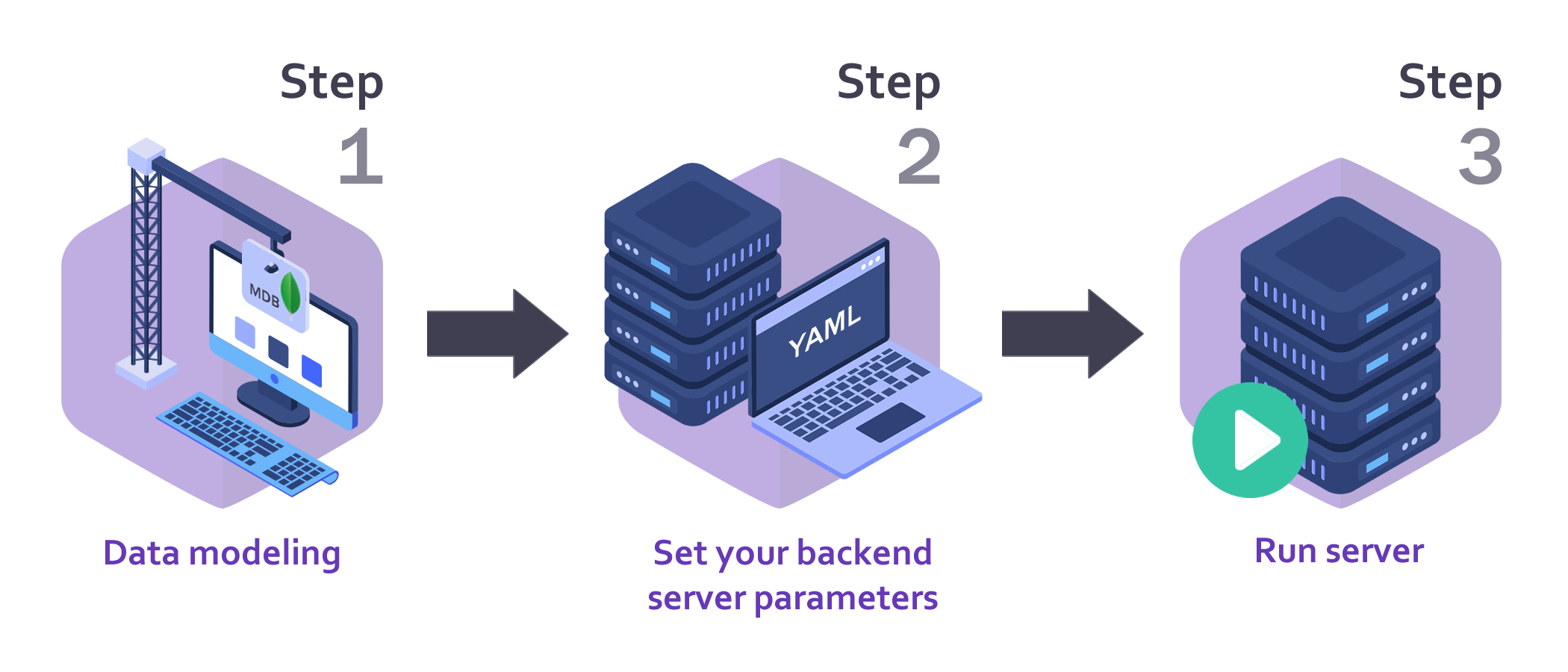
##### `Lolo Backend in 3 single steps`
---
## Step 1 - Data modeling
##### `With Mongoose Schemas & Express-Validator`
**Lolo Backend** allows automatic import of [Mongoose Schemas & Models](https://mongoosejs.com/docs/guide.html).
During the saving process in the database ([MongoDB](https://www.mongodb.com/en/)), these Schemas allow for a previous check against the corresponding Schema. Should the validation of the schema fail, [mongoose](https://mongoosejs.com/docs/) will abort the save operation.
On the other hand, for validation rules and data normalization, **Lolo Backend** uses [express-validator](https://express-validator.github.io/docs/).
[express-validator](https://express-validator.github.io/docs/) is a set of [express.js](http://expressjs.com/) middlewares that wraps [validator.js](https://github.com/validatorjs/validator.js) validator and sanitizer functions that ensure that only the correct data input reaches its destination ([MongoDB](https://www.mongodb.com/en/)).
* Import [mongoose](https://mongoosejs.com/docs/) and [express-validator](https://express-validator.github.io/docs/) frameworks inside models' definitions files:
```javascript
//Import modules:
const mongoose = require('mongoose');
const { body } = require('express-validator');
```
* **Modeling example** (Simple user data modeling with [mongoose](https://mongoosejs.com/docs/)):
```javascript
//Define Schema:
const Schema = new mongoose.Schema({
username: { type: String, required: true },
email: { type: String, required: true, match: /.+\@.+\..+/ },
status: { type: Boolean, default: false }
},
{ timestamps: true },
{ versionKey: false });
//Define model:
const Model = mongoose.model('users', Schema);
```
* **Validation rules and data normalization example** ([express-validator](https://express-validator.github.io/docs/)):
```javascript
//Define validation rules and data normalization for your models:
const Validator = [
body('username')
.trim()
.isLength(8)
.withMessage('The username is too short (minimum lenght: 8 characters).')
.toLowerCase(),
body('email')
.trim()
.isEmail()
.withMessage('The value entered is not a valid email.')
.normalizeEmail({ gmail_remove_dots: false })
.toLowerCase(),
body('status')
.trim()
.isBoolean()
.withMessage('The status entered is not a boolean (true or false).')
.toBoolean()
];
```
* **Clarification:** The elements must be exported in the following way so that they are correctly interpreted by **Lolo Backend**.
```javascript
//Export Shcema, Model and Validation Rules:
module.exports = { Schema, Model, Validator };
```
---
## Step 2 - Set your backend server parameters
**Lolo Backend** imports the **settings.yaml** file from the root of the project (`./`).
In this file all the parameters to suit your backend server must be defined and adjusted.
* Example of the contents of the **settings.yaml** file:
```yaml
# MongoDB server settings:
db:
host: 'localhost'
port: 27017
user: 'user_database'
pass: 'pass_database'
name: 'database_name'
# Web server settings:
webserver:
host : 'localhost'
http_enabled : true
http_port : 3001
https_enabled : false
https_port : 8443
# SSL settings (Only if https_enabled is true):
ssl_certificates:
key : './certificates/my_cert.key'
cert : './certificates/my_cert.crt'
ca : false
# Set CORS and CORS whitelist:
cors_enabled: false
cors_whitelist : ['http://example.com:8080','https://another-example.com:443']
# Determine whether to use verbose mode:
verbose_log_enabled: true
# Set your secret token:
# For your safety change this value please.
secret_token: 'MY_SECRET_TOKEN'
# Establish JWT credentials for service consumers:
jwt_credentials:
1:
id: '54a8ce618e91b0b13665e2f9'
username: 'angular-frontend'
password: 'clave.segura.1'
time_exp: '1d'
2:
id: '605a3f8282d6f81a5bbbc57a'
username: 'mobile-app'
password: 'clave.segura.2'
time_exp: '2d'
# Set the language of the responses:
language: 'EN'
# Establish your models and their names:
models:
users: './models/users'
# Determine whether to use custom routes:
custom_routes_enabled: true
# Set your custom routes file (Only if custom_routes_enabled is true):
custom_routes_file: './routes/custom_routes'
```
> **Important note `jwt_credentials`:**
>
> * **time_exp:** Expressed in seconds or a string describing a time span [zeit/ms](https://github.com/zeit/ms).
>
> ---
>
> **Example:** `60`, `"2 days"`, `"10h"`, `"7d"`. A numeric value is interpreted as a seconds count. If you use a string be sure you provide the time units (days, hours, etc), otherwise milliseconds unit is used by default (`"120"` is equal to `"120ms"`).
---
## Step 3 - Run your backend server
After making the models and configuring the parameters of your backend server, simply import `lolo-backend` and run it on your application.
```javascript
//Import Lolo Backend:
const loloBackend = require('lolo-backend');
//Run Lolo Backend Server:
loloBackend.runserver();
```
---
# How to use your backend server
Once the **Lolo Backend** is up and running, the following functions will be available for your application (`API RESTful`).
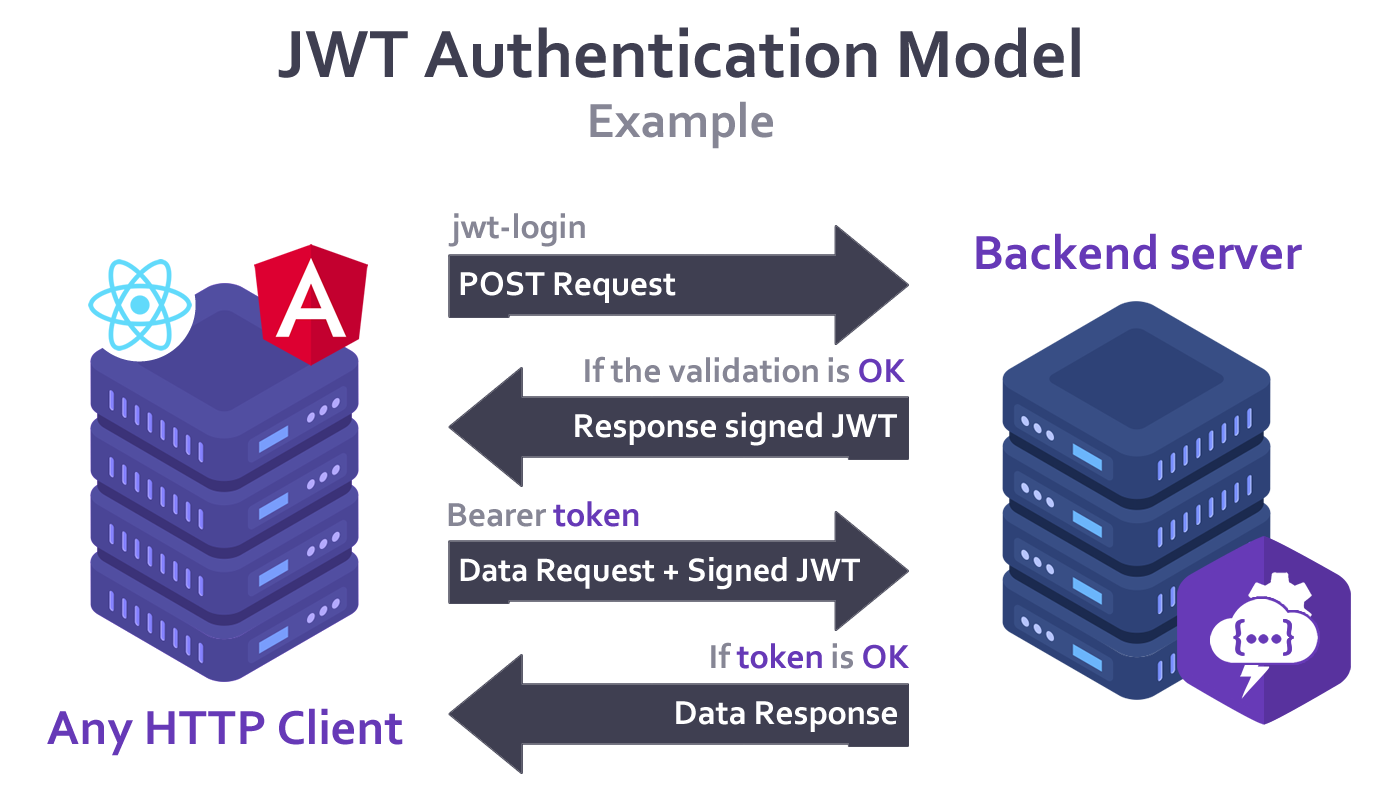
## JSON Web Token (JWT)
**Lolo Backend** uses [JWT](https://jwt.io/) to ensure secure access to data.
[JWT](https://jwt.io/) is an open JSON-based standard for creating access tokens that allow identity and privilege propagation, in this case for your own backend server.
---
## Request Methods
**Lolo Backend** provides the following list of request methods automatically for each of the defined models.
| METHOD | REQUIRES BEARER TOKEN | PATH / URL | DESCRIPTION |
| -------- | :-------------------: | ------------- | ------------------------------------------------------------ |
| **POST** | No | jwt-login | Generates a token ([JWT](https://jwt.io/)) using authentication (`settings.yaml > credentials`). |
| **GET** | Yes | describe | Returns all the model's keys. |
| **GET** | Yes | count | Returns the number of documents that matches a specified filters. |
| **GET** | Yes | find | Finds all the records in the collection that match the filters, the projection and the requested sort. |
| **GET** | Yes | findById | Finds an element based on an ID (`MongoDB _id`). |
| **GET** | Yes | findOne | Finds a single item (first occurrence), in the collection that matches the filters, the projection and the requested sort. |
| **POST** | Yes | insert | Creates a new record in the database. |
| **POST** | Yes | update | Validates against the model and if positive, updates an existing record in the database according to the ID (`MongoDB _id`), and specified parameters. |
| **POST** | Yes | delete | Deletes an item from the database based on an ID (`MongoDB _id`). |
| **POST** | Yes | checkPassById | Checks password (`password type field`) according to the ID (`MongoDB _id`). |
### Supported parameters & forms
* #### jwt-login
`admit: x-www-form-urlencoded`
* **username** = *username* defined in your **settings.yaml** file in the credentials section. `REQUIRED`
* **password** = *password* defined in your **settings.yaml** file in the credentials section. `REQUIRED`
+ #### describe
+ Does not admit parameters.
+ #### count
`admit: URL Query Parameters`
* **filter**[`field_name`] = *string, number, boolean*.
* #### find
`admit: URL Query Parameters`
* **filter**[`field_name`] = *string, number, boolean*.
* **proj**[`field_name`] = *number* (1 or 0 - Based on [MongoDB](https://www.mongodb.com/en/) Projections).
* **sort**[`field_name`] = *number* (1 or -1 - Based on [MongoDB](https://www.mongodb.com/en/) Sort definitions).
* **skip** = *number*.
* **limit** = *number*.
* **pager[page_number]** = *number*.
* **pager[page_limit]** = *number*.
> ***Important note `pager`:***
> *"If you use the **pager** parameters, keep in mind these overwrite the **skip** and **limit** parameters".*
* #### findById
`admit: URL Query Parameters`
* **id** = *MongoDB _id*. `REQUIRED`
* **proj**[`field_name`] = *number* (1 or 0 - Based on [MongoDB](https://www.mongodb.com/en/) Projections).
* #### findOne
`admit: URL Query Parameters`
* **filter**[`field_name`] = *string, number, boolean*.
* **proj**[`field_name`] = *number* (1 or 0 - Based on [MongoDB](https://www.mongodb.com/en/) Projections).
* **sort**[`field_name`] = *number* (1 or -1 - Based on [MongoDB](https://www.mongodb.com/en/) Sort definitions).
* #### insert
`admit: x-www-form-urlencoded`
* Your models' fields: **name_field** = *value*. `REQUIRED`
* #### update
`admit: x-www-form-urlencoded`
* **id** = *MongoDB _id*. `REQUIRED`
* Fields to set: **name_field** = *value*. `REQUIRED`
* #### delete
`admit: x-www-form-urlencoded`
* **id** = *MongoDB _id*. `REQUIRED`
* #### checkPassById
`admit: x-www-form-urlencoded`
* **id** = *MongoDB _id*. `REQUIRED`
* `password_field_name` = *password_to_check*. `REQUIRED`
### Set password case
If your model has a password type field, it must be specified with the **isPassword()** method of **Lolo Backend's** middleware **crudMiddleware** and this field will automatically be encrypted before being saved.
The request method **checkPassById** is available to validate the saved password field.
* **Modeling and validation rules definition example** (Simple user data modeling with password field):
```javascript
//Import modules:
const mongoose = require('mongoose');
const { body } = require('express-validator');
const loloBackend = require('lolo-backend');
//Define Pre-Schema (Only if a password field exists):
//For the rest of the cases use Schema directly.
const preSchema = new mongoose.Schema({
username: { type: String, required: true },
password: { type: String, required: true },
email: { type: String, required: true, match: /.+\@.+\..+/ },
status: { type: Boolean, default: false }
},
{ timestamps: true },
{ versionKey: false });
//Indicate that the schema has a password (to be encrypted):
Schema = loloBackend.crudMiddleware.isPassword(preSchema, 'password');
//Define model:
const Model = mongoose.model('users', Schema);
//Define validation rules and data normalization for your models:
const Validator = [
body('username')
.trim()
.isLength(8)
.withMessage('The username is too short (minimum lenght: 8 characters).')
.toLowerCase(),
body('password')
.trim()
.isLength(8)
.withMessage('The password is too short (minimum lenght: 8 characters).'),
body('email')
.trim()
.isEmail()
.withMessage('The value entered is not a valid email.')
.normalizeEmail({ gmail_remove_dots: false })
.toLowerCase(),
body('status')
.trim()
.isBoolean()
.withMessage('The status entered is not a boolean (true or false).')
.toBoolean()
];
//Export Shcema, Model and Validation Rules:
module.exports = { Schema, Model, Validator };
```
---
## Supported languages
Currently, **Lolo Backend** supports the following languages for its response messages.
* English ( `EN` )
* Spanish ( `ES` )
---
## Example of a simple project
An example of a simple project is available for [download here](https://github.com/cpifano/lolo-backend/tree/main/example).
---
## License
**Lolo Backend** is licensed by [MIT License](https://choosealicense.com/licenses/mit/).