log-with-statusbar
Version:
A light weight logger with a status bar on the bottom or the top that does not disappear with scrolling
195 lines (148 loc) • 6.39 kB
Markdown
A light weight logger with a status bar on the bottom or the top that does not disappear with scrolling.
You can also attach a verbosity level to each scrollable log call.
[](https://www.npmjs.com/package/log-with-statusbar)
[![NPM Downloads][downloadst-image]][downloads-url]
- [x] Prints system log while showing a status line message at the bottom without scrolling
- [x] Supports multiple non-scrollable status lines
- [x] Based on [ololog](https://github.com/xpl/ololog). All features of ololog are available.
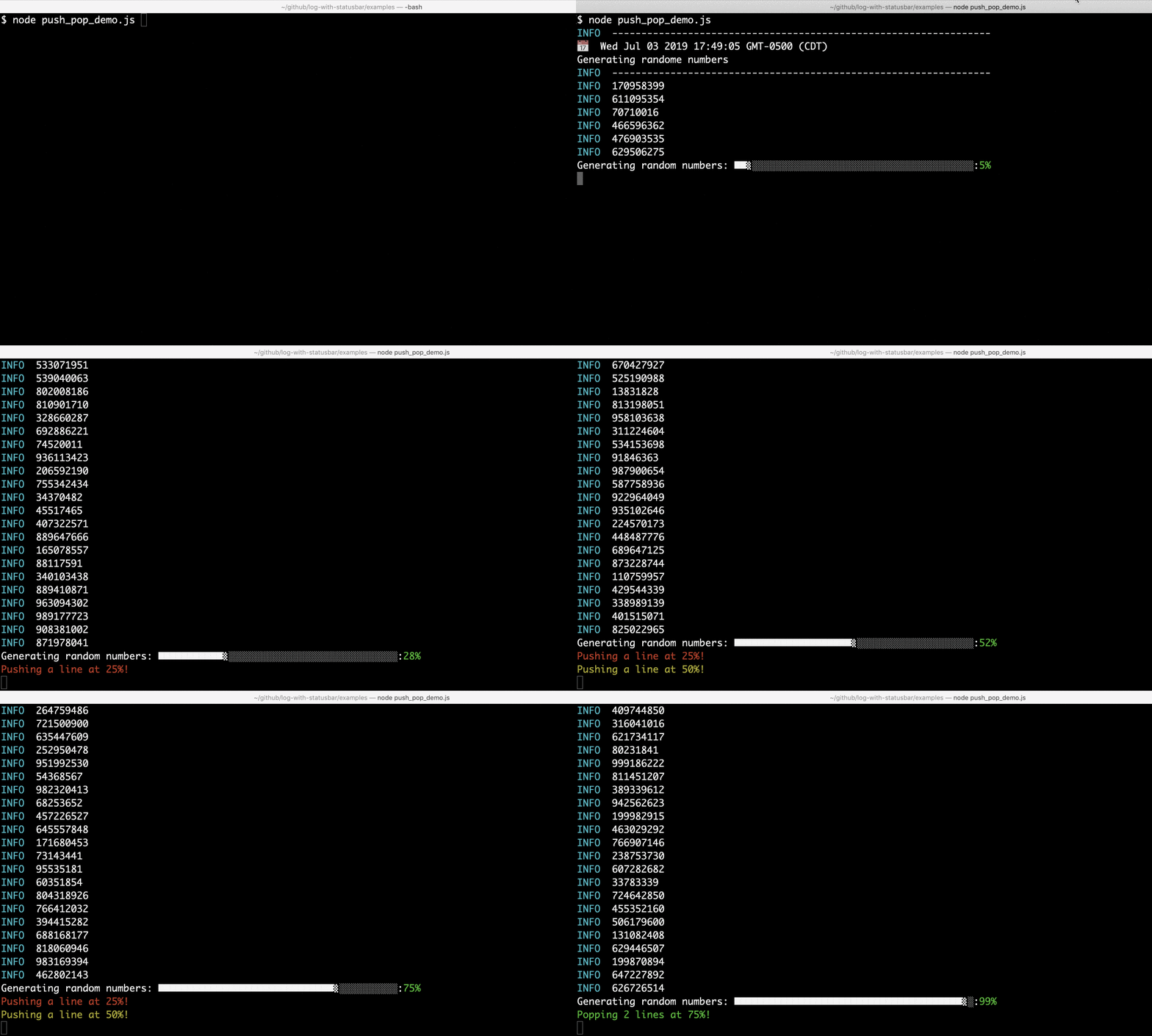
Status bar on the bottom:
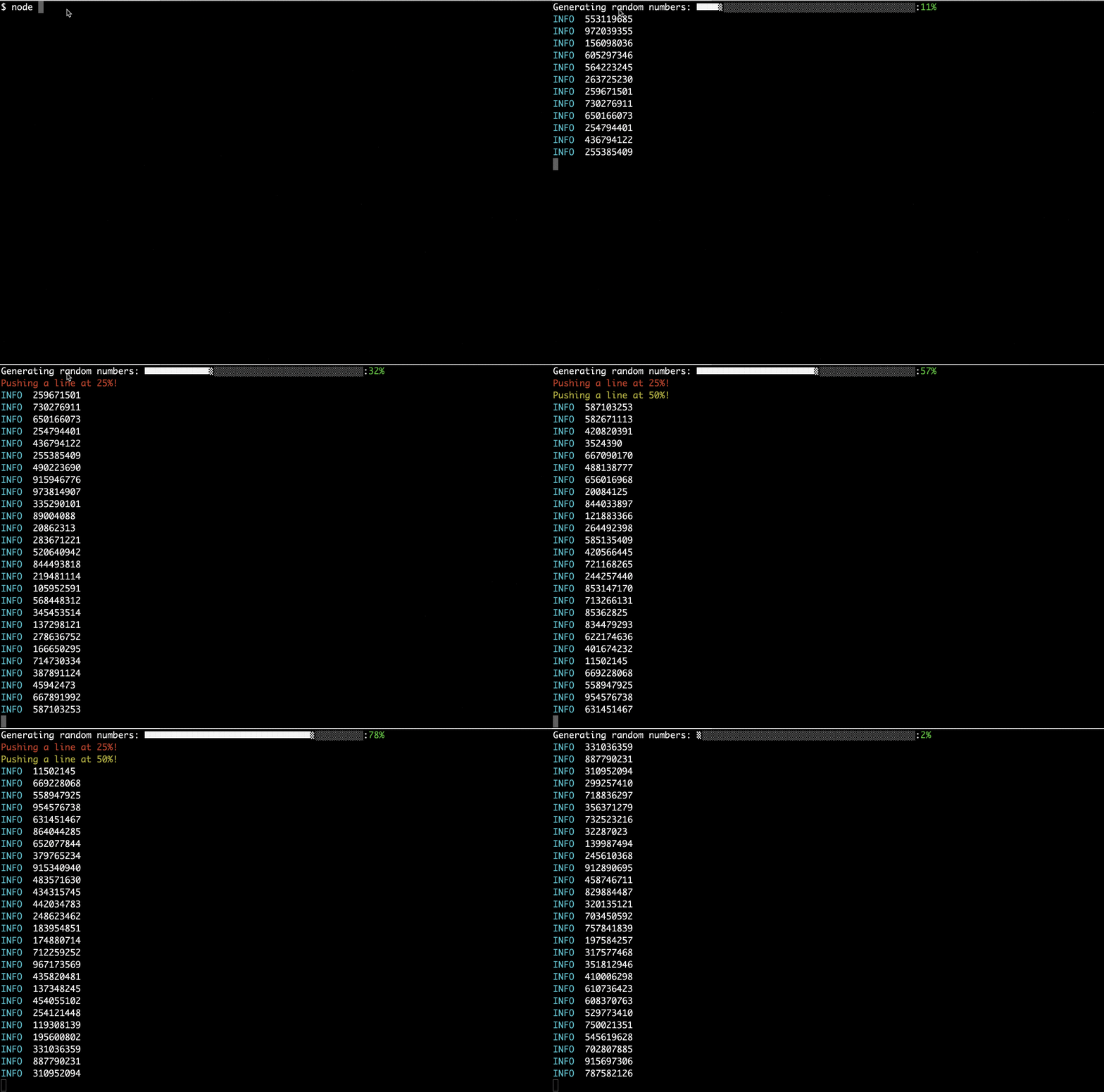
Status bar on the top:
Install with npm:
```bash
npm install log-with-statusbar
```
```javascript
const log = require("log-with-statusbar")();
// Set the bottom status lines
// Each line is an entry of the array
log.setStatusBarText([
`This is non-scrollable status bar line 1`,
`This is non-scrollable status bar line 2`
]);
// Normal scrollable system logs
let i = 0;
setInterval(() => {
log.info(`This is a normal scrollable log ${i++}`);
}, 1);
```
Several examples are available in [examples](examples) folder:
- [Simple demo](examples/simple_demo.js)
- [Progress bar](examples/demo.js)
- [Spinner](examples/spinner.js)
- [Enable/Disable log and status bar](examples/enable.js)
- [Push and Pop](examples/push_pop_demo.js)
- [Verbosity](examples/verbose.js)
You can add or remove lines to the status bar
```javascript
// Adds one line to the status bar (See examples/push_pop_demo.js)
log.statusBarTextPush(`Adding one line to the status bar`);
// Removes one line from the status bar (See examples/push_pop_demo.js)
log.statusBarTextPop(`Remove the last line from the status bar`);
```
You can enable/disable the status bar or both scrollable log and status bar. See [examples/enable.js](examples/enable.js)
```javascript
// Disables the status bar
log.disableStatusBar();
// Enables the status bar
log.enableStatusBar();
// Completely disables logging both scrollable and status bar
log = log.disable();
// Completely enables logging both scrollable and status bar
log = log.enable();
```
You can use create pre-designed spinners. credit to [cli-spinners](https://github.com/sindresorhus/cli-spinners). See [Spinner](examples/spinner.js) example and [spinners.json](spinners.json) file.
```javascript
// Returns an object created from the spinners.json file
let spinners = log.getSpinners();
```
If you just want to use the status bar and also setup ololog parameters, you can set the following:
```javascript
const log = require("log-with-statusbar")({
ololog_configure: {
locate: false,
tag: true
}
});
```
`ololog_configure`: sets the [ololog](https://github.com/xpl/ololog) configurations. All features of ololog are available.
The following settings are for the status bar behavior:
```javascript
const log = require("log-with-statusbar")({
initialStatusTextArray: [`Please wait...`],
enableStatusBar: true,
position: "top" // Default value is "bottom"
});
```
Pushing keys while showing the status bar might disturb the output. You can disable input keys except for CTRL+C using `disableInput`, which is set to false by default:
```javascript
const log = require("log-with-statusbar")({
initialStatusTextArray: [`Please wait...`],
disableInput: true
});
```
Besides globally [enabling and disabling](
- Calling `log.verbosity(n).info("Test");` attaches verbosity level `n` to this call.
- Calling `log.info("Test");` attaches verbosity the default verbosity level to this call.
- Calling `log = log.maxVerbosity(1000);` will change the global maximum verbosity level
Below is an example:
```javascript
// We only print if verbosity is less than or equal maxVerbosity
var log = require("log-with-statusbar")({
maxVerbosity: 1, //maximum verbosity level
verbosity: 1, //Default verbosity level
enableStatusBar: false
});
// Non-verbose mode: The lines with verbosity 2 and 3 won't print
log("This prints because (1 <= 1)= true");
log.verbosity(2).info("Less important line 1");
log.verbosity(3).info("Even less important line 2");
console.log("\nLet's be more verbose!\n");
// Let's be more verbose: The lines with verbosity 2 and 3 will now print
log = log.maxVerbosity(3);
log("This prints because (1 <= 3)= true");
log.verbosity(2).info("Less important line 1");
log.verbosity(3).info("Even less important line 2");
```
And here is a more complicated example:
```javascript
var log = require("log-with-statusbar")({
maxVerbosity: 1, //maximum verbosity level
verbosity: 1, //Default verbosity level
enableStatusBar: false
});
// We only print if verbosity is less than or equal maxVerbosity
log("This prints using default verbosity level: (1 <= 1)= true");
// Attaching verbosity level 1
log.verbosity(1).info("This will print, (1 <= 1) = true");
// Attaching verbosity level 17
log.verbosity(17).info("This won't print, (17 <= 1) = false");
//Let's be more verbose now!
log.info("Changing maxVerbosity to 1000");
log = log.maxVerbosity(1000);
log.verbosity(17).info("This will print, (17 <= 1000) = ture");
log.verbosity(12).info("This will print, (12 <= 1000) = true");
log.verbosity(1).info("This will print, (1 <= 1000) = true");
log.verbosity(1500).info("This won't print, (1500 <= 1000) = false");
//Default verbosity level is still 1
log.info("This will print, (1 <= 1000) = true");
// Changing default verbosity level
log = log.verbosity(1600);
log.info("This won't print, (1600 <= 1500) = false");
```
[]: https://img.shields.io/npm/dm/log-with-statusbar.svg
[]: https://img.shields.io/npm/dt/log-with-statusbar.svg
[]: https://npmjs.org/package/log-with-statusbar