leaflet.tilelayer.colorfilter
Version:
A simple and lightweight Leaflet plugin to apply CSS filters on map tiles.
206 lines (151 loc) • 9.2 kB
Markdown
# Leaflet.TileLayer.ColorFilter
A simple and lightweight [Leaflet](https://leafletjs.com/) plugin to apply CSS color filter on map tiles.
> **Important: Breaking Changes in ColorFilter v2.x**
> * For existing projects on Leaflet 1.x, you can continue using v1.2.5 ([release](https://github.com/xtk93x/Leaflet.TileLayer.ColorFilter/releases/tag/1.2.5), [readme](https://github.com/xtk93x/Leaflet.TileLayer.ColorFilter/blob/1.2.5/README.md)) of this plugin without any changes.
> * With the release of [Leaflet 2.0](https://leafletjs.com/2025/05/18/leaflet-2.0.0-alpha.html), this plugin has been updated to v2.x. This version introduces breaking changes to simplify usage and ensure compatibility. For details, please see the [Upgrading section](#upgrading-to-leaflettilelayercolorfilter-v2x).
## Demos
- [Demo with a few presets.](https://xtk93x.github.io/Leaflet.TileLayer.ColorFilter/)
- [Make your own filter.](https://xtk93x.github.io/Leaflet.TileLayer.ColorFilter.updateFilter/)
## Installation
[NPM](https://www.npmjs.com/package/leaflet.tilelayer.colorfilter):
```
npm install --save leaflet.tilelayer.colorfilter
```
Or download [a release from the repository](https://github.com/xtk93x/Leaflet.TileLayer.ColorFilter/releases).
## Usage
This plugin can be used with Leaflet 2 and it's legacy versions.
### Leaflet 1.x (and older)
For legacy versions of Leaflet, you need to include the `leaflet-tilelayer-colorfilter-global.min.js` file after Leaflet.
```html
<script src="https://unpkg.com/leaflet@1.9.4/dist/leaflet.js"></script>
<script src="leaflet-tilelayer-colorfilter-global.min.js"></script>
<script>
const map = L.map('map').setView([51.505, -0.09], 13);
const tilelayer = L.tileLayer('https://tile.openstreetmap.org/{z}/{x}/{y}.png', {
attribution: '© <a href="http://www.openstreetmap.org/copyright">OpenStreetMap</a>',
colorFilter: ['invert:100%', 'grayscale:50%']
}).addTo(map);
</script>
```
A complete, working example can be found in `example/using-leaflet-legacy-1.9.4.html`, and `example/using-leaflet-legacy-0.7.0.html`.
### Leaflet 2.x (Global)
For Leaflet 2 using global scripts, include `leaflet-tilelayer-colorfilter-global.min.js`.
```html
<script src="https://unpkg.com/leaflet@2.0.0-alpha.1/dist/leaflet-global.js"></script>
<script src="leaflet-tilelayer-colorfilter-global.min.js"></script>
<script>
const map = new L.Map('map').setView([51.505, -0.09], 13);
const tilelayer = new L.TileLayer('https://tile.openstreetmap.org/{z}/{x}/{y}.png', {
attribution: '© <a href="http://www.openstreetmap.org/copyright">OpenStreetMap</a>',
colorFilter: ['invert:100%', 'grayscale:50%']
}).addTo(map);
</script>
```
A complete, working example can be found in `example/using-leaflet-2.0.0-global.html`.
### Leaflet 2.x (Module)
When using Leaflet 2 as an ES module, you can import the plugin directly.
```html
<script type="importmap">
{
"imports": {
"leaflet": "https://unpkg.com/leaflet@2.0.0-alpha.1/dist/leaflet.js"
}
}
</script>
<script type="module">
import { Map, TileLayer } from 'leaflet';
import 'leaflet-tilelayer-colorfilter';
const map = new Map('map').setView([51.505, -0.09], 13);
const tilelayer = new TileLayer('https://tile.openstreetmap.org/{z}/{x}/{y}.png', {
attribution: '© <a href="http://www.openstreetmap.org/copyright">OpenStreetMap</a>',
colorFilter: ['invert:100%', 'grayscale:50%']
}).addTo(map);
</script>
```
A complete, working example can be found in `example/using-leaflet-2.0.0-module.html`. To run this example, you need to serve it through a local web server. This is because browsers restrict the use of ES modules (`import`/`export`) from local file paths for security reasons. A simple way to do this is to run `python3 -m http.server` in the project's root directory and then navigate to `http://localhost:8000/example/using-leaflet-2.0.0-module.html` in your browser.
> **Technical Note.**
> The plugin is designed to be imported for its side effects, which means it modifies Leaflet's `TileLayer` directly rather than exporting a new class. This is why the import is `import 'leaflet-tilelayer-colorfilter';`. This design prevents conflicts with other plugins; if this plugin exported its own `TileLayer` subclass, you couldn't use it with other plugins that do the same. By augmenting the original `TileLayer`, features from multiple plugins can be used together on the same layer.
## Reference
### TileLayer(url, options)
After succesfully importing the plugin, TileLayer will have the new option `colorFilter` inside `options` parameter.
`colorFilter` accepts an array of string filters with the following format:
| Filter | Aliases | Description | Example | Default |
| --- | --- | --- | --- | --- |
| **Blur** | blur | Applies a Gaussian blur filtering measured in pixels | `['blur:2px']` | 0px |
| **Brightness** | brightness, bright, bri | Controls the brightness of tile image | `['brightness:150%']` | 100% |
| **Contrast** | contrast, con | Changes the color contrast of tiles | `['contrast:150%']` | 100% |
| **Grayscale** | grayscale, gray | Changes the color of tiles to a grayscale | `['grayscale:100%']` | 0% |
| **Hue-Rotate** | hue-rotate, hue-rotation, hue | Applies a hue rotation in degrees on tile colors | `['hue:180deg']` | 0deg |
| **Opacity** | opacity, op | Defines the opacity of the tiles | `['opacity:60%']` | 100% |
| **Invert** | invert, inv | Invert the tile colors | `['invert:100%']` | 0% |
| **Saturate** | saturate, saturation, sat | Saturates the tile colors | `['saturate:150%']` | 100% |
| **Sepia** | sepia, sep | Converts the tile colors to sepia | `['sepia:0%']` | 0% |
For *CSS Filter Browser Compatibility* please, refer to [Browser Compatibility](https://developer.mozilla.org/en-US/docs/Web/CSS/filter#Browser_compatibility_2).
### myTileLayer.updateColorFilter(newFilter)
On the fly changes on filter is supported with the `updateColorFilter` function ([demo](https://xtk93x.github.io/Leaflet.TileLayer.ColorFilter.updateFilter/)):
```js
let map = L.map('map').setView([51.505, -0.09], 14);
let oldFilter = [
'grayscale:100%',
'invert:100%',
]
let myTileLayer = L.tileLayer('https://tile.openstreetmap.org/{z}/{x}/{y}.png', {
attribution: '© <a href="http://www.openstreetmap.org/copyright">OpenStreetMap</a>',
colorFilter: oldFilter,
}).addTo(map);
myTileLayer.updateColorFilter(['brightness:110%', 'hue:90deg', 'saturate:120%']);
```
## Useful Tips
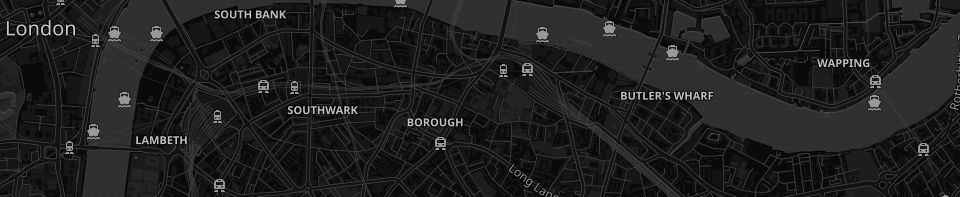
**The following settings is enough to make most of the light maps to become dark:**
```js
let myFilter = [
'grayscale:100%',
'invert:100%',
]
```
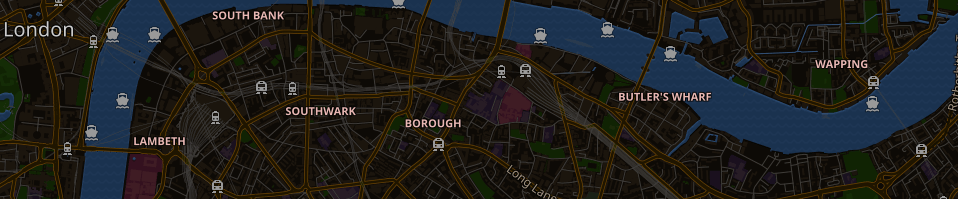
**To keep water and street colors, a hue rotation around 180deg is very helpful to correct the color inversion:**
```js
let myFilter = [
'hue:180deg',
'invert:100%',
]
```
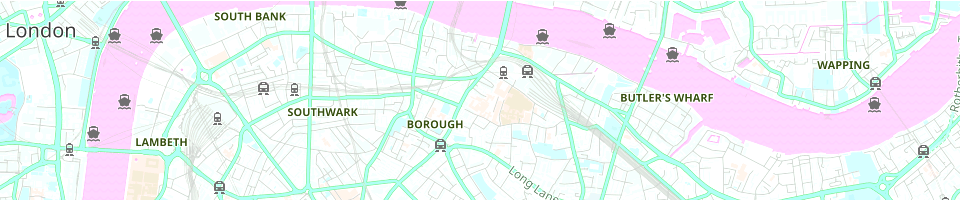
**Light maps may also look good:**
```js
let myFilter = [
'brightness:110%',
'hue:90deg',
'saturate:120%',
]
```
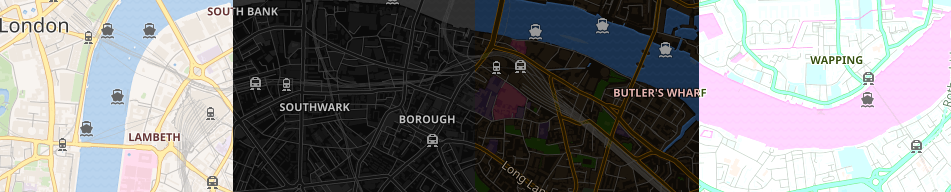
**The filter order matters:**
```js
let leftColoFilter = [
'invert:100%',
'brightness:115%',
'hue:186deg',
]
let rightColorFilter = [
'hue:186deg',
'brightness:115%',
'invert:100%',
]
```

## Upgrading to Leaflet.TileLayer.ColorFilter v2.x
If you are using Leaflet 1.x, you can either continue using `v1.2.5` of this plugin without any changes (see the [v1.2.5](https://github.com/xtk93x/Leaflet.TileLayer.ColorFilter/blob/1.2.5/README.md)) or upgrade to `v2.x` by following the steps below. To use Leaflet 2, you must use `v2.x` of this plugin.
When upgrading this plugin to `v2.x`, you will need to:
- Update the imports according to the Leaflet version you are using.
- For Leaflet 2 in **Global Script mode** (or Leaflet 1.x and older), use `leaflet-tilelayer-colorfilter-global.min.js`.
- For Leaflet 2 in **Module mode**, use `leaflet-tilelayer-colorfilter.min.js`.
- Update your code to use the new syntax. For the correct syntax, refer to the example that matches your Leaflet version: [Leaflet 1.x and older](#leaflet-1x-and-older), [Leaflet 2.x Global](#leaflet-2x-global), or [Leaflet 2.x Module](#leaflet-2x-module). In summary:
- The plugin now extends `TileLayer` directly.
- The `filter` option has been renamed to `colorFilter`.
- The `updateFilter()` method has been renamed to `updateColorFilter()`.
For a full list of changes, see the [CHANGELOG.md](./CHANGELOG.md).
## MIT License
This project is licensed under the MIT License. (c) 2018-2025, Cláudio T. Kawakani.