leaflet-responsive-popup
Version:
Removes the need to move the map to be able to see the content of a L.Popup
107 lines (68 loc) • 4.43 kB
Markdown
## Leaflet Responsive Popup
This plugin removes the need to move the map to be able to see the content of the popup. This happens when opening a popup near an edge of the map.
The implementation overrides [L.Popup](http://leafletjs.com/reference-1.0.2.html#popup).
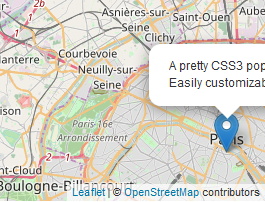
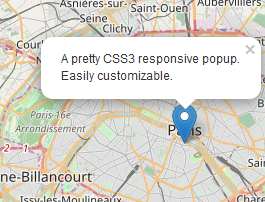
Here is a [demo](https://yafred.github.io/leaflet-responsive-popup/default-marker-tip) and a [use case](http://franceimage.github.io/map).
## Usage
### include leaflet and leaflet-responsive-popup
```html
<script src="https://unpkg.com/leaflet@1.8.0/dist/leaflet.js"></script>
<link rel="stylesheet" href="https://unpkg.com/leaflet@1.8.0/dist/leaflet.css" />
<script src="https://unpkg.com/leaflet-responsive-popup@1.0.0/leaflet.responsive.popup.js"></script>
<link rel="stylesheet" href="https://unpkg.com/leaflet-responsive-popup@1.0.0/leaflet.responsive.popup.css" />
```
### RTL support
If your pages use rtl (right to left) direction, add leaflet.responsive.popup.rtl.css
```html
<script src="https://unpkg.com/leaflet@1.8.0/dist/leaflet.js"></script>
<link rel="stylesheet" href="https://unpkg.com/leaflet@1.8.0/dist/leaflet.css" />
<script src="https://unpkg.com/leaflet-responsive-popup@1.0.0/leaflet.responsive.popup.js"></script>
<link rel="stylesheet" href="https://unpkg.com/leaflet-responsive-popup@1.0.0/leaflet.responsive.popup.css" />
<link rel="stylesheet" href="https://unpkg.com/leaflet-responsive-popup@1.0.0/leaflet.responsive.popup.rtl.css" />
```
### bind a L.ResponsivePopup to your markers
```javascript
var popup = L.responsivePopup().setContent('A pretty CSS3 responsive popup.<br> Easily customizable.');
L.marker([48.850258, 2.351074], { icon: myIcon }).addTo(map).bindPopup(popup);
```
### Angular support
See examples:
* https://github.com/yafred/ng-leaflet-responsive-popup (Angular)
* https://github.com/yafred/ngx-leaflet-responsive-popup (Angular @asymmetrik/ngx-leaflet)
## Options
### offset
The offset of the popup position.
As the position of the popup is not always above, it is slightly different from the L.Popup option.
`offset.x` is used when the popup is either left or right. `offset.y` is used when the popup is either top or bottom.
```javascript
var popup = L.responsivePopup({ offset: [10,10] }).setContent('A pretty CSS3 responsive popup.<br> Easily customizable.');
L.marker([48.850258, 2.351074], { icon: myIcon }).addTo(map).bindPopup(popup);
```
### autoPanPadding
Space (in pixels) we allow between the popup and the border of the map before we consider the popup is overflowing. `autoPanPadding.x` is used to prevent left and right overflows, `autoPanPadding.y` is used to prevent top and bottom overflows.
```javascript
var popup = L.responsivePopup({ autoPanPadding: [10,10] }).setContent('A pretty CSS3 responsive popup.<br> Easily customizable.');
L.marker([48.850258, 2.351074], { icon: myIcon }).addTo(map).bindPopup(popup);
```
### hasTip
```javascript
var popup = L.responsivePopup({ hasTip: false }).setContent('A pretty CSS3 responsive popup.<br> Easily customizable.');
L.marker([48.850258, 2.351074], { icon: myIcon }).addTo(map).bindPopup(popup);
```
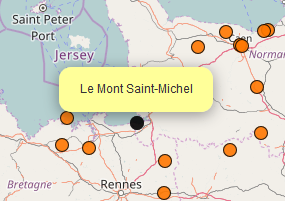
If you don't show the tips, you can either change the icon of the marker like [here](http://franceimage.github.io/map).
or add another marker to highlight the marker's position.
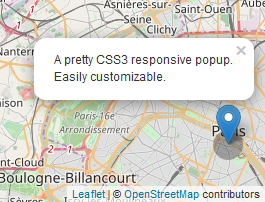
```javascript
map.on('popupopen',function(e) {
e.popup.highlight = L.circleMarker(e.popup.getLatLng(), { radius: 15 , opacity: 0, fillColor: "#000000", fillOpacity: .3 }).addTo(map);
});
map.on('popupclose',function(e) {
map.removeLayer(e.popup.highlight);
});
```
## Notes
Leaflet 1.0 to 1.7: you need to use leaflet-responsive-popup 0.6.4
Leaflet 1.8: you need to use leaflet-responsive-popup 1.0.0
This was inspired by [Rrose: A Leaflet Plugin for Edge Cases](https://github.com/erictheise/rrose).