leaflet-polydraw
Version:
Advanced Leaflet plugin for freehand polygon drawing, with smart merging and powerful editing tools. Compatible with both Leaflet v1.x and v2.x.
77 lines (56 loc) • 6.06 kB
Markdown
[](https://github.com/AndreasOlausson/leaflet-polydraw)
# Leaflet Polydraw
_A modern Leaflet plugin for intuitive freehand polygon drawing and advanced spatial editing — fully compatible with Leaflet 1.x and 2.x._
**Live Demo**: [https://polydraw.ao-tech.se](https://polydraw.ao-tech.se)
> **Advanced Leaflet plugin for freehand polygon drawing, with smart merging and powerful editing tools**
**Leaflet.Polydraw** lets you draw polygons directly on Leaflet maps in a natural freehand way — click and drag to sketch shapes.
It also supports point-to-point precision drawing, intelligent polygon merging, drag-and-drop repositioning, and a rich set of editing tools.
This makes it ideal for GIS platforms, mapping applications, and spatial data workflows.
[](https://www.npmjs.com/package/leaflet-polydraw)
[](https://opensource.org/licenses/MIT)
[](https://www.typescriptlang.org/)
[](https://github.com/AndreasOlausson/leaflet-polydraw/actions/workflows/ci.yml)
---
## Key Features
[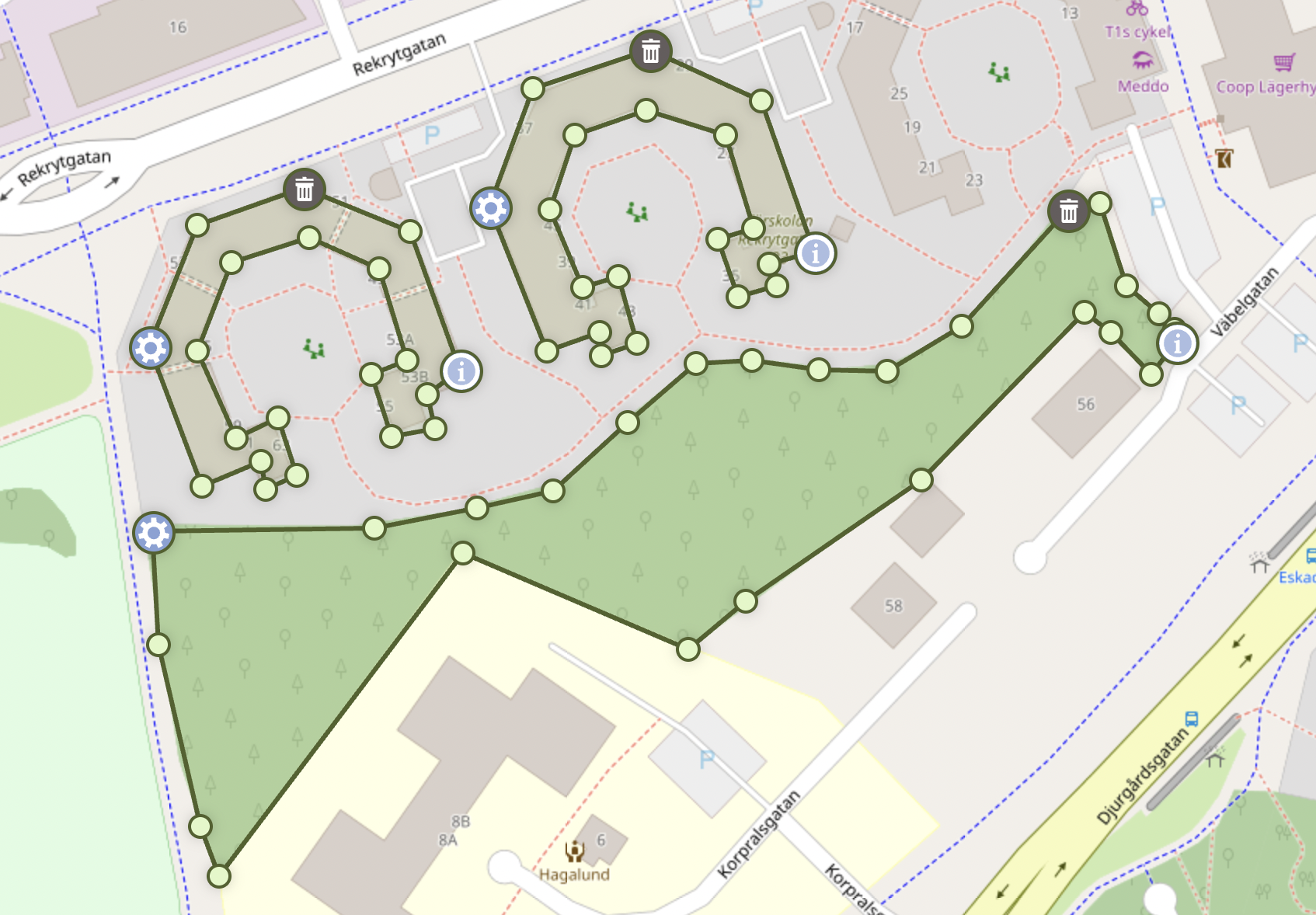](https://raw.githubusercontent.com/AndreasOlausson/leaflet-polydraw/main/Leaflet.Polydraw/docs/images/feature-overview.png)
- **Freehand Drawing**: Draw polygons naturally by sketching directly on the map — click and drag to create shapes in real time.
- **Smart Polygon Merging**: Automatically detects and merges overlapping polygons (including smooth C-to-O shape completion).
- **Layer Management**: Organize polygons into named layers with visibility, color, ordering, read-only/static policies, and metadata.
- **Drag & Drop Editing**: Intuitive polygon repositioning with intelligent spatial interactions.
- **Clone Drag Mode**: Duplicate polygons instantly by dragging a copy while the original remains in its starting position (preserves holes and metadata).
- **Advanced Vertex Editing**: Drag vertices, add or remove points, and reshape polygons seamlessly.
- **Scaling & Rotation Handles**: Transform polygons visually using interactive bounding boxes — scale, rotate, or stretch with precision.
- **Donut Transform Tool**: Turn simple polygons into holes or outward donut-style shapes from the polygon menu with undo support.
- **Custom Polygon Menu Actions**: Inject application-specific actions into the polygon menu with typed callbacks, async support, history control, and custom styling.
- **Undo & Redo History**: Full action history with reversible edits — step backward or forward through vertex moves, shape changes, merges, and freehand strokes (Ctrl/Cmd+Z, Ctrl+Y or Cmd+Shift+Z).
- **Point-to-Point Mode**: Optional precise vertex-by-vertex drawing for detailed or structured geometry.
- **Hole Support**: Create complex polygons with holes and nested structures effortlessly.
- **Smart Markers**: Adaptive marker placement prevents overlaps and maintains visual clarity.
- **Modifier Shortcuts**: Hold Ctrl or Cmd (or user-defined keys) to temporarily switch to subtract while drawing or in point-to-point draw mode (`modifierSubtractMode`).
- **Performance Optimized**: Efficient rendering and event handling even for large datasets.
- **GeoJSON Import**: Add Polygon and MultiPolygon features directly from RFC 7946 GeoJSON
- **Coordinate Auto-Detection**: Accepts multiple coordinate formats automatically (lat/lng, DMS, DDM, N/E, etc.).
- **Leaflet 1.x & 2.x Compatible**: Fully compatible with both generations of the Leaflet API.
- **TypeScript Ready**: Includes complete type definitions for modern development workflows.
---
**[Live Demo](https://polydraw.ao-tech.se)** · **[Quick Start](https://github.com/AndreasOlausson/leaflet-polydraw/blob/main/docs/QUICK_START.md)** · **[Custom Actions](https://github.com/AndreasOlausson/leaflet-polydraw/blob/main/docs/CUSTOM_ACTIONS.md)** · **[Full Documentation](https://github.com/AndreasOlausson/leaflet-polydraw/tree/main/docs)**
---
## Documentation
Full documentation and examples are available on GitHub:
- [Installation](https://github.com/AndreasOlausson/leaflet-polydraw/blob/main/docs/INSTALLATION.md)
- [Quick Start](https://github.com/AndreasOlausson/leaflet-polydraw/blob/main/docs/QUICK_START.md)
- [Configuration](https://github.com/AndreasOlausson/leaflet-polydraw/blob/main/docs/CONFIGURATION.md)
- [Features](https://github.com/AndreasOlausson/leaflet-polydraw/blob/main/docs/FEATURES.md)
- [Custom Polygon Menu Actions](https://github.com/AndreasOlausson/leaflet-polydraw/blob/main/docs/CUSTOM_ACTIONS.md)
- [API Reference](https://github.com/AndreasOlausson/leaflet-polydraw/blob/main/docs/API.md)
- [Markers](https://github.com/AndreasOlausson/leaflet-polydraw/blob/main/docs/MARKERS.md)
- [Events](https://github.com/AndreasOlausson/leaflet-polydraw/blob/main/docs/EVENTS.md)
- [Coordinate Formats](https://github.com/AndreasOlausson/leaflet-polydraw/blob/main/docs/COORDINATES.md)
- [Demo (Leaflet 1.x / 2.x)](https://github.com/AndreasOlausson/leaflet-polydraw/blob/main/docs/DEMO.md)
- [General — Browser Support, License, Acknowledgments](https://github.com/AndreasOlausson/leaflet-polydraw/blob/main/docs/GENERAL.md)
- [Roadmap](https://github.com/AndreasOlausson/leaflet-polydraw/blob/main/docs/ROADMAP.md)
- [Changelog](https://github.com/AndreasOlausson/leaflet-polydraw/blob/main/Leaflet.Polydraw/CHANGELOG.md)
- [Migration Guide (v1 -> v2)](https://github.com/AndreasOlausson/leaflet-polydraw/blob/main/docs/MIGRATION.md)
---
### Disclaimer
This project is provided "as is", without any warranty or guarantee of any kind. See the [MIT License](LICENSE) for full terms.