language-icons
Version:
[](https://www.npmjs.com/package/language-icons)  [ • 2.84 kB
Markdown
# 🌐 Language icons
[](https://www.npmjs.com/package/language-icons)

[](https://travis-ci.org/AnandChowdhary/language-icons)

[](https://github.com/AnandChowdhary/language-icons/blob/master/LICENSE)

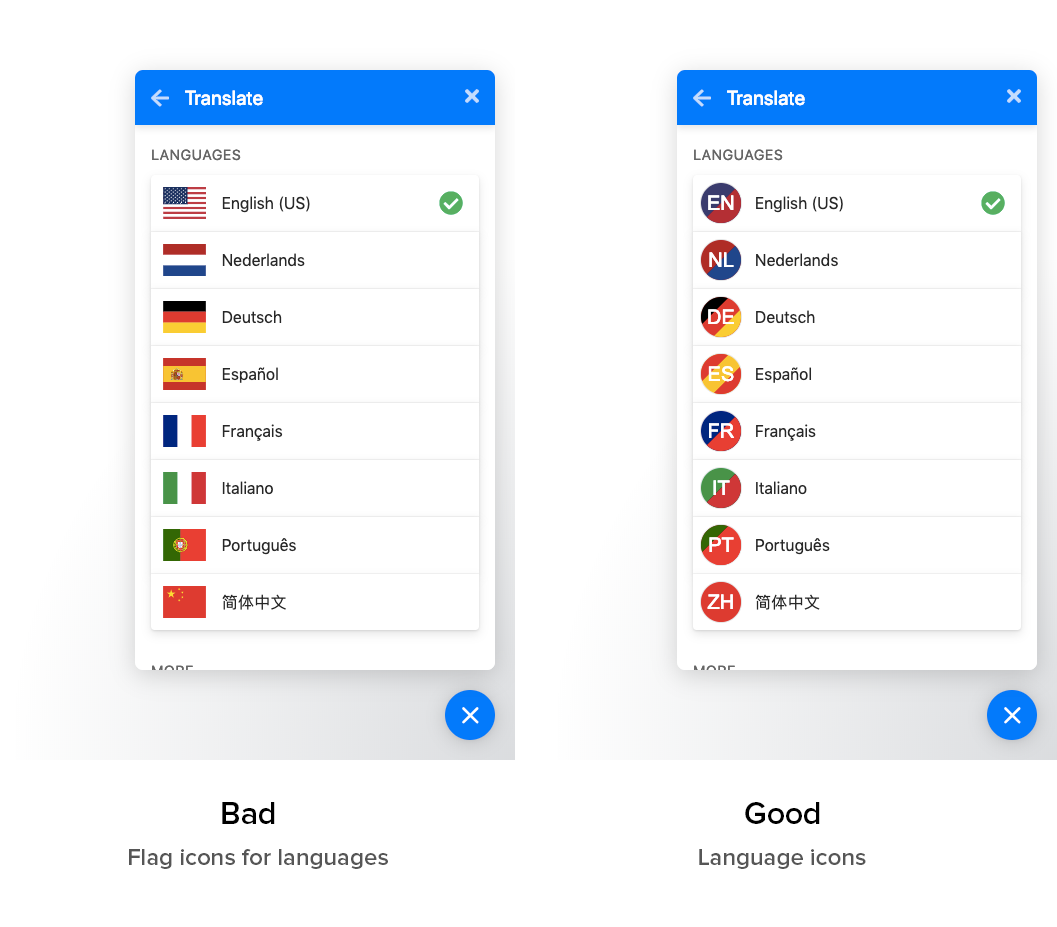
[Flags are not languages](http://www.flagsarenotlanguages.com/blog/), so we shouldn't use country flags as language icons.
You can use these icons instead.
They are generated using the language's ISO 639-1 code, combined with some colors. Colors are flag-inspired. For example, green/red for [Portuguese](https://unpkg.com/language-icons/icons/pt.svg), and they fallback to blue for unknown colors. If you want to color a currently blue icon, edit the [`colors.json`](https://github.com/AnandChowdhary/language-icons/blob/master/colors.json) file and make a pull request.
Each icon is an SVG, around 300 ± 10 bytes.
## 🖼️ Usage
You can use a CDN like Unpkg to embed a flag icon:
```
https://unpkg.com/language-icons/icons/LANGUAGE_CODE.svg
```
In HTML, for example:
```html
<img alt="English" src="https://unpkg.com/language-icons/icons/en.svg">
```
Icons are also available on NPM:
```bash
npm install language-icons
```
They are in the `./icons` folder, you can use an SVG loader to import them:
```js
import English from "./node_modules/language-icons/icons/en.svg"
```
## ⭐ Why
## 🎨 Icons
See the list of icons: https://unpkg.com/language-icons@0.2.0/icons/












## ⚒️ Building
Install Typescript dependencies and build icons using the `npm run build` command.
## 📝 License
Icons and code, both MIT