kish
Version:
Image Charts Tools: Image Chart & Infographics wrapper for Node.js
219 lines (129 loc) • 5.5 kB
Markdown
# Kish
Easy to use [Image Charts](https://image-charts.com) wrapper.
This package was made to replace [Quiche](https://npmjs.com/package/quiche).
## Install
```bash
npm install kish
```
# Examples
## Pie chart
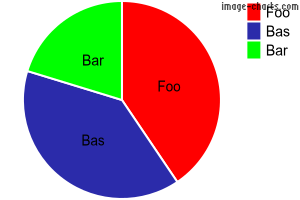
```js
const Kish = require('kish');
const pie = new Kish('pie');
pie.setTransparentBackground(); // Make background transparent
pie.addData(3000, 'Foo', 'FF0000');
pie.addData(2900, 'Bas', '0000FF');
pie.addData(1500, 'Bar', '00FF00');
pie.setLabel(['Foo','Bas','Bar']); // Add labels to pie segments
const imageUrl = pie.getUrl(true); // First param controls http vs. https
```
## Bar chart
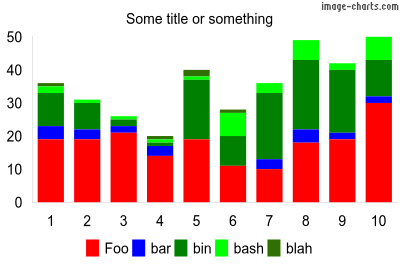
```js
const Kish = require('kish');
const bar = new Kish('bar');
bar.setWidth(400);
bar.setHeight(265);
bar.setTitle('Some title or something');
bar.setBarStacked(); // Stacked chart
bar.setBarWidth(0);
bar.setBarSpacing(6); // 6 pixles between bars/groups
bar.setLegendBottom(); // Put legend at bottom
bar.setTransparentBackground(); // Make background transparent
bar.addData([19, 19, 21, 14, 19, 11, 10, 18, 19, 30], 'Foo', 'FF0000');
bar.addData([4, 3, 2, 3, 0, 0, 3, 4, 2, 2], 'bar', '0000FF');
bar.addData([10, 8, 2, 1, 18, 9, 20, 21, 19, 11], 'bin', '008000');
bar.addData([2, 1, 1, 1, 1, 7, 3, 6, 2, 7], 'bash', '00FF00');
bar.addData([1, 0, 0, 1, 2, 1, 0, 0, 0, 0], 'blah', '307000');
bar.setAutoScaling(); // Auto scale y axis
bar.addAxisLabels('x', ['1', '2', '3', '4', '5', '6', '7', '8', '9', '10']);
const imageUrl = bar.getUrl(true); // First param controls http vs. https
```
## Line chart
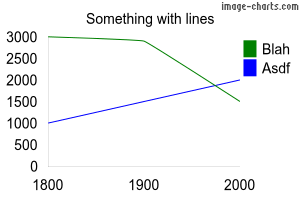
```js
const Kish = require('kish');
const chart = new Kish('line');
chart.setTitle('Something with lines');
chart.addData([3000, 2900, 1500], 'Blah', '008000');
chart.addData([1000, 1500, 2000], 'Asdf', '0000FF');
chart.addAxisLabels('x', ['1800', '1900', '2000']);
chart.setAutoScaling();
chart.setAxisRange('y', 500, 3500, 250);
chart.setTransparentBackground();
const imageUrl = chart.getUrl(true); // First param controls http vs. https
```
## QR Code

```js
const Kish = require('kish');
const qr = new Kish('qr');
qr.setLabel('https://github.com/otoneko1102/kish');
qr.setWidth(100);
qr.setHeight(100);
const url = qr.getUrl(true); // First param controls http vs. https
```
# Documentation
## API
### Supported charts
* line
* pie
* bar
* qr
### All charts
* `chart.setWidth(width [number]);`
* `chart.setHeight(height [number]);`
* `chart.setTitle(title [string]);`
* `chart.setTitleColor(color [hex color]);`
* `chart.setTitleSize(size [number]);`
* `chart.setTitleRight();`
* `chart.setTitleLeft();`
* `chart.setLegendOrder(order [string])`
* `chart.setLegendLeft();`
* `chart.setLegendRight();`
* `chart.setLegendBottom();`
* `chart.setLegendTop();`
* `chart.setLegendVertical();`
* `chart.setLegendHorizontal();`
* `chart.setLegendHidden();`
* `chart.setLegendSize([number]);`
* `chart.setTransparentBackground();`
* `chart.addAxisLabels(axis [x | y | r], labels [array]);`
* `chart.addData(data [number | array], label [string], color [hex color]);`
* `chart.setAutoScaling();`
* `chart.setHostname(hostname [string]);`
* `chart.getUrl(https [boolean]);` // true = https, false = http
* `chart.getReq(https [boolean], callback [function]);`
* `chart.getPostReq(https [boolean], callback [function]);`
### Pie
* `pie.set3D();`
* `pie.setLabel();`
* `pie.addPercent();`
### Bar
* `bar.addData();`
* `bar.setBarWidth([number]);`
* `bar.setBarSpacing([number]);`
* `bar.setBarVertical();`
* `bar.setBarHorizontal();`
* `bar.setBarGrouped();`
* `bar.setBarStacked();`
* `bar.setBarOverlapped();`
* `bar.setAxisRange(axis ["x", "r", "y"], start [number], end [number], step [number]);`
### Line
* `line.addData(data [number | array], label [string], color [hex color], thickness [number], line length [number], space length [number]);`
* `line.setSparklines();`
* `line.setXY();`
* `line.setAxisRange(axis ["x", "r", "y"], start [number], end [number], step [number]);`
### QR Code
* `qr.setLabel(data [string]);`
* `qr.setEncoding(encoding [UTF-8 | Shift_JS | ISO-8859-1]);`
* `qr.setErrorCorrectionLevel(level [string])`
* `qr.setMargin(margin [number]);` // Margin around graphic
* `qr.setWidth(width [number]);`
* `qr.setHeight(height [number]);`
* `qr.getUrl(https [boolean]);` // true = https, false = http
# Features
* Pie charts
* Bar charts
* Auto scaling