kakapo
Version:
Next generation mocking framework in Javascript
680 lines (493 loc) • 18.9 kB
Markdown
# Kakapo.js <img src="https://sdl-stickershop.line.naver.jp/products/0/0/1/1087538/LINEStorePC/main.png?__=20150924" width="40" height="40" >
[](https://travis-ci.org/devlucky/Kakapo.js)
[](https://codecov.io/github/devlucky/Kakapo.js?branch=master)
[](https://npmjs.com/package/kakapo)
[](https://david-dm.org/devlucky/Kakapo.js)
[](https://tldrlegal.com/license/mit-license)
<img src="http://benschwarz.github.io/bower-badges/badge@2x.png" width="130" height="25">
> Next generation mocking framework in Javascript - [docs](http://devlucky.github.io/kakapo-js)
## Contents
- [Getting started](#getting-started)
- [Installation](#installation)
- [Examples](#examples)
- [Basic](#basic)
- [Using the DB](#using-the-db)
- [Unchaining the Router](#unchaining-the-router)
- [Fetch & XMLHttpRequest support](#fetch--xmlhttprequest-support)
- [Database candyness](#database-candyness)
- [Passthrough](#passthrough)
- [Demo Apps](#demo-apps)
- [TODO App](#todo-app)
- [Github explorer](#github-explorer)
- [Components](#components)
- [Server](#server)
- [Router](#router)
- [Database](#database)
- [Response](#response)
- [Serializers](#serializers)
- [Interceptors](#interceptors)
- [Scenarios](#scenarios)
- [Fake data](#fake-data)
- [Browser support](#browser-support)
- [Roadmap](#roadmap)
Kakapo its a full featured http mocking library, he allows you to entirely replicate your backend logic in simple and declaritive way directly in the browser. This way you can easily prototype and develop the whole Application without backend and just deactivate Kakapo when you go production. In order to achieve that Kakapo gives you a set of utilities like Routing, Database, Response, Request and so on...
## Installation
`$ npm i kakapo -D`
`$ bower i kakapo -D`
# Examples
Before going deep into the Kakapo docs, we want to show you some examples of how to use Kakapo in your apps, in order to demonstrate how easy to integrate it is
## Basic
Use the kakapo router to declare two custom routes and returning custom data.
```javascript
import {Router, Server} from 'Kakapo';
const router = new Router();
router.get('/users', _ => {
return [{
id: 1,
name: 'Hector'
}, {
id: 2,
name: 'Zarco'
}]
});
router.get('/users/:user_id', request => {
const userId = request.params.user_id;
return [{
id: userId,
name: 'Hector'
}];
});
const server = new Server();
server.use(router);
fetch('/users', users => {
console.log(users[0].id === 1);
console.log(users[1].id === 2);
});
fetch('/users/3', user => {
console.log(user.id === 3);
console.log(user.name === 'Hector');
});
```
### Using the DB
Combine the usage of the Router and the Database to have a more consistent way of managing the mock data. In the following example we are defining the user factory and later using some access methods provided by the db.
```javascript
import {Database, Router, Server} from 'Kakapo';
const db = new Database();
db.register('user', () => ({
firstName: 'Hector',
lastName: 'Zarco'
}));
db.create('user', 10);
const router = new Router();
router.get('/users', (request, db) => {
return db.all('user');
});
router.get('/users/:user_id', (request, db) => {
const userId = request.params.user_id;
return db.findOne('user', userId);
});
const server = new Server();
server.use(db);
server.use(router);
fetch('/users', users => {
console.log(users[0].id === 1);
console.log(users[1].id === 2);
console.log(users[2].id === 3);
});
fetch('/users/7', user => {
console.log(user.id === 7);
console.log(user.name === 'Hector');
});
```
As you can see, the database automatically handles the **id** generation, so you don't have to worry about assigning incremental id's of any kind.
### Unchaining the Router
Next you will see how to use other features of the router and figure out the things you can build with it. In this example we show you how easy is to create a fake pagination handling, which is based in the actual requested page.
```javascript
import {Router, Server} from 'Kakapo';
const router = new Router();
router.get('/users', (request) => {
const currentPage = request.query.page;
let count = request.query.count;
let users = []
while (--count) {
users.push({name: 'hector', age: 24});
}
return {
data: users,
metadata: {
previous_page: currentPage - 1,
current_page: currentPage,
next_page: currentPage + 1
}
}
});
router.post('/users/:user_id/friends/:friend_id', (request) => {
const token = request.headers.get('X-auth-token');
const userId = request.params.friend_id;
const friendId = request.params.friend_id;
let message;
if (token === 'foo-bar') {
message = `successs friend: ${friendId} created for userId: ${userId}`;
} else {
message = 'Unauthorized';
}
return {
message
}
});
const server = new Server();
server.use(router);
fetch('/users?page=1&count=3', response => {
console.log(response.data.length === 3);
console.log(response.metadata.previous_page === 1);
console.log(response.metadata.next_page === 2);
});
const headers = new Headers();
headers.append('X-auth-token', 'foo-bar');
const request = new Request('/users/10/friends/55');
fetch(request, {method: 'POST', headers}).then(response => {
console.log(response.message);
});
```
### Fetch & XMLHttpRequest support
Kakapo have Fetch and XMLHttpRequest support by default, but you can always change that if you want, see the [interceptors docs](#interceptors).
```javascript
import {Router, Server} from 'Kakapo';
const router = new Router();
router.get('/users/', () => {
return 'meh';
});
const server = new Server();
server.use(router);
fetch('/users', users => {
console.log(users[0].id === 1);
console.log(users[1].id === 2);
});
const xhr = new XMLHttpRequest();
xhr.onreadystatechange = () => {
if (xhr.readyState !== 4) return;
const response = JSON.parse(xhr.responseText);
console.log(response[0].id === 1);
console.log(response[1].id === 2);
};
xhr.open('GET', '/users', true);
xhr.send();
```
### Database candyness
Check how easy to build a consistent CRUD Api with the kakapo db.
```javascript
import {Database, Router, Server, Response as KakapoResponse} from 'Kakapo';
const sever = new Server();
const router = new Router();
const databse = new Database();
database.register('user', faker => {
return {
firstName: faker.name.firstName,
lastName: faker.name.lastName,
age: 24
};
});
database.create('user', 5);
router.get('/users', (request, db) => {
return db.all('user');
});
router.post('/users', (request, db) => {
const user = JSON.parse(request.body);
db.push('user', user);
return user;
});
router.put('/users/:user_id', (request, db) => {
const newLastName = JSON.parse(request.body).lastName;
const user = db.findOne('user', request.params.user_id);
user.lastName = newLastName;
user.save();
return user;
});
router.delete('/users/:user_id', (request, db) => {
const user = db.findOne('user', request.params.user_id);
const code = user ? 200 : 400;
const body = {code};
user && user.delete();
return new KakapoResponse(code, body);
});
const server = new Server();
server.use(database);
server.use(router);
const getUsers = () => {
return fetch('/users').then(r => r.json());
}
const createUser = (user) => {
return $.post('/users', user);
};
const updateLast = () => {
return $.ajax({
url: '/users/6',
method: 'PUT',
data: {lastName: 'Zarco'}
});
};
const deleteFirst = () => {
return $.ajax({
url: '/users/1',
method: 'DELETE'
});
};
getUsers() // users[0].id === 1, users.length === 5
.then(createUser.bind(null, {firstName: 'Hector'})) // response.id === 6, response.firstName === 'Hector'
.then(deleteFirst) // response.code === 200
.then(getUsers) // users[0].id == 2, users[4].id == 6, users.length == 5
.then(updateLast) // user.id == 6, user.lastName == 'Zarco'
.then(getUsers) // users.length == 5
```
### Passthrough
You don't need to do anything in order to keep your existing request working as they were before. Kakapo will just passthrough all the request that doesn't match any of the defined routes and fire the associated callback.
```javascript
import {Router, Server} from 'Kakapo';
const server = new Server();
const router = new Router();
router.get('/users', (request) => {
return 'Kakapo';
});
const server = new Server();
server.use(router);
fetch('/users', users => {
users == 'Kakapo';
});
fetch('https://api.github.com/users', users => {
//Real Github users data
});
```
# Demo Apps
## TODO App
Every project needs a TODO App, so here is the Kakapo one. Straightforward vanilla js app, uses the **fetch api** for the networking part.
[Check the demo](https://kakapo-todo-app.firebaseapp.com/) or [look at the code](https://github.com/devlucky/Kakapo.js/tree/master/examples/todo-app)

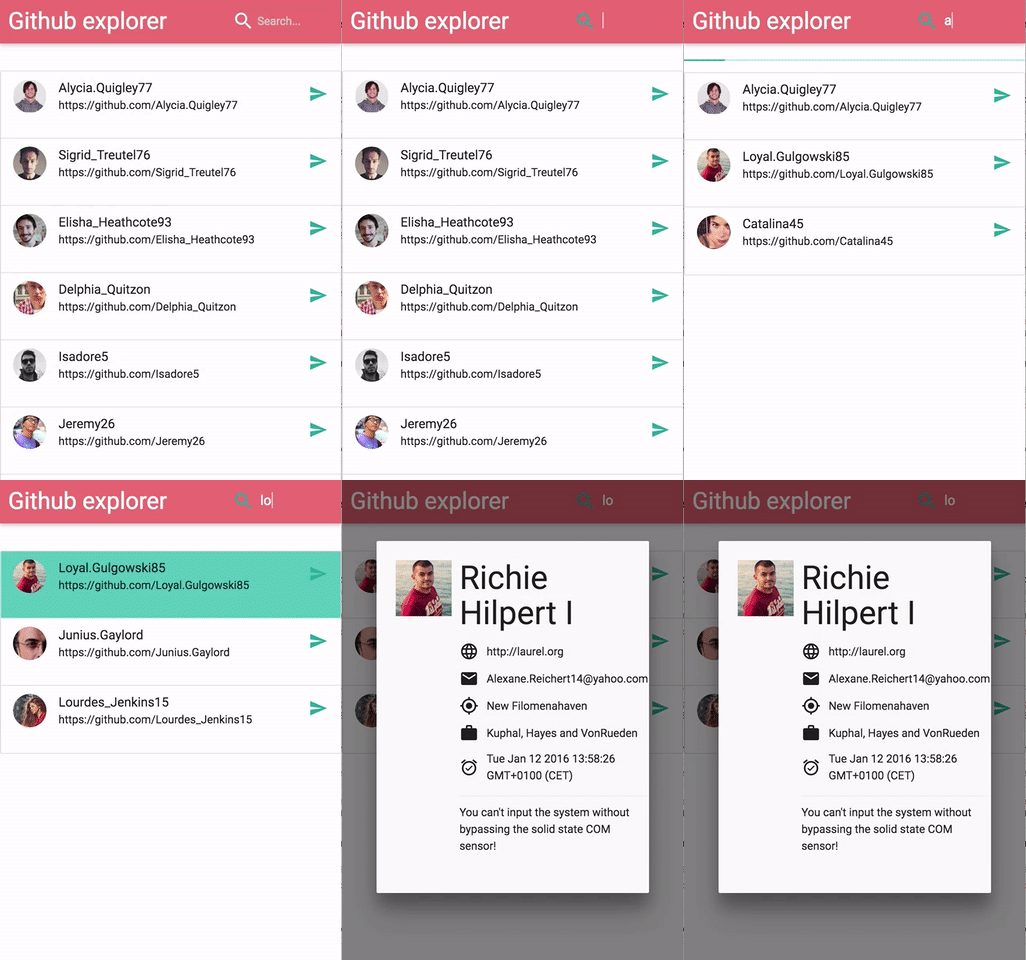
## Github explorer
Basic github users search example, based 100% on the (Github Api)[https://developer.github.com/v3]. It shows you how easy is to replicate the logic of a backend with Kakapo and iterate faster when building the UI. This example also uses jQuery just to demostrate the compatibility with Kakapo.
[Check the demo](https://kakapo-github-explorer.firebaseapp.com) or [look at the code](https://github.com/devlucky/Kakapo.js/tree/master/examples/github-explorer)
# Components
## Server
The Kakapo Server is the main component of the framework, he is charge of activate things and link components like the router or the database.
**Linking components**
So, in order to make your router to start intercepting requests, you must connect him with your server using the *use* method. Also is a good practice to connect your *current database* with your server, that way you will receive her as a parameter in your request handlers. This practice is very useful when you have multiple databases and routers, since you can easily swicth them without rewriting anything, see [Scenarios](#scenarios) section
```javascript
const myDB = new Database();
const router = new Router();
const server = new Server();
router.get('/posts', (request, db) => {
console.log(db === myDB);
});
server.use(myDB);
server.use(router);
fetch('/posts');
```
## Router
The Router class gives you the functionality to
it has a very intuitive interface, so if you ever had to build any kind of rest api in any server-side language, you are already familiar with the Kakapo router. that allows you to define complex routes (like in a real server)
**Method handling**
Those are the supported http methods
```javascript
import {Router} from 'kakapo';
const router = new Router();
router.get('/users/:user_id')
router.post('/users/:user_id')
router.put('/users/:user_id')
router.delete('/users/:user_id')
```
**Request object**
You can access to all the request properties through the request object passed in the request handler
```javascript
router.get('/posts/:post_id/comments/:comment_id', request => {
console.log(request.params.post_id);
console.log(request.params.comment_id);
console.log(request.query.page);
console.log(request.query.count);
console.log(request.body);
console.log(request.headers);
});
$.ajax({
url: '/posts/1/comments/5?page=1&count=10',
data: {text: 'Foo comment'},
headers: {'X-Access-token': '12345'}
})
```
**Options**
Other useful router options are the **host** and the **requestDelay**, you just need to pass them at the initialization moment
```javascript
import {Router} from 'kakapo';
const router = new Router({
host: 'https://api.github.com',
requestDelay: 2000
});
```
## Database
Database along with the Router is also one of the most important components, if you learn how to use it properly you can reuse tons of code and become really productive, that's why Kakapo promotes the use of the Database but you can still don't use it and return whatever you want from the request handlers.
**Factories**
They come with [Faker](https://github.com/Marak/faker.js) a cool library to generate fake data
Just a brief example of what you can achieve with the db:
```javascript
import {Server, Router, Database} from 'kakapo';
const router = new Router();
const database = new Database();
const server = new Server();
db.register('user', faker => {
const name = faker.internet.userName();
return {
name,
avatar_url: faker.internet.avatar,
url: `https://api.github.com/users/${name}`,
type: "User",
company: faker.company.companyName,
blog: faker.internet.url,
location: faker.address.city,
email: faker.internet.email,
bio: faker.hacker.phrase,
created_at: faker.date.past,
updated_at: faker.date.recent
}
});
db.create('user', 10);
router.get('/users', (request, db) => {
return db.all('user');
});
router.get('/users/:user_id', (request, db) => {
return db.findOne('user', request.params.user_id);
});
router.post('/users', (request, db) => {
return db.push('user', request.params.body);
});
server.use(database);
server.use(router);
```
**Relationships**
Sometimes while mocking, you miss some sort of consistency in your responses. Let's say you have a blog and when you ask for comments of a post you return a **post_id** that doesn't match any of the post ids...
You can solve that using relationships, they are designed to help you create this consistent state across all your requests. The methods are **belongsTo** and **hasMany**
```javascript
import {Server, Database, Router} from 'kakapo';
const server = new Server();
const db = new Database();
const router = new Router();
const blogFactory = () => ({
posts: db.hasMany('post'),
authors: db.hasMany('user', 2) //Notice how we expecify the author id, to force to return that record always
});
const postFactory = () => ({
title: 'Js for the lulz',
body: 'html body',
blog: db.belongsTo('blog')
});
const userFactory = () => ({
name: 'devlucky',
followers: 1000,
});
db.register('blog', blogFactory);
db.register('post', postFactory);
db.register('user', userFactory);
db.create('post', 10);
db.create('user', 5);
db.create('blog', 1);
```
## Response
The Response object is a helper class mostly used inside the request handlers to provide rich responses to your real handlers
```javascript
import { Server, Response, Router } from 'kakapo';
const server = new Server();
const router = new Router();
router.get('/user/:user_id', request => {
const code = request.params.user_id < 10 ? 200 : 400;
const headers = {'X-request-date': new Date().getTime()};
return new Response(code, {status: code}, headers);
});
server.use(router);
```
## Serializers
This is another component very familiar in backend laguages, Serializers offers you a way to abstract the **render** part of your entities.
In this example we cover a common case in which you have different versions of your Api and you want to represent that in Kakapo in the same way
```javascript
const ApiV2Serializer = (record, type) => {
const id = record.id;
const metadata = {created_at: new Date()};
const attributes = Object.assign({}, record, metadata);
return {
id,
type,
attributes
};
};
const db = new Database();
db.register('user', () => ({
firstName: 'Hector',
lastName: 'Zarco',
age: 24,
}), ApiV2Serializer);
db.register('comment', () => ({
text: 'msg'
}), ApiV2Serializer);
```
## Interceptors
This component is the one that actually handles the original request, is a private one but you can configure it in the Router. Just pass **strategies** in the constructor, by default both **fetch** and **XMLHttpRequest** are used.
```javascript
import {Server, Router} from 'kakapo';
const server = new Server();
const fetchRouter = new Router({
strategies: ['fetch']
});
const xhrRouter = new Router({
strategies: ['XMLHttpRequest']
});
server.use(fetchRouter);
//LATER
server.use(xhrRouter);
```
## Scenarios
The **scenario** concept is nothing else than the ability of having different presets of Kakapo, like router, database, etc... and later, allow the user to decide when he wants to use one of other.
Let's say you want to check how the spinners looks in your app, in that case you probably will put a higher value as a **requestDelay**, to make sure that the requests are intercepted late and you can check the UI... other good use case might be one in which you want to test the performance of a view when you have thousands of elements, in order to achieve that you will just need to pass a high number to the **create** method of the **Database**:
```javascript
import {Server, Router, Database} from 'kakapo';
const userFactory = (faker) => {
return {
name: faker.name.findName,
age: 24,
city: 'Valencia'
}
};
const usersHandler = (request, db) => db.all('user');
const wifiServer = new Server({requestDelay: 150});
const threeGServer = new Server({requestDelay: 1000});
const router = new Router();
const chillDB = new Database();
const stressfulDB = new Database();
chillDB.register('user', userFactory);
chillDB.create('user', 5);
stressfulDB.register('user', userFactory);
stressfulDB.create('user', 1000);
wifiServer.get('/users', usersHandler);
threeGServer.get('/users', usersHandler);
//Pick the server with more latency if you want to check how the spinner looks like
//server.use(wifiServer);
server.use(threeGServer);
//Here you just have to switch between different databases in order to test the UI with tons of users
//server.use(chillDB);
server.use(stressfulDB);
```
## Fake data
As mention above, you can use [Faker](https://github.com/Marak/faker.js) for generate fake data, take a look at the full demo [here](http://marak.com/faker.js/). Also note that you can define nested properties and use Faker on them:
```javascript
db.register('user', faker => {
return {
user: {
name: faker.name.findName,
nick: 'nick'
},
company: faker.company.companyName,
location: 'Valencia, Spain'
}
});
```
# ROADMAP
**Full support for JSONApiSerializer**
**Node.js compatibility**
**Node.js interceptors**
# Authors
[@rpunkfu](https://github.com/rpunkfu) - [@zzarcon](https://github.com/zzarcon)