jspreadsheet
Version:
Jspreadsheet is a lightweight, vanilla javascript data grid plugin to create amazing web-based interactive tables and spreadsheets compatible with other spreadsheet software.
644 lines (439 loc) • 25.1 kB
Markdown
# Jspreadsheet – JavaScript Spreadsheet Component
<p align="center">
<img src="https://jspreadsheet.com/templates/default/img/logo/logo.webp" alt="Jspreadsheet Logo" width="300">
</p>
<p align="center">
<strong>Build Excel-like data grids and spreadsheets in your web applications</strong>
</p>
<p align="center">
<a href="https://www.npmjs.com/package/jspreadsheet"><img src="https://img.shields.io/npm/v/jspreadsheet.svg" alt="npm version"></a>
<a href="https://jspreadsheet.com/license"><img src="https://img.shields.io/badge/license-Commercial-blue.svg" alt="License"></a>
<a href="https://www.npmjs.com/package/jspreadsheet"><img src="https://img.shields.io/npm/dm/jspreadsheet.svg" alt="Downloads"></a>
<a href="https://github.com/jspreadsheet/ce"><img src="https://img.shields.io/github/stars/jspreadsheet/ce.svg?style=social" alt="GitHub Stars"></a>
</p>
**Note:** This is the **PRO/Commercial** version. For the open-source MIT version, see [jspreadsheet-ce](https://github.com/jspreadsheet/ce)
[🚀 **Try Live Demo**](https://jspreadsheet.com/demo/integration) | [📖 **Documentation**](https://jspreadsheet.com/docs) | [💬 **Community**](https://github.com/jspreadsheet/pro/issues)
---
## 📑 Table of Contents
- [What is Jspreadsheet?](#-what-is-jspreadsheet)
- [Quick Start](#-quick-start)
- [What's New in v12](#-whats-new-in-version-12)
- [Key Features](#-key-features)
- [Framework Integration](#️-framework-integration)
- [Live Examples](#-live-examples)
- [Use Cases](#-use-cases)
- [Documentation](#-documentation--resources)
- [FAQ](#-frequently-asked-questions)
- [Changelog](#-changelog)
- [Package Information](#-package-information)
- [Community & Support](#-community--support)
- [License](#-license)
---
## 🌟 What is Jspreadsheet?
Jspreadsheet is a **lightweight, high-performance data grid and spreadsheet engine** that enables developers to deliver rich, Excel-style editing experiences in modern web applications **without any framework dependencies**.
Whether you're building a SaaS dashboard, financial modeller, admin portal, or collaborative web app, Jspreadsheet gives you everything you need to create fast, professional, and user-friendly spreadsheet solutions.
### 🏢 Trusted by Leading Companies
**Virgin Media** • **Samsung** • **Deloitte** • **Nissan** • **Johnson & Johnson** • **General Electric** • **Kawasaki** • **BP** • **Comcast** • **Asahikasei** • **Denso Wave** • **Moody's** • **Verizon** • **Kyocera** • **Mizuho** • **Noritz** • **Lexisnexis**
---
## ⚡ Quick Start
### System Requirements
- **Node.js**: 14.x or higher
- **Browsers**: Chrome 70+, Firefox 65+, Safari 12+, Edge 79+
- **Dependencies**: jsuites v6.x
### Installation
[](https://bundlephobia.com/package/jspreadsheet)
[](https://www.npmjs.com/package/jsuites)
#### Via npm
```bash
npm install jspreadsheet@12
```
#### Via CDN
```html
<script src="https://cdn.jsdelivr.net/npm/jspreadsheet@12/dist/index.min.js"></script>
<link rel="stylesheet" href="https://cdn.jsdelivr.net/npm/jspreadsheet@12/dist/jspreadsheet.min.css" type="text/css" />
<script src="https://cdn.jsdelivr.net/npm/jsuites@6/dist/jsuites.min.js"></script>
<link rel="stylesheet" href="https://cdn.jsdelivr.net/npm/jsuites@6/dist/jsuites.min.css" type="text/css" />
```
### Basic Usage
```html
<div id="spreadsheet"></div>
```
```javascript
// Set your license (required for PRO version)
// Get a free trial license at: https://jspreadsheet.com
jspreadsheet.setLicense('YOUR-LICENSE-KEY');
// Create a spreadsheet
const spreadsheet = jspreadsheet(document.getElementById('spreadsheet'), {
worksheets: [{
data: [
['Product', 'Price', 'Quantity', 'Total'],
['Laptop', 999.99, 5, '=B2*C2'],
['Mouse', 29.99, 10, '=B3*C3'],
['Keyboard', 79.99, 3, '=B4*C4']
],
columns: [
{ type: 'text', title: 'Product', width: 120 },
{ type: 'number', title: 'Price', width: 100, mask: '#,##0.00' },
{ type: 'number', title: 'Quantity', width: 80 },
{ type: 'number', title: 'Total', width: 100, mask: '#,##0.00' }
]
}]
});
```
[🔗 **See More Examples**](https://jspreadsheet.com/demo/)
---
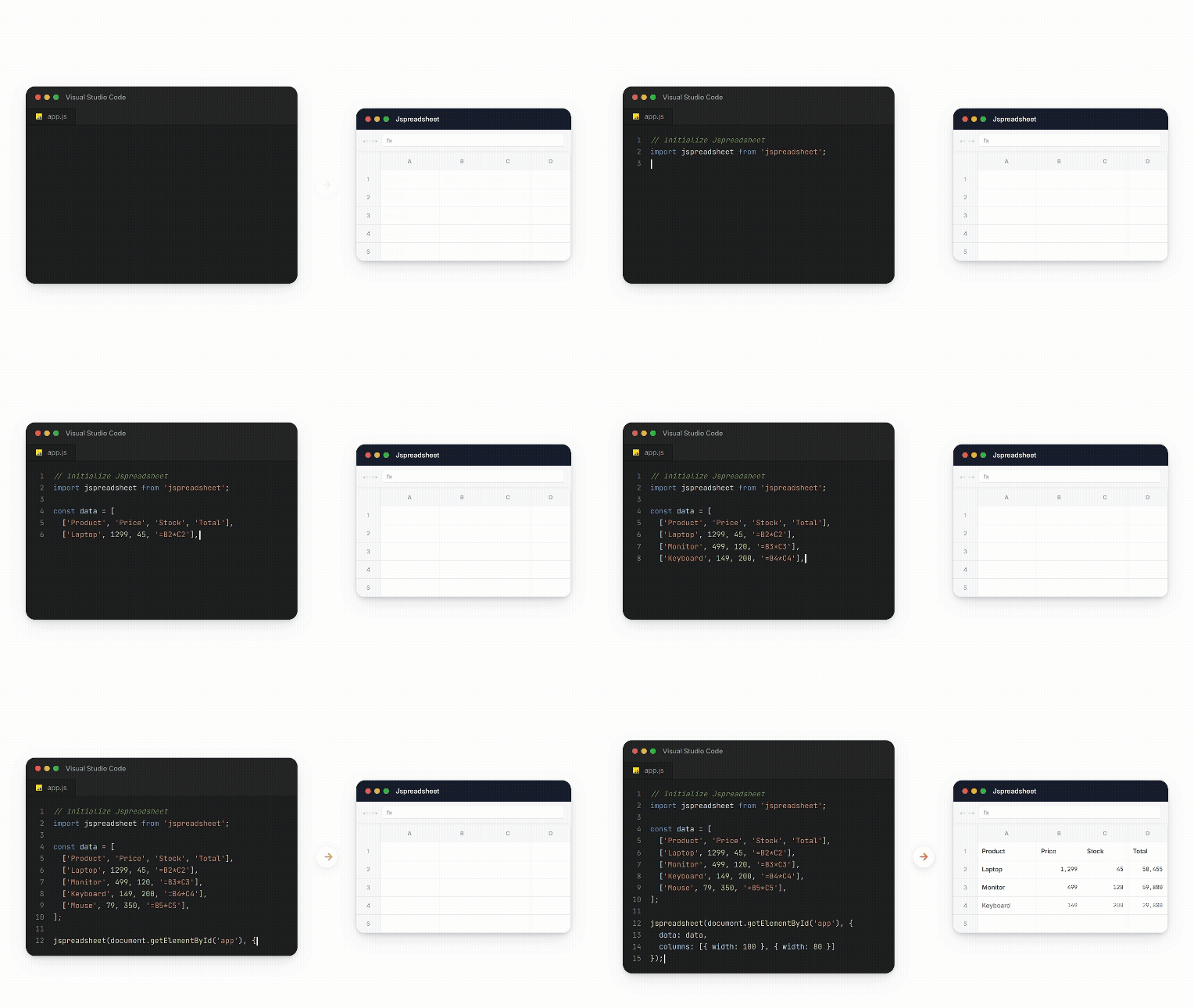
## 🎬 Live Demo
Experience Jspreadsheet in action with interactive examples:
[Live Demo](https://jspreadsheet.com/demo/integration)
### 🎯 Try These Features:
✏️ Edit cells • 🧮 Use formulas • 📋 Copy/paste • ➕ Add rows/columns • 🎨 Format cells • 📊 Sort data
### 🚀 More Examples:
[📈 Charts](https://jspreadsheet.com/demo/integration) • [👥 Collaboration](https://jspreadsheet.com/demo/collaboration) • [⚡ Performance](https://jspreadsheet.com/demo/performance)
[**📚 View All Examples →**](https://jspreadsheet.com/demo)
---
## 🎯 Why Choose Jspreadsheet?
### ⚡ **Pure JavaScript Implementation**
Built with vanilla JavaScript, Jspreadsheet has **zero dependencies** and works with any build system or no build system at all. Integrate seamlessly into existing applications without worrying about framework conflicts or version compatibility issues.
### 🚀 **Unmatched Performance & Scalability**
Handle massive datasets confidently. Our **virtual rendering engine** delivers smooth scrolling and interaction, even with hundreds of thousands of rows and columns. Enhanced memory management and smart caching ensure your application's responsiveness.
### 👥 **Excel Compatible User Experience**
Your users already know how to use spreadsheets. Jspreadsheet provides the exact keyboard shortcuts, mouse interactions, copy/paste behavior, and visual feedback that users expect from Excel and Google Sheets.
### 🏢 **Enterprise Ready Architecture**
Jspreadsheet adapts to organizations of all sizes, from startups to Fortune 500 firms. It offers robust security features, detailed audit trails, real-time collaboration, and enterprise-level support.
---
## 🆕 What's New in Version 12
Version 12 delivers unprecedented performance and powerful new features:
### 🚀 Major Enhancements
| Feature | Description |
| :---- | :---- |
| **🎯 1M+ Rows** | Handle over 1 million rows with real DOM elements |
| **📊 Pivot Tables** | Dynamic data summarization with drag-and-drop field configuration |
| **📋 Worksheet Tables** | Structured data management with built-in sorting/filtering |
| **✨ Style Preservation** | Copy/paste from Excel & Google Sheets with full formatting |
| **🧩 Web Components** | Modern web-components-based editor architecture |
| **📱 Mobile Navigation** | Completely redesigned touch experience |
| **⌨️ Accessibility** | Enhanced keyboard navigation with IME support |
### 🔧 New Extensions
- **@jspreadsheet/extensions** - Complete collection of all extensions
- **@jspreadsheet/format** - Advanced custom editors and cell masking
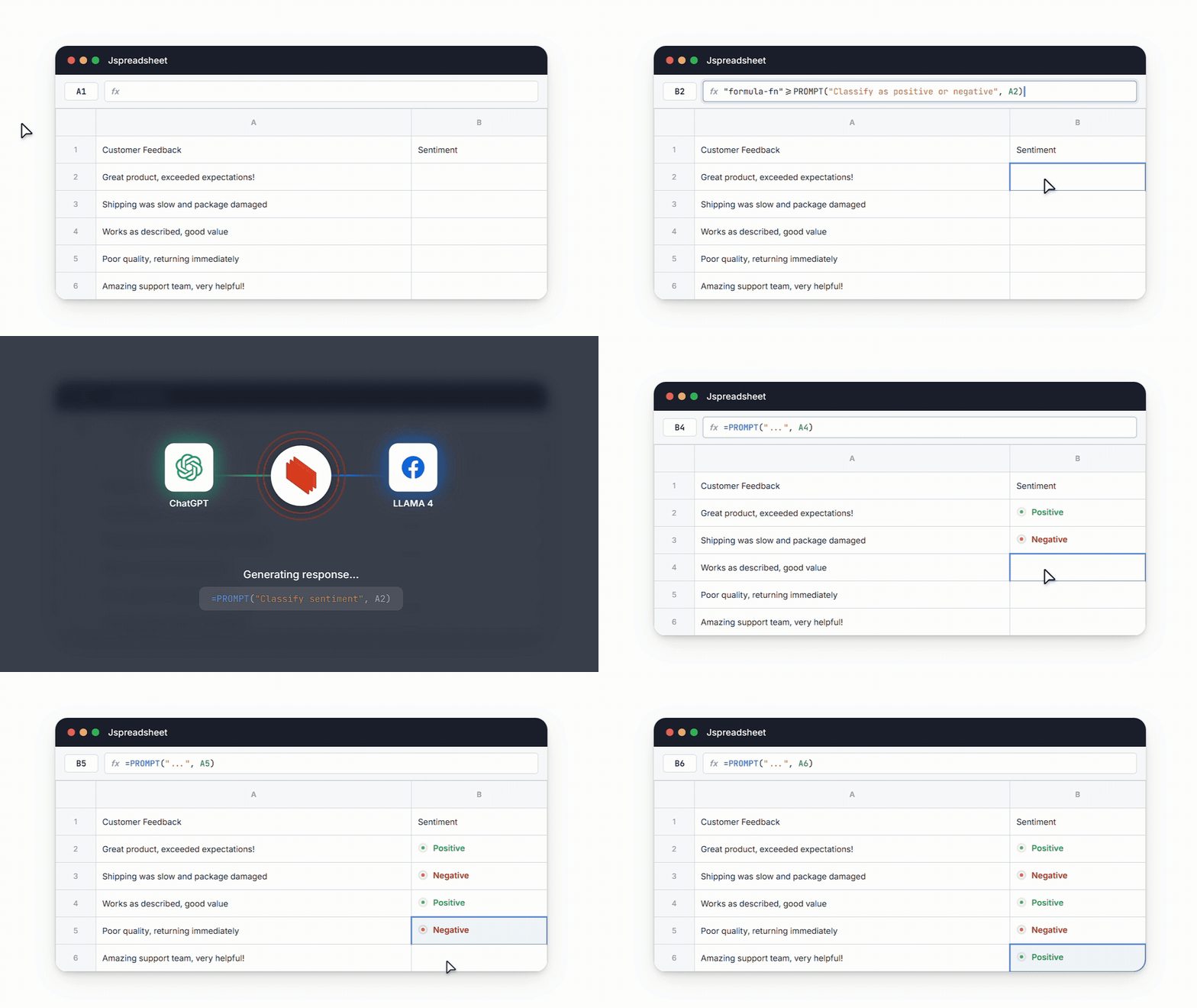
### 🤖 AI Integration
Integrate your data grid with AI to enable intelligent data processing, natural language queries, and automated insights.
[📖 **See All v12 Features →**](https://jspreadsheet.com/docs/upgrades)
---
## 🔥 Key Features
### 📊 Core Spreadsheet Functionality
**500+ Excel-Compatible Formulas** Every formula your users know and love, implemented with complete Excel compatibility. From basic arithmetic to advanced statistical functions, financial calculations, and text manipulation – if it works in Excel, it works in Jspreadsheet.
**Advanced Cell Selection & Editing** Multi-cell selection with Ctrl+click, range selection with Shift+click, and full keyboard navigation. Support for cell references, formula auto-completion, and intelligent cell addressing that adapts as you insert or delete rows and columns.
**Professional Data Entry** Auto-fill sequences, drag-and-drop cell ranges, smart formatting detection, and automatic data type recognition. Your users can work as efficiently as they do in desktop spreadsheet applications.
**Undo/Redo System** Comprehensive action history with unlimited undo/redo capabilities. Every cell edit, formula change, formatting adjustment, and structural modification is tracked and reversible.
**Copy/Paste** Full clipboard integration supporting rich formatting, formulas, and cross-application data transfer. Paste from Excel, Google Sheets, or any other spreadsheet application with formatting preservation.
### 🎨 Advanced Cell Types & Editors
**Rich Input Controls** Transform static cells into interactive and user-friendly elements:
- Dropdown lists with search and custom validation
- Checkbox and radio button groups
- Date and time pickers with localization
- Color pickers with custom palettes
- Numeric steppers and sliders
- Rich text editors with formatting
- File upload cells with preview
- Rating controls and progress bars
**Custom Editor Framework** Build your own cell editors using our comprehensive API. Create specialized input controls for your domain-specific data types, integrate with external services, or build complex multi-field editors for structured data.
**Data Validation Engine** Enforce specific business rules and input constraints directly within your spreadsheet:
- Numeric ranges and precision validation
- Date range constraints
- Text pattern matching with regex
- Custom validation functions
- Dropdown value restrictions
- Cross-cell validation rules
### 🎯 Visual Formatting & Styling
**Themes & Customization** Personalize the appearance of your spreadsheet to fit your exact needs or your brand's identity, with built-in light and dark themes and complete CSS customization capabilities.
**Complete Formatting Control** Customize your spreadsheet's appearance and behavior:
- Font families, sizes, and weights
- Text color and background colors
- Borders and cell alignment
- Number formatting (currency, percentage, scientific)
- Date and time formatting with localization
- Conditional formatting with custom rules
- Cell merging and text wrapping
**Charts & Visualization** Turn your spreadsheet data into different types of graphical charts:
- Line, bar, column, and area charts
- Pie and doughnut charts with customizable segments
- Scatter plots and bubble charts
- Combo charts mixing multiple chart types
- Sparklines for in-cell visualizations
- Real-time chart updates as data changes
### 📊 Pivot Tables
Transform raw data into meaningful insights with powerful pivot table functionality:
- Drag-and-drop field configuration for rows, columns, values, and filters
- Multiple aggregation functions (sum, count, average, min, max, etc.)
- Dynamic filtering and sorting capabilities
- Expandable/collapsible row and column groups
- Custom calculated fields and items
- Export pivot table results to various formats
### ⚡ Performance & Scalability Features
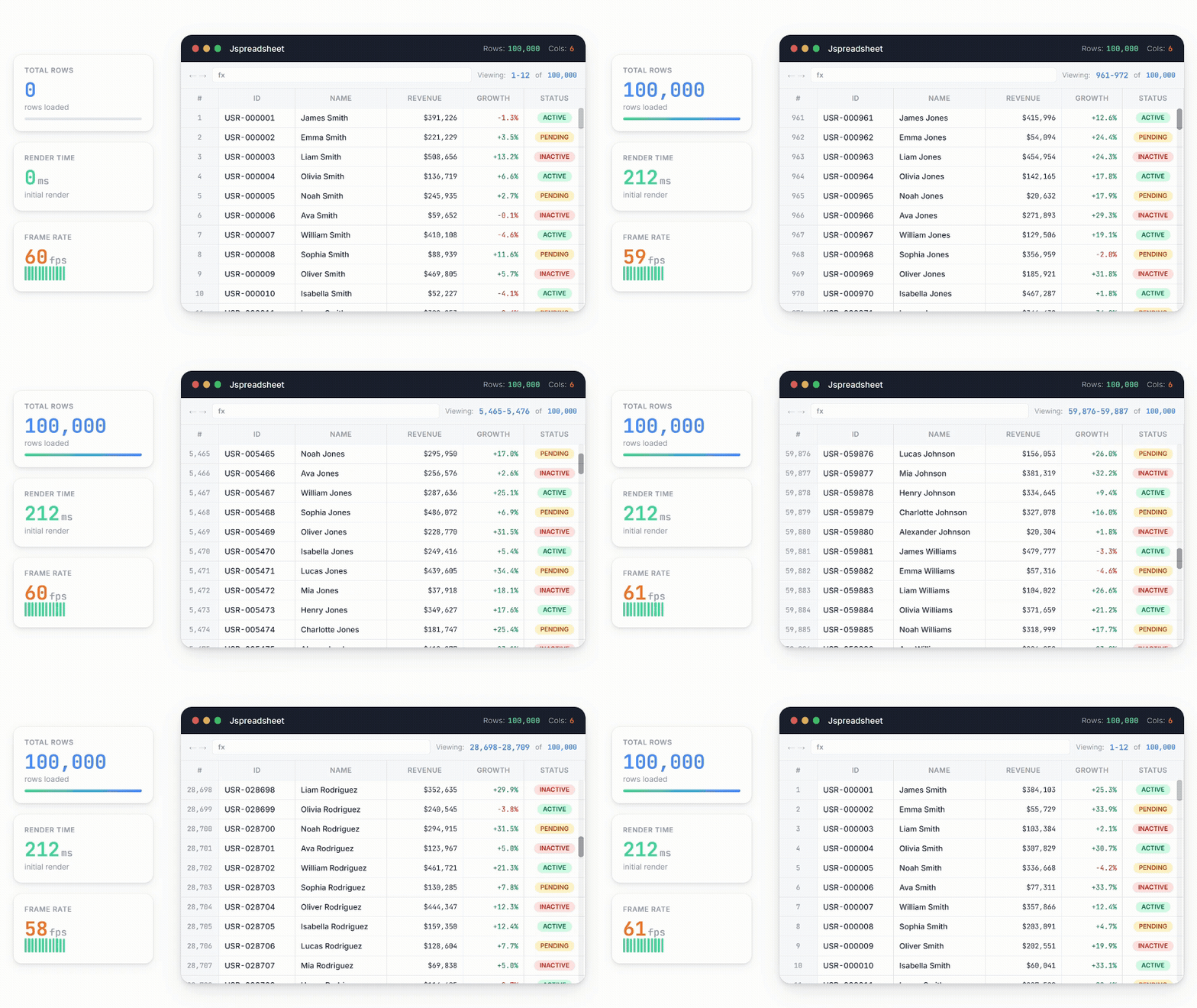
**Virtual Rendering Engine** Only visible cells are rendered in the DOM, enabling smooth performance with unlimited data sizes. Scroll through millions of rows without lag or memory issues.
**Intelligent Caching** Smart caching algorithms ensure frequently accessed data remains instantly available while optimizing memory usage for large datasets.
**Lazy Loading Support** Load data on demand as users scroll or navigate, ideal for server-side data sources and real-time feeds.
**Mobile Optimization** Jspreadsheet is designed to work comfortably on mobile devices:
- Pinch-to-zoom for detailed viewing
- Touch scrolling with momentum
- Long-press context menus
- Responsive layout adaptation
### 📁 Data Import & Export
**Excel File Support** Powerful Excel file support for .XLS and .XLSX formats with:
- All formulas and calculations
- Cell formatting and styles
- Charts and embedded objects
- Multiple worksheets
- Named ranges and defined names
- Data validation rules
**CSV Handling** Advanced CSV processing with:
- Custom delimiter detection
- Encoding handling (UTF-8, Latin-1, etc.)
- Quote and escape character processing
- Header row detection
- Data type inference
**JSON Integration** Native JSON import/export for seamless integration with REST APIs and modern data sources.
### 👥 Collaboration Features *(Enterprise Edition)*
**Real-Time Multi-User Editing** Multiple users can edit the same spreadsheet simultaneously with:
- Conflict resolution algorithms
- User presence indicators
- Live cursor tracking
- Automatic change synchronization
- Offline editing with sync on reconnect
**Advanced Comments & Annotations** Threaded commenting system with:
- Rich text comments
- @mentions and notifications
- Comment resolution tracking
- Audit trail maintenance
**Version Control** Every change is automatically recorded:
- Point-in-time restoration
- Change highlighting
- User attribution
- Branching and merging capabilities
**Permissions & Security** Advanced features to protect your data:
- Cell-level permissions
- Sheet protection
- User role management
- Field-level encryption
- Audit logging
[📖 **Complete Feature Documentation →**](https://jspreadsheet.com/docs)
---
## 🛠️ Framework Integration
Jspreadsheet works seamlessly with all major frameworks:
### React
```bash
npm install @jspreadsheet/react
```
```jsx
import React, { useRef } from "react";
import { Spreadsheet } from '@jspreadsheet/react';
import "jsuites/dist/jsuites.css";
import "jspreadsheet/dist/jspreadsheet.css";
const license = 'YOUR-LICENSE-KEY';
function App() {
const spreadsheet = useRef();
const worksheets = { data: [[1, 2, 3]] };
return <Spreadsheet ref={spreadsheet} worksheets={worksheets} license={license} />;
}
```
[📖 Docs](https://jspreadsheet.com/docs/react) • [🎮 Examples](https://jspreadsheet.com/docs/react#examples)
### Vue.js
```bash
npm install @jspreadsheet/vue
```
```vue
<template>
<Spreadsheet :worksheets="worksheets" :license="license" />
</template>
<script>
import { Spreadsheet } from "@jspreadsheet/vue";
import "jsuites/dist/jsuites.css";
import "jspreadsheet/dist/jspreadsheet.css";
const license = 'YOUR-LICENSE-KEY';
export default {
components: { Spreadsheet },
data() {
return {
license: license,
worksheets: { data: [[1, 2, 3]] },
};
}
}
</script>
```
[📖 Docs](https://jspreadsheet.com/docs/vue) • [🎮 Examples](https://jspreadsheet.com/docs/vue#examples)
### Angular
```bash
npm install jspreadsheet
```
```typescript
import { Component, ViewChild, ElementRef } from "@angular/core";
import jspreadsheet from "jspreadsheet";
jspreadsheet.setLicense('YOUR-LICENSE-KEY');
@Component({
selector: 'app-root',
standalone: true,
template: `<div #spreadsheet></div>`,
})
export class AppComponent {
@ViewChild('spreadsheet') spreadsheet!: ElementRef;
worksheets: jspreadsheet.worksheetInstance[] = [];
ngAfterViewInit() {
this.worksheets = jspreadsheet(this.spreadsheet.nativeElement, {
worksheets: [{ data: [[1, 2, 3]] }]
});
}
}
```
[📖 Docs](https://jspreadsheet.com/docs/angular) • [🎮 Examples](https://jspreadsheet.com/docs/angular#examples)
### All Frameworks
| Framework | Package | Docs |
| :---- | :---- | :---- |
| **React** | `@jspreadsheet/react` | [Documentation](https://jspreadsheet.com/docs/react) |
| **Vue.js** | `@jspreadsheet/vue` | [Documentation](https://jspreadsheet.com/docs/vue) |
| **Angular** | `jspreadsheet` | [Documentation](https://jspreadsheet.com/docs/angular) |
| **Vanilla JS** | `jspreadsheet` | [Documentation](https://jspreadsheet.com/docs) |
---
## 🎮 Live Examples
Explore interactive examples organized by category:
| Category | Description |
| :---- | :---- |
| [**Performance**](https://jspreadsheet.com/demo/performance) | Handle millions of rows with smooth scrolling |
| [**Integration**](https://jspreadsheet.com/demo/integration) | Charts, formulas, and data binding |
| [**Collaboration**](https://jspreadsheet.com/demo/collaboration) | Real-time multi-user editing |
| [**Supply Chain**](https://jspreadsheet.com/demo/supply-chain) | Dashboard with inventory tracking |
| [**Project Management**](https://jspreadsheet.com/demo/project-management) | Task tracking and Gantt charts |
| [**Financial**](https://jspreadsheet.com/demo/financial) | Investment portfolio tracker |
| [**HR Planner**](https://jspreadsheet.com/demo/fiscal-year) | Fiscal year planning tool |
| [**Sales Dashboard**](https://jspreadsheet.com/demo/sales-dashboard) | Revenue and metrics visualization |
[🚀 **View All Examples**](https://jspreadsheet.com/demo)
---
## 🎯 Use Cases
| Industry | Applications |
| :---- | :---- |
| **Finance & Accounting** | Budgeting tools, balance sheets, forecasting apps, loan calculators |
| **Data Analysis** | KPI monitoring, ad hoc reporting, analytics front-ends |
| **Operations & Logistics** | Inventory tracking, scheduling, project management boards |
| **Healthcare & Research** | Clinical data collection, experiment logs, scientific modelling |
| **Education** | Interactive exercises, grading sheets, collaborative workbooks |
| **Enterprise SaaS** | Admin panels, CRMs, HR tools, product configurators |
---
## 💬 What Our Customers Say
> *"At SplitC we struggled sometimes when users wanted to bulk insert/edit things (sometimes over 100k rows) and we needed performance. Jspreadsheet is probably the fastest spreadsheet component you'll find out there, and with a small bundle size. By the way, support is awesome."*
>
> **— Lucas Segers, SplitC**
> *"We vetted 10 JavaScript components and we must say that Jspreadsheet comes out as the best."*
>
> **— Lode Cools, Bizz Control**
> *"The latest version of Jspreadsheet is a powerful data grid tool, providing an excellent front end for our spreadsheet interface. The Jspreadsheet team is helpful and quick to respond."*
>
> **— Dana Stoesz, PharmacyWire**
---
## 📚 Documentation & Resources
### 📖 Getting Started
- [Installation Guide](https://jspreadsheet.com/docs)
- [Quick Start Tutorial](https://jspreadsheet.com/docs/getting-started)
- [Basic Examples](https://jspreadsheet.com/demo)
### 🔧 Advanced Topics
- [Formula Reference](https://jspreadsheet.com/docs/formulas)
- [Custom Cell Editors](https://jspreadsheet.com/docs/editors)
- [Real-time Collaboration](https://jspreadsheet.com/products/server)
- [Performance Optimization](https://jspreadsheet.com/docs/performance)
### 🎨 Customization
- [Themes & Styling](https://jspreadsheet.com/docs/themes)
- [Custom Plugins](https://jspreadsheet.com/docs/plugins)
- [API Reference](https://jspreadsheet.com/docs/methods)
---
## ❓ Frequently Asked Questions
<details>
<summary><strong>Does Jspreadsheet work with any build system or bundler?</strong></summary>
Yes, Jspreadsheet is built with vanilla JavaScript and has zero dependencies, making it compatible with any build system including Webpack, Rollup, Parcel, Vite, or no build system at all.
</details>
<details>
<summary><strong>What browsers are supported?</strong></summary>
Jspreadsheet supports all modern browsers including Chrome 70+, Firefox 65+, Safari 12+, and Edge 79+. Mobile browsers (iOS Safari, Android Chrome) are fully supported with touch-optimized interactions.
</details>
<details>
<summary><strong>How many rows can Jspreadsheet handle?</strong></summary>
Version 12 can handle **over 1 million rows** with real DOM elements while maintaining smooth scrolling and editing performance. The virtual rendering engine ensures only visible cells impact performance.
</details>
<details>
<summary><strong>Does it work with TypeScript?</strong></summary>
Yes, Jspreadsheet includes comprehensive TypeScript definitions with full type safety for all APIs, events, and configuration options.
</details>
<details>
<summary><strong>Can I import Excel files?</strong></summary>
Yes, Excel import (.XLS and .XLSX) is available in Standard, Enterprise, and Ultimate editions with support for formulas, formatting, charts, multiple worksheets, and data validation rules.
</details>
<details>
<summary><strong>Is real-time collaboration supported?</strong></summary>
Real-time collaboration is available in the Enterprise Edition with features including simultaneous multi-user editing, live cursor tracking, conflict resolution, and offline editing with sync.
</details>
[**View Full FAQ →**](https://jspreadsheet.com/docs/faq)
---
## 📋 Changelog
### v12.0.0 - September 2024 🎉
**Major Release Highlights:**
- ✨ **1M+ Rows** - Support for over 1 million rows with real DOM elements
- ✨ **Pivot Tables** - Dynamic data summarization with drag-and-drop configuration
- ✨ **Worksheet Tables** - New table feature for structured data management
- ✨ **Style Preservation** - Copy/paste from Excel/Google Sheets with formatting
- ✨ **Web Components** - Modern web-components-based editors
- ✨ **Multi-Selection** - Drag & drop for multiple columns/rows
- ✨ **Mobile Navigation** - Completely redesigned touch experience
- ✨ **Accessibility** - Enhanced keyboard navigation with IME support
**New Extensions:**
- `@jspreadsheet/extensions` - Complete collection of extensions
- `@jspreadsheet/format` - Advanced custom editors and cell masking
[📖 **Full Changelog**](https://jspreadsheet.com/docs/upgrades)
---
## 📦 Package Information
### NPM Package
- **Package Name**: `jspreadsheet`
- **Current Version**: 12.x
- **Bundle Size**: ~200KB minified + gzipped
- **Dependencies**: jsuites v6.x
- **TypeScript**: Full type definitions included
- **Module Formats**: ESM, CommonJS, UMD
### Repository
- **Homepage**: [https://jspreadsheet.com](https://jspreadsheet.com)
- **Documentation**: [https://jspreadsheet.com/docs](https://jspreadsheet.com/docs)
- **Issues**: [https://github.com/jspreadsheet/pro/issues](https://github.com/jspreadsheet/pro/issues)
- **Community Edition**: [https://github.com/jspreadsheet/ce](https://github.com/jspreadsheet/ce)
### Keywords
`spreadsheet`, `datagrid`, `data-grid`, `excel`, `table`, `data-table`, `vanilla-js`, `javascript`, `typescript`, `react`, `vue`, `angular`, `pivot-table`, `formulas`, `charts`, `data-visualization`, `collaboration`, `real-time`
---
## 💬 Community & Support
### 👋 Join Our Community
- [GitHub Discussions](https://github.com/jspreadsheet/pro/issues) - Ask questions and share ideas
- [Stack Overflow](https://stackoverflow.com/questions/tagged/jspreadsheet) - Technical Q&A
### 📞 Get Support
- **Standard Edition**: Priority email support with 48-hour response time
- **Enterprise Edition**: Dedicated support team and phone support
- **Ultimate Edition**: SLA guarantees with 4-hour response for critical issues
[Contact Support](https://jspreadsheet.com/contact)
---
## 📄 License
**Jspreadsheet PRO** is available under commercial license options:
- **Standard Edition**: Commercial license for small teams
- **Enterprise Edition**: Full commercial license with premium features
- **Ultimate Edition**: Complete solution with collaboration and advanced features
**Looking for the open-source version?** Check out [jspreadsheet-ce](https://github.com/jspreadsheet/ce) (Community Edition) under MIT License.
[View License Details](https://jspreadsheet.com/docs/license) | [Compare Editions](https://jspreadsheet.com/pricing)
---
## 🌍 Join Thousands of Developers
Jspreadsheet powers spreadsheet applications across industries — from fintech startups to Fortune 500 enterprises. Join our growing community of developers who are building the future of data manipulation on the web.
**Transform your data, empower your users, and accelerate your development with Jspreadsheet.**
---
<p align="center">
<a href="https://jspreadsheet.com"><strong>🚀 Try it for Free</strong></a> •
<a href="https://jspreadsheet.com/docs"><strong>📖 Read the Docs</strong></a> •
<a href="https://github.com/jspreadsheet/jspreadsheet/discussions"><strong>💬 Join Community</strong></a>
</p>
<p align="center">
Made with ❤️ by the Jspreadsheet Team
</p>