jsonpath-lifter
Version:
JSONPath based document transformations
376 lines (271 loc) • 13.5 kB
Markdown
# jsonpath-lifter
Transform JSON objects using JSONPath expressions
## Declarative Rule Based Document Transformations
Suppose you have documents like this:
```javascript
const doc = {
reporter: {
name: "Andy Armstrong",
email: "andy@example.com"
},
links: [
"https://github.com/AndyA",
"https://twitter.com/AndyArmstrong"
],
repos: [
{ n: "jsonpath-faster", u: "https://github.com/AndyA/jsonpath-faster" },
{ n: "jsonpath-lifter", u: "https://github.com/AndyA/jsonpath-lifter" }
]
}
```
But you need the data arranged like this:
```javascript
const want = {
ident: "Andy Armstrong <andy@example.com>",
links: [
"https://github.com/AndyA",
"https://twitter.com/AndyArmstrong",
"https://github.com/AndyA/jsonpath-faster",
"https://github.com/AndyA/jsonpath-lifter"
]
}
```
All the links are collected in one place and the `name` and `email` properties of `reporter` have been merged as `ident`.
With `jsonpath-lifter` you can make a function to perform the transformation.
```javascript
const lifter = require("jsonpath-lifter");
// Make a new lifter
const lift = lifter(
{
src: "$.reporter",
dst: "$.ident",
via: rep => `${rep.name} <${rep.email}>` // translate value
},
{
src: ["$.links[*]", "$.repos[*].u"], // multiple paths
dst: "$.links",
mv: true // allow multiple values
}
);
const got = lift(doc);
```
Read on to discover more complex rules and the interesting ways in which they can be combined.
## API
To create a new transformation function call `lifter` with a list of [rules](#rules).
```javascript
const lift = lifter(
{ dst: "$.id", src: "$.serial" },
{ dst: "$.updated",
src: "$.meta.updated",
via: u => new Date(u).toISOString() },
{ dst: "$.author",
src: "$.meta.author.email" }
);
```
`lifter` returns a function that will apply the rules in order to an input document to produce an output document. You can pass a mixture of rules (as above), other `lift` functions or any function with the same signature as a `lift` function.
Any nested arrays in the input arguments will be flattened.
```javascript
const liftMeta = lifter({ ... });
const liftTimes = lifter({ ... });
const lift = lifter(
{ dst: "$.id", src: "$._id" },
[ liftMeta, liftTimes ] // flattened
);
```
The returned function accepts up to three arguments. We call this function `lift` in much of the following documentation.
### lift(inDoc[, outDoc[, $]])
Argument | Meaning
---------|--------
`inDoc` | The document to transform
`outDoc` | The output document to write to; automatically created if none passed
`$` | A general purpose [context variable](#context) which is passed to `via`, `dst` and `set` callbacks and may be referenced in JSONPath expressions.
The return value is the output document - either `outDoc` (modified) or a newly created object if `outDoc` is `undefined`.
## Methods
The generated `lift` function also has these methods.
### lift.add(...rules)
Add additional rules to this lifter.
```javascript
lift.add({ set: () => new Date().toISOString(), dst: "$.modified"});
```
Accepts the same arguments as `lifter`.
### async lift.promise(inDoc[, outDoc[, $]])
Lift the supplied `inDoc` and return a promise that resolves when all of the promises in `outDoc` have resolved. Accepts the same arguments as the `lift` function itself. This allows async `via` functions.
```javascript
const lift = lifter(
{ dst: "$.status", src: "$.url", via: async u => fetchStatus(u) }
);
const cooked = await lift.promise(doc);
```
Returns a Promise that is resolved when all of the promises found in the document have resolved (including any copied from the input document). Rejects if any of them rejects.
## Rules
A lifter is a set of rules that are applied one after another to an input document to produce an output document. Here's what the data flow looks like.
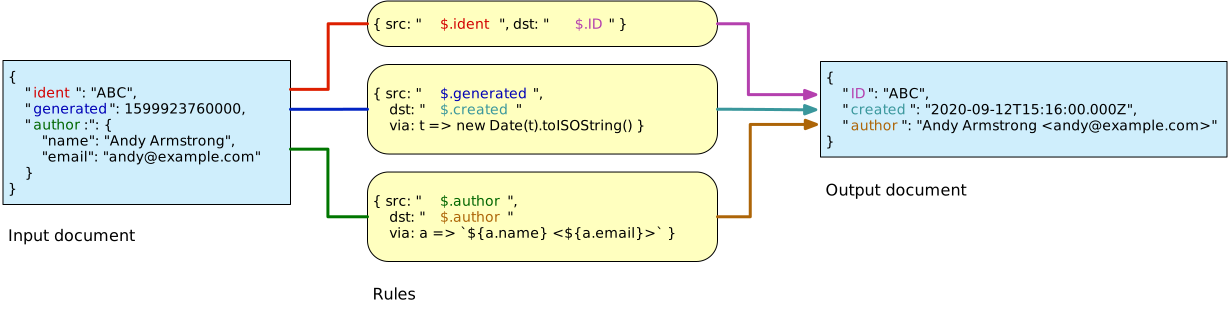
Each rule is either a function with the signature `f(inDoc, outDoc, $)` or an object that may contain the following properties.
Property | Meaning
---------|--------
`src` | The source JSONPath to extract data from. May match multiple locations. May be an array of JSONPaths
`set` | Used instead of `src` to provide a constant or computed value
`dst` | JSONPath to write values to in the output document
`via` | A function to cook the value with. May be another lifter or an array of rules (which will be compiled into a lifter)
`mv` | True to make `dst` an array that receives all matched values
`clone` | True to clone values copied from the source document
`leaf` | `src` will only match leaf nodes
The `src` and `set` properties control the execution of each rule and one or other of them is required. The other properties are optional. Let's take a look at them in more detail.
### src
Specify the JSONPath in the input document that this rule will match. It can be any valid JSONPath. If it matches at multiple locations in the source document the rule will be executed once for each match. If `src` has no matches the rule will not be executed. If `src` is an array each of the paths in it will be tried in turn and the rule will execute for all matches.
Here's a rule that normalises an ID that may be found in `_id`, `ident` or `_uuid`.
```javascript
// Normalise ID: may in in _id, ident or _uuid
const idNorm = lifter({ src: ["$._id", "$.ident", "$._uuid"], dst: "$.ID" });
```
If more than one of `_id`, `ident` and `_uuid` are present in the input document the rule will execute for each match and ultimately `$.ID` will be set to the value of the last match. See [mv](#mv) and [dst](#dst) for ways of gathering multiple values with a single rule.
### set
Use `set` to add a value to the output document without having to match anything.
```javascript
lift.add(
// Add modified stamp
{ dst: "$.modified", set: () => new Date().toISOString() },
// Say we were here
{ dst: "$.processedBy", set: "FooMachine" }
);
```
To compute the value dynamically `set` should be a function. It is called as `set(inDoc, $)`.
```javascript
lift.add(
{ dst: "$.stamp", set: (doc, $) => `${doc.id}-${$.rev}` }
);
```
Alternately `set` can be a literal value.
```javascript
lift.add(
{ dst: "$.touched", set: true }
);
```
Set requires `dst` to be supplied and to be a literal JSONPath.
Every rule must contain either a `src` or a `set` property.
### dst
Specify the path in the output document where the matched value should be stored. For `set`, `dst` is required and must be a JSONPath string.
When used with `src`, `dst` can take the following values
Value | Meaning
-----------------------|----------
A JSONPath string | The location in the output document for this value
`undefined` or `true` | Use the path in the input document where this value was found.
`false` | Discard value. Assumes `via` has side effects that we need
A function | Called as `dst(value, path, $)`, returns a new dst which is interpreted according to these rules
When `dst` is a JSONPath string and `mv` is not set each matching value will be written to the same location in the output document overwriting any previous matches. If `mv` is set `dst` is a list onto which matching items are pushed.
If `dst` is missing altogether (`undefined`) or `true` the concrete path where each value was found will be used unaltered. Here's an example that makes a skeleton document that contains all the `id` fields in their original locations but nothing else.
```javascript
const liftIDs = lifter({ src: "$..id" });
```
If `dst` is a function it will be called as `dst(value, path, $)`. The value it returns is interpreted in the same way as a literal `dst`. This means it can return
* `true` or `undefined` to copy a value
* `false` to discard a value
* a different path to copy to
* another function which will be called to provide a new`dst`.
### via
Values found in the input document may be modified before assigning them to the output document. Let's build on the previous example to convert all found ids to lower case.
```javascript
const liftIDs = lifter({ src: "$..id", via: id => id.toLowerCase() });
```
The `via` function is called as `via(inValue, outValue, $)` and should return the value to be assigned to the output document.
The signature of the `via` function is the same as that of a `lift` function; `outValue` and `$` are optional and `inValue` is the value in the input document that `src` matched. Lifters are `via` functions!
```javascript
const liftMeta = lifter( { ... } );
const lift = lifter( { src: "$.meta", dst: "$.metadata", via: liftMeta } );
```
You may specify `via` as an array of rules which is a shorthand for supplying a nested lifter.
```javascript
const lift = lifter({
src: "$.info",
dst: "$.meta",
via: [
{ src: "$.name", dst: "$.moniker" },
{ src: "$.modified",
dst: "$.updated",
via: mod => new Date(mod).toISOString() }
]
});
```
### mv
Normally a single value is assigned to each location in the output document. However if `mv` is set to `true` the corresponding `dst` is treated as an array onto which each matching value is pushed.
```javascript
const collectLinks = lifter({
dst: "$.links",
mv: true,
src: [ "$.link[*]", "$..info.link" ]
});
```
In the above example the output document would contain an array at `$.links` containing all of the links found at `$.link[*]` and `$..info.link`.
### clone
Set `clone` to deep clone each value before copying it into the output document.
```javascript
const lift = lifter(
{ dst: "$.meta", src: "$.metadata", clone: true },
// Without clone this would alter the source document's
// metadata object - because meta would be a reference
// to it.
{ dst: "$.meta.author", src: "$.author" }
);
```
### leaf
Set `leaf` to force the `src` JSONPath to match only leaf nodes - i.e. not nodes containing an object or an array.
## Use in Array.map()
It is tempting to pass a lifter to Javascript's `Array.map()` method. It won't do what you expect because the `map` called back is called as
```javascript
cb(doc, index, array)
```
but a lifter is called as
```javascript
lift(doc, outDoc, $)
```
As a bit of syntactic sugar every lift function has a `mapper` property which is a function that may be passed directly to `map`.
```javascript
lift.mapper(doc)
```
Use it anywhere you don't control the remainder of the arguments to the callback after `doc`.
## Context
The context variable `$` is used internally by `jsonpath-lifter` and is passed to all callbacks. It may be augmented with your own properties. Internally it's used to hold references to the input and output documents and any [local variables](#local-variables).
Property | Meaning
---------|--------
`doc` | The input document
`out` | The output document
`local` | The local variable stash.
## Local Variables
Sometimes its useful to make a value from a document available to later rules - maybe rules in nested lifters. Here's an example that stashes the document ID and uses it in a nested lifter.
```javascript
const liftAddStamp = lifter({ dst: "$.stamp", src: "@.id" });
const lift = lifter(
{ dst: "@.id", src: "$._uuid" }, // stash id
liftAddStamp // use id
);
```
Any JSONPath that starts with `@` rather than `$` refers to a local variable which persists for only a single invocation of the lifter. Nested lifters inherit local variables but any changes that they make are not propagated back to the calling lifter.
## Pipelines
All of the rules in a lifter read from a single input document and write to the single output document. Sometimes it's useful to build the output document in one more more stages - using intermediate, temporary documents.
Pipelines are created by calling `lifter.pipe` with a list of lifters (or other functions with the same signature). Here's a pipeline with two stages.
```javascript
const liftPoint = lifter.pipe(
lifter(
// extract lat, lon, alt
{ dst: `$.lat`, src: `$.coordinates[1]` },
{ dst: `$.lon`, src: `$.coordinates[0]` },
{ dst: `$.alt`, src: `$.coordinates[2]` }
),
lifter(
// copy lat, Lon, alt from previous stage
{ src: ["$.lat", "$.lon", "$.alt"] },
// create map link
{
dst: `$.map`,
src: `$`,
via: v => `https://www.google.co.uk/maps/place/${v.lat},${v.lon}`
}
)
);
```
A pipeline has the same signature as a lifter. Lifters and pipelines may be freely mixed to achieve the desired data flow.
The last stage in a pipeline writes to the pipeline's output documents; previous stages write to a temporary empty document which is passed to the next stage as its input document.
## Performance
The `lift` function is created using [`jsonpath-faster`](https://www.npmjs.com/package/jsonpath-faster) which compiles JSONPath expressions into Javascript and caches the resulting functions. All of the `src` JSONPaths in a lifter are compiled into a single Javascript function which then dispatches to callbacks which handle the outcome of each rule. `dst` paths are compiled and cached the first time each one is seen. It's designed to be as fast and efficient as possible and is used in production as part of a processing pipeline which handles millions of complex documents per hour.
## License
[MIT](LICENSE)