js-solr-highlighter
Version:
A JavaScript library for highlighting HTML text based on the query in the lucene/solr query syntax
64 lines (58 loc) • 5.5 kB
Markdown
# js-solr-highlighter
A JavaScript library for highlighting HTML text based on the query in the lucene/solr query syntax<br />
Run in the browser or Node.js environment<br />
Built based on [lucene](https://github.com/bripkens/lucene "lucene") and [text-annotator](https://github.com/zhan-huang/text-annotator "text-annotator")<br />
The general highlighting process is:
1. Derive which text to highlight from a query in the lucene syntax
2. Highlight the derived text in the HTML
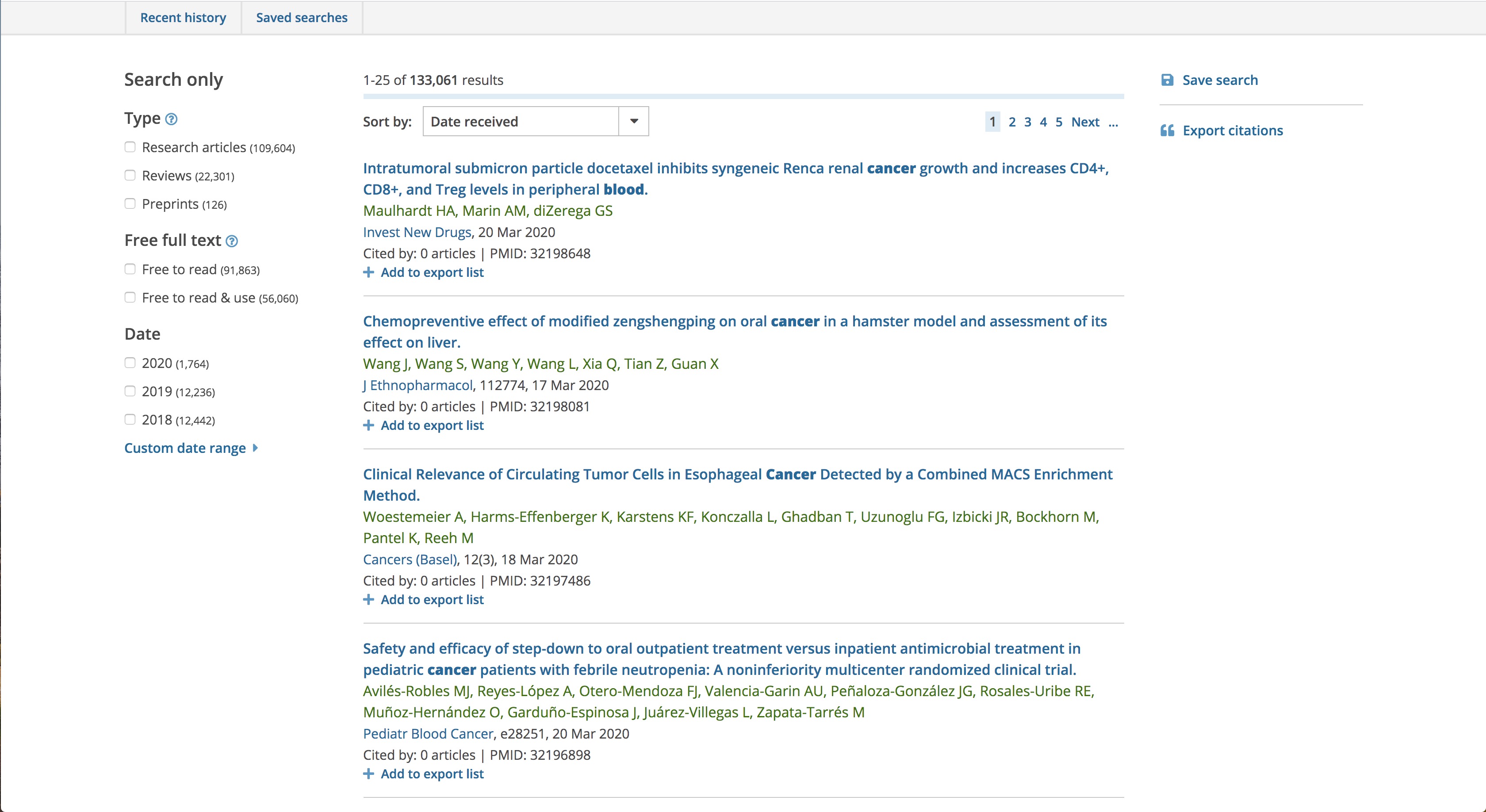
## An example from Europe PMC
js-solr-highlighter has been used to highlight the article titles in the search results of [Europe PMC](https://europepmc.org "Europe PMC"), an open science platform that enables access to a worldwide collection of life science publications. An example is https://europepmc.org/search?query=blood%20AND%20TITLE%3Acancer
## Basic usage
### No options
```javascript
var query = 'cancer AND blood'
var content = 'Platelet Volume Is Reduced In Metastasing Breast Cancer: Blood Profiles Reveal Significant Shifts.'
var highlightedContent = highlightByQuery(query, content)
// 'Platelet Volume Is Reduced In Metastasing Breast <span id="highlight-0" class="highlight">Cancer</span>: <span id="highlight-1" class="highlight">Blood</span> Profiles Reveal Significant Shifts.'
```
### With the validFields options that specify the fields valid in the query syntax. If not specified, all like x:x will be valid fields
```javascript
var query = 'TITLE:blood AND CONTENT:cell'
var content = 'A molecular map of lymph node blood vascular endothelium at single cell resolution'
var options = { validFields: ['TITLE'] }
var highlightedContent = highlightByQuery(query, content, options)
// 'A molecular map of lymph node <span id="highlight-0" class="highlight">blood</span> vascular endothelium at single cell resolution'
// "cell" will not be highlighted
```
### With the highlightedFields options that specify the valid fields whose values will be highlighted. If not specified, the values of all valid fields will be highlighted
```javascript
var query = 'TITLE:blood OR CONTENT:cell'
var content = 'A molecular map of lymph node blood vascular endothelium at single cell resolution'
var options = { validFields: ['TITLE', 'CONTENT'], highlightedFields: ['CONTENT'] }
var highlightedContent = highlightByQuery(query, content, options)
// 'A molecular map of lymph node blood vascular endothelium at single <span id="highlight-0" class="highlight">cell</span> resolution'
// "blood" will not be highlighted
```
## Options
| Field | Type | Description |
| ---- | ---- | ---- |
| validFields | array | validFields are those parsed as fields.<br />If undefined, all will be parsed as fields if they are like x:x |
| highlightedFields | array | highlightedFields are those among validFields whose values will be highlighted.<br />If undefined, the values of all valid fields will be highlighted. |
| highlightAll | boolean | highlightAll indicates whether to highlight all occurances of the text or the first found occurance only.<br />If undefined, it is true. |
| highlightIdPattern | string | highlightIdPattern is the same pattern of the IDs associated with the highlights in the HTML.<br />A highlight ID consists of highlightIdPattern followed by the index of the highlight, such as "highlight-0", "highlight-1"...<br />If undefined, it is "highlight-". |
| highlightClass | string | highlightClass is the classname of every highlight in the HTML.<br />If undefined, it is "highlight". |
| caseSensitive | boolean | caseSensitive indicates whether to ignore case when highlighting.<br />If undefined, it is false (ignore).
## Highlighting rules
| Rule | Examples |
| ---- | ---- |
| If the query has only text and has no fields, highlight each word in it. | If the query is `methylation test`, `methylation` and `test` will be highlighted if they appear in the content. |
| If the field is valid, highlight its value. | If the query is `TITLE:blood` and `TITLE` is a valid field, highlight `blood` if it appears in the content. |
| Do not highlight part of a word in the content. | If the query is `bloo` and the content has no such word but has the word `blood`, do not highlight `bloo` in `blood`. |
| Highlight both the text or field values that the `AND` or `OR` operator takes. | If the query is `blood AND TITLE:cancer` and `TITLE` is a valid field, highlight both `blood` and `cancer` in the content if they exist. |
| Do not highlight the text or field value that the `NOT` operator takes. | If the query is `NOT blood AND cancer`, highlight `cancer` but not `blood`. |
| Highlight the text or field values within parentheses. | If the query is `(blood) AND (TITLE:cancer)` and `TITLE` is a valid field, both `blood` and `cancer` will be highlighted if possible. |
| Do not highlight [Solr stop words](https://github.com/apache/lucene-solr/blob/master/solr/core/src/test-files/solr/collection1/conf/stopwords.txt "solr stop words"). | If the query is `a theory-based study`, do not highlight `a` but the other words. |
| If the text or the value of a valid field is within quotes, highlight the EXACT text/value (including stop words). | If the query is `"breast cancer"`, do not highlight `breast` or `cancer` if it appears without the other following or being followed. |
## Contact
[Zhan Huang](mailto:z2hm@outlook.com "Zhan Huang")