joplin-plugin-life-calendar
Version:
This plugin renders yaml-based fenced code into a Life Calendar inspired by Tim Urban's article "Your Life in Weeks".
129 lines (113 loc) • 5.58 kB
Markdown
# Life Calendar
This plugin renders yaml-based fenced code into a Life Calendar inspired by Tim Urban's article "Your Life in Weeks".
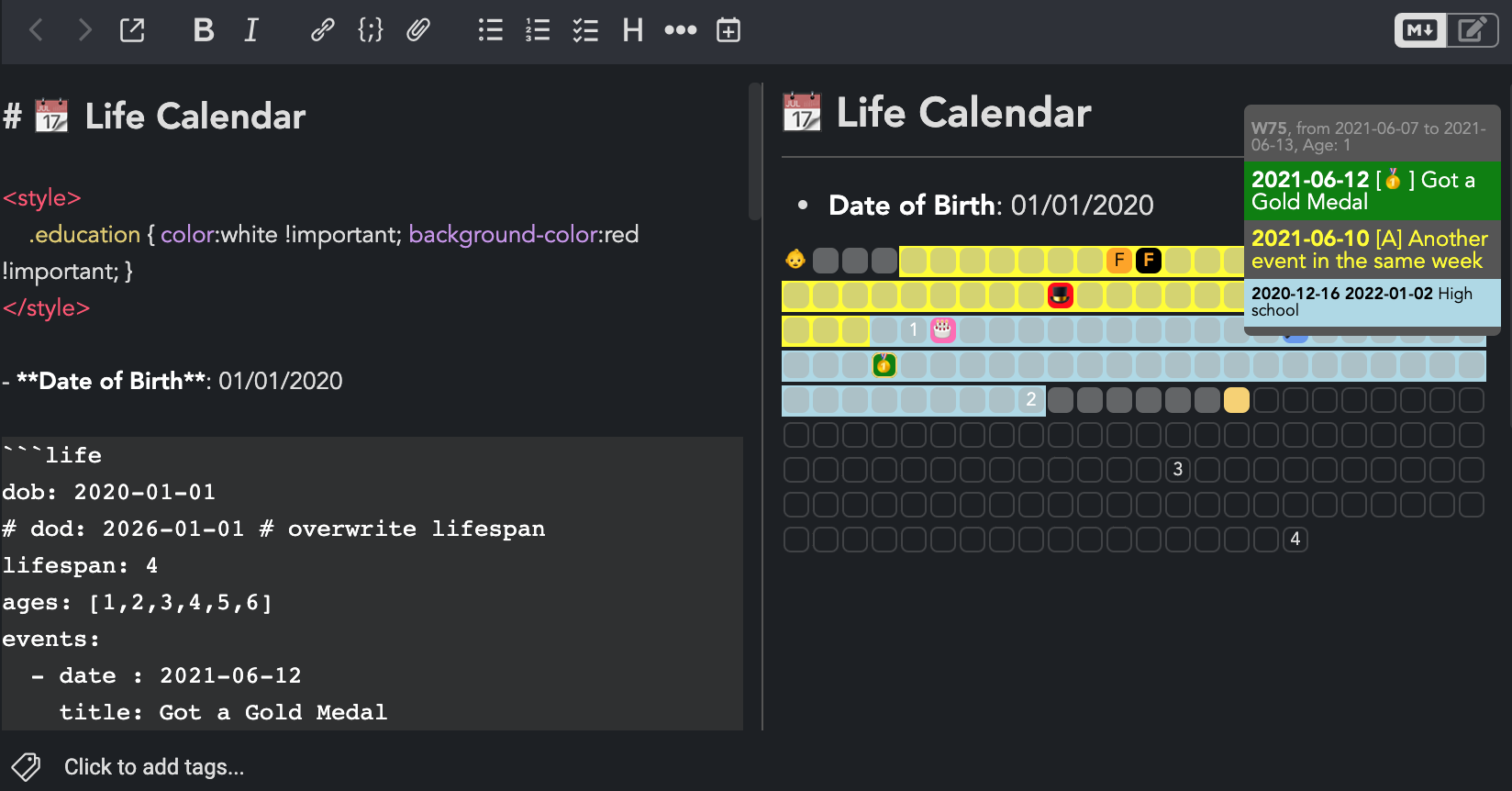
The purpose of Life Calendar is documenting the events in your life but there is nothing stopping you from using it for other purposes such as project management. The yaml-based syntax make it easy to export data to other format.
## Usage
You need to create a fenced code with `life` as language to render the calendar then input the events using the the follow template:
```
- date : yyyy-mm-dd # (required) (interpretation DD/MM/YYYY 12:00 local time)
title: # (required) event title
icon : # (optional) event icon, use 1st character of title if icon is null
z-index: # (optional) priority of the event, the one with the bigest value will be shown (default:0)
className: # (optional) css class of the event (color, background-color, etc.)
color: # (optional) overwrite color
backgroundColor: # (optional) overwrite background-color
```
This plugin also support periods which is a span of time instead of a point in time. The template for period is as follow:
```
- start: yyyy-mm-dd # (required) (interpretation: DD/MM/YYYY 01:00 local time)
end : yyyy-mm-dd # (required) (interpretation: DD/MM/YYYY 23:00 local time)
title: # (required) event title
className: # (optional) css class of the event (color, background-color, etc.)
color: # (optional) overwrite color
icon: # (optional) period icon
backgroundColor: # (optional) overwrite background-color
```
The example below should demostrate all the supported features. It is recommended to intend the events block with spaces as yalm parser is quite sensitive. You may encounter parsing problems when typing with Joplin as it use tab for intending.
From v1.3.0 forward, this plugin also support day-based, month-based, and year-based calendar beside week-based by writting down the desired type `type: month`. Moreover you can click on the a square to pin down the details window so you can read. Click again at any square to unpin it.
`````markdown
# 📆 Life Calendar
<style>
.education { color:white !important; background-color:red !important; }
</style>
- **Date of Birth**: 01/01/2020
```life
type: week # [ day, week, month, year ]
dob : 2020-01-01 # alias=startDate
lifespan: 4 # alias=duration
# dod: 2026-01-01 # alias=endDate
ages: [1,2,3,4,5,6]
events:
- { date: 2022-04-19, title: Inline Event, icon: 🍿, backgroundColor: navy, color: white }
- date : 2021-06-12
title: Two events in the same week
color: yellow
- date : 2021-06-10
title: Got a Gold Medal
icon : 🥇
z-index: 1 # shown icon of this event in calendar board instead of the other one
backgroundColor: green
- date : 2021-03-28
title: Random Event
icon : 🎤
color: black
backgroundColor: '#6495ED'
- date : 2021-01-03
title: Birthday Party
icon : 🎂
color: black
backgroundColor: hotpink
- date : 2020-08-19
title: Obtain Magician License
icon : 🎩
className: education
- date : 2020-03-19
title: First character used as icon
backgroundColor: orange
color: black
- date : 2020-03-27
title: Used explicit icon
icon : '<b>F</b>'
color: orange
backgroundColor: black
- date : 2020-01-01
title: Date of Birth
icon : 👶
backgroundColor: transparent
periods:
- start: 2022-09-19
end : 2022-11-05
title: Sunny
icon : 🌤
- start: 2022-02-16
end : 2022-08-16
title: Advanced Magic Course
className: education
- start: 2020-12-15
end: 2022-01-01
title: High school
color: black
backgroundColor: lightblue
- start: 2020-02-01
end: 2020-12-15
title: Preschool
backgroundColor: yellow
color: black
```
`````
You can further customize the apperance using `userstyle.css`
## Tips & Tricks
### Ages template
Some pre-prepared templates for `ages` option, just copy it to your note instead of typing yourself:
```
ages: [1, 2, 3, 4, 5, 6, 7, 8, 9, 10, 11, 12, 13, 14, 15, 16, 17, 18, 19, 20, 21, 22, 23, 24, 25, 26, 27, 28, 29, 30, 31, 32, 33, 34, 35, 36, 37, 38, 39, 40, 41, 42, 43, 44, 45, 46, 47, 48, 49, 50, 51, 52, 53, 54, 55, 56, 57, 58, 59, 60, 61, 62, 63, 64, 65, 66, 67, 68, 69, 70, 71, 72, 73, 74, 75, 76, 77, 78, 79, 80, 81, 82, 83, 84, 85, 86, 87, 88, 89, 90, 91, 92, 93, 94, 95, 96, 97, 98, 99]
ages: [2, 4, 6, 8, 10, 12, 14, 16, 18, 20, 22, 24, 26, 28, 30, 32, 34, 36, 38, 40, 42, 44, 46, 48, 50, 52, 54, 56, 58, 60, 62, 64, 66, 68, 70, 72, 74, 76, 78, 80, 82, 84, 86, 88, 90, 92, 94, 96, 98]
ages: [3, 6, 9, 12, 15, 18, 21, 24, 27, 30, 33, 36, 39, 42, 45, 48, 51, 54, 57, 60, 63, 66, 69, 72, 75, 78, 81, 84, 87, 90, 93, 96, 99]
ages: [4, 8, 12, 16, 20, 24, 28, 32, 36, 40, 44, 48, 52, 56, 60, 64, 68, 72, 76, 80, 84, 88, 92, 96]
ages: [5, 10, 15, 20, 25, 30, 35, 40, 45, 50, 55, 60, 65, 70, 75, 80, 85, 90, 95]
```
## Acknowledgements
- Tim Urban for popularizing the [Your Life in Weeks Concept](https://waitbutwhy.com/2014/05/life-weeks.html)
- [Dylan N's Life Calendar Implementation](https://github.com/ngduc/life-calendar) which is a reference for this plugin.
## License
[MIT](https://raw.githubusercontent.com/hieuthi/joplin-plugin-life-calendar/main/LICENSE)