joplin-plugin-freehand-drawing
Version:
[On GitHub](https://github.com/personalizedrefrigerator/joplin-plugin-freehand-drawing) | [On the Joplin Forum](https://discourse.joplinapp.org/t/plugin-js-draw-integration/27114) | [Online Demo](https://personalizedrefrigerator.github.io/js-draw/example/
135 lines (88 loc) • 7.39 kB
Markdown
# `joplin-plugin-freehand-drawing`
[On GitHub](https://github.com/personalizedrefrigerator/joplin-plugin-freehand-drawing) | [On the Joplin Forum](https://discourse.joplinapp.org/t/plugin-js-draw-integration/27114) | [Online Demo](https://personalizedrefrigerator.github.io/js-draw/example/index.html) | [Installing](https://github.com/personalizedrefrigerator/joplin-plugin-freehand-drawing#installing)
A Joplin plugin for creating and editing freehand drawings using [js-draw](https://github.com/personalizedrefrigerator/js-draw).
<img width="600" src="./screenshots/editor-lightdark-fullscreen.png"/>
## Installing
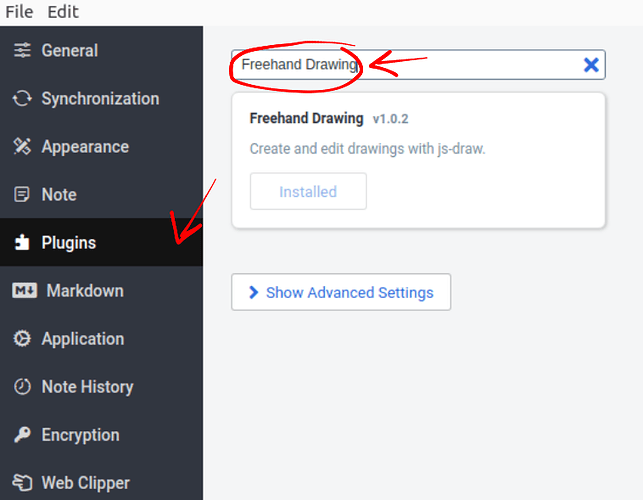
Search for "freehand drawing" under the plugins tab in Joplin's settings:
After installation, an "insert drawing" button should appear in the toolbar:

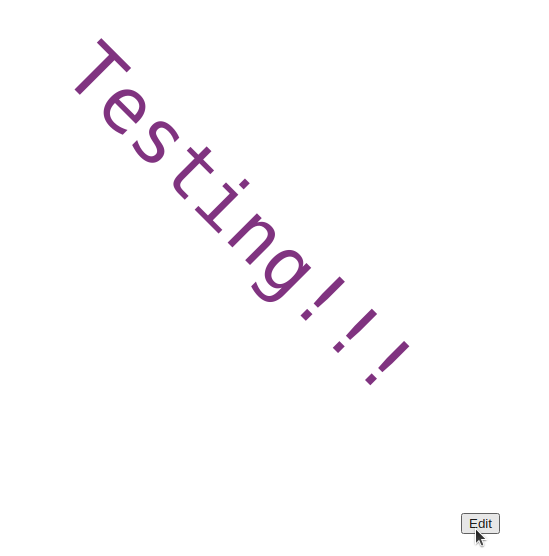
Existing drawings can be edited by hovering over the drawing in the markdown preview pane, then clicking "edit".
# FAQ
## How do I edit drawings from the rich text editor?
**Editing an existing drawing**: Double-click on the drawing.
**Adding a new drawing**: Click either the  toolbar button or "Insert Drawing" from the `Edit` menu.
## I only use the markdown editor (no viewer). How do I edit drawings?
First, select the full resource URL for an image created with this plugin
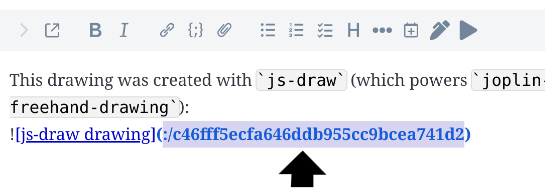
Next, click the "Insert Image" button in the toolbar.
## How do I assign a keyboard shortcut to the "Insert Image" button?
1. Open Joplin's settings
2. Click on "Keyboard Shortcuts"
3. Search for "Insert Drawing"
4. Click "_Disabled_"
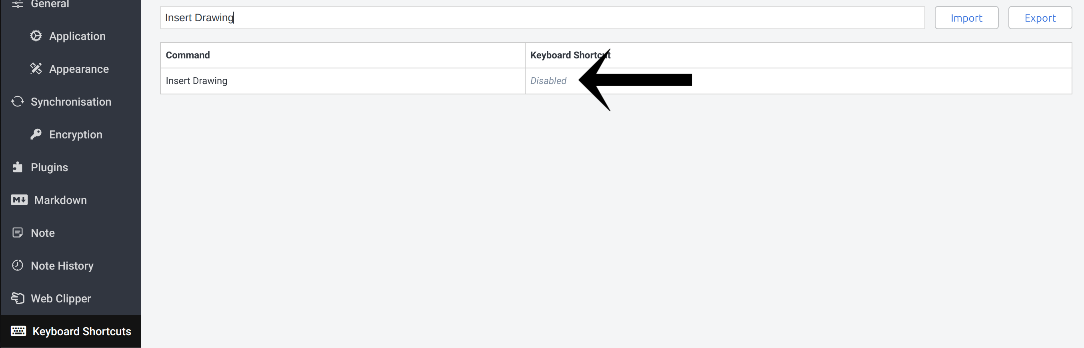
5. Entering a new key combination (e.g. <kbd>Ctrl</kbd>-<kbd>Shift</kbd>-<kbd>D</kbd>).
## How do I disable drawing with touch?
Pen/mouse-only drawing can be enabled under the "Pan" tool's menu by **enabling "Touchscreen panning"**:

## How do I open a drawing in a new window?
This feature is still in beta and is currently difficult to access. [Issue reports](https://github.com/personalizedrefrigerator/joplin-plugin-freehand-drawing/issues/new/choose) are welcome!
1. Open the markdown editor.
2. Select the drawing's ID:
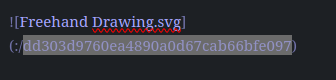
3. Open the Command Pallete
- On Windows and Linux, the keyboard shortcut for this is <kbd>ctrl</kbd>-<kbd>shift</kbd>-<kbd>p</kbd>.
- On MacOS, the keyboard shortcut is <kbd>cmd</kbd>-<kbd>shift</kbd>-<kbd>p</kbd>.
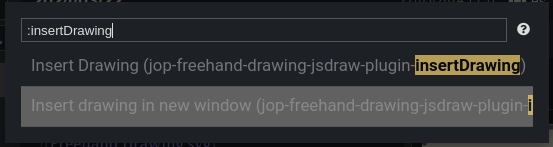
4. Type "insertDrawing" and select the "insert drawing in a new window" option.
## Joplin closed while editing a drawing. How do I recover the unsaved changes?
`joplin-plugin-freehand-drawing` autosaves every two minutes. The last autosave can be recovered by
1. Switching to the markdown editor
2. pressing <kbd>Ctrl</kbd>-<kbd>Shift</kbd>-<kbd>P</kbd> (<kbd>Cmd</kbd>-<kbd>Shift</kbd>-<kbd>P</kbd>),
3. typing `:restore autosave`, then
4. clicking "Restore from autosaved drawing"
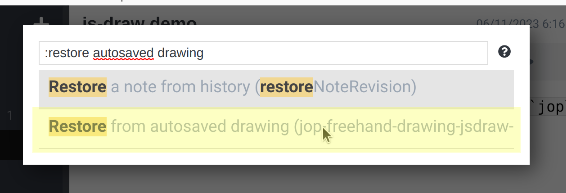
This should add a copy of the autosaved drawing to the current note.
## How do I customize the image editor's keyboard shortcuts?
The procedure to do this is currently very complicated, as there is no GUI for this. (Making this simpler is planned!).
<details><summary>Customizing keyboard shortcuts</summary>
First, open Joplin's profile directory ("Help" > "Open profile directory").
Next, open `settings.json` in a text editor.
Near the end, there should be a line similar to this:
```json
"plugin-io.github.personalizedrefrigerator.js-draw.keyboard-shortcuts": { }
```
Shortcuts can be added between the `{` and the `}`. For example,
```json
"plugin-io.github.personalizedrefrigerator.js-draw.keyboard-shortcuts": {
"jsdraw.toolbar.ExitActionWidget.exit": [
"ctrlOrMeta-w",
"alt-q"
],
"jsdraw.toolbar.SaveActionWidget.save": [
"ctrlOrMeta-s",
"ctrlOrMeta-shift-s"
],
"jsdraw.toolbar.PenTool.select-pen-1": [
"CtrlOrMeta-1",
"alt-1"
],
"jsdraw.toolbar.SelectionTool.resizeImageToSelection": [
"ctrlOrMeta-r",
"m"
]
}
```
The above adds additional shortcuts for exiting, selecting pen style 1, and resizing the visible region to the selection.
Joplin must be restarted for the changes to be applied.
> [!NOTE]
>
> Additional keyboard shortcut IDs can be found [in js-draw's source code](https://github.com/personalizedrefrigerator/js-draw/blob/main/packages/js-draw/src/tools/keybindings.ts).
</details>
## How do I delete a drawing?
Joplin should automatically purge drawings and other attachments after they have been removed from a note. The time this takes is determined by the "Keep note history for" setting, even if note history is disabled. See [this forum post for details](https://discourse.joplinapp.org/t/do-attachments-pictures-unattached-to-any-note-get-deleted-if-note-history-is-disabled/35308/3?u=personalizedrefriger).
## How do I report a bug related to the image editor?
This plugin uses [js-draw](https://github.com/personalizedrefrigerator/js-draw) to edit/create freehand drawings. Bugs related to `js-draw` can be reported using its [issue tracker](https://github.com/personalizedrefrigerator/js-draw/issues).
If you're unsure whether a bug is related to `js-draw` or this plugin, consider first [reporting the bug on this plugin's GitHub repository](https://github.com/personalizedrefrigerator/joplin-plugin-freehand-drawing/issues/new/choose). If it's more relevant to `js-draw` than this plugin, it will be moved by a maintainer.