joplin-plugin-freehand-drawing
Version:
[On GitHub](https://github.com/personalizedrefrigerator/joplin-plugin-freehand-drawing) | [On the Joplin Forum](https://discourse.joplinapp.org/t/plugin-js-draw-integration/27114) | [Online Demo](https://personalizedrefrigerator.github.io/js-draw/example/
39 lines (23 loc) • 2.92 kB
Markdown
# `joplin-plugin-freehand-drawing`
[On GitHub](https://github.com/personalizedrefrigerator/joplin-plugin-freehand-drawing) | [On the Joplin Forum](https://discourse.joplinapp.org/t/plugin-js-draw-integration/27114) | [Online Demo](https://personalizedrefrigerator.github.io/js-draw/example/index.html)
A Joplin plugin for creating and editing freehand drawings.
<img width="600" src="./screenshots/editorview-light-1.png"/>
## Installing
Search for "freehand drawing" under the plugins tab in Joplin's settings:
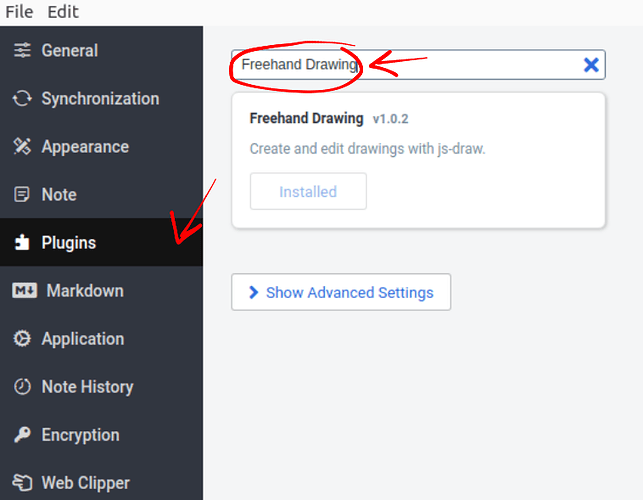
After installation, an "insert drawing" button should appear in the toolbar:

Existing drawings can be edited by hovering over the drawing in the markdown preview pane, then clicking "edit".

# Notes
* This plugin uses [js-draw](https://github.com/personalizedrefrigerator/js-draw) to edit/create freehand drawings. Bugs related to `js-draw` can be reported using its [issue tracker](https://github.com/personalizedrefrigerator/js-draw/issues).
* At present, the plugin's icon in the rich text editor is a gear: . [See the upstream bug report](https://github.com/laurent22/joplin/issues/6876)
# Development
## Building the plugin
The plugin is built using Webpack, which creates the compiled code in `/dist`. A JPL archive will also be created at the root, which can use to distribute the plugin.
To build the plugin, simply run `yarn run dist`.
The project is setup to use TypeScript, although you can change the configuration to use plain JavaScript.
## Updating the plugin framework
To update the plugin framework, run `npm run update`.
In general this command tries to do the right thing - in particular it's going to merge the changes in package.json and .gitignore instead of overwriting. It will also leave "/src" as well as README.md untouched.
The file that may cause problem is "webpack.config.js" because it's going to be overwritten. For that reason, if you want to change it, consider creating a separate JavaScript file and include it in webpack.config.js. That way, when you update, you only have to restore the line that include your file.