jenni
Version:
CLI tool to interact with Jenkins server
127 lines (93 loc) • 5.43 kB
Markdown
# jenni
> Jenkins personal assistant - CLI tool to interact with Jenkins server
[](https://www.npmjs.com/package/jenni)
[](https://github.com/m-sureshraj/jenni/actions?query=workflow:build+branch:master)
Note - jenni will only work inside the **git** repository
## Features
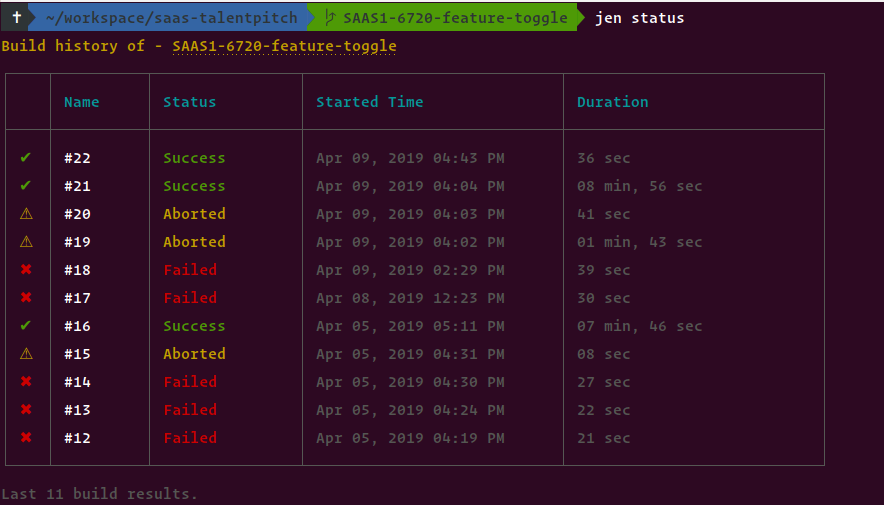
* Print Jenkins build history of a Job.
* Show estimated remaining time for running builds.
* Open Jenkins build in the browser.
* Trigger new builds. (without parameters)
* Watch the console output or stage view after triggering a build.
* View specific build console output.
## Upcoming Features
* Trigger new builds with parameters
* Abort running builds
## Prerequisites
- Make sure you have Node.js `>= v8.11` installed.
- Jenkins **API Token** - [How to get a Jenkins API token](https://stackoverflow.com/questions/45466090/how-to-get-the-api-token-for-jenkins)
## Installation
```
> npm i -g jenni
```
Above installation will give you **globally** available `jen` command to intract with Jenkins server.
### Migration from v0.2.6 to v1
The v1 has breaking changes. If you're using an old version of Jenni, follow the steps below before upgrading to v1.
```
step 1: Find the config dir path
> jen c
output: Config path - /home/suresh/.config/jenni-nodejs/config.json
step 2: Manually delete the config directory
> rm -rf /home/suresh/.config/jenni-nodejs
step 3:
> npm update -g jenni@latest
```
## Setup
> Each git project will requires separate initialization.
`jen init` will walk you through to initialize jenni to your project.

## Usage
```
> jen --help
Usage: jen [options] [command]
Jenkins personal assistant
Options:
-v, --version output the version number
-d, --debug Enable debug mode
-h, --help output usage information
Commands:
init|i Initialize jen
status|s Print branch build status
open|o Open jenkins build in browser
build|b [options] Trigger a new build
console|co [options] Show console output
config|c [options] Show or Update repository configuration
```
| Command | Options | Description |
| --- | --- | --- |
| `jen init` \| `i` | - | Initialize jenni to your project. |
| `jen status` \| `s` | - | Print branch build history. |
| `jen open` \| `o` | Optional build number <br> e.g. `jen open <build number>` | Open jenkins build in the browser. |
| `jen build` \| `b` | `--watch` \| `-w` <br><br> Watch the console output after triggering a build. <br><br> `--stage` \| `-s` <br><br> Watch the stage view after triggering a build. | Trigger a new build and optionally watch its console output or stage view. Note it's not possible to view console output, stage view together. |
| `jen console` \| `co` | `--build` \| `-b` <br><br> View specific build console output. <br> e.g. `jen console --build <build id>` | By default, this command will print the last build console output. If the job has more than one running builds, then it will prompt the user to select a build to retrieve its console output. Use `--build` option to view the specific build console output. <br><br> Refer to this [flow chart](./media/console-cmd.png) that explains console command behavior. |
| `jen config` \| `c` | `--username` \| `-n` <br> `--token` \| `-t` <br> `--url` \| `-u` <br> `--job-name` <br> `--job-path` <br> `--job-type` <br> <br> e.g. Reconfigure username & token <br> `jen config --username <foo> --token <bar>` | Overwrite project jenni config. Without any options it will print current config. |
## Debug
It's basic for the moment, pass `-d` or `--debug` to log debug messages. Can also be enabled by setting the environment variable `DEBUG_JEN` to `true`. E.g.
```
> jen status -d
// OR
> DEBUG_JEN=true jen status
```
## Known Limitations
* At the moment Jenni handles only `WorkflowJob` and `WorkflowMultiBranchProject` job types. So, if you get the error message `Unsupported job type: <job type>` please file an issue.
* When initializing Jenni (`jen init`) currently there is no way to interactively select jobs inside the folders [(Issue)](https://github.com/terkelg/prompts/issues/224). As a workaround, Jenni will print jobs up to 3 levels deep. For example
```
├── folder-1
│ ├── folder-1.1
│ │ └── job3
│ └── job2
└── job1
for the above structure, the output will be:
job1
folder-1 → job2
folder-1 → folder-1.1 - job3
```
So if your job is deeply nested, you should manually configure the job. [Follow this guide](JOB_CONFIGURATION.md).
## Feedback
I'm no expert Jenkins user 🤫. I'm building this tool while learning Jenkins concepts. I'm really interested in hearing your use cases, insights, and suggestions for improvements.
## Similar Projects
There're a few similar project you can found below:
* [jenkins-cli](https://github.com/jenkins-zh/jenkins-cli)
## license
MIT © [Sureshraj](https://github.com/m-sureshraj)