j5-ds-touch
Version:
Nintendo DS Touch Screen component class plugin for Johnny-Five
162 lines (99 loc) • 4.94 kB
Markdown
# DSTouch
[](https://travis-ci.org/rwaldron/j5-ds-touch)
A DS Touch Screen component plugin for [Johnny-Five](https://github.com/rwaldron/johnny-five).
- [SparkFun Nintendo DS Screen Kit](https://www.sparkfun.com/products/13631)
- [Adafruit Touch Screen (Nintendo DSL digitizer)](https://www.adafruit.com/products/333) + [Touch screen breakout board](https://www.adafruit.com/product/334)
## API & Documentation
### DSTouch
The `DSTouch` class constructs objects that represent a single Nintendo DS Touch screen component.
```js
var touch = new DSTouch();
touch.on("change", function() {
console.log(this.x, this.y);
});
```
#### Parameters
| Property | Type | Value(s)/Description | Default | Required |
|------------|-----------|---------------------------|---------|----------|
| address | number | Address for I2C device \* | `0x04` | no |
```js
// Example of explicitly specified address
var touch = new DSTouch({
address: 0x04
});
```
\* The address used by this "backpack" component is `0x04`. This can be changed by [modifying the value in the firmware](https://github.com/rwaldron/j5-ds-touch/blob/master/firmware/ds_touch_slave.ino#L3).
#### Properties
| Property | Type | Value(s)/Description |
|------------|-----------|---------------------------|
| x | number | The `x` coordinate of the present touch point. Will read `1023` if there is no touch point. |
| y | number | The `y` coordinate of the present touch point. Will read `1023` if there is no touch point. |
#### Events
- **change** Fired whenever the `[x, y]` coordinates of the pointer has changed.
- **data** Fired as frequently as the hardware can be read.
- **down / pointerdown** The pointer makes physical contact with the surface, but was previously not touching the surface (similar to the browser **mousedown** or **pointerdown** event).
- **move / pointermove** The pointer is touching the surface and has changed coordinates since the last position was read (similar to the browser **mousemove** or **pointermove** event).
- **up / pointerup** The pointer no longer has physical contact with surface, but was previously touching the surface (similar to the browser **mouseup** or **pointerup** event).
NOTE: The word _pointer_ means either capacitive or resistive stylus, or finger.
## Backpack Controller
### Install Firmware
Using the Arduino IDE, install the [firmware](https://github.com/rwaldron/j5-ds-touch/blob/master/firmware/ds_touch_slave.ino) to your AVR based microcontroller of choice.
### Assembly

## Connect To I2C Capable Platform
### Arduino UNO
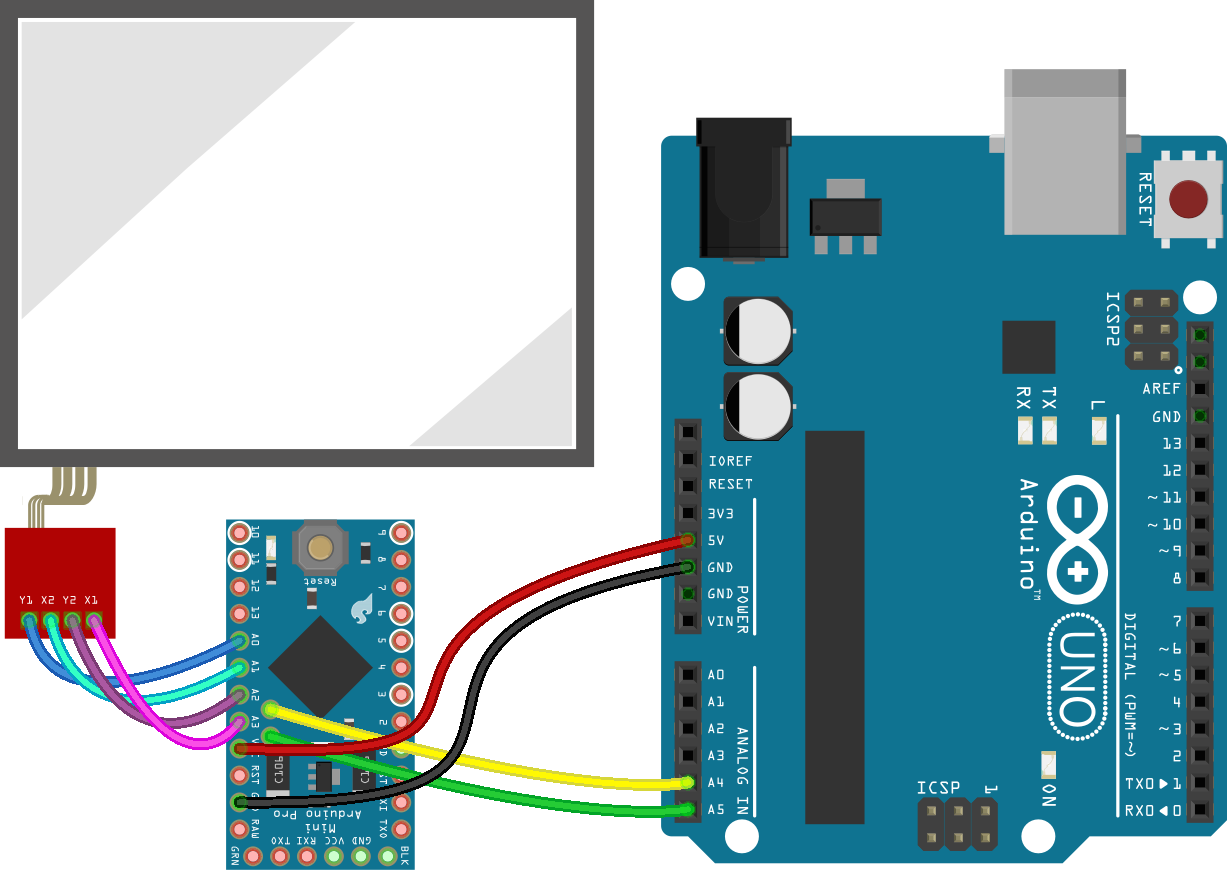
```js
var five = require("johnny-five");
var DSTouch = require("j5-ds-touch")(five);
var board = new five.Board();
board.on("ready", function() {
var touch = new DSTouch();
touch.on("pointermove", function() {
console.log({ x: this.x, y: this.y });
});
});
```
### Tessel 2
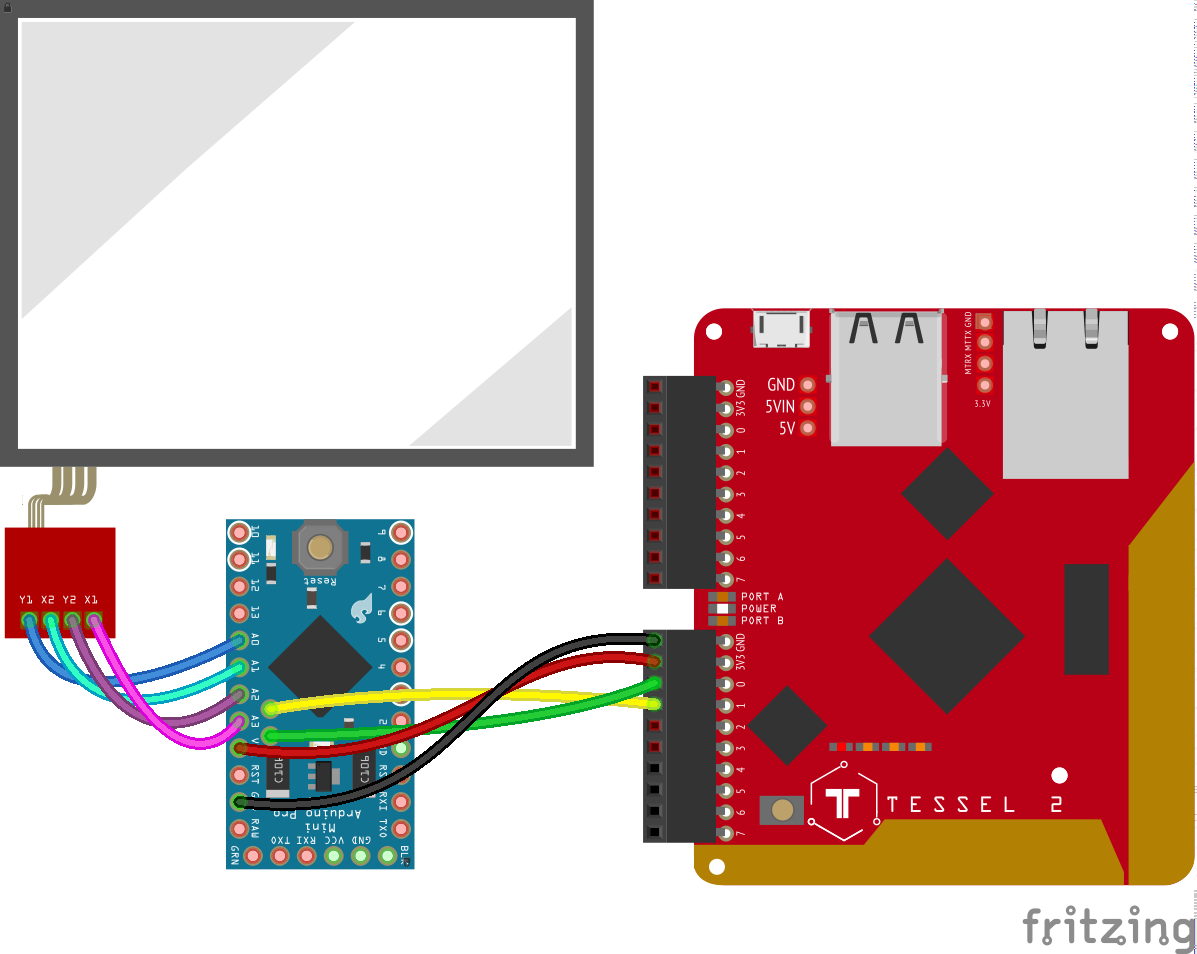
```js
var five = require("johnny-five");
var DSTouch = require("j5-ds-touch")(five);
var Tessel = require("tessel-io");
var board = new five.Board({
io: new Tessel()
});
board.on("ready", function() {
var touch = new DSTouch();
touch.on("pointermove", function() {
console.log({ x: this.x, y: this.y });
});
});
```
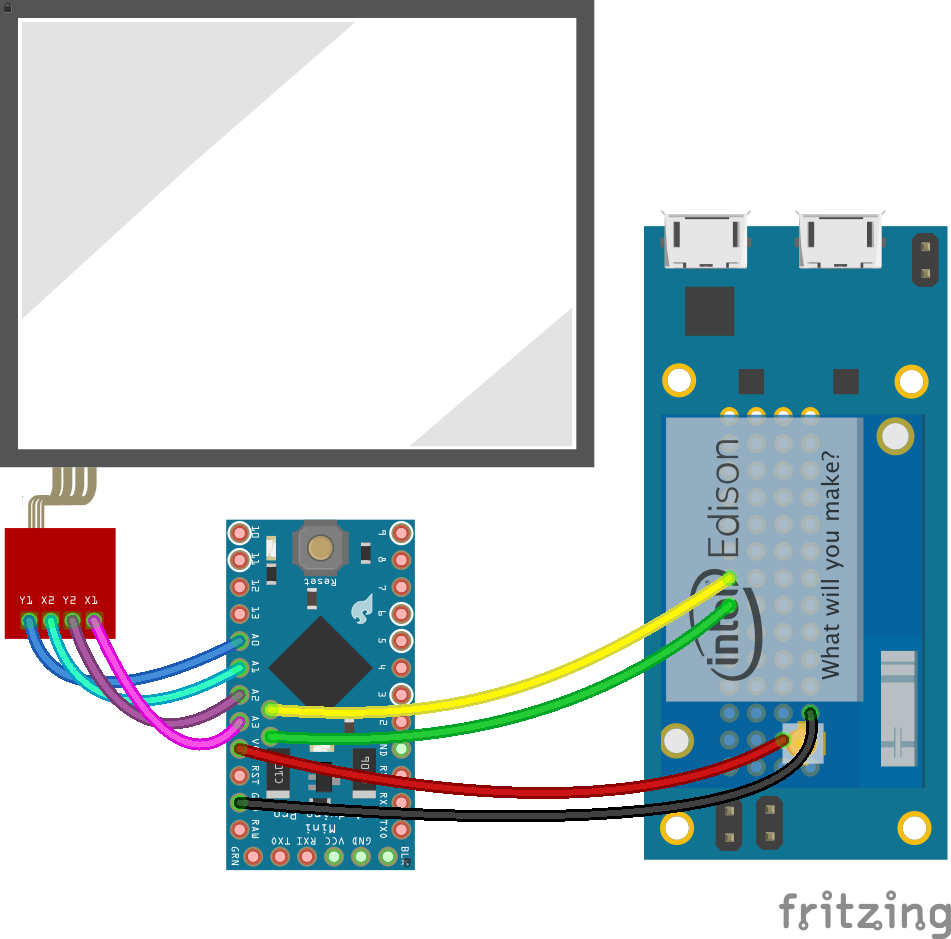
### Intel Edison MiniBoard
### Intel Edison Arduino Board
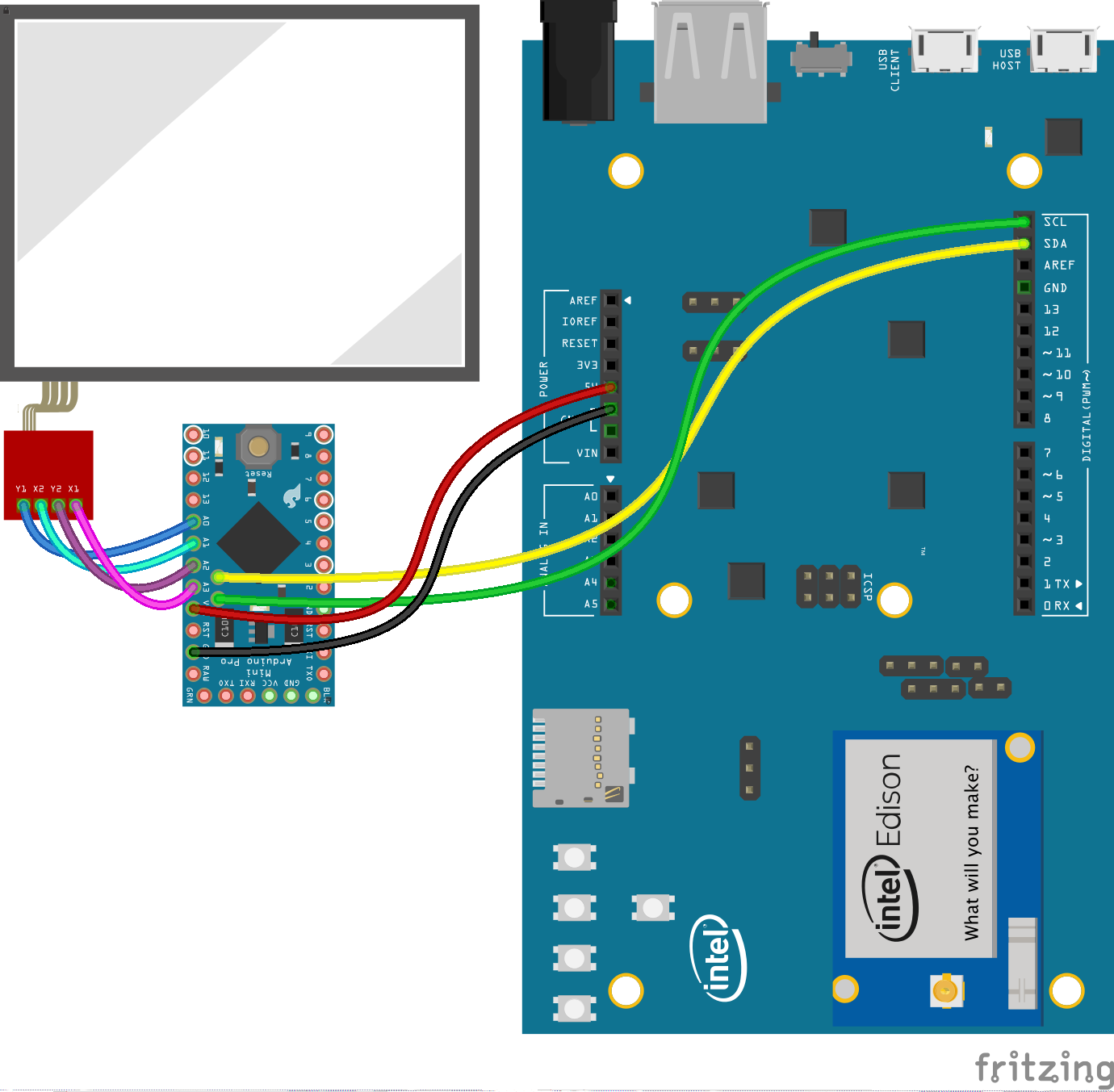
```js
var five = require("johnny-five");
var DSTouch = require("j5-ds-touch")(five);
var Edison = require("edison-io");
var board = new five.Board({
io: new Edison()
});
board.on("ready", function() {
var touch = new DSTouch();
touch.on("pointermove", function() {
console.log({ x: this.x, y: this.y });
});
});
```
## Ploma App
This repo comes with a version of @evhan55's example [Ploma](https://github.com/evhan55/ploma) app that has been modified to accept input from a socket instead of a Wacom tablet.

To Run:
```sh
node eg/server.js
```
## NOTE
The examples shown here are provided for illustration and do no specifically indicate platform support. This component class is expected to work with any platform that has I2C support.